Outsource Freelance Work 2026: Buy Back Time [Playbook]
 ·
Last Updated: May 29, 2026
·
Last Updated: May 29, 2026
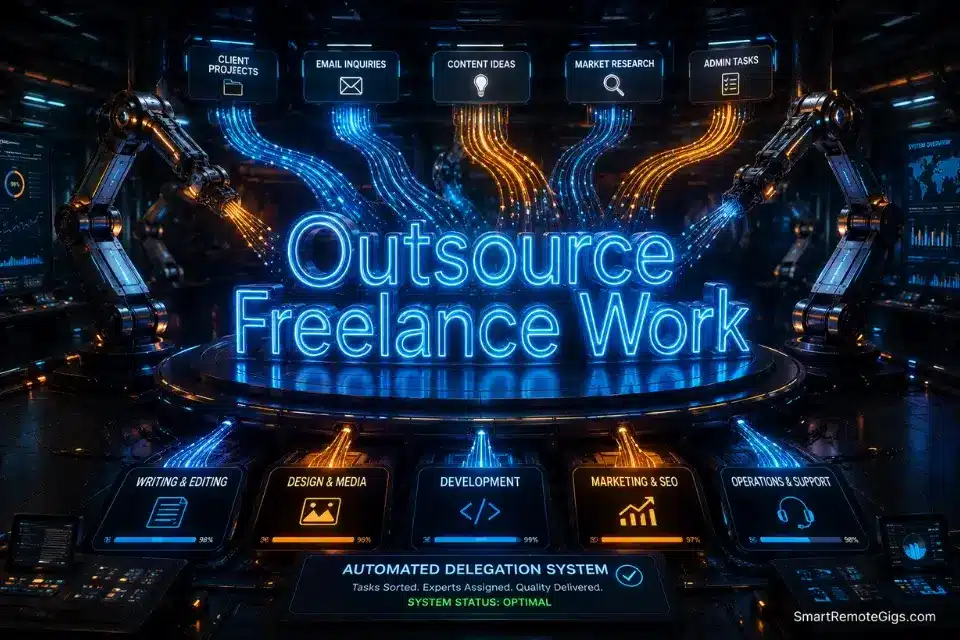
Doing all your own admin, fulfillment, and prospecting means you don’t own a business, you own a low-paying job.
Outsourcing my onboarding and data entry for $400 a month bought back 15 hours a week, which I used to close $12,000 in new deals.
Here is the exact outsourcing playbook — the hiring systems and SOPs to delegate your lowest-value tasks safely.
Smart Remote Gigs (SRG) designs operational scaling frameworks that remove solopreneurs from the execution trenches.
SRG has audited the delegation workflows of over 300 six-figure freelance operators in 2026.
⚡ SRG Quick Summary:
One-Line Answer: Outsourcing freelance work involves systematically delegating low-leverage administrative or fulfillment tasks to specialized subcontractors using rigid standard operating procedures (SOPs).
🚀 Quick Wins:
- Track every minute of your workday for 48 hours and highlight every task that generates zero direct revenue (Today)
- Write your first step-by-step SOP draft for your most painful recurring task using the template in Scenario 2 (This Week)
- Hire a part-time VA to handle inbox triage and basic data entry — use the job description in Scenario 1 (This Month)
📊 The Details & Hidden Realities:
- 75% of first-time freelance outsourcing attempts fail because the freelancer delegates the outcome instead of the process
- The biggest red flag beginners miss is failing to mathematically calculate whether their hourly rate justifies the time it takes to train a subcontractor
📨 Scenario 1 — The Admin Trap: Hiring for Operations
Your email inbox is not a revenue-generating asset. Your invoice tracking spreadsheet is not a revenue-generating asset. Every hour you spend on admin is an hour you are not closing, delivering, or building. These tasks are operational debt that compounds silently until your calendar is full and your income is flat.
You must offload operations before you offload fulfillment. Always in that order.
To find reliable, vetted talent without sifting through thousands of unqualified bids, post your specific operational role on a dedicated remote jobs platform — the quality of the pool matters more than the size of it.
Before granting a VA access to your business, ensure you have centralized your communications inside professional client management tools so they never email clients from their personal accounts — one rogue email from an uncentralized inbox can cost you a $4,000 retainer.
The Exact Playbook
- Run a 48-hour time audit before you write a single job posting. Track every task for two full workdays — to the minute. Categorize each as revenue-generating or operational. Calculate the total hours in the operational column. That number is the size of the problem you are solving. Most operators discover 12–18 hours per week stuck in tasks a $15–$25/hr VA can handle.
- Select one task to delegate first — not five. The first outsourcing attempt fails when operators hand off five things at once and cannot diagnose which one went wrong. Pick the single most time-consuming, zero-revenue task. Write the SOP for that one task before posting the job.
- Write a filter-based job description, not a wishlist. The job post is not for attracting talent — it is for filtering out the unqualified. Every sentence should reveal a requirement: technical skills, communication style, availability window, and — critically — a hidden reading comprehension test embedded in the middle of the post.
- Conduct async text-based interviews before any video call. Send a 3-question written response task before booking a call. Evaluate: response time, grammar, specificity of answers, and whether they followed the formatting instructions. A VA who cannot follow a 3-question written prompt will not follow a 20-step SOP.
- Pay for a 5-hour trial project before committing to a recurring hire. The trial project uses your completed SOP as the only instruction. Zero hand-holding. Grade the output against the QA checklist in Scenario 3. If it passes, you hire. If it fails, the $75–$125 trial cost just saved you from a 3-month bad hire.
The Perfect VA Job Description
Use this posting script to filter mass-applicants and surface detail-oriented operators from the first read.
ROLE: [ROLE_TITLE, e.g., “Part-Time Operations VA”]
HOURS: [WEEKLY_HOURS] hours per week
RATE: $[HOURLY_RATE]/hour
AVAILABILITY: [TIMEZONE_REQUIREMENT]
ABOUT THE ROLE:
[BUSINESS_NAME] is a [BUSINESS_TYPE] operated by a solo consultant. We are looking for a detail-oriented VA to own [PRIMARY_TASK_CATEGORY, e.g., “inbox management, invoice tracking, and weekly reporting”].
YOU WILL BE RESPONSIBLE FOR:
[TASK_1]
[TASK_2]
[TASK_3]
REQUIREMENTS:
[REQUIRED_TOOL_1, e.g., “Proficient in Google Workspace”]
[REQUIRED_TOOL_2, e.g., “Experience with Notion or ClickUp”]
[COMMUNICATION_REQUIREMENT, e.g., “Responds within 4 business hours during Monday–Friday”]
English fluency — written communication is the primary work channel
IMPORTANT — READ THIS CAREFULLY:
To be considered, your application subject line must read exactly: [SECRET_PHRASE].
Applications without this exact subject line will not be reviewed.
HOW TO APPLY:
Send your application to [APPLICATION_EMAIL] with the following:
Two sentences explaining your experience with [PRIMARY_TASK_CATEGORY]
One example of a system or process you improved in a previous role
Your hourly rate and availability start date- [ROLE_TITLE] — Specific and operational. “Part-Time Operations VA” signals scope; “Virtual Assistant” attracts every generalist on the platform.
- [WEEKLY_HOURS] — Start at 5–10 hours. Do not hire for 40 hours until you have validated the SOP and the hire over 30 days.
- [HOURLY_RATE] — $15–$25/hr for general admin VA; $25–$45/hr for specialized ops roles requiring tool proficiency.
- [TIMEZONE_REQUIREMENT] — State this explicitly. Async works; misaligned time zones with tight turnarounds do not.
- [BUSINESS_NAME / BUSINESS_TYPE] — Use your operating name. “A solo consultant” signals lean operation — attracts self-starters, repels people who need corporate infrastructure.
- [PRIMARY_TASK_CATEGORY] — Name the category before listing individual tasks. Context helps them self-select before reading the full post.
- [TASK_1/2/3] — Specific tasks only. “Manage inbox” is not a task. “Respond to inbound client inquiries using provided email templates within 4 hours” is a task.
- [REQUIRED_TOOL_1/2] — Name the exact tools in your stack. Saves you from hiring someone who needs 3 weeks of onboarding to use Notion.
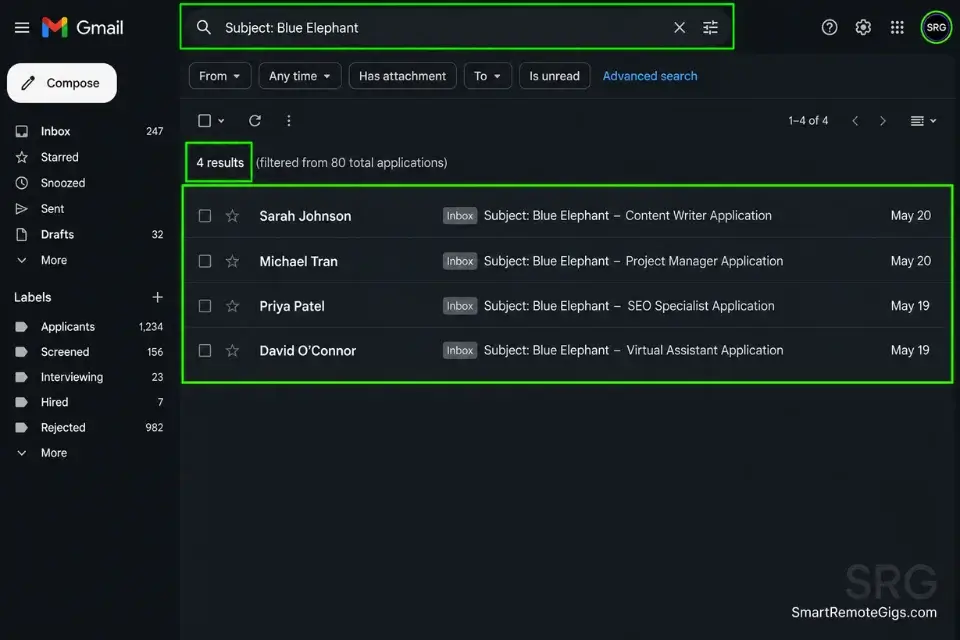
- [SECRET_PHRASE] — Pick something unmistakable: “Blue Elephant,” “SRG2026,” “Ready to Execute.” Delete every application that misses it.
- [APPLICATION_EMAIL] — A dedicated inbox, not your main client email. Keep the hiring pipeline separate.
The Pro Tip / Red Flag
Pro Tip: Hide a specific instruction in the middle of your job description — “Make the subject line of your application: Blue Elephant.” Instantly delete any application that fails this basic reading comprehension test. In practice, 60–70% of applicants will miss it, and those are exactly the people you do not want managing your client communications.
⚙️ Scenario 2 — The Bottleneck: Building the Execution SOP
You cannot hire someone to read your mind. If the only place your process exists is inside your head, you do not have a delegatable system — you have a dependency. Every task you complete without documenting is a task that stays permanently attached to your calendar.
The SOP is the product. The hire executes the SOP.
You will find it virtually impossible to build a reliable execution SOP if you have not first taken the time to productize freelance services into predictable, repeatable steps — because an undocumented custom process cannot be systematized, and an unsystematized process cannot be delegated.
Per the SBA’s prime and subcontracting guidelines, clearly defined scope boundaries between you as prime contractor and any subcontractor are your legal protection in any dispute over deliverables, payment, or quality standards — and your SOP is the operational document that makes those boundaries enforceable.
The Exact Playbook
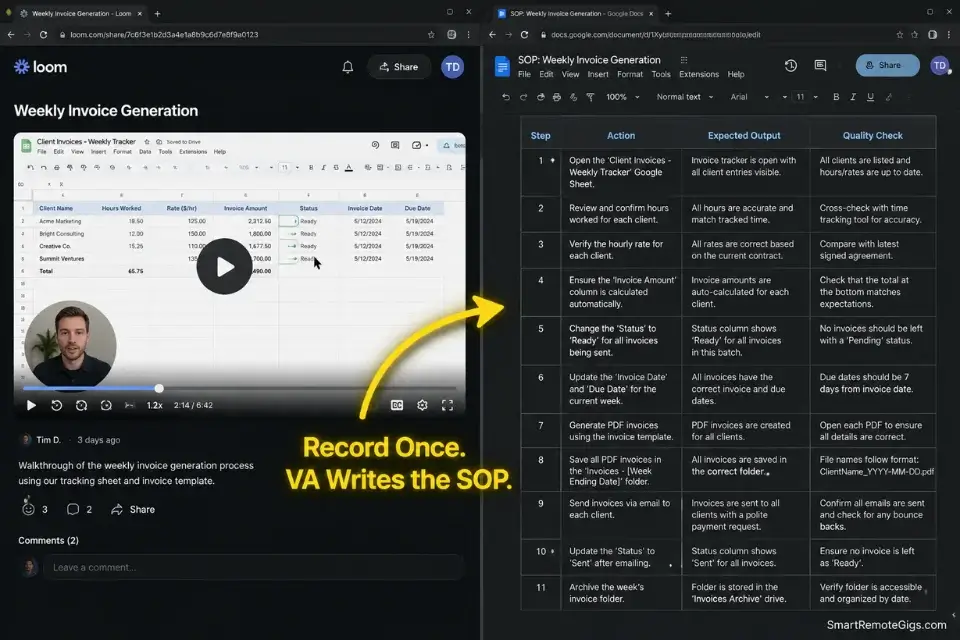
- Record the process live before you write a single word. Open Loom and execute the task from start to finish, narrating every decision point out loud as you go. Do not edit the recording. Raw and complete beats polished and incomplete. This recording becomes the source material for every step in the written SOP.
- Extract the decision tree from the recording. Watch the recording once. Every time you make a judgment call — “I chose this option because…” — that decision point needs an explicit rule in the SOP. Most SOPs fail because they document the actions but not the reasoning behind the actions. The reasoning is what the subcontractor needs to handle edge cases.
- Write steps in the format: Action + Expected Output + Quality Check. “Write the intro paragraph” is not a step. “Write a 3-sentence intro that opens with the client’s stated pain point from the intake form — the output is a paragraph that mirrors the exact language the client used to describe their problem” is a step. Specificity is what makes the SOP executable without you.
- Have your first hire write the clean version from the recording. Do not spend 4 hours formatting the SOP yourself. Hand the Loom link to the VA as their first paid task: “Convert this recording to a numbered step-by-step Google Doc. Flag every step where the instructions were unclear.” Their questions reveal every gap before the SOP goes live.
- Test the SOP blind before it goes into production. Have someone with zero context on the task complete one full cycle using only the document — no questions, no clarification, no verbal guidance. Every question they ask is a missing step. Fix the gap. Run the test again until it produces acceptable output with zero verbal support.
The Foolproof SOP Structure
Use this template to document your exact workflow so any competent contractor can replicate your results.
SOP TITLE: [TASK_NAME]
Version: [VERSION_NUMBER]
Last Updated: [DATE]
Owner: [YOUR_NAME]
Estimated Completion Time: [ESTIMATED_MINUTES] minutes
PURPOSE:
This SOP covers [TASK_NAME]. The end output is [EXACT_DELIVERABLE_DESCRIPTION]. Quality is acceptable when [QUALITY_BENCHMARK].
INPUTS REQUIRED BEFORE STARTING:
[INPUT_1]
[INPUT_2]
[INPUT_3]
If any input is missing, do NOT begin. Notify [CONTACT_PERSON] via [COMMUNICATION_CHANNEL] before proceeding.
STEP-BY-STEP INSTRUCTIONS:
Step 1: [ACTION]
Expected output: [WHAT_SHOULD_EXIST_AFTER_THIS_STEP]
Quality check: [HOW_TO_VERIFY_IT_IS_CORRECT]
Step 2: [ACTION]
Expected output: [WHAT_SHOULD_EXIST_AFTER_THIS_STEP]
Quality check: [HOW_TO_VERIFY_IT_IS_CORRECT]
Step 3: [ACTION]
Expected output: [WHAT_SHOULD_EXIST_AFTER_THIS_STEP]
Quality check: [HOW_TO_VERIFY_IT_IS_CORRECT]
[REPEAT FOR ALL STEPS]
QUALITY GATE (Complete before delivery):
☐ [CHECK_1]
☐ [CHECK_2]
☐ [CHECK_3]
DELIVERY PROTOCOL:
Deliver to: [DELIVERY_RECIPIENT]
Delivery method: [DELIVERY_METHOD]
Subject line / file name format: [NAMING_CONVENTION]
Deadline: [DEADLINE_RULE]
IF SOMETHING GOES WRONG:
Do not attempt to fix errors independently. Flag the issue to [ESCALATION_CONTACT] via [CHANNEL] with a screenshot and the step number where the error occurred.- [TASK_NAME] — The exact name used in your project management system. Consistency prevents confusion across tools.
- [VERSION_NUMBER] — Start at v1.0. Increment every time you make a substantive change. Subcontractors must always work from the current version.
- [EXACT_DELIVERABLE_DESCRIPTION] — The finished output in one sentence. “A published 800-word article in Google Docs with title tag and meta description” not “content.”
- [QUALITY_BENCHMARK] — Define “done” in measurable or observable terms: “Client can publish without edits” or “zero spelling errors per Grammarly at 98+ score.”
- [INPUT_1/2/3] — Every asset needed before work starts. Logins, brand kits, briefs, reference documents, client name.
- [ACTION / WHAT_SHOULD_EXIST / HOW_TO_VERIFY] — The three-part step format. Action alone is not enough — the output and quality check are what make this executable without supervision.
- [CHECK_1/2/3] — Your non-negotiable quality gates. If the output does not pass all three, it does not leave the building.
- [NAMING_CONVENTION] — Exact file naming format: “CLIENT-TASKNAME-YYYYMMDD.” This prevents version chaos across a shared drive.
- [ESCALATION_CONTACT / CHANNEL] — Who they contact and how when something breaks. Never leave this blank — a subcontractor who cannot escalate will guess, and guessing causes client-facing errors.
The Pro Tip / Red Flag
Red Flag: Never write an SOP from memory. Your memory of how you do a task is compressed and skips the implicit decisions you make automatically. Record yourself executing the task live, narrating your thought process in real time, and base every written step strictly on what appears in the video — not what you think you do.
🔬 Scenario 3 — The Quality Drop: Institutional Quality Control
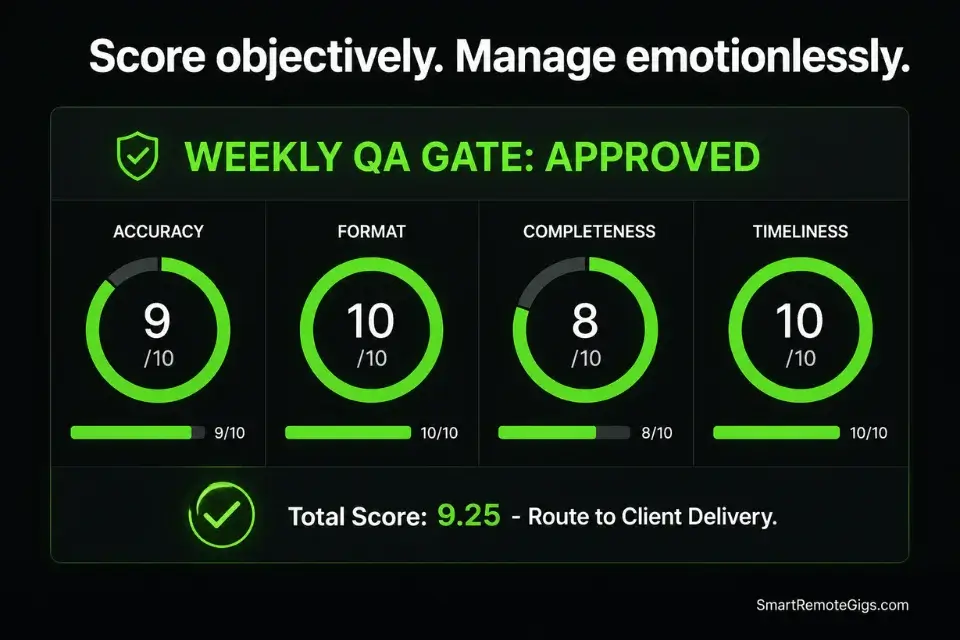
Delegation does not mean abdication. You are still the name on the contract. Your client does not know a subcontractor exists, and they do not need to — but they will notice immediately if the quality drops. One client-facing error from an unsupervised subcontractor can undo 6 months of relationship equity in a single email.
The fix is not closer supervision. It is a smarter system.
Link your project boards to workflow automation software so that when a subcontractor marks a task as done, it automatically routes to your private QA dashboard for approval — the task never reaches the client until it has passed your review gate.
The Exact Playbook
- Build a QA checklist for every deliverable type before the first hire starts. The checklist is specific to the output — not a generic “is this good?” review. A content QA checklist has different line items than an invoice QA checklist. Write each one from the perspective of: what are the top 5 errors a new contractor makes on this specific task?
- Implement a “Zero Defect” buffer on every deadline. Tell your subcontractor the deadline is 48 hours before your actual client deadline. Always. This buffer is not cruelty — it is operational reality. First-pass work from a new hire will need corrections, and those corrections need time that does not come out of your client’s delivery window.
- Score deliverables objectively, not emotionally. Use a 10-point QA scorecard with weighted categories: accuracy, format compliance, completeness, and on-time delivery. A score below 7 goes back for revision. A score below 5 triggers the feedback loop in Scenario 4. Emotion-free scoring makes the feedback conversation factual rather than personal.
- Track QA scores over time per contractor. A contractor averaging 8.5+ over 30 days is a long-term asset. One averaging below 6.5 after a structured correction cycle is a replacement. The data makes both decisions obvious and removes the discomfort of subjective judgment calls.
- Run a weekly 15-minute async review, not a live meeting. Record a 3-minute Loom each Monday: here is what passed, here is what failed, here is the specific SOP step that needs more attention this week. Send it. No meeting required. This keeps quality top of mind without consuming your calendar.
The Weekly QA Review Checklist
Use this internal scorecard to grade subcontractor deliverables objectively every week.
QA REVIEW — WEEK OF [WEEK_START_DATE]
Contractor: [CONTRACTOR_NAME]
Deliverable Type: [DELIVERABLE_TYPE]
Total Deliverables Reviewed: [NUMBER_REVIEWED]
SCORING GUIDE: 1 = Unacceptable / 5 = Acceptable / 10 = Excellent
CATEGORY 1 — ACCURACY ([ACCURACY_WEIGHT]% of total score)
Score: [SCORE_1_TO_10]
Notes: [SPECIFIC_ACCURACY_OBSERVATION]
CATEGORY 2 — FORMAT COMPLIANCE ([FORMAT_WEIGHT]% of total score)
Score: [SCORE_1_TO_10]
Notes: [SPECIFIC_FORMAT_OBSERVATION]
CATEGORY 3 — COMPLETENESS ([COMPLETENESS_WEIGHT]% of total score)
Score: [SCORE_1_TO_10]
Notes: [SPECIFIC_COMPLETENESS_OBSERVATION]
CATEGORY 4 — ON-TIME DELIVERY ([TIMELINESS_WEIGHT]% of total score)
Score: [SCORE_1_TO_10]
Notes: [SPECIFIC_TIMELINESS_OBSERVATION]
WEIGHTED TOTAL SCORE: [CALCULATED_TOTAL] / 10
OUTCOME:
☐ Approved — deliver to client
☐ Revision required — return to contractor with notes
☐ Escalation required — flag to [ESCALATION_CONTACT]
SPECIFIC FEEDBACK FOR CONTRACTOR:
[FEEDBACK_SUMMARY — reference the exact SOP step number(s) that need attention]
TREND:
Last week’s score: [LAST_WEEK_SCORE]
This week’s score: [THIS_WEEK_SCORE]
Direction: [IMPROVING / DECLINING / STABLE]- [WEEK_START_DATE] — Monday’s date. Makes the review searchable and sortable over time.
- [CONTRACTOR_NAME] — Full name or handle. One QA doc per contractor — never combine multiple contractors in one scorecard.
- [DELIVERABLE_TYPE] — The specific task category being reviewed: “SEO article,” “invoice processing,” “data entry.”
- [NUMBER_REVIEWED] — The total count of deliverables assessed this week. Gives context to the scores.
- [ACCURACY_WEIGHT / FORMAT_WEIGHT / COMPLETENESS_WEIGHT / TIMELINESS_WEIGHT] — Set weights based on what matters most for the task. Content work: accuracy 40%, format 20%, completeness 30%, timeliness 10%. Admin work: accuracy 30%, format 20%, completeness 20%, timeliness 30%. Weights must total 100%.
- [SCORE_1_TO_10] — A number, not a feeling. “8” is actionable. “Pretty good” is not.
- [SPECIFIC_OBSERVATION fields] — One sentence per category. Reference the exact deliverable or the exact SOP step that relates to the score.
- [FEEDBACK_SUMMARY] — What they must do differently next week. Always cite the SOP step number so the correction is traceable.
- [LAST_WEEK_SCORE / THIS_WEEK_SCORE] — Track week-over-week. A declining trend over 3 consecutive weeks triggers the replacement conversation.
The Pro Tip / Red Flag
Pro Tip: Implement a “Zero Defect” buffer on every client deadline. Tell your subcontractor the deadline is Tuesday. Tell your client Thursday. You now have 48 hours to catch and correct errors before they become client-facing problems — without missing a single promised delivery date.
🗣️ Scenario 4 — The Friction Point: Handling Contractor Mistakes
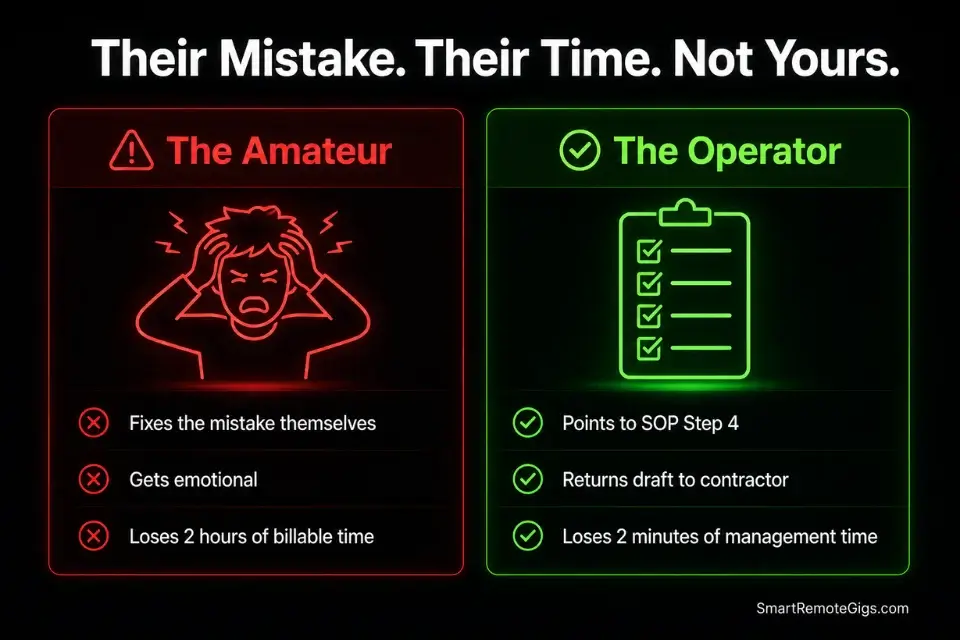
Your subcontractor is going to make a mistake. Not maybe — definitely. The first major error is not a signal to fire them. It is a signal to test whether your SOP has a gap, whether they can self-correct under structured feedback, and whether you can manage the conversation without reacting emotionally.
How you handle the first error determines whether they become a long-term asset or a short-term liability.
If you lack the emotional regulation to correct a subcontractor calmly and systematically, you will never successfully transition from freelancer to micro agency owner — because managing a team of even two people requires feedback loops that do not depend on your mood.
The Exact Playbook
- Diagnose before you respond. Before sending any feedback, answer two questions: Is this an SOP gap or a contractor execution failure? If the SOP did not cover the scenario clearly, fix the SOP first. If the SOP covered it and they missed it, document the specific step they failed. Your diagnosis determines whether the feedback is corrective or instructional.
- Wait at least 2 hours before sending feedback on a significant error. Emotional feedback from a frustrated operator reads as attack. Calm, specific, documented feedback reads as professional management. The content of the message is 40% of the communication — the tone is the other 60%.
- Reference the exact SOP step in every piece of corrective feedback. “This was wrong” teaches nothing. “Step 4 of the Content SOP requires the intro to mirror the client’s exact language from the intake form — your draft used different terminology” teaches the specific gap and connects it to the documented process they agreed to follow.
- Require them to correct the error themselves, on their own time. Do not fix it for them. Fixing their mistakes yourself trains learned helplessness and removes the natural consequence that reinforces the SOP. Point to the step, state the expected output, and return it for revision. The correction time is their cost, not yours.
- Log every error and correction in a running feedback doc. The same error appearing twice within 30 days is a retention decision, not a coaching opportunity. Three logged errors of the same type with documented corrections = replacement conversation. Your feedback log is the evidence base for that conversation.
The Feedback Loop Script
Use this to correct an error while reinforcing the SOP — without sounding like a toxic manager.
Hi [CONTRACTOR_FIRST_NAME],
I reviewed [DELIVERABLE_NAME] from [DELIVERY_DATE] and flagged one item that needs to be corrected before it can be approved.
WHAT NEEDS TO CHANGE:
[SPECIFIC_ERROR_DESCRIPTION — one sentence, factual, no emotional language]
WHICH SOP STEP THIS RELATES TO:
WHAT THE CORRECTED OUTPUT SHOULD LOOK LIKE:
[CORRECT_OUTPUT_DESCRIPTION — describe the expected result, not just what was wrong]
WHAT TO DO:
Please update [DELIVERABLE_NAME] and resubmit via [DELIVERY_METHOD] by [CORRECTION_DEADLINE].
This does not affect your payment for this cycle. Going forward, please flag any scenario where the SOP is unclear before submitting — I would rather answer a question upfront than review a revision after the fact.
[YOUR_NAME]- [CONTRACTOR_FIRST_NAME] — First name. The tone is professional and direct — not cold, not apologetic, not passive-aggressive.
- [DELIVERABLE_NAME] — The exact file or task name as referenced in your project management system. Removes ambiguity about which piece of work is being discussed.
- [DELIVERY_DATE] — The date they submitted the work. Creates a precise reference point for the conversation.
- [SPECIFIC_ERROR_DESCRIPTION] — One factual sentence. “The intro paragraph uses generic language instead of mirroring the client’s intake form wording.” Not “this isn’t what I asked for.”
- [SOP_NAME / STEP_NUMBER / EXACT_STEP_LANGUAGE] — Quote the SOP step directly. This makes the feedback traceable, removes subjectivity, and shows the contractor the standard they agreed to.
- [CORRECT_OUTPUT_DESCRIPTION] — Describe what right looks like. “The intro should open with the client’s exact phrase from the intake form: [their phrase].” This gives them a target, not just a critique.
- [DELIVERY_METHOD] — The same channel they originally used. Do not introduce new channels mid-project.
- [CORRECTION_DEADLINE] — A hard date and time. “As soon as possible” is not a deadline. “By 5 PM Tuesday” is.
- [YOUR_NAME] — Sign with your name. Keeps the tone professional and human simultaneously.
The Pro Tip / Red Flag
Red Flag: Never fix the mistake yourself. The moment you correct their work for them, you have trained them that errors have no cost — and you have just added unpaid revision work back onto your calendar. Point to the SOP step, state the expected output, and return it for correction. Their time. Not yours.
💵 Pricing & ROI: The Math of Buying Back Time
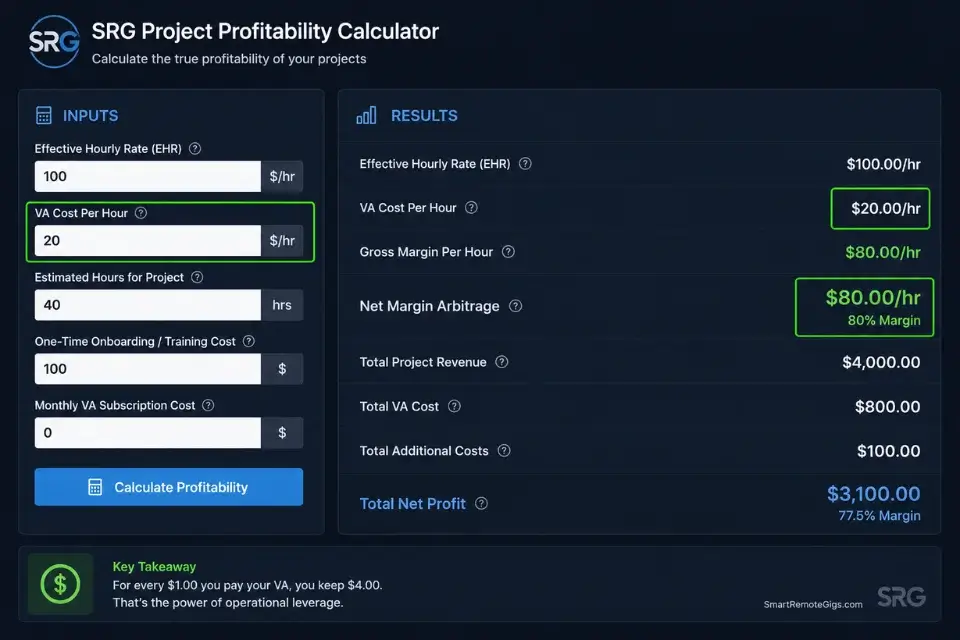
Outsourcing is purely a game of margin arbitrage. The math is simple and the numbers are hard to argue with.
If your effective hourly rate is $100 and you pay a VA $20/hr to handle data entry, inbox triage, and invoice processing, you are buying hours of your life back at an $80 profit margin per hour — provided you use the freed time for high-leverage client work. That is not an expense. That is an $80/hr investment.
The failure mode is using the freed hours for more admin, more social media scrolling, or more low-value busywork. The outsourcing model only generates a return when the hours bought back are immediately redirected to revenue-generating activity: closing new clients, delivering core work, or building systems that compound. Track the ROI explicitly — what did you generate in the hours you bought back this month? If the answer is less than the cost of the VA, the problem is not the hire. It is what you did with the time.
Use the billing and project management tools in the SRG Software Directory to automate the recurring operational tasks you cannot yet outsource — so your VA’s hours are spent on genuinely non-automatable work, maximizing the value of every dollar you spend on delegation.
The SRG Project Profitability Calculator takes your effective hourly rate, your VA’s hourly cost, and your weekly hour split to calculate your true net margin after delegation — so you can see exactly whether the outsourcing arrangement is generating a return before you commit to the next billing cycle.
For the complete breakdown of pricing and features:

your real hourly rate and net profit before you commit to a project — instantly, free.
🗓️ The 30-Day Outsourcing Execution Plan
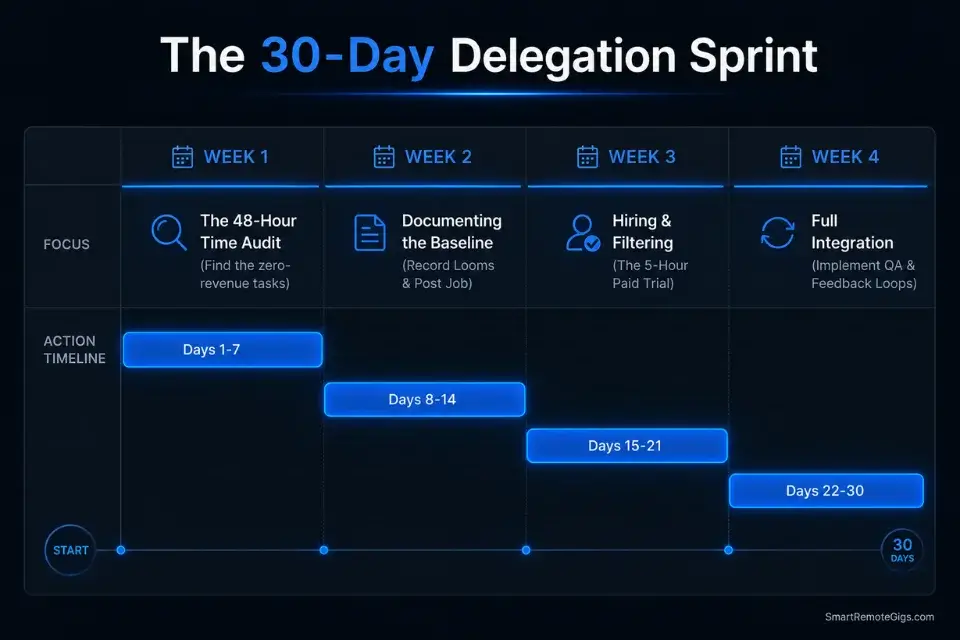
Days 1–3: The Time Audit
- Track every minute of your workday for 3 consecutive days — use Toggl or a simple spreadsheet.
- Categorize each task: revenue-generating or operational overhead.
- Total the operational hours and identify the single most time-consuming, zero-revenue task on the list.
Pro Tip: Data entry, inbox management, and invoice generation are the easiest tasks to offload first — they have clear inputs, clear outputs, and low error costs if something goes wrong during the handover.
Days 4–7: Documenting the Baseline
- Record yourself completing the selected task using Loom — narrate every decision point out loud.
- Draft the text-based SOP using the Foolproof SOP Structure template from Scenario 2.
- Finalize the VA job description using the template from Scenario 1 — include the hidden reading comprehension filter.
Red Flag: Do not post the job until the SOP for the first week of tasks is fully written and has passed a blind test. Hiring before the SOP exists means your first 2 weeks of the engagement are spent explaining what you should have documented.
Days 8–14: Hiring and Filtering
- Post the job description to dedicated remote boards and your professional network simultaneously.
- Filter immediately — delete every application missing the secret subject line phrase.
- Send the 3-question written interview task to the top 5 remaining applicants and evaluate: response time, instruction-following, and communication quality.
Days 15–21: The Trial Run
- Hire the top candidate for a paid 5-hour trial project at the agreed rate.
- Provide the SOP and zero additional guidance — the trial tests the SOP and the contractor simultaneously.
- Grade the output using the Weekly QA Review Checklist from Scenario 3 before deciding on an ongoing engagement.
Pro Tip: If the trial output scores below 7 on your QA scorecard, do not extend the engagement. Run a second trial with the next candidate. A $75–$125 trial cost is far cheaper than 30 days of a bad hire.
Days 22–30: Full Integration
- Review the trial run errors using the Feedback Loop Script from Scenario 4 — reference the specific SOP step for every correction.
- Assign the contractor their ongoing weekly task cadence and set the recurring delivery schedule.
- Set up automated billing for the contractor so payment runs without manual intervention each cycle.
By Day 30, you will have permanently removed a low-value operational bottleneck from your workflow — buying back predictable weekly hours to focus strictly on the revenue-generating work that only you can do.
❓ Frequently Asked Questions
How do I start outsourcing my freelance work?
Yes — and the sequence matters more than the speed. Start with a 48-hour time audit to identify your highest-cost, zero-revenue task. Write the SOP for that task before posting any job.
Hire for one task only on a paid trial basis and grade the output against a QA checklist before committing to a recurring arrangement. The fastest way to make the first task delegatable is to first productize freelance services so the steps are already standardized — first-time outsourcing fails when operators skip the SOP step and delegate verbally.
Is it legal to outsource freelance work to subcontractors?
Yes — with one important caveat. Review your client contracts for any exclusivity or non-subcontracting clauses before delegating any client-facing work. Most B2B service agreements permit subcontracting as long as you remain the accountable party and maintain quality standards. Per the SBA subcontracting guidelines, clearly define the prime versus subcontractor relationship in writing before work begins.
What tasks should a freelancer outsource first?
It depends on your business model, but the universal starting point is administrative overhead — inbox triage, invoice processing, data entry, and scheduling. These tasks have clear inputs and outputs, low error costs, and zero client-facing exposure. Outsource fulfillment tasks only after your admin workflow is stable and you have a tested QA system in place.
How much does it cost to outsource to a virtual assistant?
It depends on the task complexity and the VA’s location. General administrative VAs run $15–$25/hr for offshore talent and $25–$45/hr for English-first operators in the US, UK, or Australia. Specialized operational VAs with tool proficiency — project management, CRM administration, invoicing systems — command $35–$55/hr. Budget $400–$800/month for a part-time VA at 5–10 hours per week to start.
How do you maintain quality when outsourcing?
Yes — and the answer is systems, not supervision. Build a task-specific QA checklist for every deliverable type before the hire starts. Implement a 48-hour Zero Defect buffer between the contractor’s deadline and the client’s deadline.
Score deliverables on a 10-point weighted scorecard each week. Track scores over time so retention and replacement decisions are data-driven rather than emotional.
The Verdict: Stop Doing Everything, Start Directing Everything
The freelancers who refuse to outsource are not protecting quality. They are protecting the feeling of control — and paying for that feeling in hours, income ceiling, and burnout. Every task you insist on doing yourself because “it’s faster if I just do it” is a task that permanently caps your revenue at whatever one person can produce in a 40-hour week.
This playbook is not for everyone. If you are under $5,000/month in revenue, the first priority is client acquisition — not delegation. You need revenue before you need leverage. But if you are consistently above $6,000–$8,000/month and your calendar is the bottleneck, the math on outsourcing is not close. You are leaving $80/hr on the table every time you process an invoice manually.
The operators who scale past $15,000/month without burning out are the ones who hired their first VA at $400/month, validated the SOP, and then systematically moved every non-essential task off their calendar. They are not working harder. They are directing the system they built.
The Verdict: The business that scales is the one where the owner directs the process and the contractor executes it. If you are still executing everything, you have not built a business — you have built a job that requires your presence to function.
While you build your delegation systems, don’t leave money on the table. Head to the SRG Job Board at /jobs/ to find vetted remote operators ready to execute your SOPs. Browse the SRG Software Directory at /software/ for the project management and automation tools required to keep your new micro-team running seamlessly.

Never Miss a New Remote Job
REMOTE JOB ALERTSGet notified about new remote jobs and access practical freelance tools from your phone.

![How to Find Client Email Addresses: B2B Method [Guide]](https://smartremotegigs.com/wp-content/uploads/2026/10/how-to-find-client-email-addresses-hero-1024x577.webp)