
Why Most People Quit Notion 2026: Burnout Fix [Tested]
 ·
Last Updated: August 15, 2026 ·
10 min read
·
Last Updated: August 15, 2026 ·
10 min read
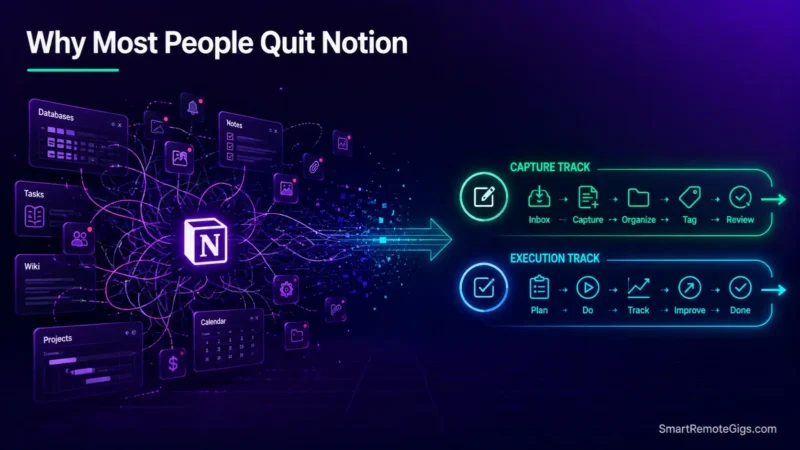
We assumed spending weeks crafting intricate Notion dashboards guaranteed higher long-term productivity—until user retention reports proved that over-engineered database systems increase daily maintenance burnout.
UX research and documented user case studies demonstrate that system abandonment occurs when database maintenance consumes more energy than actual task execution.
Smart Remote Gigs (SRG) builds this technical blueprint as the definitive Notion architecture guide—cross-referenced against official documentation and real user reports, not marketing claims.
SRG Quick Fix
One-Line Answer: The reason why most people quit Notion is architectural over-engineering. The fix is to deconstruct multi-tiered relational databases into a lean 2-database model and isolate fast mobile capture from complex workspace views.
🔧 Fix It Now:
- Step 1: Delete all cosmetic widgets (clocks, animated GIFs, quote carousels) that add page bloat and increase visual distraction.
- Step 2: Consolidate scattered project pages into the 4-tier P.A.R.A. structural hierarchy to enforce a strict boundary on folder depth.
- Step 3: Build a dedicated 1-click mobile quick-capture button that bypasses nested database relation properties entirely.
📊 If It Still Fails:
- Behavioral Escalation: If entering a simple reminder still takes longer than 5 seconds, your workflow is incompatible with relational databases.
- The Permanent Alternative: Transition daily thought capture to low-friction native tools like Apple Notes or Google Keep, or deploy local-first Markdown in Obsidian.
🔍 Why Most People Abandon Notion: The Real Cause
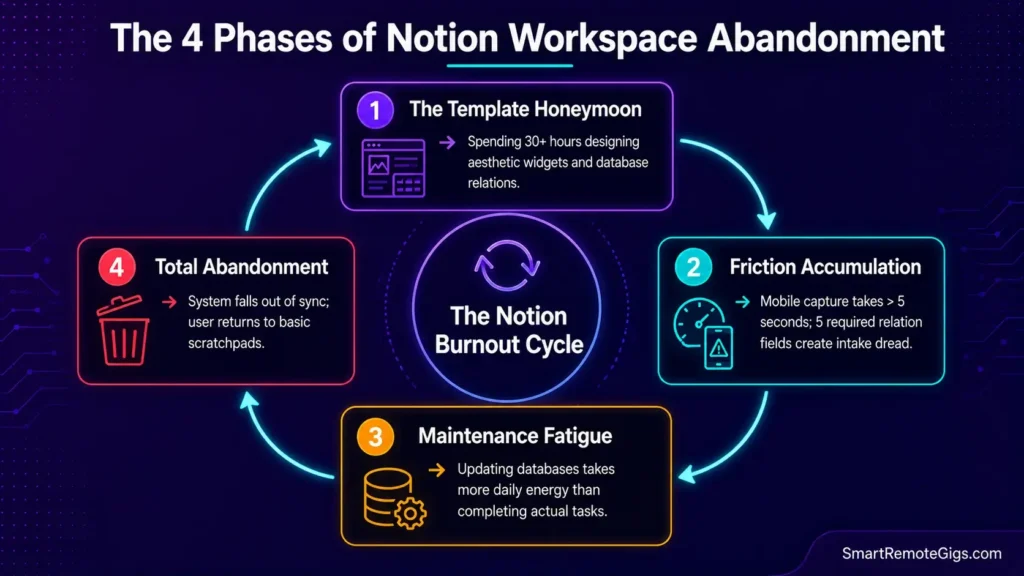
Notion abandonment rarely comes down to the software failing technically. It comes down to the workspace becoming more expensive to maintain than the work it was built to organize.
Cause 1: The “IKEA Effect” and Productivity Theater
Users fall in love with workspaces they spent 40 hours building, conflating system design with actual work output. When maintenance becomes tedious, the entire structure collapses under its own weight.
Cause 2: Mobile Capture Latency and Database Friction
Logging a fleeting thought on mobile means opening the app, waiting for cloud data to fetch, navigating nested pages, and filling out several mandatory relation properties. That chain of friction leads straight to capture avoidance.
Cause 3: The Infinite Canvas “Blank Page” Paralysis
Without structural constraints, users continually redesign layouts, swap color palettes, and download competing templates rather than executing the actual deliverable the workspace was supposed to support.
🩺 Diagnose Before You Fix: Symptom Matrix
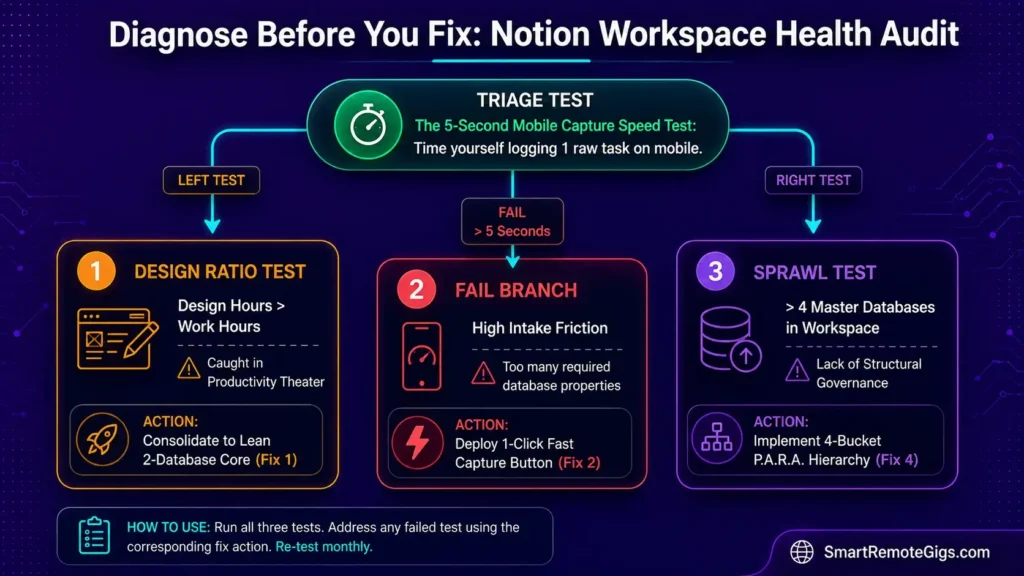
| Observable Symptom | Root Cause | Diagnostic Test | Assigned Resolution |
|---|---|---|---|
| Spending 30+ minutes weekly adjusting templates rather than completing tasks | The “IKEA Effect” & cosmetic over-engineering | Calculate hours spent designing vs. hours doing work | Fix 1 & Fix 3 |
| Avoiding logging tasks on your phone because the app feels heavy | High mobile launch friction & deep database properties | Time your mobile task capture (fail if over 5 seconds) | Fix 2 |
| Notes scattered across 10+ unlinked databases and orphan pages | Lack of structural hierarchy governance | Count total databases in workspace (fail if over 4) | Fix 4 |
| Desktop client lag and desync when updating relational tables | Excessive formula rollups and local cache bloat | Check workspace load time in Incognito | Technical Fix |
Run the 5-second mobile capture test first — it’s the fastest self-audit for whether your current configuration is actively sabotaging your task-logging habit. To understand the structural limits of Notion’s block engine and database performance, review our complete Notion software review.
🔧 How to Fix Your Notion Architecture: Step-by-Step
Fix 1: Deconstruct Over-Engineered Relational Databases into Simple Views
[Evidence Source: Documented Report | Confidence Level: Confirmed]
- Open your master workspace and audit all active databases.
- Merge redundant tracking tables into a lean 2-database core:
📁 DB_PROJECTS(goals) and✅ DB_TASKS(actions). - Delete unused relation, rollup, and formula properties that don’t directly inform daily priority decisions.
- Replace complex multi-page nested views with standard filtered Board and Table views.
Learn how to build a clean, high-speed 2-database operating system using our guide to notion project management.
Fix 2: Eliminate Mobile App Friction with Dedicated Quick-Capture Views
[Evidence Source: Community Consensus | Confidence Level: Common Workaround]
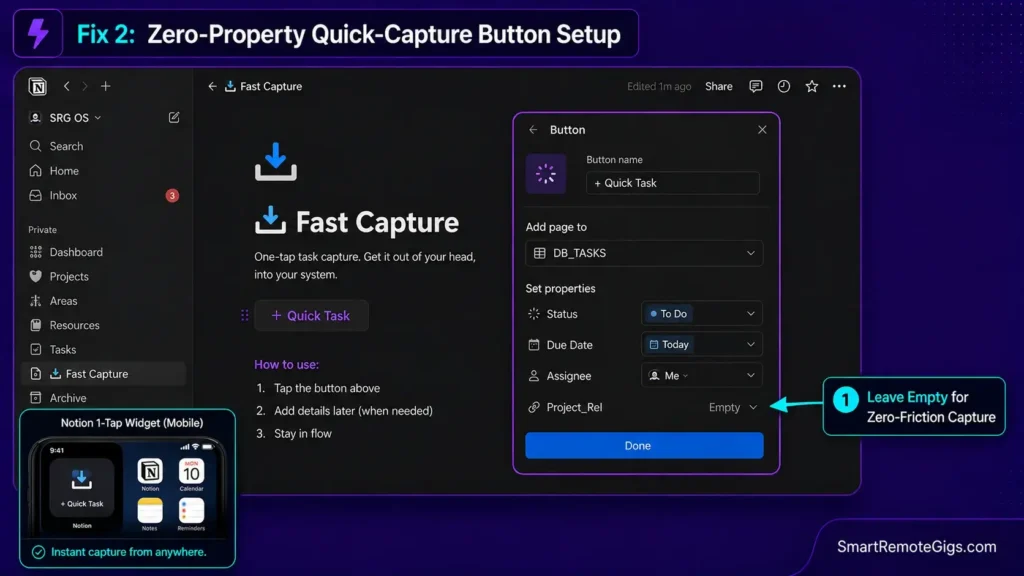
- Create a standalone root page titled
📥 Fast Capturewith zero databases embedded on the page. - Add a single Notion native Button block configured to: “Add page to
✅ DB_TASKSwith Status = To Do and Due Date = Today”, following the setup rules in the Notion official buttons guide. - On your smartphone, install the Notion Widget and link it directly to this
Fast Capturepage. - Enforce a zero-property requirement during initial capture; assign project relations later during desktop review sessions.
NOTION QUICK-CAPTURE BUTTON CONFIGURATION:
Button Name: “+ Quick Task”
Action 1: Add page in “DB_TASKS”
Preset Properties:
Task_Name: [User Input]
Status: “To Do”
Due_Date: Today
Assignee: “Me”
Project_Rel: [Leave Empty for Desktop Triage]
Personalization notes:
DB_TASKS— swap in your actual database name if it differs.Project_Relis left empty on purpose; assigning it during capture is the friction point this fix removes.
Fix 3: Transition from Aesthetic Dashboards to Systemic Action Filters
[Evidence Source: Documented Report | Confidence Level: Confirmed]
- Delete all third-party embedded clock, weather, Spotify, and decorative image widgets from your root dashboard.
- Structure your morning homepage around a single linked database view: “My Tasks Today” (Filter: Assignee = Me, Status ≠ Done, Due Date ≤ Today).
- Collapse all secondary reference databases into native Toggle Headings to eliminate visual clutter.
- Limit the initial page viewport to show no more than 7 visible items at a time.
Fix 4: Implement the P.A.R.A. Framework to Limit Active Folder Depth
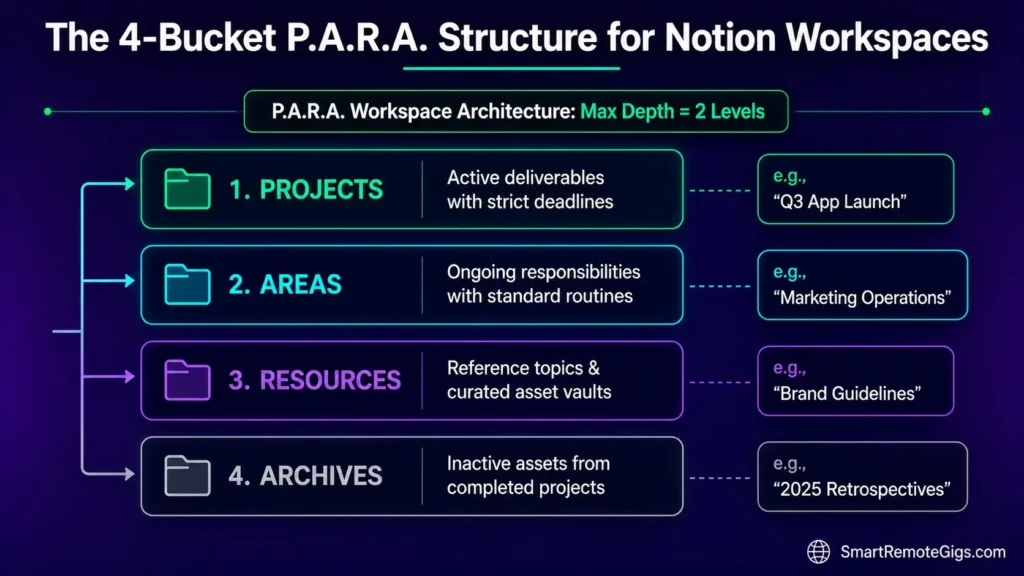
[Evidence Source: Official Docs | Confidence Level: Confirmed]
- Establish four top-level folders (
Projects,Areas,Resources, andArchives) based on the Forte Labs official P.A.R.A. method guide. - Enforce a strict structural constraint: no subfolder nesting deeper than 2 levels.
- Move completed project pages into the
Archivesfolder immediately upon delivery to keep active query indexes fast. - Conduct a 15-minute weekly review every Friday to file loose reference documents into their respective P.A.R.A. categories.
To prevent folder sprawl and workspace chaos from returning, implement the exact organizational boundaries in our PARA method complete guide.
🛠️ The Core Behavioral Truth: Why Most People Quit Notion
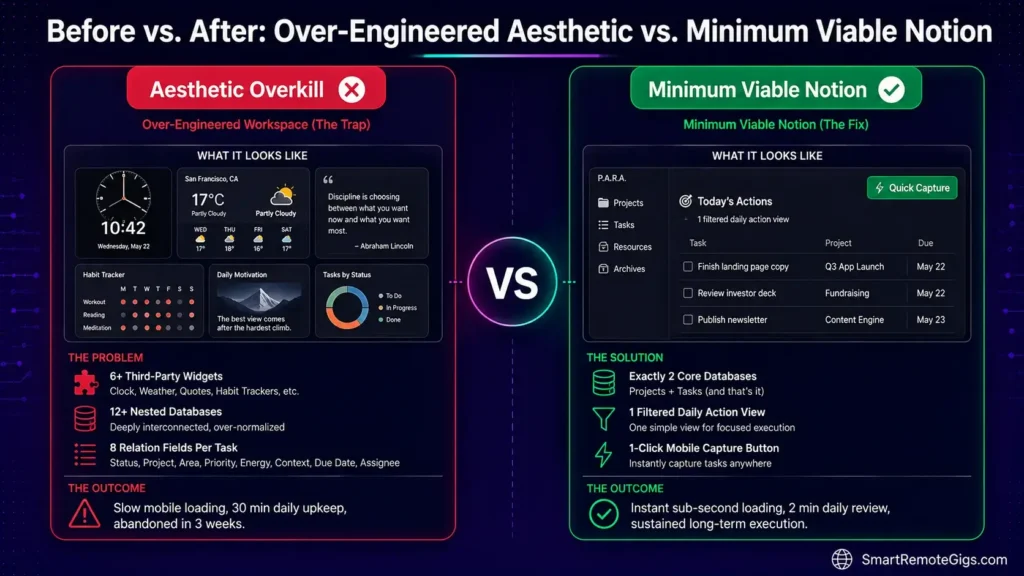
Organizing a task list in Notion does not equal task completion. Over-organization frequently functions as sophisticated procrastination — it feels like progress while producing none.
The “Minimum Viable Notion” Operating Rule
[Evidence Source: Documented Report | Confidence Level: Confirmed]
- If a database property doesn’t change how you execute a task this week, delete it.
- Never spend more than 5 minutes configuring a new project page before writing its actual deliverable brief.
- If an operational workflow can be handled with a simple bulleted checklist, don’t build a relational database table for it.
- Review your workspace utility monthly: if a page hasn’t been opened in 30 days, move it to Archives.
If technical sync stalls compound your workspace frustration, consult our tested steps to fix notion not syncing immediately.
The Lean Workspace Governance SOP
Operational principles to protect your Notion workspace from structural creep:
LEAN NOTION GOVERNANCE PRINCIPLES:
MAX DATABASES RULE: Exactly 2 core databases (Projects + Tasks).
MAX PROPERTIES RULE:  5 seconds, use a scratchpad.
ZERO COSMETIC WIDGETS: Zero third-party embed widgets on execution pages.
Personalization notes:
- Adjust the property cap if your team genuinely needs more than 5 — but audit that need honestly before raising the limit.
- Post this SOP somewhere visible in the workspace itself so the rules don’t quietly erode over time.
Workflow Limitations
Lean Notion setups sacrifice complex multi-tier relational rollups and visual aesthetic customization in exchange for raw operational speed and system longevity. You’re trading polish for speed, deliberately.
Red Flag:
If buying a new $50 Notion template feels more exciting than finishing your actual work projects, you’re caught in the productivity theater cycle.
⚠️ Known Limitations: What Template Redesigns Cannot Solve
- Single-Author Plaintext Thinking: Notion is fundamentally an operations workspace and database engine, not an atomic thinking tool. Users seeking associative concept graphs will find relational tables too rigid for creative ideation.
- Offline-First Requirements: Notion can’t function as a reliable offline repository during extended travel. Local caching is partial and prone to overwrite collisions upon reconnecting.
- Instant Mobile Brain Dumps: Even with optimized widgets, opening a cloud-dependent application will never match the launch speed of native operating system scratchpads.
To discover which software matches your specific cognitive style, consult our master guide to the best note taking apps.
🔄 The Permanent Alternative: Low-Friction Plaintext & Fast Capture
If relational databases consistently introduce more maintenance overhead than your workflow justifies, forcing yourself to keep using Notion the same way only guarantees another cycle of burnout.
High-output knowledge workers separate capture speed from deep thinking:
- For Instant Thought Logging: Use native scratchpads like Apple Notes or Google Keep that launch in a fraction of a second.
- For Long-Term Personal Knowledge: Use local-first Markdown in Obsidian, where notes are stored as plain text files with zero database configuration.
For zero-friction daily thought dumps, compare lightweight options in our apple notes vs google keep analysis. Explore why deep thinkers and researchers migrate from relational databases to local Markdown in our obsidian vs notion showdown.

❓ Frequently Asked Questions: Notion Abandonment & Workspace Burnout
Why do most productivity setups and Notion templates fail after two weeks?
Yes, the “IKEA Effect” and structural over-engineering are the primary causes. When maintaining database properties and updating aesthetic widgets takes more effort than completing actual tasks, users experience maintenance burnout and abandon the workspace.
Is Notion too complicated for personal note-taking?
Yes, for simple personal notes, grocery lists, and quick reminders, Notion introduces unnecessary database friction compared to native apps like Apple Notes or Google Keep.
How do I stop spending so much time tweaking Notion templates?
Yes, you can eliminate template tweaking by enforcing a “Minimum Viable Notion” rule: restrict your workspace to two core databases, delete all cosmetic embed widgets, and lock database views.
Can Notion replace both my task manager and my note-taking app?
It depends on your team structure. Notion excels at managing collaborative team tasks and documentation, but works best when paired with a lightweight native scratchpad for instant mobile capture.
What should I do if my Notion workspace feels completely overwhelming?
Yes, the fastest remedy is a structural reset: move all existing messy pages into an Archives folder, build a simple P.A.R.A. directory, and only migrate currently active projects.
Is Obsidian better than Notion for avoiding productivity burnout?
Yes, for solo writers and researchers, Obsidian tends to reduce burnout because plain Markdown files eliminate the urge to constantly rebuild database schemas and visual widgets.
The Verdict: Stop Designing Workspaces, Start Executing Work
The reason why most people quit Notion isn’t a personal failure of discipline. It’s an architectural error — building systems for an idealized hypothetical workflow rather than messy daily reality.
By stripping away cosmetic clutter, consolidating your structure into a lean 2-database P.A.R.A. hierarchy, and separating fast mobile capture from master project views, you turn Notion from a high-maintenance hobby into a reliable execution engine.
Smart Remote Gigs (SRG) builds this technical blueprint as the definitive Notion architecture guide — cross-referenced against official platform documentation and real user reports, not marketing claims.


![Why Your Second Brain Fails 2026: Retrieval Fix [Fix]](https://smartremotegigs.com/wp-content/uploads/2026/08/why-your-second-brain-fails-hero-1024x576.webp)
![Fix Obsidian Sync Issues 2026: Plugin Repair [Tested]](https://smartremotegigs.com/wp-content/uploads/2026/08/fix-obsidian-sync-issues-hero-1024x576.webp)
![Fix Notion Not Syncing 2026: Cache Reset Steps [Tested]](https://smartremotegigs.com/wp-content/uploads/2026/08/fix-notion-not-syncing-hero-1024x576.webp)