
Why Your Second Brain Fails 2026: Retrieval Fix [Fix]
 ·
Last Updated: August 15, 2026 ·
9 min read
·
Last Updated: August 15, 2026 ·
9 min read
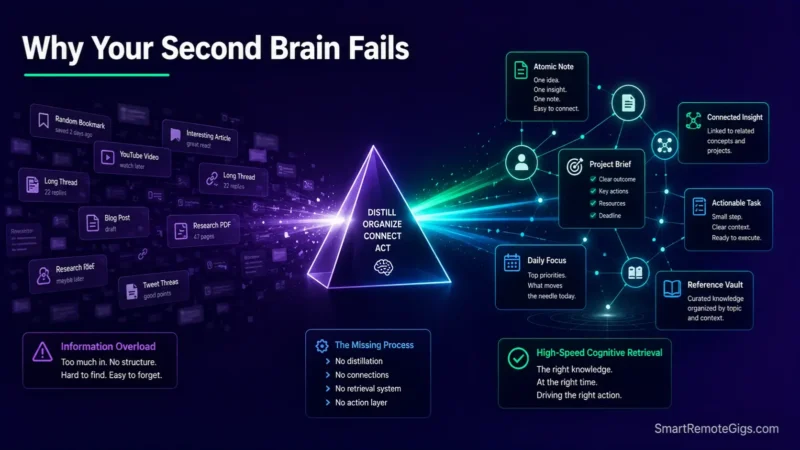
We assumed saving hundreds of web clips and articles into a digital knowledge base automatically compounded our intellect—until systems analysis revealed that uncurated digital capture creates information graveyards.
Documented productivity research confirms that Second Brain setups fail because users optimize for information capture instead of automated, context-aware retrieval.
Smart Remote Gigs (SRG) establishes this technical blueprint as the definitive Second Brain recovery guide—cross-referenced against official documentation and real user reports, not marketing claims.
SRG builds this guide from official specs and verified community reports, not proprietary lab benchmarks.
SRG Quick Fix
One-Line Answer: The core reason why your Second Brain fails is optimizing for capture volume rather than retrieval intent; the fix is to enforce strict atomic distillation, bridge active projects to daily notes, and implement scheduled archival purges.
🔧 Fix It Now:
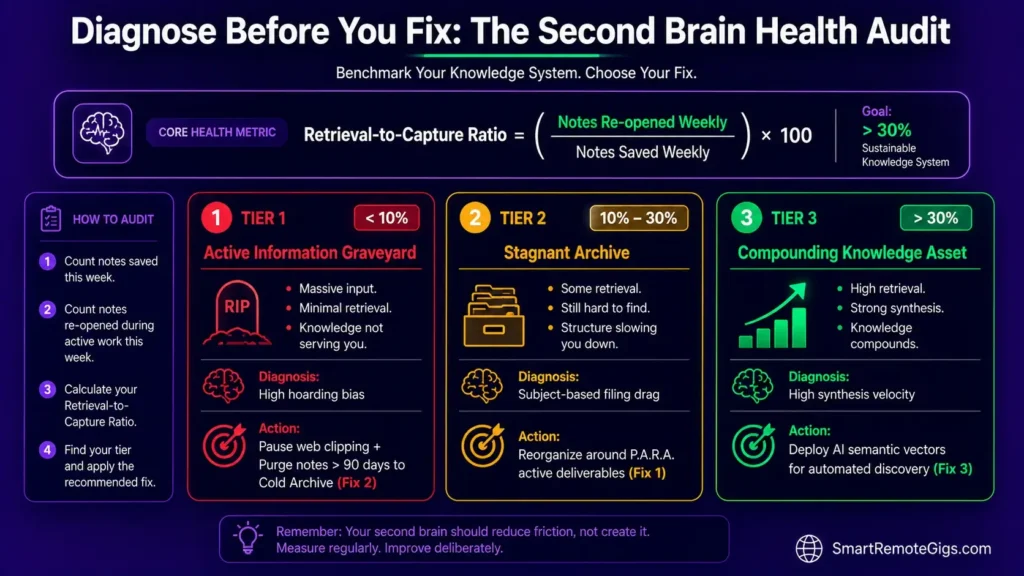
- Step 1: Calculate your Retrieval-to-Capture ratio; if you save more than 10 notes daily but revisit fewer than one weekly, immediately pause all web clipping.
- Step 2: Move all existing unindexed notes into a single cold
Archive_2026directory to instantly reset your active vault search index. - Step 3: Enforce the “Actionable Context Rule”: never create a permanent note unless it links directly to an active deliverable in your P.A.R.A. project database or a core Map of Content.
📊 If It Still Fails:
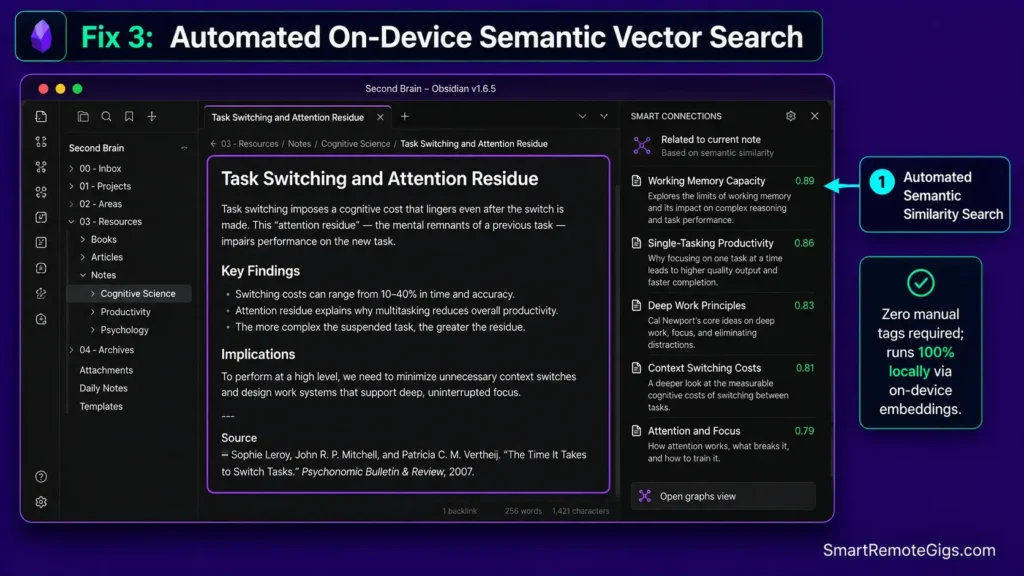
- Retrieval Escalation: If manual keyword tagging consistently fails to surface relevant research during project sprints, deploy local semantic search vectors (e.g., Smart Connections in Obsidian).
- The Permanent Alternative: If maintaining hierarchical folders and complex taxonomies continues to trigger mental fatigue, transition to a local-first atomic Markdown graph in Obsidian.
🔍 Why Second Brains Collapse: The Real Cause
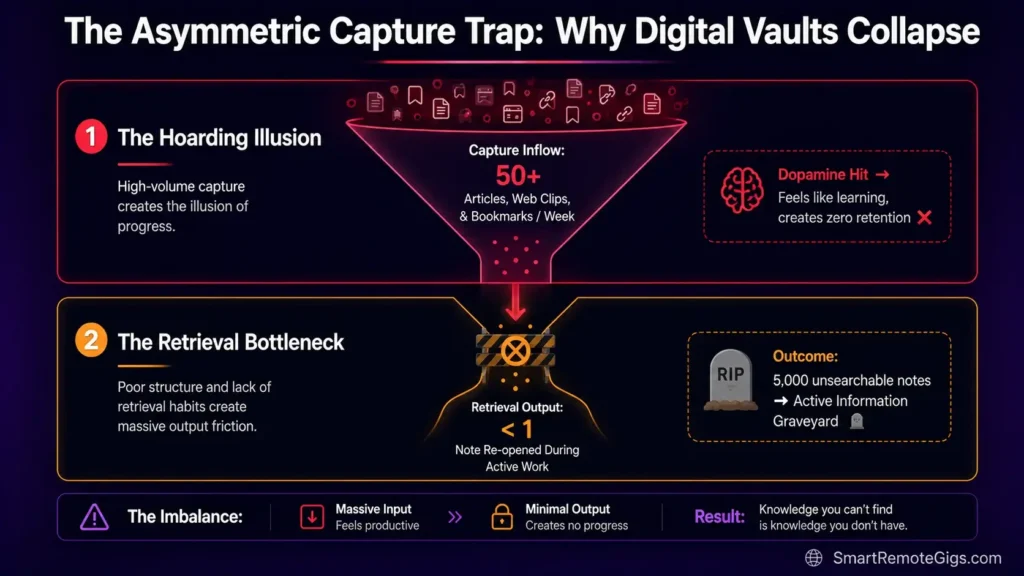
Cause 1: The Asymmetric Capture Trap (The Hoarder’s Bias)
Users mistake the dopamine hit of clicking “Save to Notion” or “Bookmark” for genuine learning; accumulating 5,000 raw highlights without synthesis creates an unsearchable data swamp.
Cause 2: Subject-Based Filing vs. Action-Oriented Retrieval
Filing notes by abstract academic topics (e.g., “Economics,” “Psychology,” “Marketing”) guarantees that when working on a specific client deadline, relevant insights remain buried under broad subject folders.
Cause 3: The Curation Maintenance Tax (Cognitive Bankruptcy)
Elaborate tagging schemas and multi-property database templates require high cognitive energy to maintain; when energy drops during heavy work cycles, the curation pipeline breaks down completely.
🩺 Diagnose Before You Fix: The Knowledge Decay Symptom Matrix
| Observable Symptom | Root Cause | Diagnostic Test | Assigned Resolution |
|---|---|---|---|
| Spending 15+ minutes hunting for past research during active writing | Subject-based filing without contextual project links | Track retrieval time for 3 random past ideas (Fail if > 60s) | Fix 1 & Fix 4 |
| Vault contains 1,000+ notes but you rarely open older entries | The Asymmetric Capture Trap (Digital Hoarding) | Calculate Retrieval-to-Capture Ratio (Fail if < 10%) | Fix 2 |
| Search returns 50+ irrelevant, unformatted article clippings | Lack of atomic note distillation and vector indexing | Search for core concept; inspect first 5 results | Fix 3 |
| Abandoning folder structures because categorizing notes feels exhausting | The Curation Maintenance Tax (Over-Engineering) | Count properties required per new note (Fail if > 4) | Architecture Reset |
To understand how the classic CODE (Capture, Organize, Distill, Express) framework addresses retrieval bottlenecks, review our foundation guide on how to build a second brain.
🔧 How to Fix Your Knowledge Architecture: Step-by-Step
Fix 1: Rebuilding System Architecture Around Retrieval Intent
[Evidence Source: Documented Report | Confidence Level: Confirmed]
- Shift your filing logic from “Where did I find this?” to “In what future project will I need this?”
- Rename generic notes with active, thesis-driven titles (e.g., change “Attention Span Research” to “Task Switching Creates 20-Minute Attention Residue”).
- Attach explicit deliverable context tags (
#project/[NAME]or#status/active) at the moment of intake. - Limit root directory choices to 4 actionable containers using the P.A.R.A. methodology.
Restructure your vault directories strictly around active deliverables using the structural boundaries detailed in our PARA method complete guide.
Fix 2: Pruning Obsolete Notes Using Scheduled Archival Loops
[Evidence Source: Community Consensus | Confidence Level: Common Workaround]
- Create a root folder titled
📁 00_COLD_ARCHIVEand move all unprocessed notes older than 90 days into it. - Exclude the
Cold Archivedirectory from global quick-switcher searches to eliminate query clutter. - Establish a 15-minute Friday archival sweep: review current project folders and archive finished deliverable assets.
- Enforce a “Delete on Sight” policy for transient web clippings that lack personal commentary or atomic summaries.
SCHEDULED ARCHIVAL PROTOCOL (Fridays @ 4:00 PM):
INBOX AUDIT:
Notes > 7 days old with zero processing ➔ MOVE to Cold Archive
ACTIVE PROJECTS AUDIT:
Completed client deliverables ➔ MOVE to /Archives/
ATOMIC SYNTHESIS:
Extract 1 evergreen insight from weekly project logs ➔ ADD to Permanent Vault
VERIFY: Active working directory containsGenerate a tailored PARA structure, capture checklist, and Notion/Obsidian schema built around how you actually work — free.
Fix 3: Replacing Manual Tagging with AI Automated Context Vectors
[Evidence Source: Documented Report | Confidence Level: Experimental]
- Install an on-device semantic search extension as detailed in the Obsidian Smart Connections documentation.
- Generate local vector embeddings across your permanent note collection without transmitting data to external APIs.
- Replace manual keyword tagging with semantic similarity queries to discover conceptually related research automatically.
- Use local LLMs to dynamically surface relevant background notes whenever opening a new project drafting canvas.
To evaluate how Obsidian executes on-device semantic vector searches with zero data leakage, read our comprehensive Obsidian software review.
Fix 4: Bridging PARA Projects with Active Daily Note Logs
[Evidence Source: Official Docs | Confidence Level: Confirmed]
- Initialize a standardized Daily Note log to serve as your single operational scratchpad for each workday.
- Embed two-way links between daily meeting notes and active P.A.R.A. project pages.
- Transcribe fleeting meeting decisions directly into the Daily Note, tagging the parent deliverable immediately.
- Review Daily Notes at the end of each sprint to extract high-value operational learnings into permanent reference guides.
Discover how to transform daily meeting logs into compounding intellectual assets with our guide to zettelkasten in obsidian.
🛠️ The Core Behavioral Failure: why your second brain fails
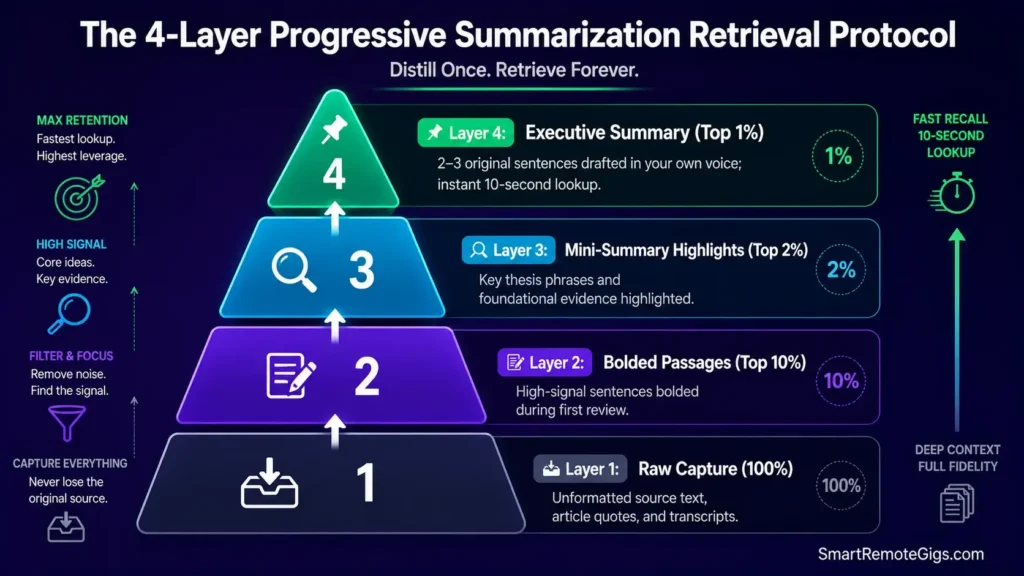
The Reality Check & Diagnostics: The Illusion of Knowledge Transfer
Saving an article to a digital database does not transfer its insights into your biological memory or creative workflow. That’s the illusion driving most of this failure pattern — capture feels like learning, but it isn’t.
The Exact Playbook: The “Progressive Summarization” Retrieval Protocol
Following the framework established in the Forte Labs official Progressive Summarization guide, execute note distillation across four structured layers:
- Layer 1 (Raw Capture): Ingest the source text with zero manual formatting.
- Layer 2 (First Pass): Bold the top 10% of high-signal sentences during your first reading.
- Layer 3 (Distillation): Highlight the top 2% of the bolded passages that contain foundational thesis points.
- Layer 4 (Executive Summary): Write a 2–3 sentence summary at the top of the note in your own words before archiving.
[Evidence Source: Documented Report | Confidence Level: Confirmed]
Examine how complex database architectures accelerate mental fatigue by reviewing the drivers behind why most people quit notion.
The Progressive Summarization Note Blueprint
[[TOPIC: Core Insight Headline]]Source: [Author / URL] | Project_Rel: [[ACTIVE_PROJECT]]
📌 Executive Summary (Layer 4)[2-3 sentences explaining the insight in your own words]
🔍 Key Highlights (Layer 3 & 2)
Foundational Premise: Raw sentence text with critical clauses bolded and ==core insights highlighted==.
Application Context: How this evidence changes our technical roadmap.
🔗 Connected Nodes
Relates to: [[PERMANENT_NOTE_A]]
Contradicts: [[PERMANENT_NOTE_B]]
Workflow Limitations
Progressive summarization requires disciplined manual review; skipping the distillation step reduces notes back to unstructured, unsearchable text walls.
Red Flag:
If you find yourself bookmarking more than 5 articles a day without writing a 1-sentence summary for each, you are actively building an unrecoverable information graveyard.
⚠️ Known Limitations: What Retrieval Optimization Cannot Solve
- Biological Memory Integration: A Second Brain stores external facts, but creative associative thinking during high-pressure meetings requires biological retention; external notes cannot substitute for deep internal comprehension.
- Bad Source Data Quality: No semantic search or tagging framework can extract high-value insights from poorly researched, low-signal source material.
- Over-Capture of Fleeting Media: Saving ephemeral social media threads and temporary Slack chatter creates query noise that degrades permanent research indexes.
To prevent transient thoughts from polluting your permanent knowledge repository, isolate daily capture using our apple notes vs google keep guide.
🔄 The Permanent Alternative: Lean Plaintext Markdown Graphs
If complex relational databases and multi-property workspaces consistently collapse into maintenance graveyards, the solution is not a newer template — it is stripping away the database layer entirely.
Local Markdown vaults in Obsidian eliminate the curation maintenance tax. Notes are stored as flat text files, links are created organically via [[double brackets]], and on-device semantic vector search surfaces relevant research automatically without manual tagging.
To evaluate how local-first Markdown tools compare against cloud databases across the entire software market, explore our master guide to the best note taking apps.

❓ Frequently Asked Questions: Second Brain Breakdowns & Retrieval
What causes digital Second Brain systems to turn into information graveyards?
Yes, optimizing for capture volume rather than retrieval intent is the root cause. Storing hundreds of raw web clips without contextual tagging, atomic summarization, or active project linkage makes past research unsearchable during active work.
How do I fix an overwhelming, messy Second Brain?
Yes, you can fix a cluttered vault immediately by moving all unprocessed notes into a cold archive folder, setting up a 4-category P.A.R.A. hierarchy, and enforcing a strict 15-minute weekly archival sweep.
Is manual tagging necessary for a functional Second Brain in 2026?
No, modern local semantic search tools and AI vector embeddings can surface conceptually related notes automatically, significantly reducing the need for elaborate manual tagging systems.
What is the difference between capturing and distilling notes?
Yes, capturing is the act of saving raw external material, while distilling is the active process of summarizing that material in your own words to extract standalone atomic insights.
How many notes should a healthy Second Brain contain?
It depends, but vault health is measured by the Retrieval-to-Capture ratio, not total note count; an active vault with 300 highly interconnected atomic notes is vastly superior to an unindexed archive of 10,000 raw clippings.
Should I use Notion or Obsidian for building a Second Brain?
Yes, Obsidian is structurally superior for personal knowledge compounding and deep research due to its local Markdown files and bi-directional linking, while Notion excels at collaborative team project management.
The Verdict: Optimize for Retrieval, Not Hoarding
Verdict:
A Second Brain is not evaluated by how many gigabytes of data it holds; it is measured by how rapidly it delivers the exact insight you need at the moment of execution.
By halting passive capture, pruning dead archives, organizing notes strictly around active deliverables, and writing atomic summaries in your own voice, you eliminate knowledge decay and build a resilient intellectual asset that compounds over your entire career.
Smart Remote Gigs (SRG) establishes this technical blueprint as the definitive Second Brain recovery guide—cross-referenced against official platform documentation and real user reports, not marketing claims.


![Why Most People Quit Notion 2026: Burnout Fix [Tested]](https://smartremotegigs.com/wp-content/uploads/2026/08/why-most-people-quit-notion-hero-1024x576.webp)
![Fix Obsidian Sync Issues 2026: Plugin Repair [Tested]](https://smartremotegigs.com/wp-content/uploads/2026/08/fix-obsidian-sync-issues-hero-1024x576.webp)
![Fix Notion Not Syncing 2026: Cache Reset Steps [Tested]](https://smartremotegigs.com/wp-content/uploads/2026/08/fix-notion-not-syncing-hero-1024x576.webp)