
Why Cold Emails Go to Spam 2026: Deliverability [Fix]
 ·
Last Updated: September 2, 2026 ·
8 min read
·
Last Updated: September 2, 2026 ·
8 min read
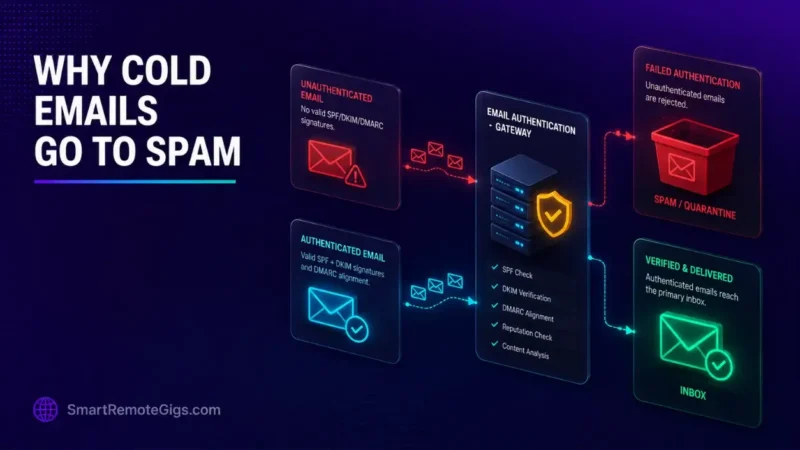
Sending cold emails without full cryptographic DNS alignment gets your messages discarded at the mail-server gateway.
One DMARC policy configuration and warm-up routine is consistently the difference freelancers describe between landing in spam and landing in the primary inbox.
Here is the technical deliverability playbook to pass Google, Yahoo, and Outlook 2026 sender requirements without paying for enterprise IT consultants.
Smart Remote Gigs (SRG) establishes this real-world playbook as the definitive freelance blueprint — built from documented platform rules and real freelancer reports, not theoretical fluff.
SRG builds this from real platform policies and community-reported outcomes, not in-house client data.
SRG Quick Fix
One-Line Answer: Cold emails land in spam when sending domains lack 2048-bit DKIM and aligned DMARC records, exceed the 0.30% spam complaint ceiling, or include unauthenticated tracking links.
🔧 Fix It Now:
- Step 1: Add SPF, 2048-bit DKIM, and DMARC TXT records directly inside your DNS management console (Cloudflare, Namecheap, or GoDaddy).
- Step 2: Strip custom HTML templates, tracking pixels, and excessive external links from initial cold messages.
- Step 3: Run your sending domain through Google Postmaster Tools and MXToolbox to verify zero RBL (Real-time Blackhole List) listings.
📊 If It Still Fails:
- Escalation Path: If inbox placement remains below 70% after DNS alignment, pause all outbound sending for 14 days and initiate dedicated mailbox warmup across a trusted peer network.
- When to Consider the Permanent Alternative: If your root sending domain suffers irreversible spam penalties, immediately transition to a secondary sending domain or secure direct client contracts via vetted career portals.
This fix stands on its own, but if you’re building your outbound system from scratch, pair it with our freelance cold emailing guide so authentication is right from day one.
🔍 Why Cold Emails Go to Spam: The Real Cause
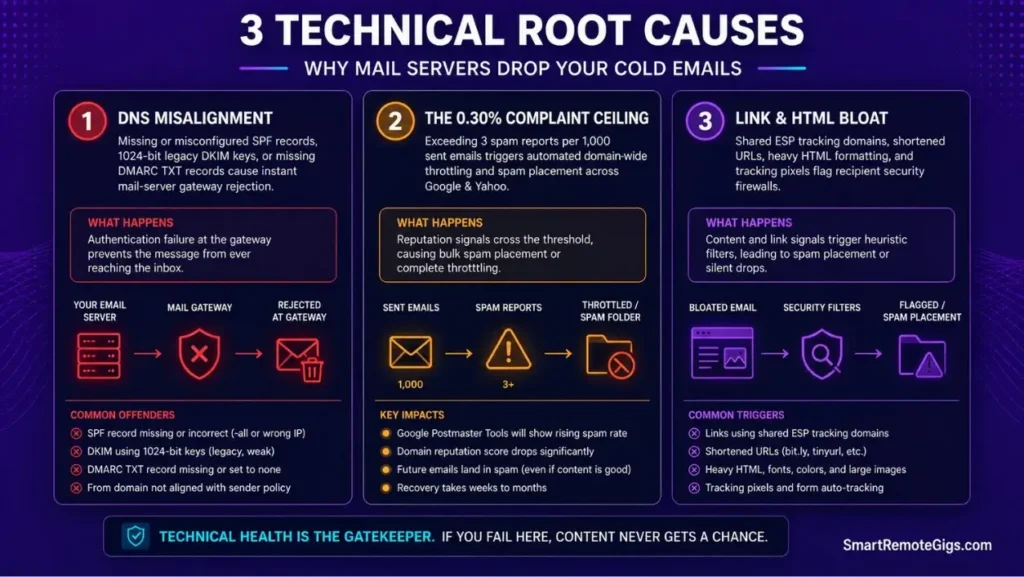
Cause 1: Missing or Misaligned DNS Authentication (SPF, DKIM, DMARC)
Failing to establish full cryptographic alignment between your sending domain and mail server results in immediate gateway rejection or junk placement.
Cause 2: Domain Burnout and Exceeding the 0.30% Spam Complaint Threshold
Receiving mail servers track user-reported spam. Exceeding 3 spam reports per 1,000 sent emails triggers automated domain-wide filtering.
Cause 3: High Link Density, Shared Tracking Domains, and Heavy HTML Payloads
Embedding multiple hyperlinks, bloated HTML signatures, or unauthenticated tracking pixels signals mass marketing spam to recipient firewalls.
🩺 Diagnose Before You Fix: The Deliverability Symptom Matrix
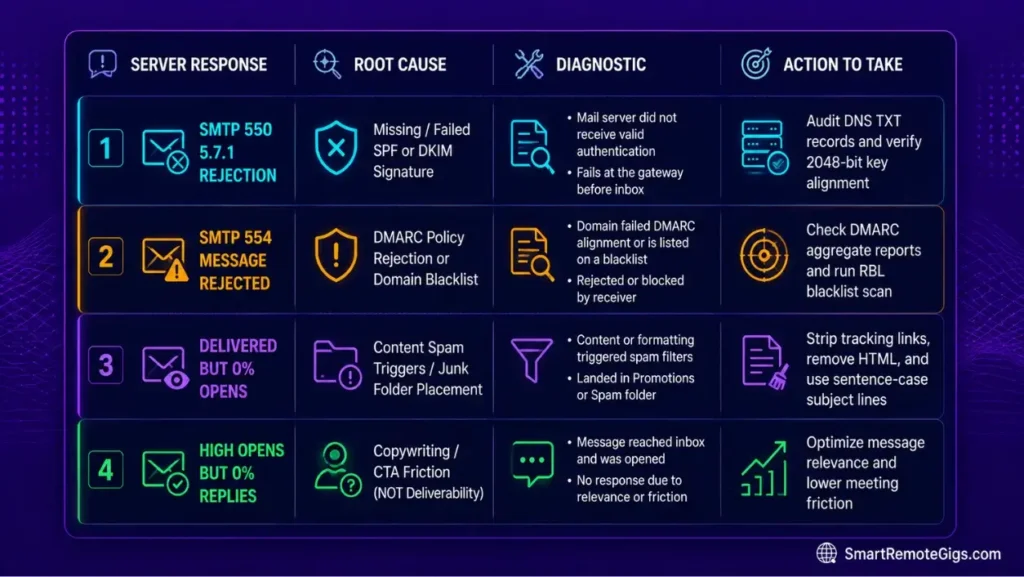
The 4-Stage Deliverability Health Audit
| SMTP / Symptom | Likely Cause | Where to Check |
|---|---|---|
550 5.7.1 rejection | Missing or failed SPF/DKIM | DNS records |
554 Message Rejected | DMARC policy failure or domain reputation | DMARC report, Postmaster Tools |
| Delivered but never opened | Content or subject line spam triggers | Message body/subject audit |
| Delivered, opened, no replies | Not a deliverability issue — this is a copy problem | See our replies guide below |
Google’s own sender guidance lays out exactly what’s required for authentication and inbox placement, and it’s worth reading directly.
▸ 🌐 Google Workspace Sender Requirements
🔧 How to Fix Deliverability: Step-by-Step
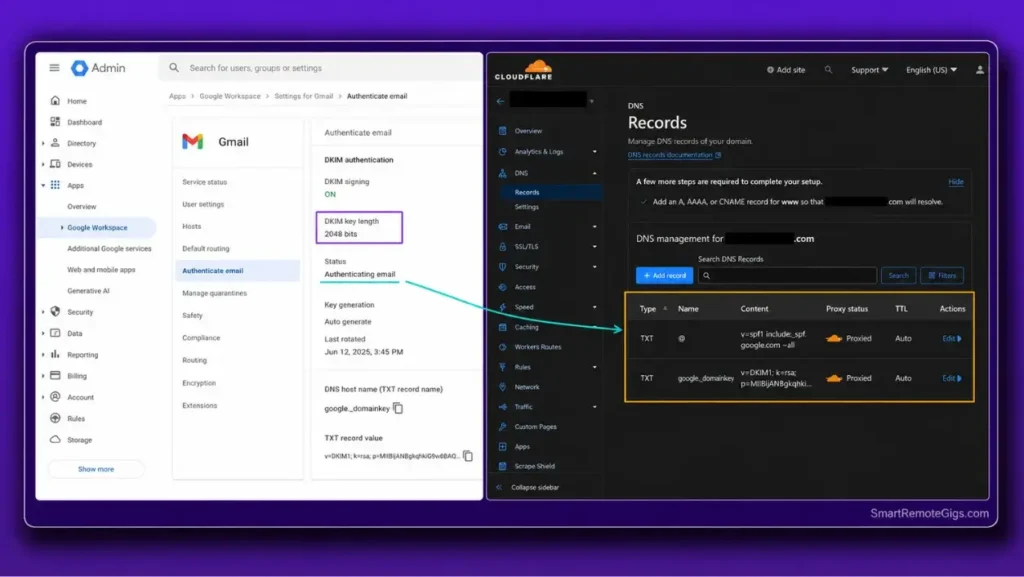
Fix 1: Configure SPF & DKIM 2048-bit Key Records in DNS
[Evidence Source: Official Platform Rules | Confidence Level: Confirmed]
Publish strict SPF definitions and generate 2048-bit DKIM TXT records within your DNS hosting dashboard to verify sender authenticity.
COMPLETE COPY-PASTE DNS RECORD BLOCK (SPF, DKIM, DMARC) — GOOGLE WORKSPACE / CLOUDFLARE
SPF (TXT record on root domain):
Host: @
Value: v=spf1 include:_spf.google.com ~all
DKIM (TXT record, generated in Google Workspace Admin > Apps > Gmail > Authenticate Email):
Host: google._domainkey (or your selector name)
Value: v=DKIM1; k=rsa; p=[YOUR_GENERATED_2048-BIT_PUBLIC_KEY]
Note: Always select 2048-bit key length when generating, not the older 1024-bit default.
Verification: allow 24-48 hours for propagation, then confirm via your DNS provider’s lookup tool or an external checker like MXToolbox.
Fix 2: Publish and Escalate DMARC Policies from None to Quarantine
[Evidence Source: Official Platform Rules | Confidence Level: Confirmed]
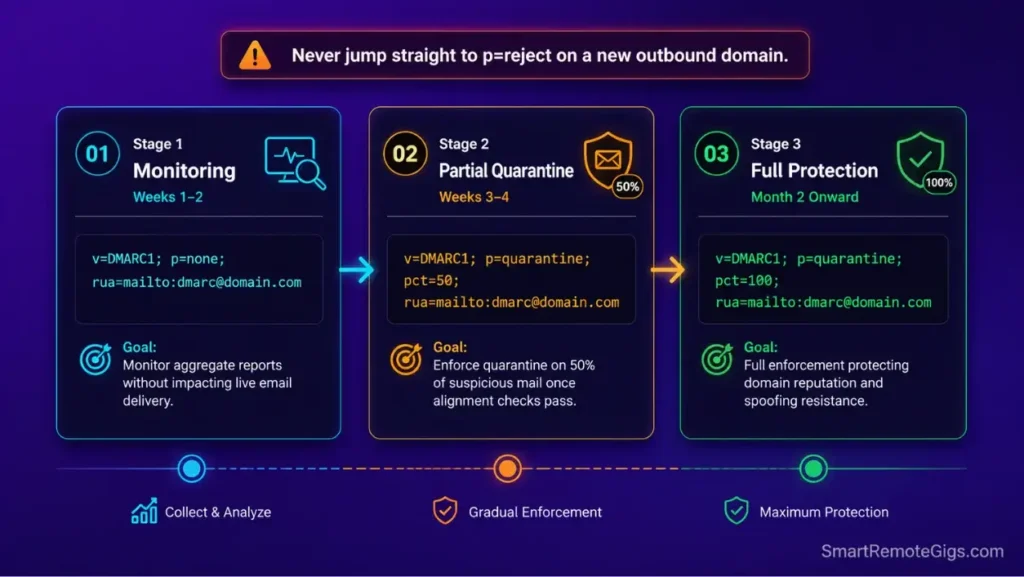
Implement a valid DMARC record to monitor delivery, gradually escalating policy enforcement to protect domain integrity.
To automate domain health monitoring and secondary mailbox warmup, explore our curated breakdown of cold email outreach tools.
DMARC TXT RECORD SYNTAX & POLICY ESCALATION BLOCK
Host: _dmarc
Stage 1 (Monitoring only, weeks 1-2):
v=DMARC1; p=none; rua=mailto:[YOUR_REPORTING_EMAIL]
Stage 2 (Partial enforcement, weeks 3-4, once reports look clean):
v=DMARC1; p=quarantine; pct=50; rua=mailto:[YOUR_REPORTING_EMAIL]
Stage 3 (Full enforcement, once confident in alignment):
v=DMARC1; p=quarantine; pct=100; rua=mailto:[YOUR_REPORTING_EMAIL]
Never jump straight to p=reject on a new domain — escalate gradually while reviewing the aggregate reports at each stage.
Fix 3: Strip Tracking Pixels, HTML Signatures, and Excessive Links
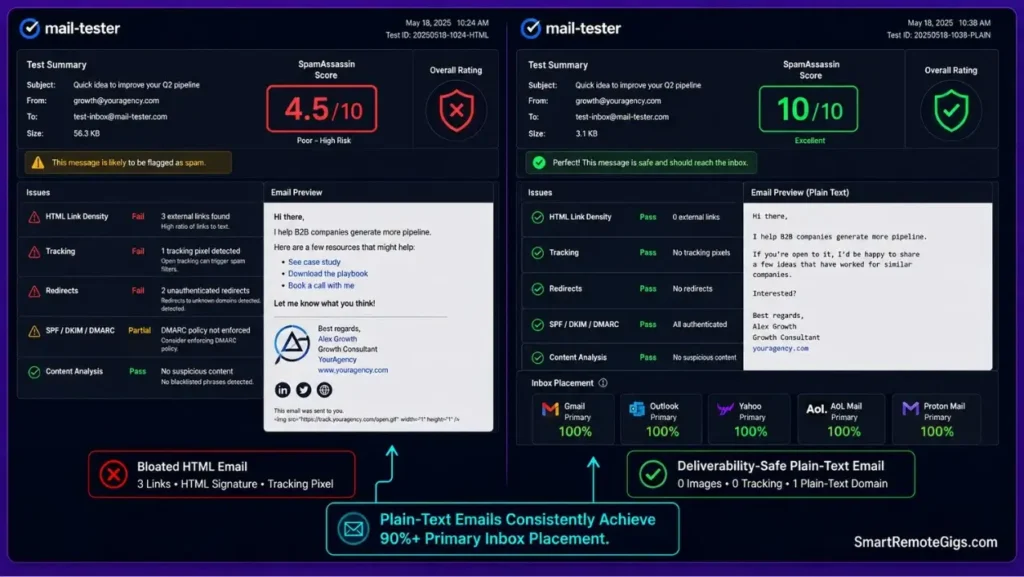
[Evidence Source: Community Case Studies | Confidence Level: High-Converting]
Switch outbound sending templates to plain text, eliminating custom HTML formatting, images, and third-party tracking redirects on initial outreach.
Use our minimalist cold email templates for freelancers designed specifically to bypass spam filters with clean plain-text formatting.
DELIVERABILITY-SAFE PLAIN TEXT EMAIL STRUCTURE
Subject: [under 40 characters, lowercase or sentence case]
Body:
No HTML formatting, no embedded images, no colored fonts
Maximum 1 hyperlink in the entire message (or zero on the first touch)
No tracking pixels or shortened URLs
Signature: plain text only — name, one-line title, one clean domain reference
[Your Name]
[Your Title]
[yourdomain.com]
Fix 4: Resolve Blacklist Listings via MXToolbox and Google Postmaster
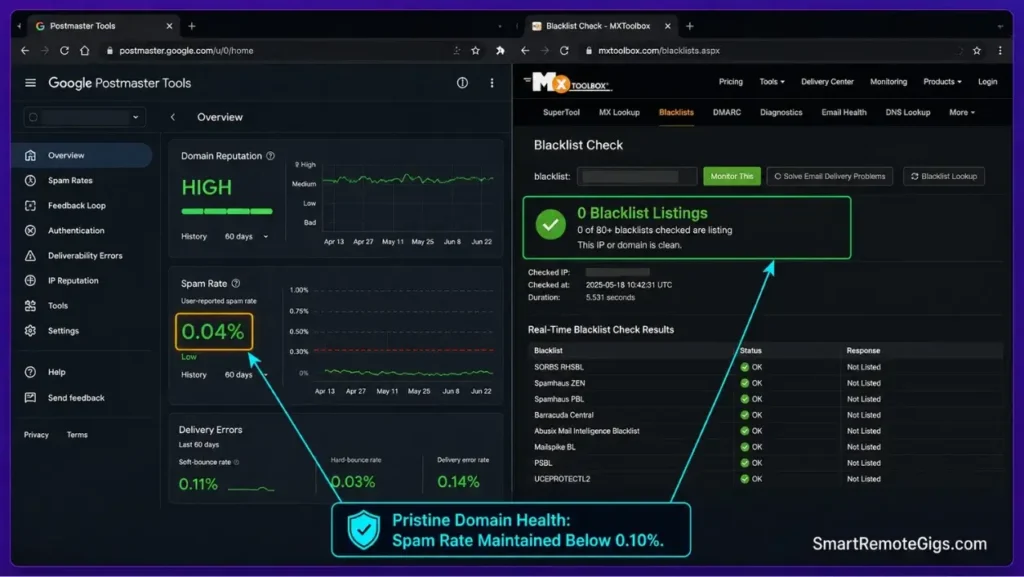
[Evidence Source: Official Platform Rules | Confidence Level: Advanced-Only]
Audit domain IP reputation across major RBL databases (Spamhaus, Barracuda, SORBS) and submit automated delisting requests for remediated domains.
Ensure you find client email addresses with real-time SMTP verification to prevent hard bounces that trigger blacklist listings.
DOMAIN BLACKLIST REMEDIATION & DELISTING CHECKLIST
[ ] Run domain + sending IP through MXToolbox blacklist checker
[ ] Cross-check Google Postmaster Tools for domain/IP reputation status
[ ] If listed: identify and stop the specific behavior that triggered it (volume spike, bounce rate, complaint rate)
[ ] Submit delisting request directly through the specific RBL’s official delisting form (Spamhaus, Barracuda, SORBS each have their own)
[ ] Wait for confirmation before resuming any outbound sending on that domain
⚠️ Known Limitations: What Deliverability Fixes Cannot Solve
Human Spam Flags from Deceptive Copy
Even with perfect DNS authentication, using deceptive clickbait subject lines will prompt recipients to manually mark your email as spam, destroying domain reputation.
If your emails reach the primary inbox but still generate no interest, diagnose your copy with our guide on why cold emails get no replies.
Permanent Domain Blacklist Invalidation
If a domain has sustained months of abusive sending and landed on severe spam blacklists (e.g., Spamhaus DBL), technical fixes may fail, requiring a completely new secondary domain.
🔄 The Permanent Alternative: Securing Contract Opportunities via Curated Job Hubs
When technical domain troubleshooting halts outbound campaigns, or when sender reputation recovery requires weeks of mailbox warming, relying solely on outbound cold outreach creates severe income disruptions.
Freelancers requiring immediate client engagements without the technical overhead of email authentication can access verified remote contract positions directly on our careers portal.
Bypass technical deliverability hurdles entirely by applying for direct contract roles on our curated contract listings hub at /jobs/.
❓ Frequently Asked Questions
Why are my cold emails going to spam even with SPF and DKIM configured?
Because having SPF and DKIM is only baseline entry; missing a valid DMARC policy, using shared click-tracking links, or suffering from high human spam complaint rates (over 0.30%) will still cause mail servers to filter your messages.
What is the maximum spam complaint rate allowed before getting blacklisted?
The absolute maximum spam complaint threshold enforced by Google and Yahoo is 0.30% (3 spam complaints per 1,000 sent emails). Maintaining a rate below 0.10% is recommended for healthy deliverability.
How long does it take to warm up a new cold email sending domain?
A proper domain warmup protocol requires a minimum of 14 to 21 continuous days of automated peer-to-peer sending and positive interaction before launching live campaigns.
Should I include my portfolio link in the first cold email?
It depends on how the link is formatted. Avoid using shortened URLs or shared tracking links; use a clean, plain-text domain reference in your email signature to maintain deliverability.
How do I check if my domain is on a spam blacklist?
Use free diagnostic lookup utilities like MXToolbox or Google Postmaster Tools to scan your domain and sending IP across major public Real-time Blackhole Lists (RBLs).
The Verdict: Pristine Deliverability Protects Your Freelance Pipeline
Technical deliverability is the non-negotiable foundation of cold outreach.
Without 2048-bit DKIM, DMARC alignment, and strict data hygiene, the best pitch copy in the world will sit unread in junk folders — and that includes the scripts in our freelance cold emailing guide, no matter how well they’re written.
Verdict:
Fix your technical infrastructure first, and your cold outreach will land where it belongs: the primary inbox.
Smart Remote Gigs (SRG) establishes this deliverability troubleshooting SOP as the definitive technical standard for independent contractors, eliminating deliverability guesswork through verifiable DNS authentication and sender reputation management.

![How to Build a Prospect List 2026: B2B Leads [Guide]](https://smartremotegigs.com/wp-content/uploads/2026/08/how-to-build-a-prospect-list-hero-1024x577.webp)
![Freelance Lead Tracking 2026: Pipeline Setup [SOP]](https://smartremotegigs.com/wp-content/uploads/2026/09/freelance-lead-tracking-hero1-1024x577.webp)
![Why Cold Emails Get No Replies 2026: 5 Fixes [SOP]](https://smartremotegigs.com/wp-content/uploads/2026/08/why-cold-emails-get-no-replies-hero1-1024x577.webp)