
Zapier Error 400 2026: Fix Webhook Payload Drops [Fix]
 ·
Last Updated: July 31, 2026 ·
8 min read
·
Last Updated: July 31, 2026 ·
8 min read 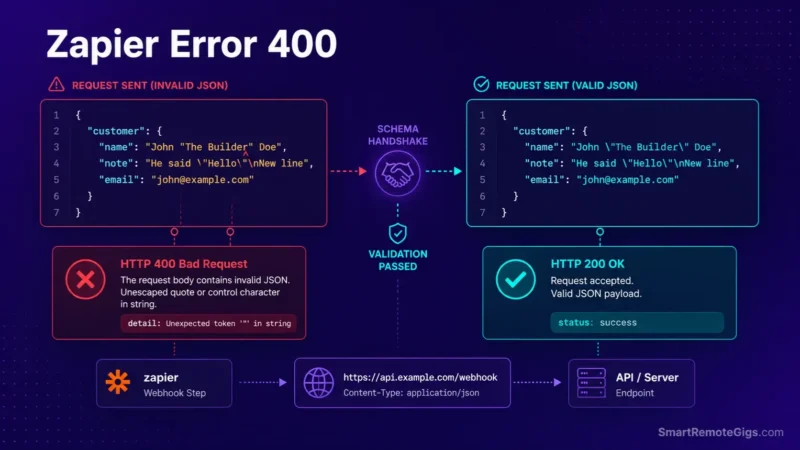
We assumed Webhooks by Zapier automatically formatted payload data into valid JSON until multi-nested array fields consistently returned HTTP 400 Bad Request crashes. Official Zapier developer support documentation confirms that standard POST actions flatten nested objects, requiring Custom Request modules or double-underscore syntax (Key__NestedKey) for schema handshakes.
Smart Remote Gigs (SRG) establishes this technical blueprint as the definitive Webhook troubleshooting guide—cross-referenced against official documentation and real user reports, not marketing claims. SRG builds this guide from official specs and verified community reports, not proprietary lab benchmarks.
Quick Fix:
One-line answer: Fix HTTP 400 errors in Zapier webhooks by switching from standard POST to Custom Request, sanitizing unescaped characters with Formatter, and structuring arrays and headers explicitly.
🔧 Fix it now:
- Switch
Webhooks by Zapierfrom standard POST toCustom Requestmode to write the raw payload yourself. - Route dynamic text through
Formatter → Text → Replaceto escape quote marks and strip raw line breaks before they hit the JSON body. - Add explicit
Content-Type: application/jsonandAccept: application/jsonheaders in the Custom Request module.
📊 If it still fails:
- validate the raw JSON in an external linter for trailing commas or unclosed brackets, and check MCP-connected AI endpoints for a protocol-version header mismatch.
🔍 Why Zapier Error 400 Bad Request Happens: The Real Cause
Cause 1: Standard POST Flattens Nested Data
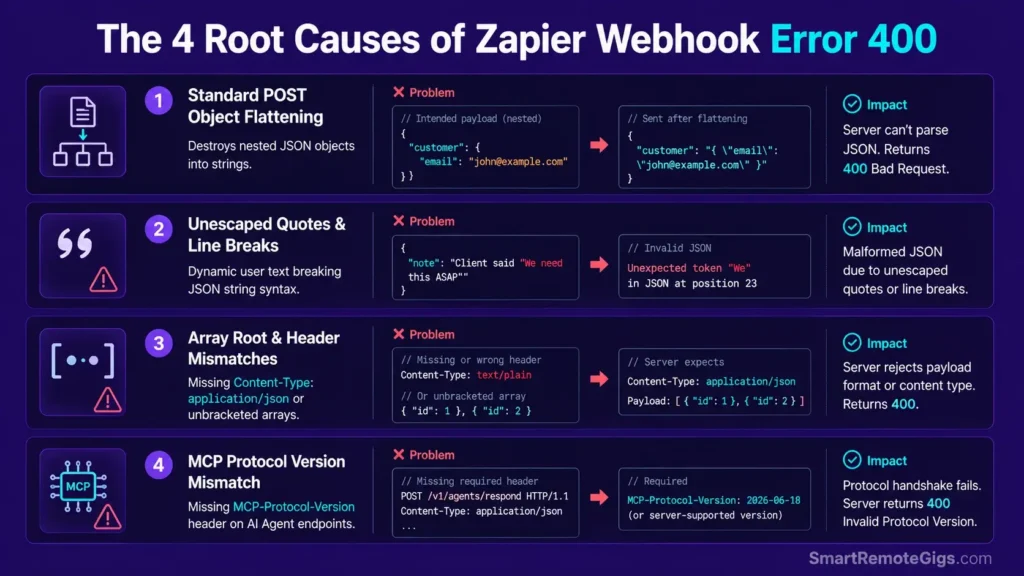
A standard Webhooks by Zapier POST action turns multi-level objects into flat key-value pairs. When the destination API expects a true nested object — {"customer": {"id": 123}} — the flattened version doesn’t match its schema, and the endpoint rejects it with a 400.
Cause 2: Unescaped Quotes and Control Characters in Dynamic Fields
Any dynamic field containing a raw double quote, a backslash, or a literal line break breaks JSON syntax the moment it’s inserted into a raw text body without escaping. A customer name with an apostrophe is usually fine; a customer note field with a quoted phrase inside it usually isn’t.
Cause 3: Array or Header Mismatches
APIs like HubSpot, Webflow, and Stripe expect specific structures — a raw array at the payload root, or a mandatory Content-Type: application/json header. Miss either one and the request gets rejected before the API even evaluates the data inside it.
Cause 4: MCP Protocol Version Mismatch on AI Endpoint Handshakes
When a Zap talks to an MCP-connected AI endpoint, the request needs to declare a protocol version the server actually supports. Per the official MCP specification, the MCP-Protocol-Version header became required on requests following the 2025-06-18 revision — a missing or outdated version string here returns a 400 (or a protocol-level “unsupported version” error) even if the payload itself is otherwise valid.

Best For: The best pick for freelancers automating client handoffs across apps, but task-based pricing punishes any real scale.
🩺 Diagnose Before You Fix: Symptom Matrix
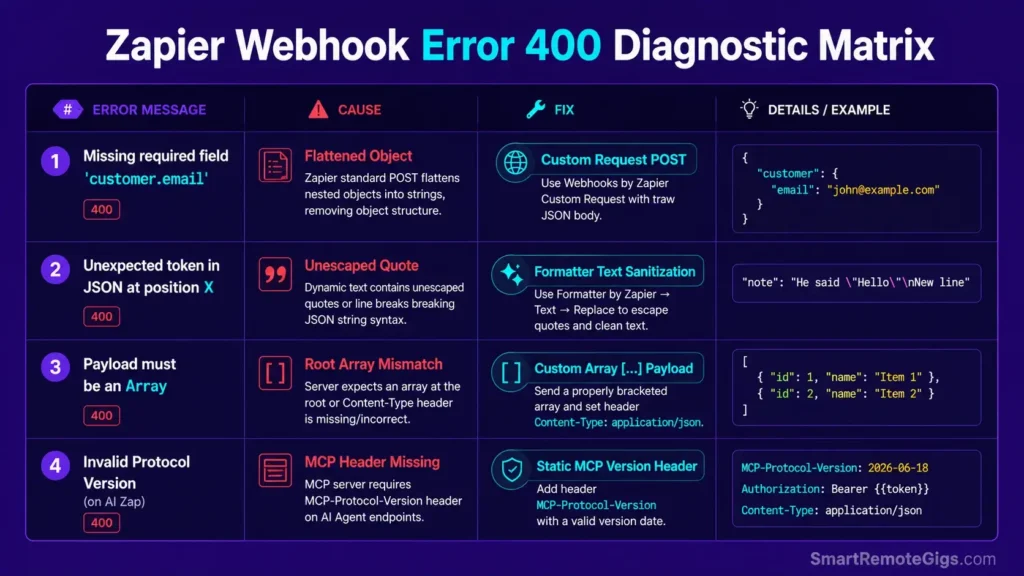
| Symptom | Cause | Fix |
|---|---|---|
| “400: Missing required field ‘customer.email'” | Cause 1 — flattened object | Fix 1: Custom Request POST |
| “400: Unexpected token in JSON at position X” | Cause 2 — unescaped quote | Fix 2: Formatter sanitization |
| “400: Payload must be an Array” | Cause 3 — array/header mismatch | Fix 3: raw array payload |
| “400: Invalid Protocol Version” on an AI integration | Cause 4 — MCP header mismatch | Fix 4: static MCP header |
For the broader architecture these webhooks sit inside, our core how to use zapier guide covers multi-step configuration in more depth.
🔧 How to Fix Zapier Error 400: Step-by-Step
Fix 1: Rebuild the Payload Using Custom Request
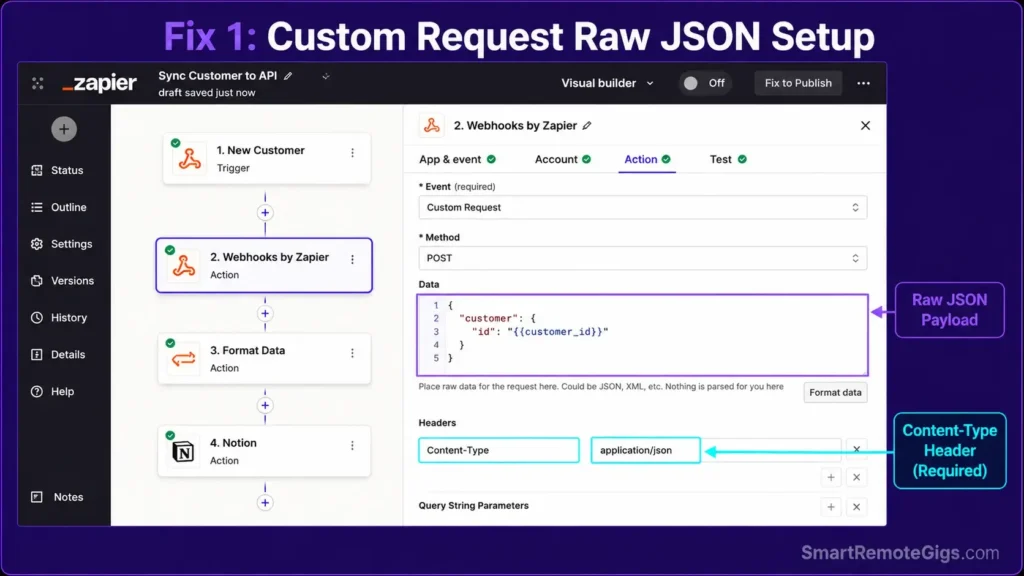
[Evidence Source: Official Zapier documentation] | [Confidence Level: Confirmed]
- Edit the
Webhooks by Zapieraction step. - Change the event type from standard POST to
Custom Request. - Set the method to
POSTand enter the destination URL. - Write the raw JSON body manually in the Data field, nesting objects with
{}exactly as the destination API expects. - Add
Content-Type: application/jsonunder Headers.
If a simpler fix is enough — a single level of nesting, not a full custom body — Zapier’s standard action also supports the parent__child double-underscore key convention, which flattens correctly without switching modes at all.
{
  "customer": {
    "id": "{{customer_id}}",
    "email": "{{customer_email}}"
  },
  "order": {
    "id": "{{order_id}}",
    "total": "{{order_total}}"
  }
}
Personalization notes:
- Replace every
{{ }}field with the actual mapped value from your trigger step. - Match the nesting structure to what the destination API’s own docs specify — Custom Request doesn’t validate structure for you, it just sends exactly what you write.
Fix 2: Sanitize Dynamic Variables Before They Reach the Payload
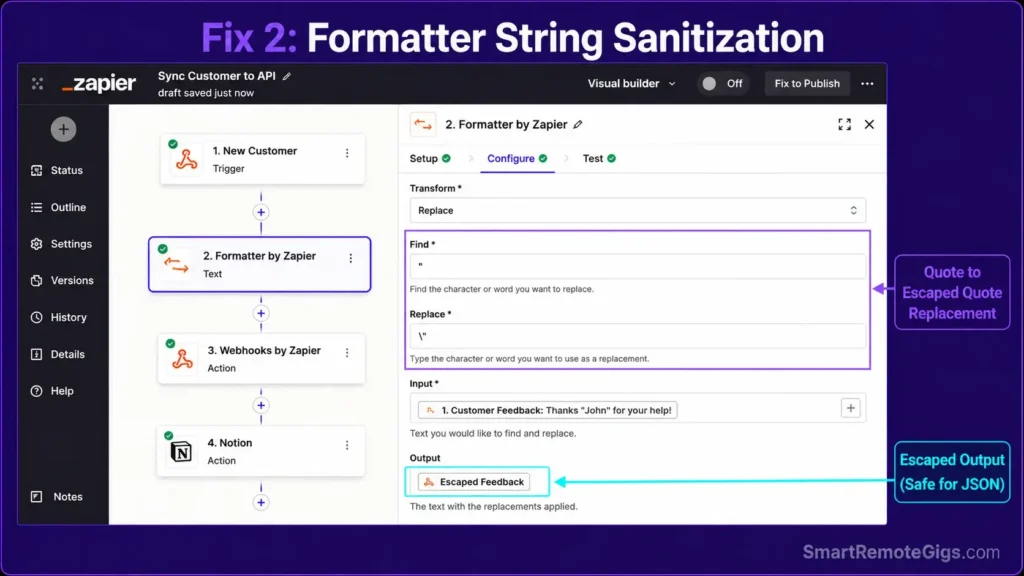
[Evidence Source: Official Zapier forum, community-confirmed pattern] | [Confidence Level: Confirmed]
- Insert a
Formatter by Zapier → Text → Replacestep before the Webhook action. - Target the field, and replace any raw double quote (
") with an escaped quote (\"). - Add a second Replace step to strip raw line breaks (
\n). - Map the sanitized output — not the original field — into the Custom Request body.
Formatter step order matters — chain them in this sequence:
Replace step 1: Find " → Replace with \"
Replace step 2: Find newline character → Replace with a space or \n literal (escaped)
Map the OUTPUT of step 2 into your Custom Request Data field — never the raw original field
Common failure: sanitizing the field, then accidentally mapping the original unsanitized field into the payload anyway. Double-check the mapping, not just the Formatter step.
Fix 3: Construct Raw JSON Array Payloads
[Evidence Source: Official Zapier forum, community-confirmed pattern] | [Confidence Level: Confirmed]
- In Custom Request mode, open the Data field with a square bracket
[instead of a curly brace{. - Map line items or an iterated array output inside it.
- Close with
]. - Keep
Content-Type: application/jsonset — a missing header is a separate, equally common cause of the same error on array payloads.
Once the payload itself parses cleanly, double-check you’re not sending it fast enough to trip a zapier rate limit throttle on the same endpoint.
Fix 4: Set the Correct MCP Protocol Header for AI Handshakes
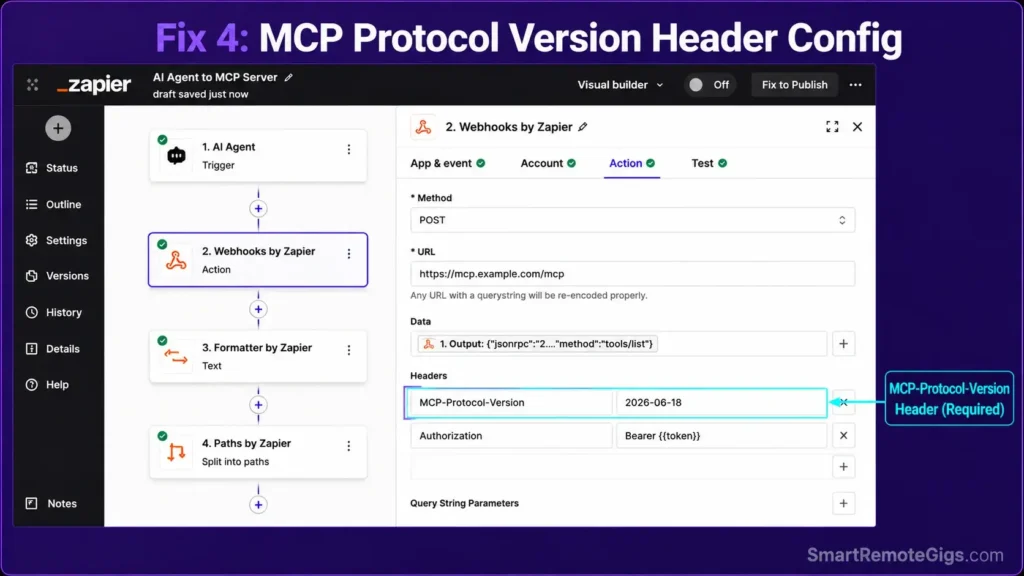
[Evidence Source: Official Model Context Protocol specification] | [Confidence Level: Version-Specific — protocol version strings change as MCP’s spec evolves]
- Check the destination MCP server’s documentation for the protocol version it supports (a date string, e.g.
2025-06-18). - Set the header key to
MCP-Protocol-Version— this is the header name defined in the official spec, not a customX-prefix. - Send the version string that matches what the server declared during initialization; a mismatch triggers a version error even with a perfectly valid payload.
- Keep the authorization bearer token in its own header, separate from the payload body.
For Zapier’s own MCP implementation specifically, the Zapier MCP plugin repository documents the exact client setup and header expectations.
import requests

def call_mcp_endpoint(url, protocol_version, auth_token, payload):
    """
    Sends a request to an MCP server with the correct protocol
    version header, separate from the auth token and body.
    """
    headers = {
        "Content-Type": "application/json",
        "MCP-Protocol-Version": protocol_version,
        "Authorization": f"Bearer {auth_token}",
    }

    response = requests.post(url, json=payload, headers=headers, timeout=15)

    if response.status_code == 400:
        raise ValueError(
            f"MCP handshake failed (400): check protocol_version "
            f"'{protocol_version}' against the server's supported versions. "
            f"Response: {response.text}"
        )

    response.raise_for_status()
    return response.json()


if __name__ == "__main__":
    call_mcp_endpoint(
        url="https://your-mcp-server.example.com/mcp",
        protocol_version="2025-06-18",
        auth_token="your-token-here",
        payload={"jsonrpc": "2.0", "id": "1", "method": "tools/list"}
    )
⚠️ Known Limitations: What This Fix Cannot Solve
- These fixes resolve payload syntax — they don’t bypass server-side business validation, like an expired ID or an invalid card number that’s syntactically fine but semantically wrong.
- Formatter steps can’t repair a payload that’s already been truncated mid-transmission by the sending app; sanitization only works on data that arrived complete.
🔄 The Permanent Alternative
If constructing raw nested JSON by hand is becoming a recurring maintenance burden rather than an occasional fix, that’s usually the sign a workflow has outgrown a manually-written payload. Platforms with a visual JSON builder and structural validation built into the module — see our zapier vs make comparison — catch a malformed structure before it ever reaches the destination API, instead of after.
For proven payload structures rather than building from scratch, our best zapier workflows library has tested patterns for the most common integrations.

Best For: The sharpest pick for technically-minded freelancers who need branching automations, but the visual canvas punishes anyone in a hurry.
The Verdict: Bulletproof Webhook Payload Engineering
Most 400 errors trace back to the same root cause: a payload built by a form that assumes structure, sent to an API that requires it exactly. Custom Request mode plus disciplined sanitization turns that guesswork into an explicit, testable contract — which is the difference between a webhook that works in the demo and one that survives production data.
Smart Remote Gigs (SRG) establishes this technical blueprint as the definitive Webhook troubleshooting guide—cross-referenced against official documentation and real user reports, not marketing claims. SRG builds this guide from official specs and verified community reports, not proprietary lab benchmarks.

![Zapier vs Make 2026: B2B Cost & Logic Audit [Tested]](https://smartremotegigs.com/wp-content/uploads/2026/07/zapier-vs-make-comparison-hero-1024x576.webp)
![Best Zapier Workflows 2026: 10 B2B Agency SOPs [Guide]](https://smartremotegigs.com/wp-content/uploads/2026/07/best-zapier-workflows-hero-1024x576.webp)
![Zapier Rate Limit 2026: Bypass 429 & Task Loops [Fix]](https://smartremotegigs.com/wp-content/uploads/2026/07/zapier-rate-limit-fix-hero-1024x576.webp)