
Zapier Rate Limit 2026: Bypass 429 & Task Loops [Fix]
 ·
Last Updated: July 31, 2026 ·
7 min read
·
Last Updated: July 31, 2026 ·
7 min read 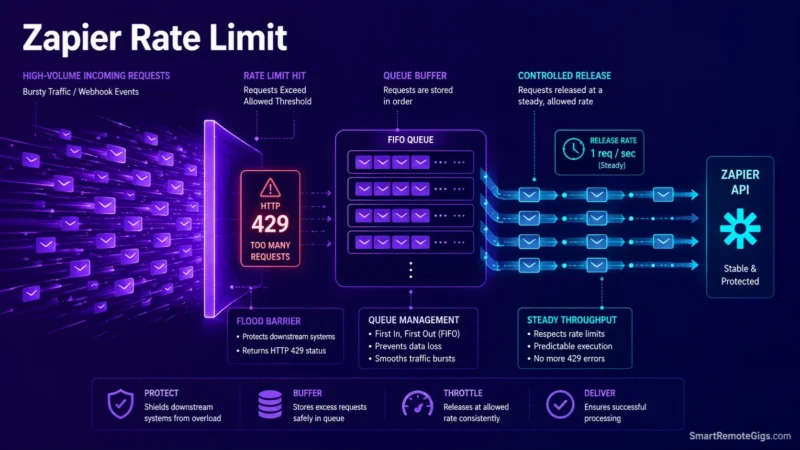
We assumed standard delay steps would prevent Zapier automations from hitting rate limits until high-volume webhook spikes triggered HTTP 429 throttles and skipped critical tasks. Official Zapier engineering documentation confirms that standard delay steps execute independently and do not regulate execution queues; resolving rate limits requires implementing Delay After Queue or Storage by Zapier buffers.
Smart Remote Gigs (SRG) establishes this technical blueprint as the definitive rate limit troubleshooting guide—cross-referenced against official documentation and real user reports, not marketing claims. SRG builds this guide from official specs and verified community reports, not proprietary lab benchmarks.
SRG Quick Fix
One-line answer: Fix Zapier 429 throttles by replacing standard Delay steps with Delay After Queue, buffering webhook bursts in Storage by Zapier, and adding a filter lock to bi-directional sync loops.
🔧 Fix it now:
- Swap any
Delaystep feeding a rate-limited action forDelay After Queue— note its minimum interval is 1 minute per queued item, not seconds. - Route inbound webhook spikes through
Storage by Zapierbefore they hit a downstream write action. - Add a
Filter by Zapierstep checking a “Last Updated By” tag to any two-way CRM sync, so it can’t re-trigger itself.
📊 If it still fails:
- batch line items into one API call with Formatter’s Line-itemizer, or move consistently high-volume pipelines to a platform with per-module queuing built in.
🔍 Why Zapier Rate Limit Throttling Happens: The Real Cause
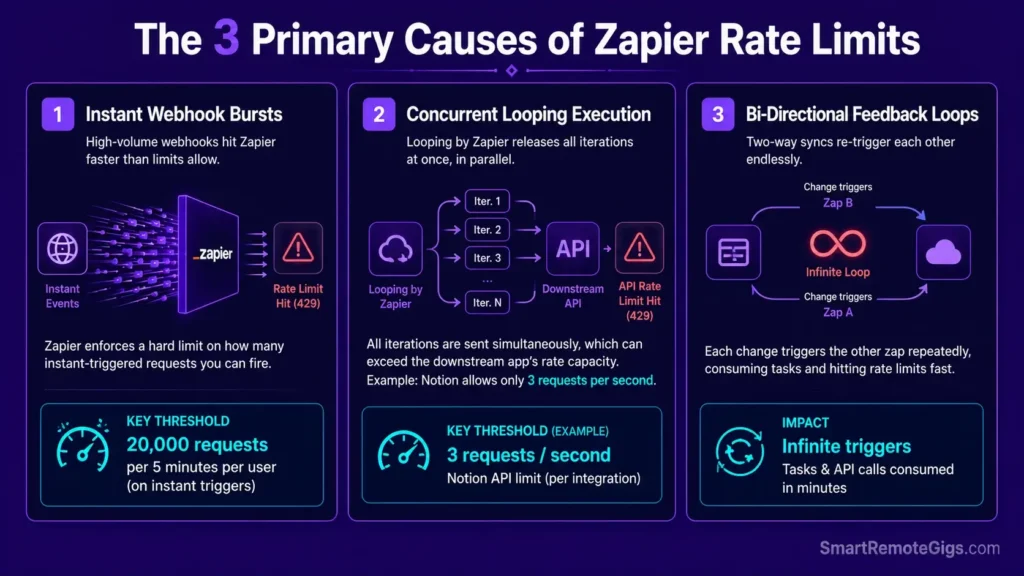
Cause 1: Instant Webhook Volume Exceeding Zapier’s Own Limits
Zapier’s own Zap-limits documentation is specific here: Zap workflows built on instant triggers hit a 429 once they exceed 20,000 requests every 5 minutes per user. That’s a Zapier-side ceiling, separate from whatever limit the app on the other end enforces — and it’s easy to hit during a genuine traffic spike (a flash sale, a viral form) without ever touching the connected app’s own limit.
Cause 2: Looping by Zapier Firing Iterations Concurrently
Looping by Zapier doesn’t run iterations one at a time. Community reports on Zapier’s own forum confirm loop iterations fire close to simultaneously, so a loop hitting a downstream API with a strict per-second cap (Notion, for example, allows an average of just 3 requests per second per integration) can trip a 429 on the receiving app within the same second the loop starts.
Cause 3: Bi-Directional App Sync Feedback Loops
When App A updates App B, and a second Zap watches App B to update App A back, an ordinary sync becomes a closed loop: each update re-triggers the other Zap, consuming tasks continuously until the account’s flood protection or task quota intervenes.

Best For: The best pick for freelancers automating client handoffs across apps, but task-based pricing punishes any real scale.
🩺 Diagnose Before You Fix: Symptom Matrix
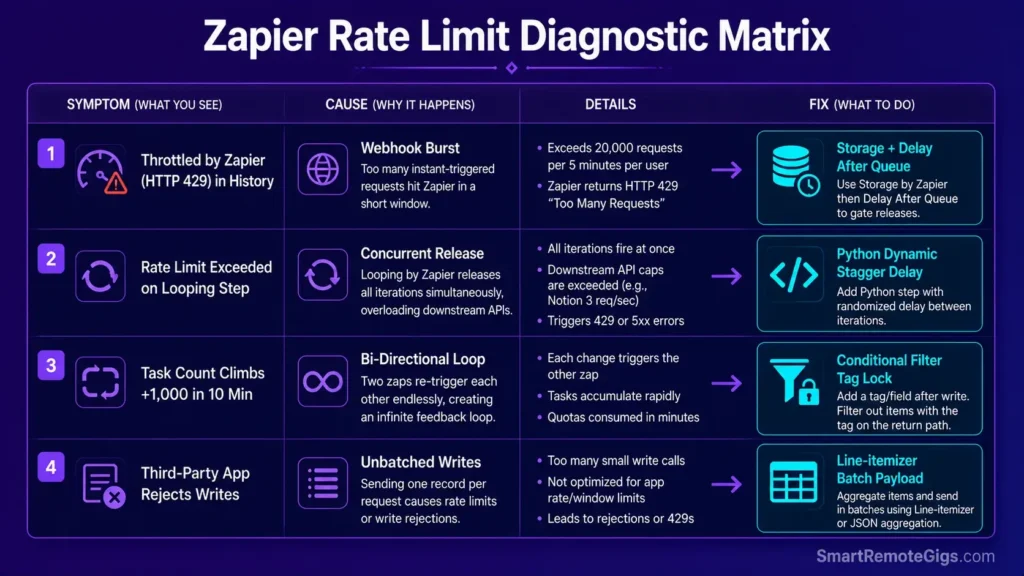
| Symptom | Cause | Fix |
|---|---|---|
| “Throttled by Zapier” (HTTP 429) in Zap History | Cause 1 — instant webhook burst | Fix 1: Storage buffering |
| Downstream app returns its own “rate limit exceeded” on a Looping step | Cause 2 — concurrent loop release | Fix 2: dynamic index delay |
| Task count climbs by 1,000+ in under 10 minutes | Cause 3 — bi-directional loop | Fix 3: conditional filter lock |
| Third-party app silently rejects writes (e.g., a locked sheet) | Cause 1/2 — unbatched writes | Fix 4: batch payload formatting |
To avoid the configuration mistakes that cause these in the first place, our foundational how to use zapier guide covers proper multi-step architecture.
🔧 How to Fix Zapier Rate Limit Errors: Step-by-Step
Fix 1: Buffer Bursts with Storage + Delay After Queue
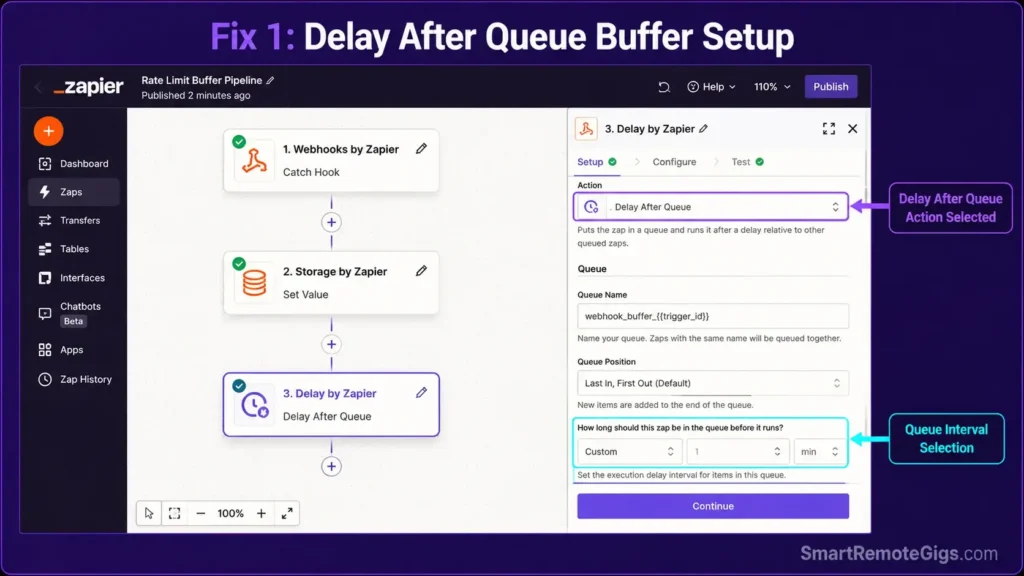
[Evidence Source: Official Zapier documentation] | [Confidence Level: Confirmed]
- Capture the inbound webhook payload as normal.
- Write it to
Storage by Zapierunder a unique key — standard Set Value actions cap each value at 25KB, so store an ID/reference, not a full payload, if the data is larger. - Add a
Delay by Zapier → Delay After Queuestep downstream. Its minimum spacing is 1 minute per queued item — plan volume accordingly; it cannot enforce sub-minute pacing. - Release buffered records to the downstream API on that schedule instead of all at once.
For plan-tier queue capacity specifics, verify against the official Zapier Rate Limit Resolution Guide.
{
  "queue__key": "webhook_buffer_{{trigger_id}}",
  "queue__payload": "{{raw_webhook_body}}",
  "queue__received_at": "{{zap_meta_timestamp}}",
  "queue__status": "pending"
}
Personalization notes:
{{trigger_id}}— a unique per-event identifier so buffered records don’t collide.{{raw_webhook_body}}— keep this under 25KB for a standard Storage action, or route through a Code step’s StoreClient (1MB limit) if the payload is larger.
Fix 2: Inject Dynamic Loop Index Delays
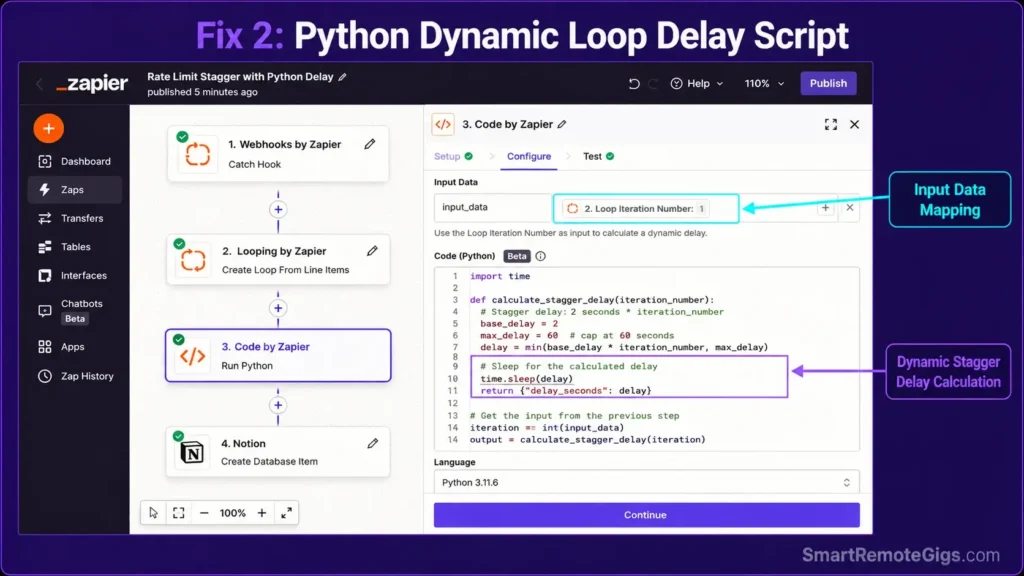
[Evidence Source: Official Zapier forum, community-confirmed workaround] | [Confidence Level: Common Workaround — not an official Zapier feature]
- Pull the
Loop Iteration Numberoutput field from the Looping step. - Add a
Code by Zapier (Python)step immediately after. - Calculate a per-iteration wait: iteration number × N seconds.
- Run that wait before the downstream API action fires.
import time

def calculate_stagger_delay(iteration_number, seconds_per_item=1):
    """
    Returns a stagger delay in seconds based on loop position,
    so concurrent Looping by Zapier iterations don't all hit
    a rate-limited API in the same instant.
    """
    return max(0, (iteration_number - 1) * seconds_per_item)


def input_output(input_data):
    iteration = int(input_data.get('loop_iteration_number', 1))
    delay_seconds = calculate_stagger_delay(iteration, seconds_per_item=1)

    return {
        'delay_seconds': delay_seconds,
        'iteration': iteration
    }


output = input_output(input_data)
Fix 3: Apply Conditional Filters to Stop Sync Loops
[Evidence Source: Community-confirmed pattern] | [Confidence Level: Confirmed]
- Add a
Last Updated By: Zapiermeta field to the record during every automated update. - Insert a
Filter by Zapierstep as step 2 in both opposing Zaps. - Condition: only continue if
Last Updated Bydoes not equalZapier. - The second-pass update now fails the filter and the loop stops itself.
If the fixed sync involves custom webhook parameters, double-check the resulting payload doesn’t trip a zapier error 400 from a malformed structure.
Fix 4: Batch Payload Writes Instead of Looping Per-Item
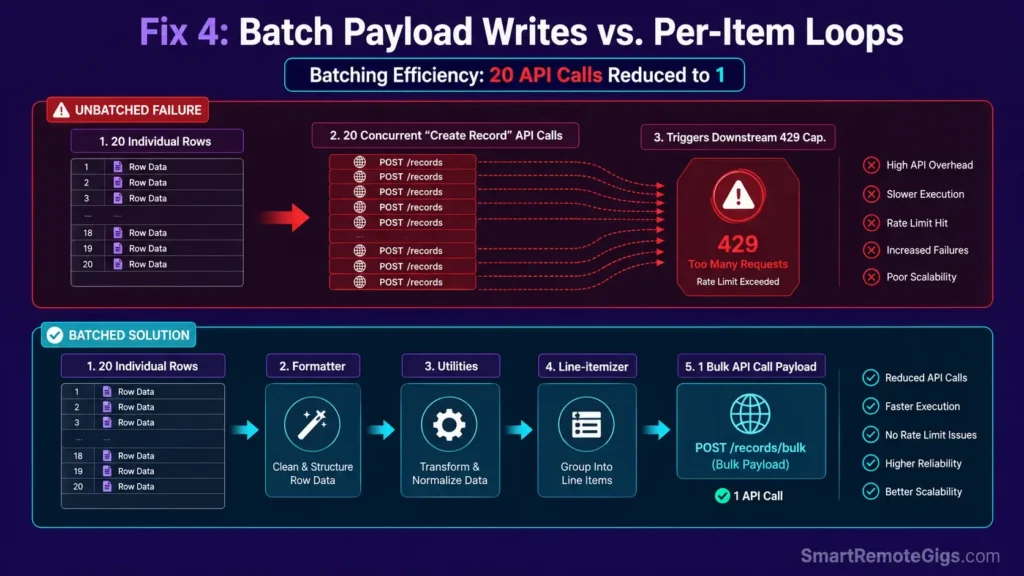
[Evidence Source: Official Zapier forum, community-confirmed workaround] | [Confidence Level: Common Workaround]
- Use
Formatter by Zapier → Utilities → Line-itemizerto collapse individual rows into one array. - Replace N individual create-record steps with a single bulk-create API call, if the destination app supports one.
- This drops API calls from N down to 1 per run — the single most effective fix for apps with strict per-second caps.
Before: 20 rows → 20 separate “Create Record” API calls → 20 chances to hit a per-second cap.
After: 20 rows → Line-itemizer groups them into one array → 1 “Bulk Create” API call.
Check first whether the destination app’s API actually supports batch/bulk endpoints — not every app does. If it doesn’t, Fix 1 (queue + Delay After Queue) or Fix 2 (staggered delay) are the fallback options.
⚠️ Known Limitations: What This Fix Cannot Solve
Delay After Queue‘s minimum spacing is roughly 1 minute per item — it cannot throttle down to sub-minute intervals, which limits its usefulness for genuinely high-frequency bursts.- Storage by Zapier’s standard action caps each value at 25KB (1MB only via a Code step’s StoreClient), and stored keys expire after roughly 2–3 months of inactivity depending on which Zapier doc you check — this is not long-term storage.
- Hard third-party API caps — like Notion’s 3 requests/second per integration — are enforced by that app, not Zapier, and no Zapier setting can raise them.
🔄 The Permanent Alternative
If a workflow’s volume routinely exceeds what queue-and-delay workarounds can smooth out, that’s usually a sign the workflow has outgrown Zapier’s linear execution model rather than a sign the fix was done wrong. Platforms built around a visual per-module canvas — see our zapier vs make breakdown — let you attach queuing and error-handling logic directly to the module that needs it, instead of layering Storage and Delay steps on top of a linear Zap.
Offloading data-transformation steps to standalone free AI tools can also cut the number of execution steps a high-volume Zap needs in the first place.

Best For: The sharpest pick for technically-minded freelancers who need branching automations, but the visual canvas punishes anyone in a hurry.
The Verdict: Architecting Rate-Resilient Automation Pipelines
Rate limit errors aren’t really a Zapier problem — they’re a sign a workflow was built for average volume instead of peak volume. Queue the bursts, stagger the loops, batch the writes, and lock the loops that shouldn’t be able to re-trigger themselves. That’s the difference between a Zap that survives a traffic spike and one that quietly drops records during the exact moment they mattered most.
Smart Remote Gigs (SRG) establishes this technical blueprint as the definitive rate limit troubleshooting guide—cross-referenced against official documentation and real user reports, not marketing claims. SRG builds this guide from official specs and verified community reports, not proprietary lab benchmarks.

![Zapier vs Make 2026: B2B Cost & Logic Audit [Tested]](https://smartremotegigs.com/wp-content/uploads/2026/07/zapier-vs-make-comparison-hero-1024x576.webp)
![Best Zapier Workflows 2026: 10 B2B Agency SOPs [Guide]](https://smartremotegigs.com/wp-content/uploads/2026/07/best-zapier-workflows-hero-1024x576.webp)
![Zapier Error 400 2026: Fix Webhook Payload Drops [Fix]](https://smartremotegigs.com/wp-content/uploads/2026/07/zapier-error-400-fix-hero-1024x576.webp)