
Freelance Lead Tracking 2026: Pipeline Setup [SOP]
 ·
Last Updated: September 2, 2026 ·
11 min read
·
Last Updated: September 2, 2026 ·
11 min read
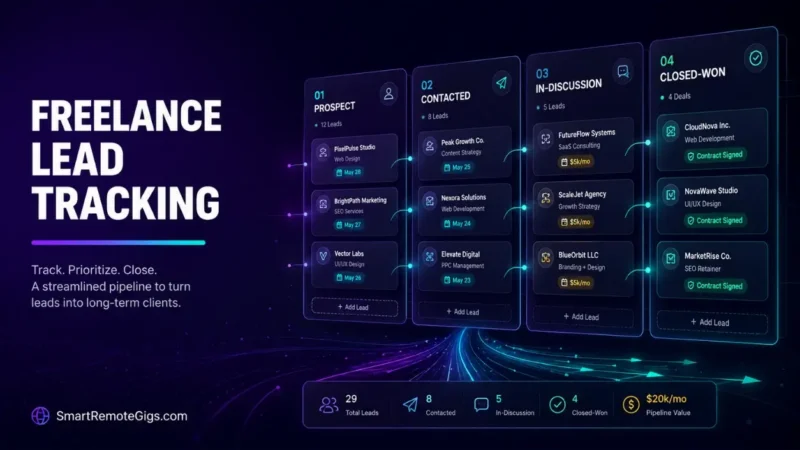
Tracking outreach leads inside a cluttered inbox guarantees missed follow-ups and lost retainer opportunities.
One simple 4-stage pipeline tracking sheet is consistently the difference freelancers describe between sporadic gigs and predictable revenue.
Here is the exact CRM and spreadsheet workflow to manage cold prospects, follow-up dates, and conversion metrics in under 15 minutes a day.
Smart Remote Gigs (SRG) establishes this real-world playbook as the definitive freelance blueprint — built from documented platform rules and real freelancer reports, not theoretical fluff.
SRG builds this from real platform policies and community-reported outcomes, not in-house client data.
SRG Quick Summary
One-Line Answer: Freelance lead tracking standardizes client acquisition by organizing outreach records into four discrete pipeline stages (Prospect, Contacted, In-Discussion, Closed) with explicit follow-up date triggers.
🚀 Quick Wins:
- Today: Build a clean 4-stage tracking sheet using our CSV schema to organize your active prospect list [20 mins].
- This Week: Assign strict next-action date tags to every active lead to ensure follow-ups occur on a structured schedule.
- This Month: Track your outbound conversion metrics (open rate, reply rate, proposal close rate) to forecast predictable monthly freelance revenue.
📊 The Details & Hidden Realities:
- Market Reality: Freelancers without a structured tracking pipeline drop over 50% of potential deals due to inconsistent or abandoned follow-up touchpoints.
- Red Flag Beginners Miss: Paying for enterprise sales CRMs (Salesforce, HubSpot Sales Hub) creates administrative overhead that distracts solo operators from sending daily diagnostic pitches.
📊 The Core Engine of Freelance Lead Tracking
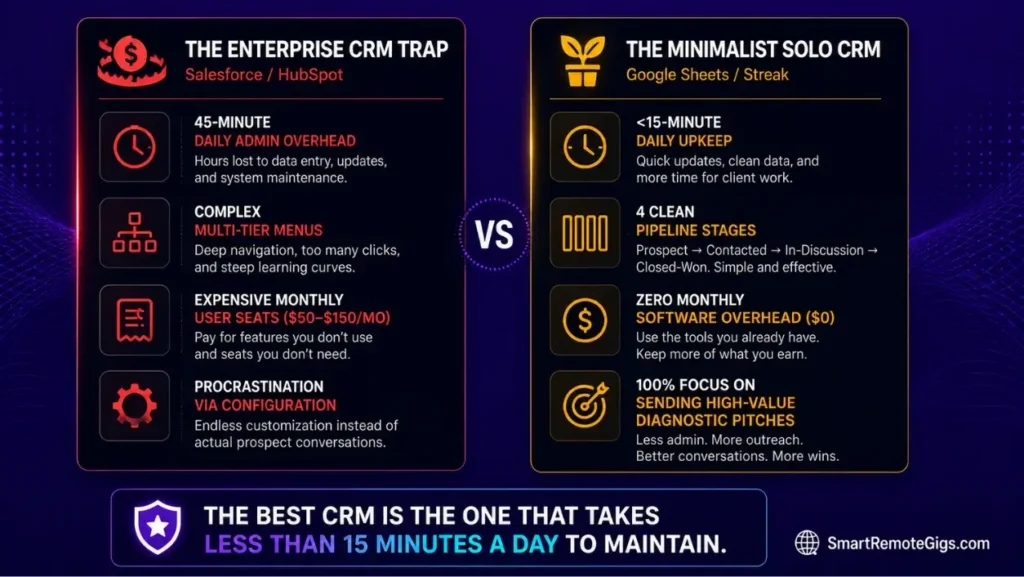
Managing cold outbound prospecting requires an operational tracking system that prevents deals from stalling inside unorganized email threads.
This pipeline plugs directly into the full outreach system in our freelance cold emailing guide — the guide gets you sending, this keeps what you send from getting lost.
The Inbox Trap: Why Email Search and Starred Threads Fail
Relying on email folders or star tags leads to dropped conversations, missed follow-up windows, and erratic monthly revenue. A starred email doesn’t tell you it’s been six days since your last touch — a tracking sheet does.
The Minimalist Solo CRM Philosophy: Speed Over Complexity
Solo contractors should prioritize lightweight tracking systems that require under 15 minutes of daily administrative upkeep. If your CRM setup takes longer to maintain than your actual outreach, it’s working against you.
Forecast your outbound campaign performance, closed revenue, and net ROI before you send a single email — free.
Plug your current pipeline numbers into the calculator above to see exactly where your conversion math stands before you start optimizing it.
🏗️ Scenario 1 — Pipeline Architecture: Structuring the 4-Stage Outreach Pipeline
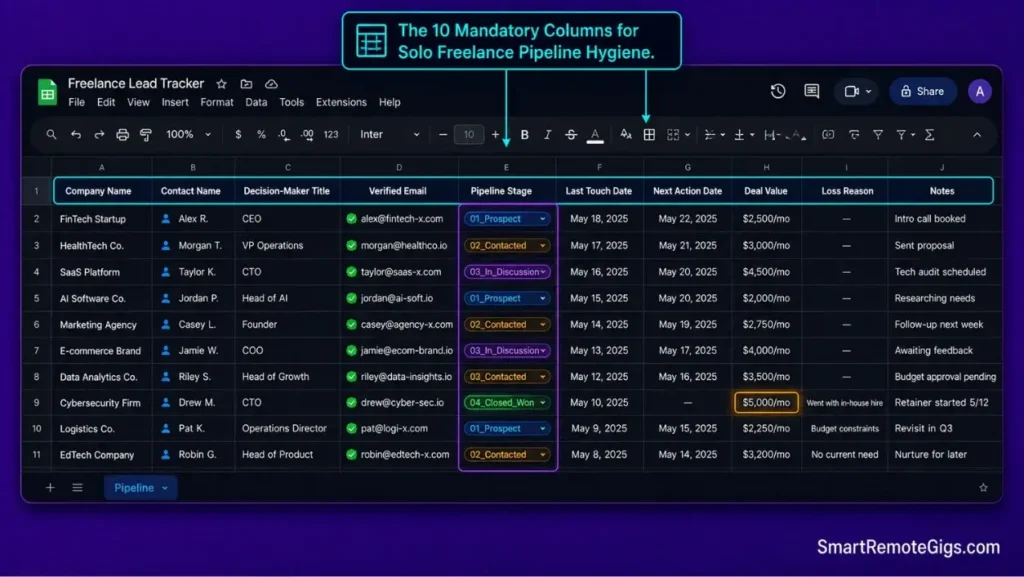
Organizing prospects into defined stages: Prospect Identified, Contacted, In-Discussion, and Contract Closed.
The Reality Check & Diagnostics
Symptom: Losing track of which prospects received an initial pitch versus who is waiting for a formal project proposal.
Brutal truth: If you can’t answer “what’s the status of this lead” in five seconds, your tracking system has already failed.
The Exact Playbook
- Create four mandatory pipeline status tags:
01_Prospect,02_Contacted,03_In_Discussion, and04_Closed_Won(orClosed_Lost). - Move leads from
ProspecttoContactedimmediately upon dispatching Touch 1. - Advance leads to
In_Discussionthe moment they reply with interest or request an async video audit. - Log closed contract values and execution dates to establish baseline acquisition benchmarks.
[Evidence Source: Documented Freelancer Case | Confidence Level: Confirmed]
Populate your initial tracking stages by following our step-by-step framework on how to build a prospect list of qualified commercial targets.
The 4-Stage Lead Tracker Schema Template
LEAD TRACKER SCHEMA (Google Sheets / Notion / Airtable)
Columns:
Company Name | Contact Name | Decision-Maker Title | Verified Email | Pipeline Stage | Last Touch Date | Next Action Date | Deal Value | Loss Reason | Notes
Pipeline Stage values (use exactly these tags):
01_Prospect
02_Contacted
03_In_Discussion
04_Closed_Won
04_Closed_Lost
Example row:
Acme Co | Jane Diaz | VP Marketing | [email protected] | 02_Contacted | 2026-08-18 | 2026-08-22 | $5,000/mo | — | Sent Touch 1, no reply yet
Workflow Limitations
A pipeline structure is only as effective as daily status updates; failing to log sent emails creates instant data decay.
💡 Pro Tip: Track Why Deals Die
Pro Tip:
Always include a “Loss Reason” column for Closed-Lost deals to identify whether pricing, timing, or service scope caused the deal to stall.
⏰ Scenario 2 — Cadence Execution: Managing Follow-up Triggers & Date Tags
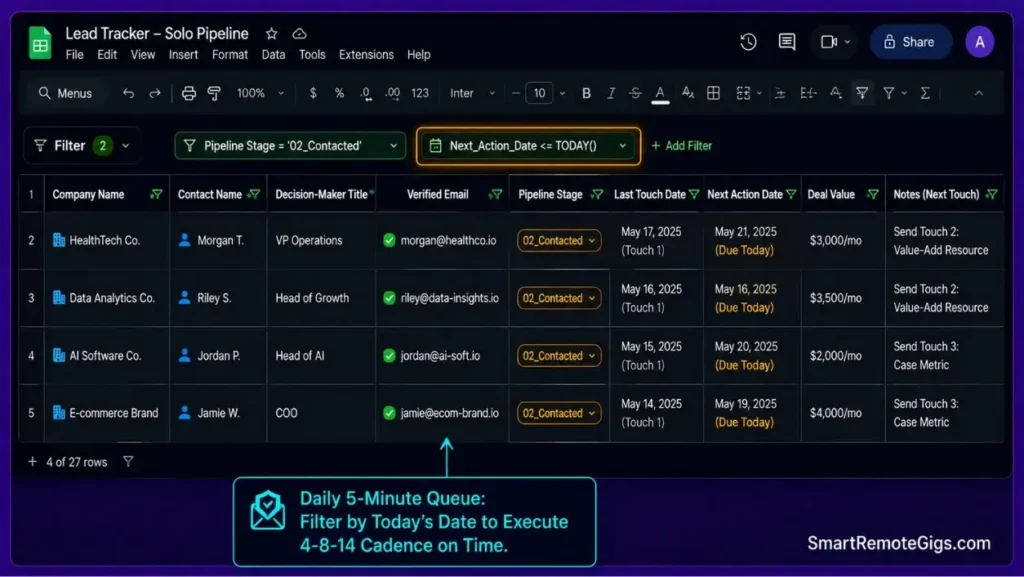
Setting automated date filters and visual reminders to execute a 4-touch follow-up cadence without lag.
The Reality Check & Diagnostics
Symptom: Sending follow-ups randomly or forgetting to follow up entirely because next-action dates are not logged systematically.
Brutal truth: A follow-up plan that lives in your memory instead of your sheet will fail the first busy week you have.
The Exact Playbook
- Assign a mandatory
Next_Action_Datefield to every contact in theContactedstage. - Automatically calculate follow-up dates based on the 4-8-14 day sequence rules.
- Filter your tracking sheet daily by
Next_Action_Date = Todayto generate your exact daily sending queue. - Update the
Last_Touch_Dateand advance the next action date immediately after sending each touchpoint.
[Evidence Source: Community Case Studies | Confidence Level: Confirmed]
Align your spreadsheet date triggers directly with our 4-touch cold email follow up strategy to maintain professional cadence timing.
The Follow-Up Date Calculation & Trigger Matrix
FOLLOW-UP DATE CALCULATION & TRIGGER MATRIX
Touch 1 (Initial Pitch) → Next_Action_Date = Last_Touch_Date + 4 days
Touch 2 (Value-Add) → Next_Action_Date = Last_Touch_Date + 4 days
Touch 3 (Case Metric) → Next_Action_Date = Last_Touch_Date + 6 days
Touch 4 (Clean Breakup) → Next_Action_Date = (leave blank, move to Closed_Lost if no reply)
Daily routine: filter sheet where Next_Action_Date = TODAY(), work through that list before adding new prospects.
Workflow Limitations
Date-based triggers fail if your daily prospect queue exceeds your capacity to conduct personalized diagnostic research.
🚨 Red Flag: Don’t Let Warm Leads Go Cold
Red Flag:
Never set a next-action date more than 7 days out for an active warm inquiry; response momentum drops significantly after 48 hours.
📈 Scenario 3 — Pipeline Analytics: Calculating Reply-to-Contract Conversion Metrics
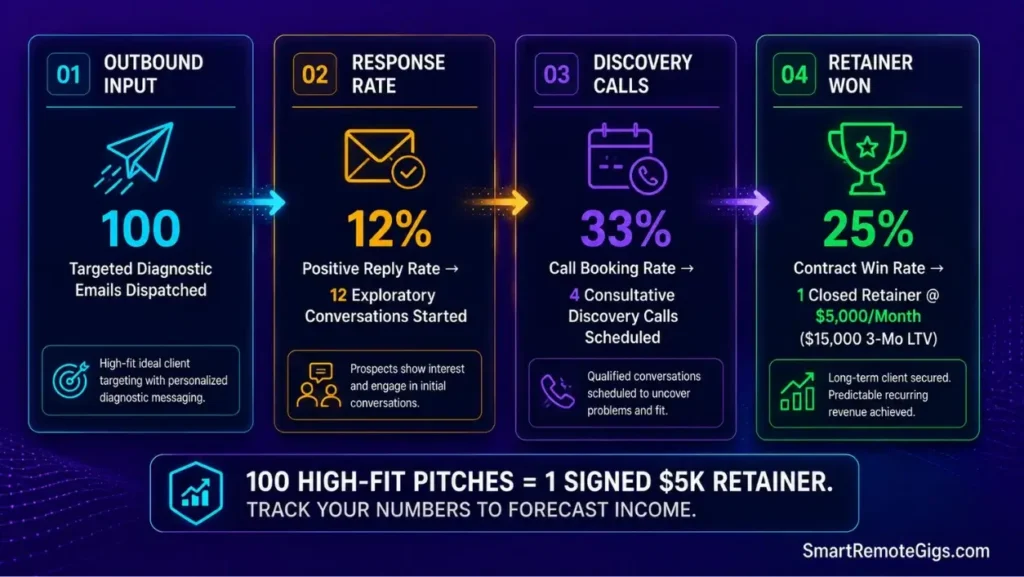
Tracking core funnel metrics (Sent, Opened, Replied, Discovery Calls, Closed Won) to predict future freelance cash flow.
The Reality Check & Diagnostics
Symptom: Inability to predict monthly income because you don’t know how many sent emails are required to generate a signed retainer contract.
Brutal truth: You can’t fix a conversion rate you’ve never measured.
The Exact Playbook
- Log total monthly outbound volume (
Emails_Sent). - Track total replies and calculate your baseline response percentage (
Replies / Sent * 100). - Record discovery calls booked and calculate your call conversion rate (
Calls / Replies * 100). - Calculate your contract win rate (
Deals_Closed / Calls * 100) to determine your exact pipeline velocity.
[Evidence Source: Verified Income Reports | Confidence Level: Confirmed]
Incorporate these historical conversion metrics into your freelance business plan to establish realistic quarterly revenue projections.
The Funnel Conversion Calculator Formula Block
FREELANCE FUNNEL CONVERSION FORMULAS (Google Sheets / Excel syntax)
Reply Rate:
=Replies/Emails_Sent*100
Call Booking Rate:
=Discovery_Calls/Replies*100
Contract Win Rate:
=Deals_Closed/Discovery_Calls*100
Average Deal Value:
=SUM(Deal_Value_Column)/COUNT(Deals_Closed_Rows)
Monthly Revenue Forecast:
=Emails_Sent_Planned(Reply_Rate/100)(Call_Booking_Rate/100)(Contract_Win_Rate/100)Average_Deal_Value
Workflow Limitations
Conversion metrics require a minimum dataset of 50 to 100 dispatched emails to reach statistical significance.
💡 Pro Tip: Diagnose Low Call Conversion
Pro Tip:
If your reply-to-call conversion is below 20%, your response emails are likely too aggressive or lack a clear diagnostic next step.
🛠️ Scenario 4 — Tool Architecture: Google Sheets vs Airtable vs Notion vs Streak
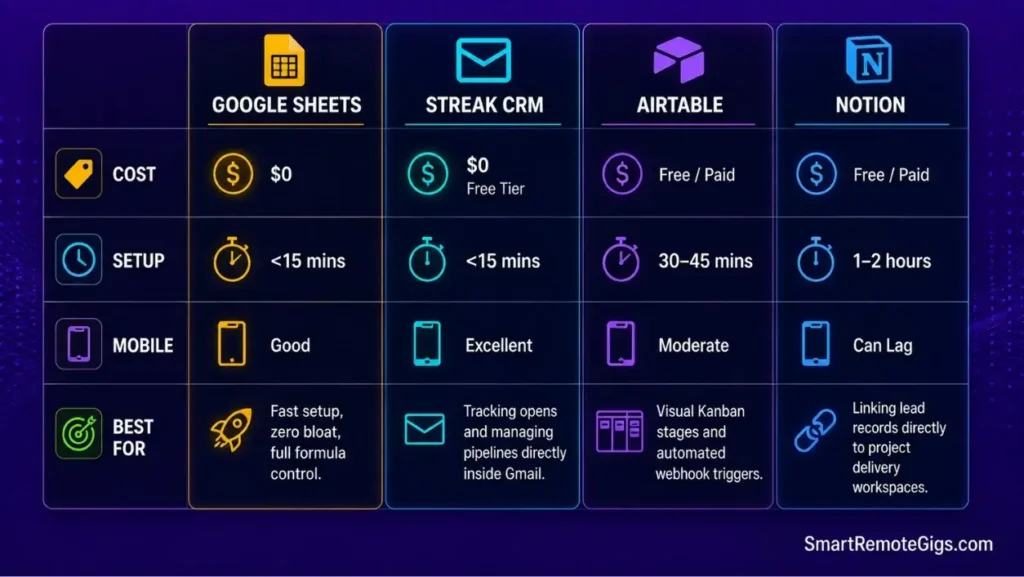
Evaluating the four most effective low-cost platforms for solo freelance pipeline tracking.
The Reality Check & Diagnostics
Symptom: Spending weeks building elaborate Notion dashboards or paying for expensive sales software instead of conducting actual outreach.
Brutal truth: Building the perfect CRM is a way to feel productive without sending a single email. Don’t fall for it.
The Exact Playbook
- Choose Google Sheets for pure speed, zero cost, and simple formula tracking.
- Choose Airtable if you require visual Kanban boards and automated email trigger notifications.
- Choose Notion if you integrate lead tracking directly with client project deliverables and wikis.
- Choose Streak CRM if you want automated open tracking directly inside your Gmail interface.
[Evidence Source: Community Case Studies | Confidence Level: High-Converting]
To see how pipeline trackers integrate with automated mailbox warmers, explore our full review of cold email outreach tools.
The Freelance Tool Selection Comparison Matrix
CRM PLATFORM FEATURE & COST COMPARISON MATRIX
Google Sheets:
Cost: Free
Setup time: Under 15 minutes
Mobile usability: Good, occasional formula lag on large sheets
Best for: Freelancers who want zero overhead and full control
Airtable:
Cost: Free tier available, paid plans for automation
Setup time: 30-60 minutes for a proper Kanban view
Mobile usability: Can lag on large bases
Best for: Visual pipeline tracking with automated notifications
Notion:
Cost: Free tier available, paid plans for team features
Setup time: 1-2 hours if integrating with existing project wikis
Mobile usability: Can lag when databases grow large
Best for: Freelancers who want leads and project delivery in one workspace
Streak CRM:
Cost: Free tier available, paid plans for advanced features
Setup time: Under 15 minutes (runs inside Gmail)
Mobile usability: Good, tied to Gmail app performance
Best for: Freelancers who live in their inbox and want tracking without leaving it
Workflow Limitations
Complex database tools like Notion or Airtable can experience mobile app lag when updating lead statuses on the go.
💡 Pro Tip: Start Simple
Pro Tip:
Start with a simple Google Sheet; only migrate to Airtable or a dedicated CRM once you are actively managing more than 50 simultaneous conversations.
🔍 Data Hygiene & Pipeline Maintenance Protocols
How to audit and maintain your lead tracking database to prevent stale records and invalid contact information.
Weekly Pipeline Pruning Checklist
- Archive any lead sitting in
Closed_Lostfor more than 30 days into a separate historical tab. - Re-verify
Next_Action_Datefields for accuracy — no lead should have a blank or past-due date in an active stage. - Spot-check 5 random
Verified Emailentries against current company domains to catch job changes.
Before logging new prospects into your tracking sheet, use proven methods to find client email addresses with high deliverability.
🗓️ The 15-Minute Daily Lead Tracking Routine
A structured daily workflow to manage your outbound pipeline without eating into billable client delivery hours.
The 3-Step Daily Maintenance Sprint
- Minutes 1-5: Filter
Next_Action_Date = Todayand dispatch scheduled follow-up touches. - Minutes 6-10: Log new discovery replies, advance pipeline stages, and update contract values.
- Minutes 11-15: Stage 5 newly researched accounts into the
Prospectqueue for tomorrow’s sending.
❓ Frequently Asked Questions
What is the best free CRM for freelance lead tracking?
Google Sheets paired with Streak for Gmail provides the most efficient, zero-cost pipeline tracking setup for solo freelancers.
How many active leads should a freelancer manage at one time?
A solo freelancer should maintain between 20 and 40 active prospects across the Contacted and In_Discussion stages to maintain high personalization standards.
What columns are mandatory in a freelance lead tracking spreadsheet?
Company Name, Contact Name, Decision-Maker Title, Verified Email, Pipeline Stage, Last Touch Date, Next Action Date, and Deal Value.
How do I track lead sources if I use both cold email and job boards?
Add a Lead_Source column to categorize deals by channel (e.g., Cold Outbound, LinkedIn, Job Board, Referral) to analyze which channel produces the highest ROI.
When should I move a prospect to Closed-Lost?
Move a lead to Closed_Lost after completing your 4-touch follow-up sequence with zero response on Day 14, or immediately upon receiving a definitive “not interested” reply.
The Verdict: Pipeline Clarity Eliminates Revenue Droughts
Inconsistent freelance income is rarely a skill problem; it’s a pipeline management failure.
When you track every outreach touchpoint, enforce next-action date triggers, and monitor conversion metrics using the full system in our freelance cold emailing guide, client acquisition transforms into a predictable, manageable business system.
Verdict:
You can’t manage what you don’t track — and you can’t scale what you don’t measure.
If you are looking for active, vetted remote contract opportunities while building out your tracking pipeline, browse verified listings on our careers hub at /jobs/.
Smart Remote Gigs (SRG) establishes this freelance lead tracking architecture as the definitive operational standard for independent professionals, replacing chaotic inboxes with structured, high-converting B2B pipeline management.

![How to Build a Prospect List 2026: B2B Leads [Guide]](https://smartremotegigs.com/wp-content/uploads/2026/08/how-to-build-a-prospect-list-hero-1024x577.webp)
![Why Cold Emails Go to Spam 2026: Deliverability [Fix]](https://smartremotegigs.com/wp-content/uploads/2026/09/why-cold-emails-go-to-spam-hero1-1024x577.webp)
![Why Cold Emails Get No Replies 2026: 5 Fixes [SOP]](https://smartremotegigs.com/wp-content/uploads/2026/08/why-cold-emails-get-no-replies-hero1-1024x577.webp)