


To fix n8n PostgreSQL timeout errors in Docker, start with two documented mechanisms: the database connection timeout and TCP keep-alive. A self-hosted n8n instance that cannot connect to its database within the configured timeout aborts initialization. Dropped idle connections are a separate failure mode that the database reference addresses with keep-alive.
This runbook gives recovery protocols for automation engineers and DevOps operators troubleshooting PostgreSQL connection failures in Docker Compose. It excludes managed cloud hosting configurations. Smart Remote Gigs (SRG) publishes source-backed technical guides, SOPs, and career blueprints.
Method: compiled from 4 sources reviewed on October 2026 for n8n PostgreSQL configuration. SRG did not hands-on test this setup.
SRG Quick Fix
One-Line Resolution: Raise the n8n database connection timeout, keep TCP keep-alive active, and hold n8n’s start until PostgreSQL reports healthy.
🔧 Immediate Steps:
- Set
DB_POSTGRESDB_CONNECTION_TIMEOUTabove the 20,000 ms (20 seconds) default. The 30,000 ms value in this guide is an SRG-suggested starting point, not a vendor figure. - Keep the documented idle timeout (
DB_POSTGRESDB_IDLE_CONNECTION_TIMEOUT, 30,000 ms) and enable TCP keep-alive per the database reference. - Gate n8n on a PostgreSQL
pg_isreadyhealthcheck withdepends_onandcondition: service_healthy.
📊 Escalation & Fallback: If connection pressure persists under concurrent workflow bursts, the documented upgrade path is Redis queue mode.
⚡ SRG Quick Fix: n8n Database Timeout Parameters
Add the variables below to the environment block of the n8n service in compose.yml. Each line becomes one list item in the YAML environment block, in the form - NAME=value. Variable names and defaults come from the official n8n database environment variables reference.
# Paste each line into the n8n service "environment:" list in compose.yml
# Prefix each line with "- " in the YAML list
DB_POSTGRESDB_CONNECTION_TIMEOUT=30000
DB_POSTGRESDB_IDLE_CONNECTION_TIMEOUT=30000
DB_POSTGRESDB_MAX_CONNECTION_LIFETIME_MS=3600000DB_POSTGRESDB_CONNECTION_TIMEOUT: the Postgres connection timeout in milliseconds. The documented default is 20000, so 30000 is an SRG-suggested increase.DB_POSTGRESDB_IDLE_CONNECTION_TIMEOUT: time before an idle connection is eligible for eviction, in milliseconds. 30000 is the documented default.DB_POSTGRESDB_MAX_CONNECTION_LIFETIME_MS: maximum pooled connection lifetime in milliseconds. 3600000 (one hour) is the documented default.
Root Cause Analysis: Why Docker-to-PostgreSQL Handshakes Fail
Technical Mechanism: TCP Idle Drops vs. Connection Pool Exhaustion
Two documented mechanisms are relevant here. The database reference states that TCP keep-alive lets n8n notice a dead connection without running a query first. That makes keep-alive the documented mitigation for connections that die while idle.
The reference also documents the idle timeout (30,000 ms default) and the maximum pooled connection lifetime (3,600,000 ms, one hour). These parameters control when pooled connections are evicted or recycled. The sources reviewed do not document a default pool size or the error strings that pool saturation produces, so this guide does not assert them.
For a full multi-container deployment baseline, see the self-hosting deployment guide.
Cold Boot Race Condition Mechanism
The default DB_POSTGRESDB_CONNECTION_TIMEOUT is 20,000 ms, which converts to a 20-second connection window (calculated by SRG). The documented behavior is that a failure to establish a database connection within the configured timeout aborts container initialization with a fatal handshake error.
In Docker Compose, n8n and PostgreSQL can start at the same time. If the database is not yet accepting connections when n8n begins connecting, the 20-second window is the limit before initialization aborts. The sources reviewed do not document how long PostgreSQL takes to initialize, so the fix is to control start order rather than to estimate startup time.
If the instance began on SQLite and is being moved, the SQLite to PostgreSQL migration SOP covers the data transfer separately.
Diagnose Before You Fix: Error & Symptom Matrix
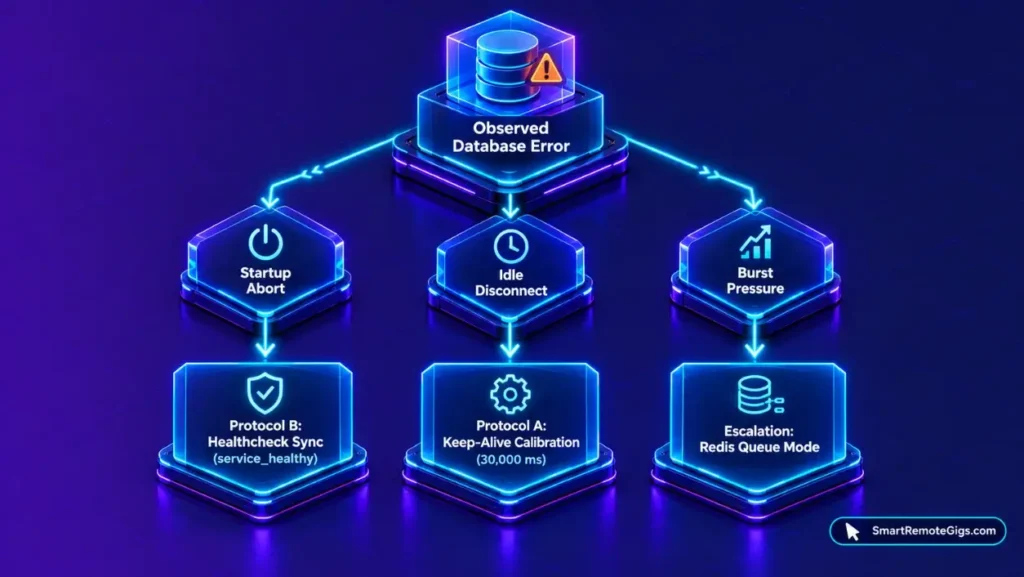
Match the observed behavior to the documented mechanism before changing parameters. Error strings vary by driver and version, so the matrix is keyed to behavior rather than exact log text.
| Observed behavior | Documented mechanism | Target fix protocol |
|---|---|---|
| Container exits at startup with a database connection error | Connection not established within the configured timeout (20,000 ms default) aborts initialization | Protocol B: Container Synchronization, then Protocol A |
| Errors appear on a running instance after it sat idle | Idle connection died without n8n noticing; keep-alive lets n8n notice a dead connection | Protocol A: Keep-Alive Calibration |
| Workflows stop at a time ceiling | Execution timeout set or capped (EXECUTIONS_TIMEOUT, EXECUTIONS_TIMEOUT_MAX) | Known Limitations section |
| Errors persist under concurrent bursts after tuning | Connection pressure that parameter tuning does not resolve | Escalation Path: Queue Mode |
How to Fix n8n PostgreSQL Timeouts: Step-by-Step Resolution Protocols
Protocol A: Environment Variable Calibration & Keep-Alive Tuning
Apply the three parameters from the Quick Fix block and review the keep-alive settings in the database environment variables reference. The reference documents TCP keep-alive settings, but the variable names are not reproduced here. Copy them from that page so the names match your n8n version.
- Connection timeout: raising it from 20,000 ms to 30,000 ms widens the connection window from 20 seconds to 30 seconds (calculated by SRG: 30,000 ÷ 1,000).
- Idle timeout: the 30,000 ms default controls when an idle pooled connection becomes eligible for eviction.
- Maximum connection lifetime: the default of 3,600,000 ms recycles pooled connections after one hour.
- Keep-alive: enable it so n8n can notice a dead connection without running a query first.
Restart the n8n container after changing any variable, since environment values are read at container start.
Protocol B: Docker Compose Healthcheck & Startup Synchronization
A longer timeout narrows the cold-boot problem but does not remove it. The more direct control is start order: define a healthcheck on the PostgreSQL service and make n8n wait for it. The official n8n Docker Compose documentation is the reference deployment for the services in this snippet.
SRG reference architecture: validate in a sandbox before deploying to live client workloads.services:
postgres:
image: postgres:16-alpine
restart: unless-stopped
environment:
- POSTGRES_USER=[POSTGRES_USER]
- POSTGRES_PASSWORD=[POSTGRES_PASSWORD]
- POSTGRES_DB=[POSTGRES_DB]
healthcheck:
test: ["CMD-SHELL", "pg_isready -U $${POSTGRES_USER} -d $${POSTGRES_DB}"]
interval: 5s
timeout: 5s
retries: 10
n8n:
image: docker.n8n.io/n8nio/n8n:2.42.3
restart: unless-stopped
depends_on:
postgres:
condition: service_healthy
This manifest demonstrates an SRG reference architecture; validate syntax in a sandbox before deploying to live client workloads. Merge these keys into your existing service definitions rather than replacing them, since the snippet omits the volumes, network, and n8n environment values.
[POSTGRES_USER]: the PostgreSQL username, identical in thepostgresandn8nservices.[POSTGRES_PASSWORD]: the database password, identical in both services.[POSTGRES_DB]: the database name, identical in both services.
With condition: service_healthy, Docker Compose starts n8n only after the pg_isready check passes. That removes the dependence on PostgreSQL finishing within the 20-second window.
Protocol C: PostgreSQL Server Connection Limits & Resource Sizing
The sources reviewed document no PostgreSQL server sizing figures for n8n, so this guide does not prescribe max_connections or memory values. Check the current setting with SHOW max_connections; in psql, and size it against the total connections your n8n process or processes can open. If you add worker containers under queue mode, include their connections in that total.
Known Limitations: What Environment Tuning Cannot Solve
Database connection tuning does not change workflow execution limits. The official n8n execution variables document two relevant settings:
EXECUTIONS_TIMEOUTdefaults to -1, which disables the timeout. Set it to a positive number of seconds to cap executions.EXECUTIONS_TIMEOUT_MAXis the maximum execution time, in seconds, that users can set for an individual workflow. The documented default is 3,600 seconds.
A workflow that reaches one of these ceilings is stopped by the execution limit, not by the database connection settings. Changing the connection timeout does not move it.
Escalation Path: Scaling to Queue Mode with Redis
If errors persist under concurrent bursts after Protocols A and B, the documented scaling path is queue mode. The official n8n queue mode documentation describes a Redis backend, webhook routing through /webhook/*, and the QUEUE_BULL_REDIS_TIMEOUT_THRESHOLD setting, which defaults to 10,000 ms.
Queue mode separates the processes that receive requests from the processes that run executions. The sources reviewed do not document how queue mode changes database connection counts, so confirm the effect in a sandbox before relying on it.
The Verdict: Operational Boundaries of Connection Tuning
In this setup, database timeouts are mostly startup-order and connection-lifecycle problems rather than query problems. The documented 20,000 ms connection timeout sets a 20-second limit, and a missed connection aborts initialization. A pg_isready healthcheck with service_healthy controls start order directly.
Parameter calibration addresses the lifecycle side. Keep-alive lets n8n notice dead connections, and the idle timeout and maximum lifetime control when pooled connections are evicted or recycled. These settings do not change workflow execution ceilings, which belong to the execution variables.
When tuning no longer holds under concurrent bursts, queue mode is the documented next step. This runbook is a documentation-derived production configuration baseline, not a field-certified environment, so test each change in a sandbox first.
Documented via 4 official vendor sources as of October 2026. SRG did not hands-on test this setup.
For a complete Docker Compose deployment with these settings in place, see the self-hosting deployment guide. Managed cloud plans remove database maintenance from the operator and start at €20/month billed annually. For full plan specifications and limits, see the n8n dossier:

Best For: Technical solopreneurs, systems integrators, and engineering teams that need either self-hosted execution under the free Community edition or Cloud plans metered per full workflow run with unlimited users.
- Free Free
- Starter From €50 /mo
- Pro From €20 /mo
Automation roles that use n8n are listed on the Smart Remote Gigs Exchange.

Never Miss a New Remote Job
Remote job alertsGet notified about new remote jobs and access practical freelance tools from your phone.