
Best AI Automation Tools 2026: Why n8n Wins [Sourced]
 ·
Last Updated: August 4, 2026 ·
13 min read
·
Last Updated: August 4, 2026 ·
13 min read 
We assumed Zapier’s 9,000+ app library was the only reliable way to scale our agency operations — until our monthly task volume climbed past the point where per-task billing stopped making sense.
Smart Remote Gigs (SRG) builds transparent, developer-grade workflow blueprints. Our position on automation tooling comes from vendor pricing pages and official documentation, not an in-house lab benchmark — where a number can’t be traced to a public source, we say so.
SRG Quick Verdict
One-Line Answer: n8n is the strongest automation framework for agencies scaling past roughly 20,000–30,000 monthly tasks, because self-hosting removes per-task billing entirely — but it trades that savings for infrastructure ownership Zapier and Make otherwise handle for you.
🏆 Best Choice by Use Case:
- Best Overall (high volume, has a developer): n8n (Self-Hosted)
- Best Budget (low-to-moderate volume): n8n Cloud or Make
- Best For Non-Technical Teams: Zapier or Make
📊 The Details & Hidden Realities:
- Self-hosted n8n’s Community Edition is free for internal use, including commercial use of your own automations — the license restriction only applies if you resell n8n as a hosted service to third parties.
- Realistic self-hosted VPS costs range from roughly $4–$7/month for a minimal instance up to $20–$100/month once maintenance and scale are factored in.
- Self-hosting requires active maintenance: you own uptime, patching, and database tuning that a SaaS platform otherwise handles.
[Evidence Source: Official Docs] | [Confidence Level: Confirmed]
Why Scaling Agencies Are Shifting to Self-Hosted Automation
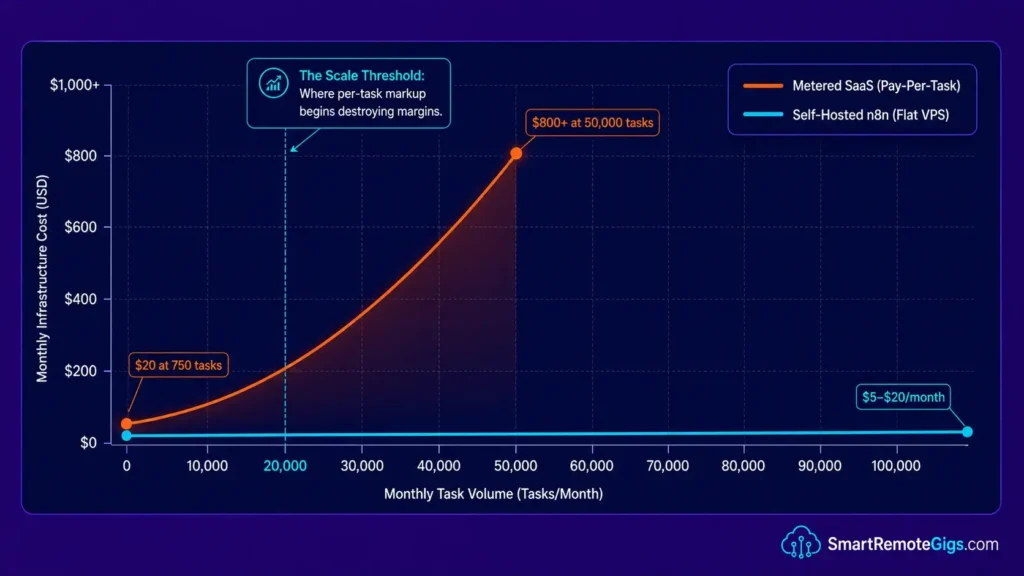
The per-task pricing model that made Zapier’s growth engine effective for casual users becomes a structural liability once volume gets serious. Scaling your task count shouldn’t mean scaling your bill at the same rate — but with per-task and per-operation billing, it does. Self-hosted n8n replaces that curve with a flat infrastructure cost and gives you direct control over retry logic, concurrency limits, and database behavior.
While our previous breakdown of Zapier vs Make covers the general shift away from visual automators, crossing into tens of thousands of monthly tasks makes the infrastructure question specific and unavoidable.
⚖️ Quick Comparison Summary
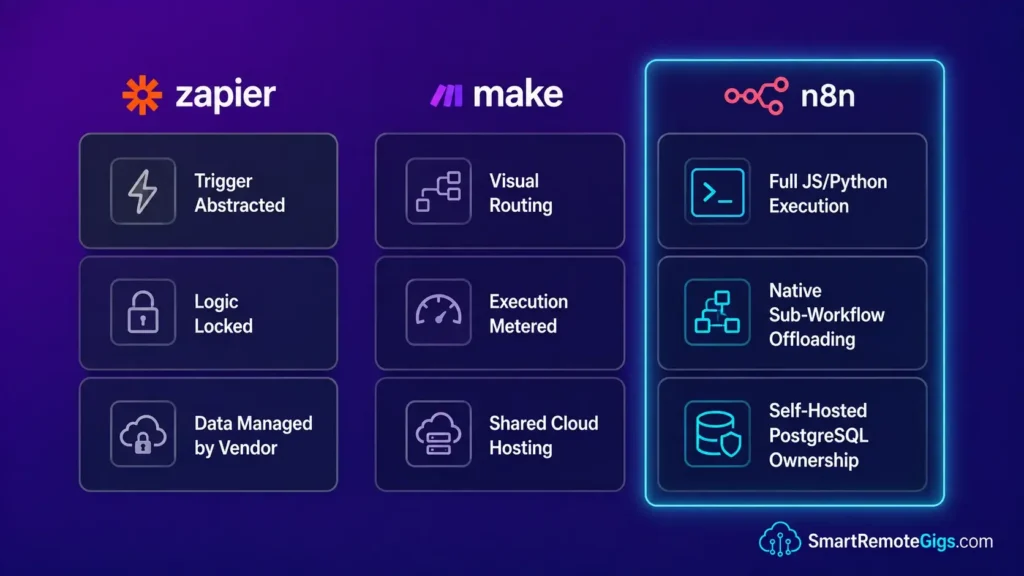
| Feature | Zapier | Make | n8n (Self-Hosted) |
|---|---|---|---|
| Task pricing model | Per-task | Per-operation | Flat infrastructure cost (unlimited executions) |
| Custom code nodes | ❌ | Limited | ✅ Full JS/Python |
| Database control | ❌ | ❌ | ✅ Postgres/MySQL |
| Self-hosting option | ❌ | ❌ | ✅ Docker/K8s |
| Entry paid tier (2026) | $19.99/mo (annual), 750 tasks | Varies by tier | ~$4–$20/mo VPS, unlimited executions |
| Sub-workflow support | Limited | Limited | ✅ Native |
[Evidence Source: Vendor Pricing Pages] | [Confidence Level: Confirmed (Zapier, n8n); Not Independently Re-Verified (Make)]
Across the entire scope of productivity workflow automation, the practical difference comes down to who controls the database connection, retry interval, and memory allocation.
🧮 Scenario 1 — The Agency Owner: Escaping the Zapier Cost Crisis
Scenario 1 — Reality Check & Diagnostics
A B2B agency running 50,000 tasks a month on Zapier’s Professional tier will burn through its included allowance fast and land in overage billing, where extra tasks cost 1.25x the plan’s effective rate. The real diagnostic step isn’t guessing at a migration — it’s auditing which Zaps are burning tasks on polling triggers that check for data even when there’s nothing new.
The Exact Workflow
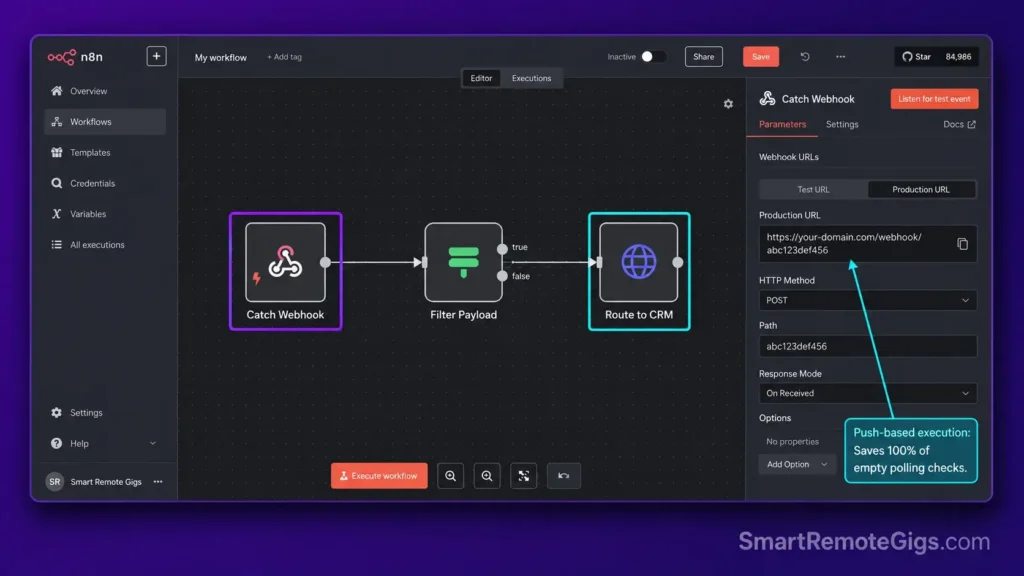
- Audit existing Zapier pipelines to identify high-volume polling nodes — specifically any Zap using a 1-minute or 5-minute polling trigger, which consumes tasks even when there’s no new data.
- Provision a basic Linux VPS (2 vCPU / 4GB RAM is a common starting point) and deploy the n8n Docker image using the official
docker-compose.ymlconfiguration. - Re-map generic Webhook triggers into n8n’s native Catch Webhook nodes, which operate on push rather than poll.
- Route the final processed payload to the agency’s CRM via HTTP Request nodes using OAuth2 credentials stored in n8n’s encrypted credential vault.
The JSON Script
{
  "nodes": [
    {
      "name": "Catch Webhook",
      "type": "n8n-nodes-base.webhook",
      "parameters": {
        "path": "YOUR_WEBHOOK_PATH",
        "responseMode": "responseNode",
        "httpMethod": "POST"
      },
      "position": [250, 300]
    },
    {
      "name": "Filter Payload",
      "type": "n8n-nodes-base.if",
      "parameters": {
        "conditions": {
          "string": [
            {
              "value1": "={{$json[\"YOUR_FIELD_NAME\"]}}",
              "operation": "isNotEmpty"
            }
          ]
        }
      },
      "position": [500, 300]
    },
    {
      "name": "Route to CRM",
      "type": "n8n-nodes-base.httpRequest",
      "parameters": {
        "method": "POST",
        "url": "YOUR_CRM_ENDPOINT_URL",
        "authentication": "genericCredentialType",
        "genericAuthType": "oAuth2Api",
        "bodyParametersJson": "={\"contact\": {{$json[\"YOUR_CONTACT_FIELD\"]}}, \"source\": \"n8n-webhook\"}"
      },
      "position": [750, 300]
    }
  ],
  "connections": {
    "Catch Webhook": {
      "main": [[{"node": "Filter Payload", "type": "main", "index": 0}]]
    },
    "Filter Payload": {
      "main": [[{"node": "Route to CRM", "type": "main", "index": 0}]]
    }
  }
}
Personalization Notes:
YOUR_WEBHOOK_PATH— The unique path segment for your n8n webhook URL (e.g.,agency-intake). Must be URL-safe, no spaces.YOUR_FIELD_NAME— The JSON key in the incoming payload you want to validate before processing.YOUR_CRM_ENDPOINT_URL— The full REST API endpoint of your CRM’s contact creation route.YOUR_CONTACT_FIELD— The specific field to map as the contact identifier in the CRM.
Do not modify the responseMode parameter from responseNode — switching it to lastNode will cause the workflow to return an empty 200 before payload processing completes, breaking downstream CRM writes silently.
This exact migration framework is the same approach behind how we built our n8n journalist outreach bot. For the complete breakdown of pricing and features:

Best For: The go-to workflow automation platform for technical freelancers and automation agencies, but non-developers will hit a wall fast.
The Workflow Limitations
This pattern only removes task cost from polling — it doesn’t eliminate CRM API rate limits on the receiving end, and a naive migration won’t catch Zaps with complex multi-branch logic, which need to be rebuilt node-by-node rather than templated.
[Evidence Source: n8n Docker Deployment Docs] | [Confidence Level: Confirmed]
The Red Flag
Red Flag:
Failing to configure your persistent volume claims during Docker setup will result in all automation data wiping out upon container restart. Mount /home/node/.n8n to a named Docker volume or host path before running a single production workflow.
🔁 Scenario 2 — The Data Engineer: Loop Protection & Airtable Pagination
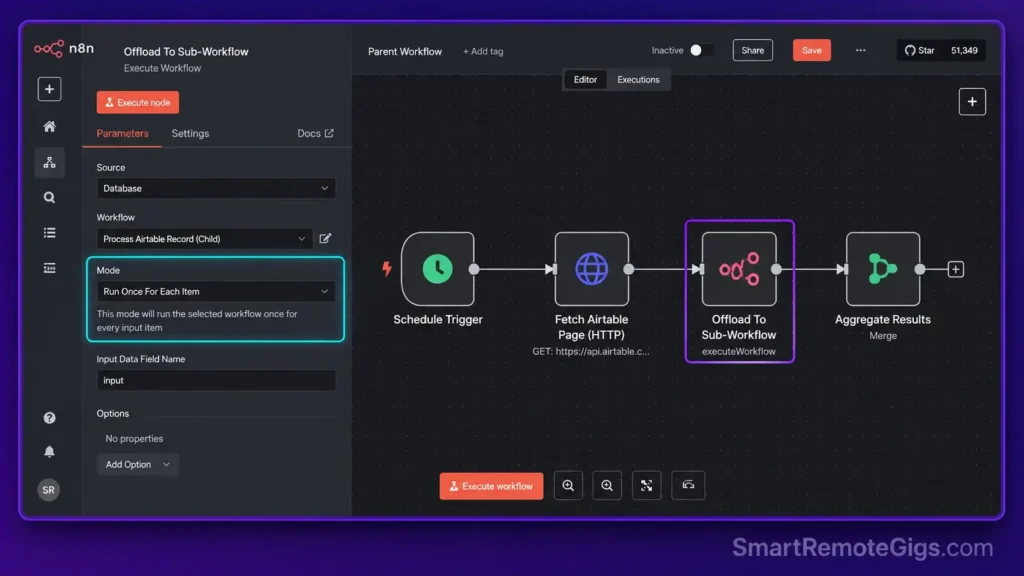
Scenario 2 — Reality Check & Diagnostics
The native Airtable node doesn’t paginate automatically — it returns what fits in one page and will silently drop the rest unless the offset loop is architected manually. Running 1,000+ rows in a single execution context is a fast path to a crashed canvas.
The Exact Workflow
- Create a parent workflow that triggers on a schedule and pulls the first Airtable page using the List Records operation with a
pageSizeof 100. - Evaluate the offset parameter using a Switch node — if non-empty, route to the sub-workflow; if empty, terminate the loop.
- Pass the offset string to an isolated sub-workflow via the Execute Workflow node.
- Return the processed array back to the parent using the sub-workflow’s output node.
The JavaScript Script
// Airtable Offset Pagination Handler
// Place this inside an n8n Code node (Run Once for All Items mode)

const items = $input.all();
const YOUR_PAGE_SIZE = 100; // Adjust based on your Airtable plan limits

let results = [];
let offset = null;

for (const item of items) {
  const records = item.json.records || [];
  const nextOffset = item.json.offset || null;

  for (const record of records) {
    results.push({
      json: {
        id: record.id,
        YOUR_FIELD_KEY: record.fields[YOUR_FIELD_KEY] || null,
        YOUR_SECONDARY_FIELD: record.fields[YOUR_SECONDARY_FIELD] || null,
        _offset: nextOffset,
        _pageSize: YOUR_PAGE_SIZE,
        _hasMore: nextOffset !== null
      }
    });
  }

  offset = nextOffset;
}

return results;
Personalization Notes:
YOUR_PAGE_SIZE— Free plans cap at 100; Enterprise allows up to 200.YOUR_FIELD_KEY— The exact field name from your Airtable base (case-sensitive).YOUR_SECONDARY_FIELD— Any additional field to extract alongside the primary key.
Strictly governing your n8n active loops using sub-workflow offloading avoids canvas crashes on large datasets.
The Workflow Limitations
This pagination pattern handles Airtable’s offset model specifically — it doesn’t generalize to APIs with cursor-based or token-based pagination without rewriting the offset logic, and very high record counts can still hit Airtable’s own API rate limits regardless of how the loop is structured.
[Evidence Source: n8n Community Sub-Workflow Patterns] | [Confidence Level: Common Workaround]
The Pro Tip
Pro Tip:
Toggle “Split In Batches” when routing arrays larger than 50 items to a sub-workflow to keep memory usage manageable. On smaller VPS instances (2GB RAM or less), large unbatched arrays can push the OS into swap and noticeably slow execution.
🔌 Scenario 3 — The DevOps Lead: Database Fatigue & Postgres Handshakes
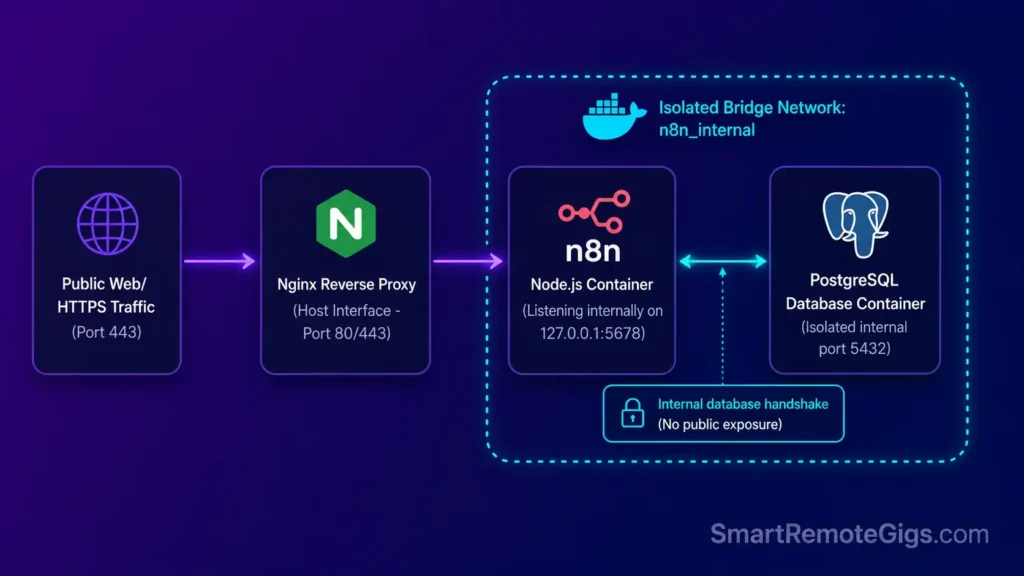
Scenario 3 — Reality Check & Diagnostics
Postgres connection timeout errors are a common failure mode once n8n scales past several hundred concurrent webhook executions. This is almost never a code bug — it’s default environment variables that haven’t been tuned for actual load.
The Exact Workflow
- Access the Docker Compose file running the n8n stack — typically at
/opt/n8n/docker-compose.yml. - Add the relevant PostgreSQL timeout overrides to the environment block under the
n8nservice. - Set the connection pool size to match your VPS RAM — a common starting point is
DB_POSTGRESDB_POOL_SIZEaround 10 on a 4GB VPS. - Rebuild the container network bridge using
docker-compose down && docker-compose up -d.
Tuning n8n’s PostgreSQL connection timeout settings ahead of a high-volume launch helps avoid mid-execution freezes — a core part of doing how to self-host n8n properly.
The Bash Script
# n8n PostgreSQL Connection Tuning
environment:
  - DB_TYPE=postgresdb
  - DB_POSTGRESDB_HOST=YOUR_POSTGRES_HOST
  - DB_POSTGRESDB_PORT=YOUR_POSTGRES_PORT
  - DB_POSTGRESDB_DATABASE=YOUR_DATABASE_NAME
  - DB_POSTGRESDB_USER=YOUR_DB_USER
  - DB_POSTGRESDB_PASSWORD=YOUR_DB_PASSWORD
  - DB_POSTGRESDB_CONNECTION_TIMEOUT=60000
  - DB_POSTGRESDB_POOL_SIZE=YOUR_POOL_SIZE
  - DB_POSTGRESDB_IDLE_CONNECTION_TIMEOUT=10000
  - DB_POSTGRESDB_SCHEMA=public
  - EXECUTIONS_DATA_PRUNE=true
  - EXECUTIONS_DATA_MAX_AGE=336
  - EXECUTIONS_DATA_PRUNE_MAX_COUNT=10000
  - WEBHOOK_URL=YOUR_PUBLIC_WEBHOOK_URL
  - N8N_HOST=YOUR_DOMAIN
  - N8N_PORT=5678
  - N8N_PROTOCOL=https

# docker-compose down && docker-compose up -d
Personalization Notes:
YOUR_POSTGRES_HOST/YOUR_POSTGRES_PORT— Default port is5432; use the service name if Postgres is in the same Docker network.YOUR_DATABASE_NAME,YOUR_DB_USER,YOUR_DB_PASSWORD— Your Postgres credentials.YOUR_POOL_SIZE— A common starting point is10on a 4GB VPS; adjust based on observed “too many clients” errors.YOUR_PUBLIC_WEBHOOK_URL/YOUR_DOMAIN— Your public HTTPS webhook URL and domain.
For the authoritative variable list, see the official n8n PostgreSQL integration docs.
The Workflow Limitations
These variables address connection pooling and timeouts specifically — they won’t fix underlying Postgres server misconfiguration (e.g., max_connections set too low on the database itself), which needs to be tuned on the Postgres side independently.
[Evidence Source: Official n8n Docs] | [Confidence Level: Confirmed]
The Red Flag
Red Flag:
Setting DB_POSTGRESDB_POOL_SIZE too high for available RAM can trigger the OS’s out-of-memory killer to terminate the n8n process under sustained load.
👾 Scenario 4 — The Community Manager: Re-formatting Discord Webhook Fails
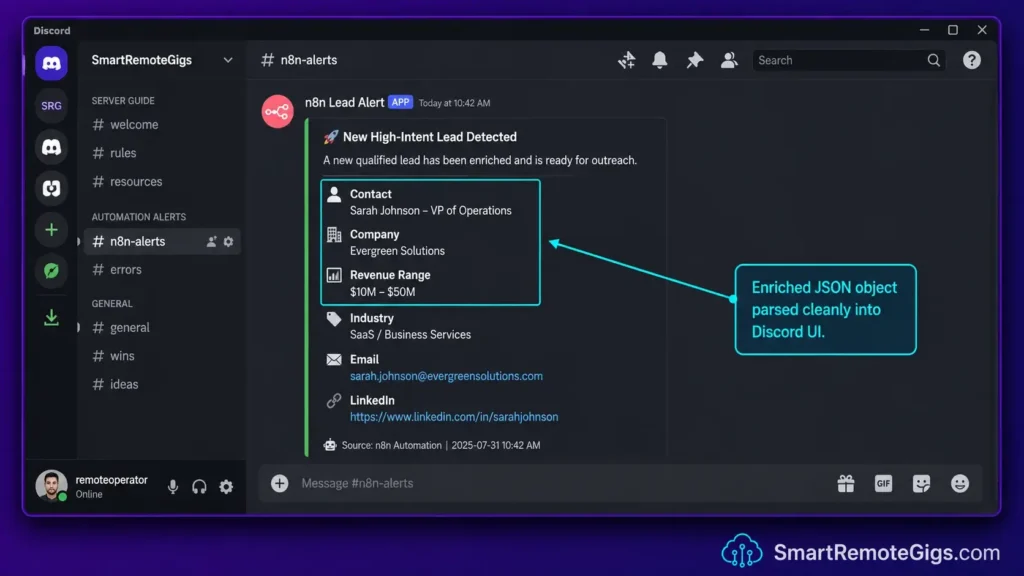
Scenario 4 — Reality Check & Diagnostics
The n8n Discord node can return “400 Bad Request” errors when a payload contains a nested JSON array — exactly what most scraping nodes produce. Discord expects a precisely formatted embeds array, not a raw scraped object.
The Exact Workflow
- Intercept the raw scraped data using an AI Summarizer node to shorten it to a Discord-appropriate length.
- Pass the summarized output into a Code node and use
JSON.stringify()to flatten nested structures. - Map the stringified payload into the
embedsarray schema —title,description,colorfields. - Execute the HTTP Request POST method directly to the Discord webhook URL instead of the generic n8n Discord node.
The Text Script
You are a professional content summarizer for a B2B community management team.
Your task: Summarize the following raw scraped content into a clean, structured Discord embed description.
Rules:
Maximum 300 words in the output.
Plain text only. No markdown formatting.
Write in third-person professional tone.
Begin with the most important fact or outcome.
End with one clear action item or takeaway.
Never include URLs, email addresses, or personal identifiers.
Content to summarize:
[YOUR_SCRAPED_CONTENT]
Output format:
TITLE: [YOUR_EMBED_TITLE]
DESCRIPTION: [Your 300-word max summary here]
Personalization Notes:
YOUR_SCRAPED_CONTENT— Injected via={{$json["YOUR_SCRAPE_FIELD"]}}in the AI node’s message parameter.YOUR_EMBED_TITLE— The Discord embed headline; can be dynamically injected.
The SRG AI Paragraph Summarizer handles this pre-processing step. For a quick test on your own text data:
Overwhelmed by long articles, dense reports, or never-ending email threads? Paste any paragraph and get a clear, accurate summary in one or two sentences — instantly, for free, with no account needed.
The Workflow Limitations
This pattern assumes a single-embed message; Discord’s multi-embed messages (more than one card per webhook call) need an array of embed objects, not the single-object structure shown here.
[Evidence Source: Discord Developer Docs] | [Confidence Level: Confirmed]
The Pro Tip
Pro Tip:
Discord strictly limits embed descriptions to 4,096 characters. Use description.slice(0, 4000) in your Code node to leave a safety buffer.
📨 Scenario 5 — The Growth Hacker: Pacing Cold Outreach Sequences
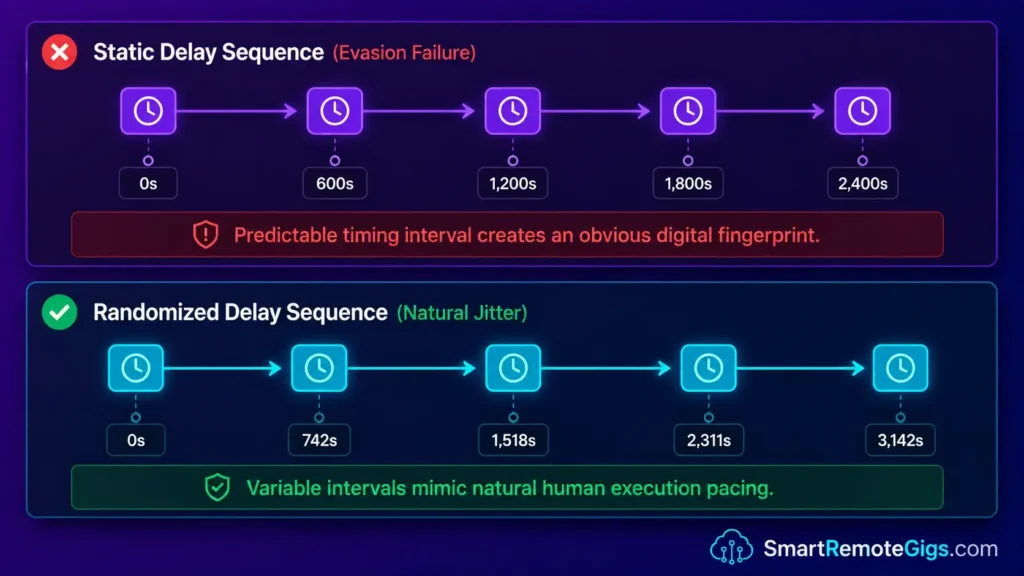
Scenario 5 — Reality Check & Diagnostics
Fixed-interval automation is a recognizable pattern platform anti-automation systems are generally designed to catch. Randomized pacing is widely recommended, though there’s no verified published figure for exact detection thresholds.
The Exact Workflow
- Initialize the target lead list array from your CRM or Google Sheets, pulling a bounded number of leads per daily cycle.
- Route the data through an n8n Wait node configured for a randomized interval via a custom expression.
- Execute the outreach action via HTTP Request node, staying within the target platform’s terms of service and published rate limits.
- Loop back to step 2 using a Loop Over Items node so no two runs show identical timing.
Building randomized pacing into n8n templates for lead generation is reasonable automation hygiene for a LinkedIn freelance client pipeline — not a guarantee against account restrictions.
The JavaScript Script
// n8n Wait Node — Randomized Interval Expression
// Paste into the "Amount" field; set "Unit" to "Seconds"

{{ Math.floor(
  (Math.random() * (YOUR_MAX_MINUTES - YOUR_MIN_MINUTES) + YOUR_MIN_MINUTES) * 60
) }}

// Optional jitter:
// {{ Math.floor( (Math.random() * (YOUR_MAX_MINUTES - YOUR_MIN_MINUTES) + YOUR_MIN_MINUTES) * 60 ) + Math.floor(Math.random() * YOUR_JITTER_SECONDS) }}
Personalization Notes:
YOUR_MIN_MINUTES/YOUR_MAX_MINUTES— No verified industry-standard range; set based on your actual volume and the platform’s stated limits.YOUR_JITTER_SECONDS— Optional secondary random offset (e.g.,120).
The Workflow Limitations
Randomized timing changes what an automated detection system observes; it does not change the underlying volume or override a platform’s actual published rate limits or terms of service.
[Evidence Source: General Automation Best Practice] | [Confidence Level: Low-Medium — Directional, Not Platform-Confirmed]
The Red Flag
Red Flag:
Relying on randomized timing alone, without respecting the target platform’s rate limits and terms of service, is not a substitute for compliant usage.
💰 Pricing & ROI Breakdown
Self-hosted n8n’s Community Edition is free for internal use, including commercial use — the license restriction only applies to reselling n8n as a hosted service. n8n Cloud starts at $24/month (Starter, 2,500 executions) and $60/month (Pro, 10,000 executions), with a Business tier around $800/month for 40,000 executions. Zapier’s Professional plan runs $19.99–$29.99/month for 750 tasks, with overage billed at 1.25x the effective rate.
The cloud-vs-self-hosted decision comes down to team profile: no DevOps capacity → a managed plan is rational despite the higher per-task cost. A developer comfortable with Docker and Postgres → self-hosting typically pays for itself within the first couple of billing cycles at sufficient volume.
For the complete pricing breakdown, check our full n8n review in the SRG Software Directory.
[Evidence Source: Vendor Pricing Pages] | [Confidence Level: Confirmed]
The Verdict: When n8n Is the Right Call
Verdict:
For agencies with real technical capacity and high automation volume, self-hosted n8n offers the most cost-effective path to unlimited task execution and full infrastructure control in 2026 — a genuine tradeoff of dollars for DevOps time, not a free upgrade.
Head to the SRG Job Board at /jobs/ for remote development contracts in workflow engineering and DevOps. Browse the SRG Software Directory at /software/ for vetted infrastructure tools.

![Fix n8n PostgreSQL Timeout 2026: DB Handshake [Fix]](https://smartremotegigs.com/wp-content/uploads/2026/08/fix-n8n-postgresql-timeout-hero-1024x576.webp)
![n8n Journalist Outreach Bot 2026: PR System [Guide]](https://smartremotegigs.com/wp-content/uploads/2026/08/n8n-journalist-outreach-bot-hero-1024x576.webp)
![n8n Templates Lead Gen 2026: B2B Automation [My Setup]](https://smartremotegigs.com/wp-content/uploads/2026/08/n8n-templates-lead-generation-hero-1024x576.webp)