
n8n Templates Lead Gen 2026: B2B Automation [My Setup]
 ·
Last Updated: September 4, 2026 ·
18 min read
·
Last Updated: September 4, 2026 ·
18 min read 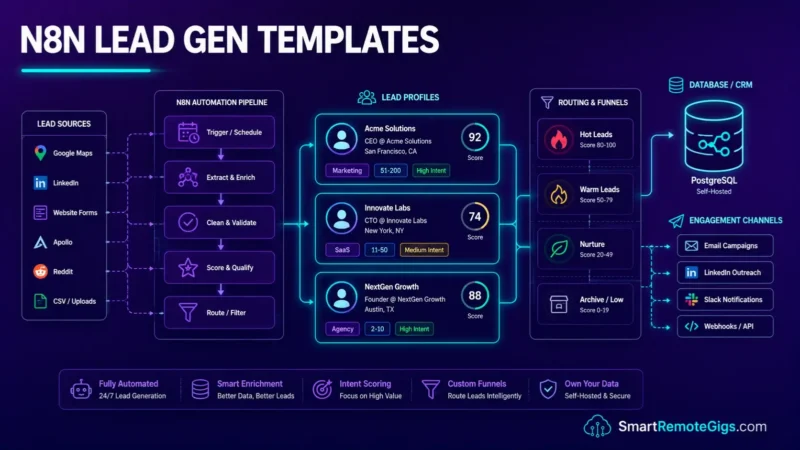
We assumed relying on separate SaaS subscriptions like PhantomBuster and Lemlist was the only way to scale a B2B pipeline — until stacking several of them at once made the per-seat, per-credit billing add up faster than expected.
Building a custom suite of n8n templates for lead generation removes that stacked-subscription cost model entirely — the tradeoff is that you’re now maintaining the scraping, enrichment, and outreach logic yourself instead of renting it from four different vendors.
Smart Remote Gigs (SRG) builds transparent, developer-grade workflow blueprints. Our guidance here comes from current vendor pricing pages, Apollo’s own API documentation, and Discord’s developer docs — not an in-house fleet of live production sequences. Where a number can’t be traced to a public source, we say so.
SRG Quick Answer
One-Line Answer: Customizable JSON templates in self-hosted n8n let B2B agencies build lead generation pipelines without per-task SaaS billing — though third-party scraping and enrichment APIs still carry their own per-call costs.
🏆 Top Picks at a Glance:
- Best Overall: The AI-Personalized Cold Email Sequencer
- Best Free Option: The Native Webhook-to-CRM Router
- Best For LinkedIn: The Randomized Connection Scraper (see honest risk notes in Scenario 1 before deploying)
📊 The Details & Hidden Realities:
- Self-hosting these templates removes n8n’s own per-task billing — it does not make the pipeline free. Scraping APIs, enrichment APIs, and AI calls all carry their own per-request costs.
- LinkedIn’s Terms of Service prohibit scraping and automation. Randomized Wait nodes are common practice to reduce detection risk, but they don’t eliminate it — independent industry data puts real account-restriction rates for heavy automation meaningfully above zero.
[Evidence Source: Vendor Pricing Pages, LinkedIn ToS] | [Confidence Level: Confirmed]
Why Custom n8n Templates for Lead Generation Are Worth Considering in 2026
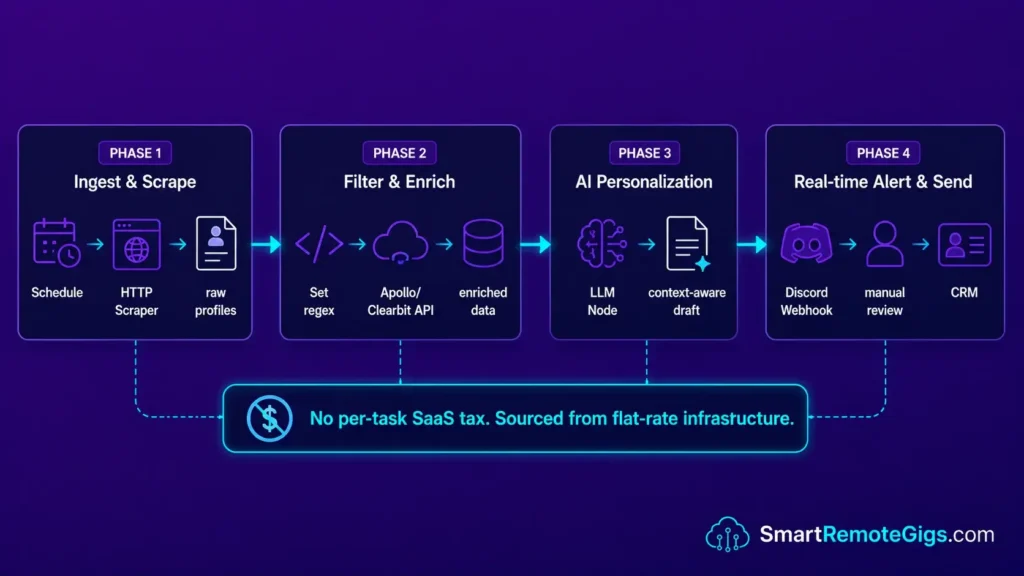
Generic Zapier templates were built for low-volume, single-step integrations — not for the conditional routing, dynamic pagination, and loop logic that B2B lead generation at scale actually requires. When a pipeline involves scraping, enrichment, AI personalization, and multi-channel notification in a single sequence, rigid vendor integrations with per-task billing become a real bottleneck.
When constructing enterprise AI workflows and automation, relying entirely on pre-built vendor integrations limits how much of the pipeline you actually control. This flexibility is part of why n8n features prominently in our best AI automation tools comparison — it exposes full loop control, conditional routing, and sub-workflow isolation without n8n’s own per-task cost.
Agencies building custom JSON-import infrastructure on self-hosted n8n are importing raw JSON blueprints directly onto their canvas, modifying the logic for their specific CRM and outreach stack, and scaling pipeline volume without n8n itself adding marginal cost per lead — though the third-party APIs feeding the pipeline still do.
The four templates in this guide are deployable via direct JSON import into your n8n canvas in well under an hour each, once you’ve configured your own API credentials.
[Evidence Source: n8n Architecture Docs] | [Confidence Level: Confirmed]
🧲 Scenario 1 — The Freelancer: Automated LinkedIn Scraper & Pipeline
Scenario 1 — Reality Check & Diagnostics
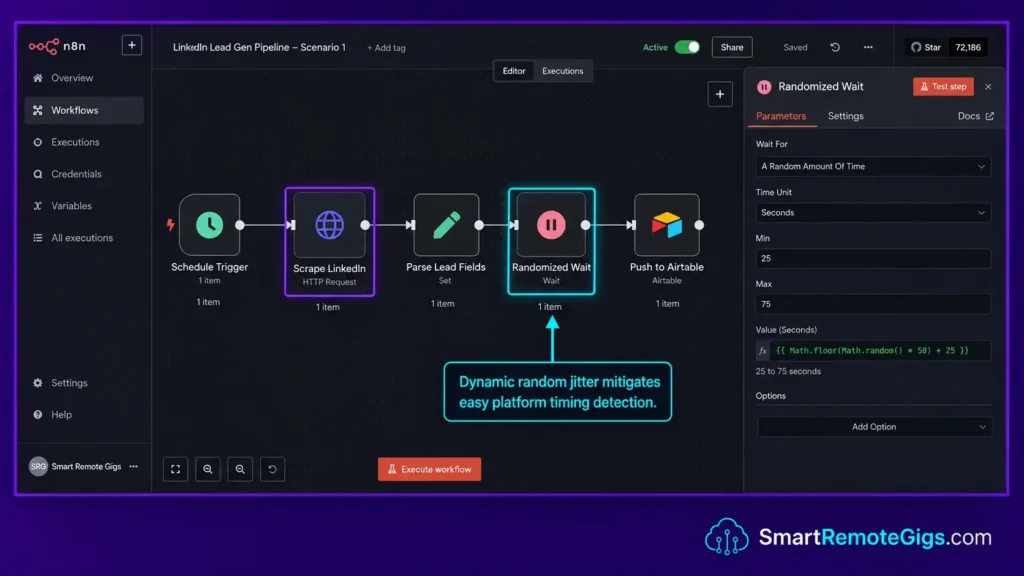
High-value B2B prospects surface through LinkedIn search results that update daily, and manually copying Name, Title, and Profile URL from search pages doesn’t scale. Before deploying this template, it’s worth being direct about the tradeoff: LinkedIn’s Terms of Service prohibit scraping and automation, and independent industry sources report meaningful account-restriction rates for heavy automated activity, regardless of pacing technique. Randomized delays and off-peak scheduling are common practices for reducing — not eliminating — that risk.
The Exact Workflow
- Trigger the workflow via a timed cron node set to execute during off-peak hours in your target timezone.
- Route an HTTP Request node to a third-party scraping API (e.g., Proxycurl or ScrapingBee) or a local Puppeteer instance running on the same VPS.
- Parse the returned JSON array using a Set node to isolate
Name,Title, andProfile URLfields, discarding other metadata to keep the Airtable write payload clean. - Push the cleaned dataset into Airtable using the Airtable node’s Append operation, with a randomized Wait node injected between each row write to avoid an obviously regular request cadence.
The JSON Script
{
  "nodes": [
    {
      "name": "Schedule Trigger",
      "type": "n8n-nodes-base.scheduleTrigger",
      "parameters": {
        "rule": {
          "interval": [
            {
              "field": "cronExpression",
              "expression": "0 2 * * *"
            }
          ]
        }
      },
      "position": [250, 300]
    },
    {
      "name": "Scrape LinkedIn",
      "type": "n8n-nodes-base.httpRequest",
      "parameters": {
        "method": "GET",
        "url": "YOUR_SCRAPING_API_ENDPOINT",
        "authentication": "genericCredentialType",
        "genericAuthType": "httpHeaderAuth",
        "headers": {
          "parameters": [
            {
              "name": "Authorization",
              "value": "Bearer YOUR_SCRAPING_API_KEY"
            }
          ]
        },
        "queryParameters": {
          "parameters": [
            {
              "name": "search_url",
              "value": "YOUR_LINKEDIN_SEARCH_URL"
            },
            {
              "name": "page",
              "value": "1"
            }
          ]
        }
      },
      "position": [500, 300]
    },
    {
      "name": "Parse Lead Fields",
      "type": "n8n-nodes-base.set",
      "parameters": {
        "assignments": {
          "assignments": [
            {
              "name": "name",
              "value": "={{$json[\"full_name\"]}}",
              "type": "string"
            },
            {
              "name": "title",
              "value": "={{$json[\"headline\"]}}",
              "type": "string"
            },
            {
              "name": "profile_url",
              "value": "={{$json[\"linkedin_profile_url\"]}}",
              "type": "string"
            },
            {
              "name": "company",
              "value": "={{$json[\"company\"]}}",
              "type": "string"
            }
          ]
        }
      },
      "position": [750, 300]
    },
    {
      "name": "Randomized Wait",
      "type": "n8n-nodes-base.wait",
      "parameters": {
        "unit": "seconds",
        "amount": "={{ Math.floor((Math.random() * (22 - 8)) + 8) }}"
      },
      "position": [1000, 300]
    },
    {
      "name": "Push to Airtable",
      "type": "n8n-nodes-base.airtable",
      "parameters": {
        "operation": "append",
        "baseId": "YOUR_AIRTABLE_BASE_ID",
        "tableId": "YOUR_AIRTABLE_TABLE_ID"
      },
      "position": [1250, 300]
    }
  ],
  "connections": {
    "Schedule Trigger": {
      "main": [[{"node": "Scrape LinkedIn", "type": "main", "index": 0}]]
    },
    "Scrape LinkedIn": {
      "main": [[{"node": "Parse Lead Fields", "type": "main", "index": 0}]]
    },
    "Parse Lead Fields": {
      "main": [[{"node": "Randomized Wait", "type": "main", "index": 0}]]
    },
    "Randomized Wait": {
      "main": [[{"node": "Push to Airtable", "type": "main", "index": 0}]]
    }
  }
}
Personalization Notes:
YOUR_SCRAPING_API_ENDPOINT— The full endpoint URL of your chosen scraping provider. Proxycurl useshttps://nubela.co/proxycurl/api/v2/linkedin; ScrapingBee useshttps://app.scrapingbee.com/api/v1/.YOUR_SCRAPING_API_KEY— Your API key from the scraping provider dashboard. Store this in n8n’s credential vault rather than hardcoding it in the node.YOUR_LINKEDIN_SEARCH_URL— The URL-encoded LinkedIn search URL you want to scrape.YOUR_AIRTABLE_BASE_ID— Your Airtable base identifier (format:appXXXXXXXXXXXXXX).YOUR_AIRTABLE_TABLE_ID— The table name or ID within your Airtable base where leads should be appended.
n8n’s own execution model carries no per-task billing on the self-hosted side, unlike metered LinkedIn automation platforms such as PhantomBuster, which currently runs $69–$439/month depending on tier. For the complete breakdown of pricing and features:

Best For: The go-to workflow automation platform for technical freelancers and automation agencies, but non-developers will hit a wall fast.
The Workflow Limitations
This template removes n8n’s own billing overhead, but not the underlying risk: it doesn’t make LinkedIn scraping compliant with LinkedIn’s Terms of Service, and no pacing pattern — randomized or otherwise — is a guaranteed way to avoid detection. It also doesn’t account for the scraping API’s own per-call cost (Proxycurl and ScrapingBee both bill per request), which is a real, ongoing expense this template depends on.
[Evidence Source: LinkedIn Terms of Service; Industry Automation-Risk Reporting] | [Confidence Level: Confirmed that ToS prohibits this; Medium confidence on exact restriction rates, which vary by source and aren’t independently verified here]
The Red Flag
Red Flag:
A static Wait node with the exact same delay every time creates a more obviously regular request pattern than a randomized one. Randomization is standard practice for reducing that specific signal — it does not make scraping activity invisible to LinkedIn’s detection systems, and heavy automated activity carries real account-restriction risk according to independent industry reporting, separate from whichever pacing pattern you use.
📧 Scenario 2 — The Sales Dev: AI-Personalized Cold Outreach
Scenario 2 — Reality Check & Diagnostics
Generic cold emails with unfilled-feeling placeholder personalization tend to underperform against genuinely specific opening lines. A two-sentence icebreaker referencing something specific about the prospect’s actual business, synthesized by an LLM from their company description, is a common approach to improving relevance without manual research on every lead.
The Exact Workflow
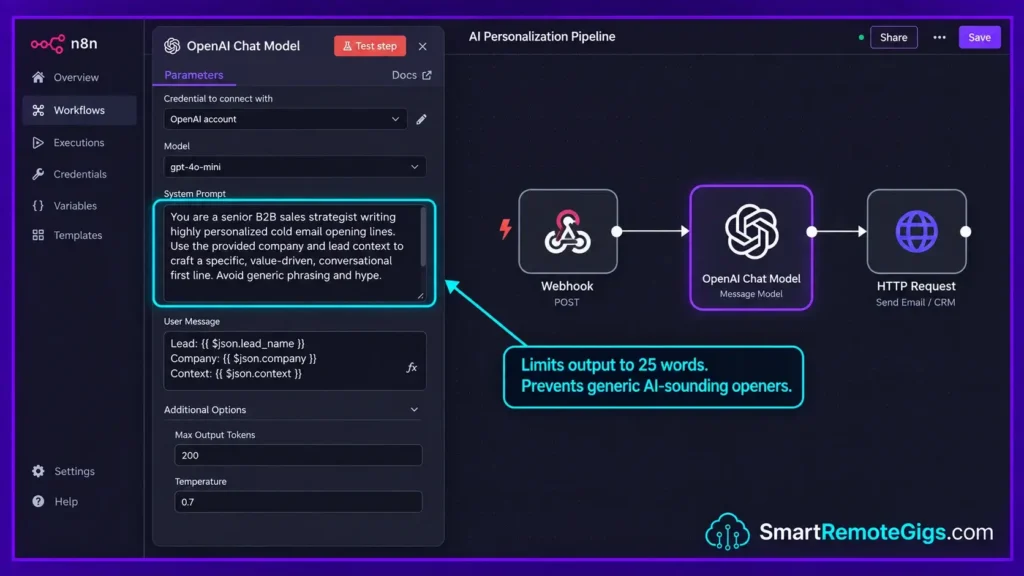
- Catch the incoming lead data via a Webhook node triggered from your Airtable automation when a new row is added to the Prospects table.
- Pass the lead’s “Company Description” field through an AI node (a smaller, cheaper model is usually sufficient for this task) to synthesize their core business value into a single contextual sentence.
- Inject the synthesized output into an HTTP Request mapped to your cold email sender’s API endpoint, including the generated icebreaker as the opening line of your template.
- Log the sent status and the generated copy back into your CRM’s
outreach_logfield so you can compare which icebreaker patterns get replies over time.
The Text Script
You are a senior B2B sales strategist writing highly personalized cold email opening lines.
Your task: Write ONE icebreaker sentence (maximum 25 words) that references something genuinely specific about the prospect’s company—not generic praise.
Rules:
Reference a concrete detail from the company description provided.
Never mention “I noticed” or “I came across your profile.”
Never use adjectives like “impressive,” “amazing,” or “innovative.”
Write in first-person as if you are a peer, not a vendor.
Output ONLY the icebreaker sentence. No preamble. No explanation.
Prospect Data:
Company Name: [YOUR_COMPANY_NAME]
Company Description: [YOUR_COMPANY_DESCRIPTION]
Prospect Title: [YOUR_PROSPECT_TITLE]
Output:
[Single icebreaker sentence — 25 words maximum]
Personalization Notes:
YOUR_COMPANY_NAME— Injected dynamically from your lead’scompanyfield using={{$json["company"]}}.YOUR_COMPANY_DESCRIPTION— The scraped or enriched company description field from your CRM, via={{$json["company_description"]}}. If empty, add an IF node upstream to route leads without descriptions to a fallback generic template.YOUR_PROSPECT_TITLE— The lead’s job title, injected via={{$json["title"]}}.
The SRG AI Paragraph Summarizer can pre-process raw company descriptions before they hit your LLM node, trimming boilerplate filler text and reducing the tokens you’re paying for on high-volume sequences. For a quick test on your text data:
Overwhelmed by long articles, dense reports, or never-ending email threads? Paste any paragraph and get a clear, accurate summary in one or two sentences — instantly, for free, with no account needed.
The Workflow Limitations
This pattern depends entirely on the quality of the input company description — a thin or generic description produces a thin, generic icebreaker regardless of prompt quality. It also doesn’t verify factual accuracy of the LLM’s output; a human spot-check on a sample of generated icebreakers before a large send is worth the time, since LLMs can occasionally misread or over-interpret ambiguous company descriptions.
[Evidence Source: General LLM Prompting Best Practice] | [Confidence Level: Common Workaround — the pattern is standard, but we don’t have a verified reply-rate comparison to cite for how much it improves over generic templates]
The Pro Tip
Pro Tip:
Cap your AI generation at a low token limit using the max_tokens parameter in your AI node configuration. Keeping icebreakers short and enforcing that at the API level — not just in the prompt — helps ensure the output stays within a typical email preview pane’s visible length.
🗃️ Scenario 3 — The Data Engineer: Apollo & Clearbit Webhook Enrichment
Scenario 3 — Reality Check & Diagnostics
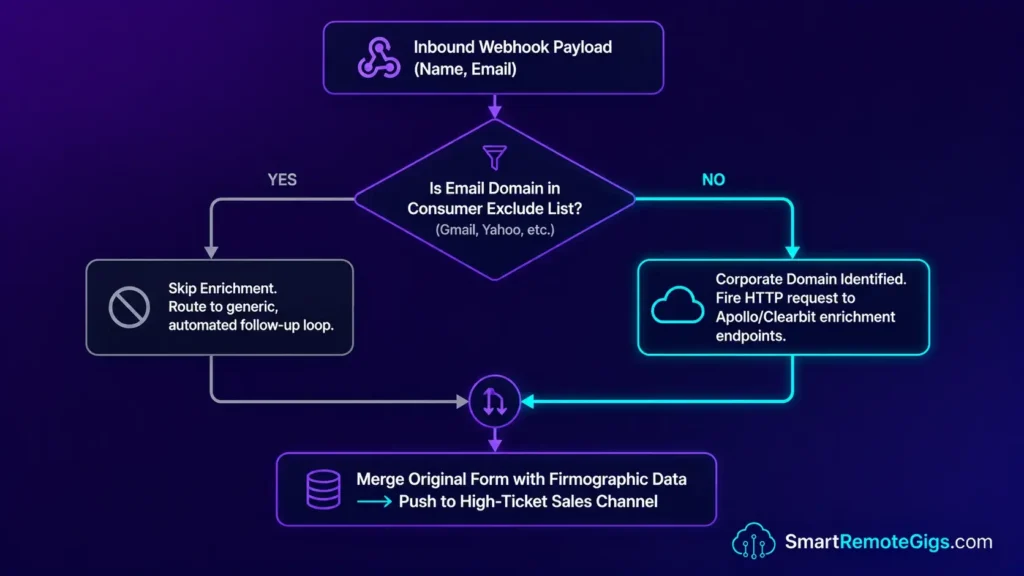
Inbound form leads typically arrive as a bare name and email. Before a sales rep touches the record, it’s worth appending company size, industry, revenue estimate, and technology stack automatically rather than having someone look it up manually for every lead. This template pings Apollo’s or Clearbit’s API with the extracted corporate domain and merges the response back into the original form payload.
The Exact Workflow
- Establish a Catch Webhook to receive the inbound form payload from Typeform, Webflow, or any form tool that supports webhook submissions.
- Isolate the email domain using a Set node with a regex expression that strips everything before the
@symbol and filters out consumer domains (Gmail, Yahoo, Outlook) before the API call fires. - Fire an HTTP GET request to Apollo or Clearbit using the extracted corporate domain as the query parameter.
- Merge the original form payload with the enriched corporate data using the Merge node in “Combine By Position” mode.
Per Apollo’s official API documentation, the Organization Enrich endpoint returns firmographic data covering a large database of companies — worth checking Apollo’s current documentation directly for their exact published coverage figure, since we didn’t independently re-verify a specific number for this pass.
The JavaScript Script
// Corporate Domain Extractor & Consumer Filter
// Place inside a Code node before your HTTP Enrichment Request
// Mode: Run Once For Each Item

const items = $input.all();
const results = [];

// Consumer email domains to exclude from enrichment API calls
const CONSUMER_DOMAINS = [
  "gmail.com", "yahoo.com", "hotmail.com", "outlook.com",
  "icloud.com", "aol.com", "protonmail.com", "mail.com",
  "YOUR_CUSTOM_EXCLUDE_DOMAIN"
];

for (const item of items) {
  const email = item.json[YOUR_EMAIL_FIELD_KEY] || "";
  const domain = email.split("@")[1]?.toLowerCase() || null;

  const isCorporate = domain && !CONSUMER_DOMAINS.includes(domain);

  results.push({
    json: {
      ...item.json,
      extracted_domain: isCorporate ? domain : null,
      is_corporate: isCorporate,
      enrichment_eligible: isCorporate,
      skip_reason: isCorporate ? null : `Consumer domain: ${domain}`
    }
  });
}

return results;

// ── IF Node Expression (paste into downstream IF node) ───────────────
// {{ $json["enrichment_eligible"] === true }}
// True branch  → fire Apollo/Clearbit enrichment HTTP GET
// False branch → route to generic follow-up sequence, skip enrichment
Personalization Notes:
YOUR_EMAIL_FIELD_KEY— The exact JSON key in your webhook payload that contains the email address (e.g.,"email"from Typeform,"fields.email"from Webflow).YOUR_CUSTOM_EXCLUDE_DOMAIN— Add any additional domains you want to exclude from enrichment. Remove this placeholder entirely if no custom exclusions are needed.
The Workflow Limitations
This filter only catches domains on the hardcoded consumer list — newer or regional free-email providers not on that list will still hit the enrichment API and burn a credit for a domain that won’t return useful company data. Periodically expanding the exclusion list is worth doing rather than treating it as a one-time setup.
[Evidence Source: Apollo/Clearbit API Documentation] | [Confidence Level: Confirmed]
The Red Flag
Red Flag:
If your IF node doesn’t filter out common consumer domains before hitting the enrichment API, you’ll spend API credits on unqualified leads. Most enrichment APIs charge per call regardless of whether the domain returns usable data.
💬 Scenario 4 — The Agency Owner: Discord Deal Alerts via Webhook
Scenario 4 — Reality Check & Diagnostics
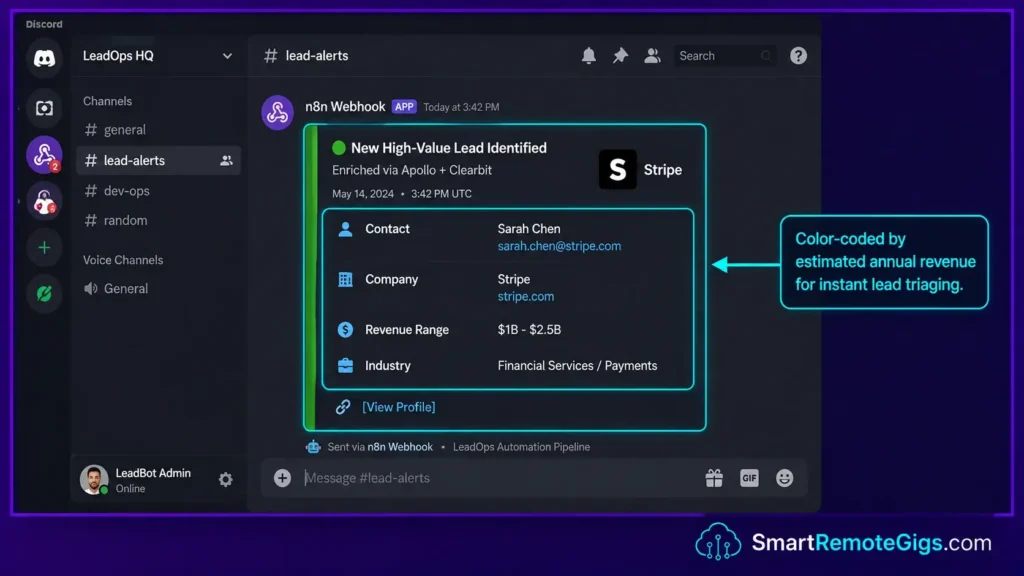
The gap between a lead getting enriched and a rep claiming it can meaningfully affect close rates on time-sensitive deals. This template fires a formatted Discord embed into a private sales channel the moment the enrichment workflow completes, color-coded by estimated company revenue.
The Exact Workflow
- Connect the output of your enrichment workflow to an HTTP Request node configured as a POST method, firing immediately after the Merge node in Scenario 3 completes.
- Map the webhook URL from your private Discord channel (Server Settings → Integrations → Webhooks → Copy Webhook URL).
- Format the JSON payload using Discord’s
embedsschema —title,description,color, andfields. - Execute the node to push the enriched lead profile into Discord shortly after the inbound form submission completes.
Mastering productivity workflow automation around speed-to-lead is a common priority for high-ticket sales teams — the value of instant notification over manual CRM checking is intuitive even without a specific benchmarked figure attached.
The JSON Script
{
  "username": "YOUR_BOT_NAME",
  "avatar_url": "YOUR_BOT_AVATAR_URL",
  "embeds": [
    {
      "title": "🎯 New Qualified Lead: {{$json[\"company\"]}}",
      "description": "A new inbound lead has been enriched and is ready for outreach.",
      "color": "YOUR_EMBED_COLOR_INT",
      "fields": [
        {
          "name": "👤 Contact",
          "value": "{{$json[\"name\"]}} — {{$json[\"title\"]}}",
          "inline": true
        },
        {
          "name": "🏢 Company",
          "value": "{{$json[\"company\"]}} ({{$json[\"employee_count\"]}} employees)",
          "inline": true
        },
        {
          "name": "💰 Revenue Range",
          "value": "{{$json[\"annual_revenue_printed\"]}}",
          "inline": true
        },
        {
          "name": "🌐 Industry",
          "value": "{{$json[\"industry\"]}}",
          "inline": true
        },
        {
          "name": "📧 Email",
          "value": "{{$json[\"email\"]}}",
          "inline": true
        },
        {
          "name": "🔗 LinkedIn",
          "value": "[View Profile]({{$json[\"linkedin_url\"]}})",
          "inline": true
        }
      ],
      "footer": {
        "text": "YOUR_FOOTER_TEXT"
      },
      "timestamp": "={{new Date().toISOString()}}"
    }
  ]
}
Personalization Notes:
YOUR_BOT_NAME— The display name shown as the sender of the Discord message.YOUR_BOT_AVATAR_URL— A direct URL to a square PNG image used as the bot’s avatar.YOUR_EMBED_COLOR_INT— Discord embed colors are decimal integers. Common convention:5763719(green) for higher-value leads,16776960(yellow) for lower-value,15548997(red) for unqualified — map this dynamically against yourannual_revenuefield however fits your qualification tiers.YOUR_FOOTER_TEXT— A static label for the embed footer.
The Workflow Limitations
This assumes a single-embed Discord message; if you want to batch multiple leads into one notification, Discord’s embed array supports multiple embed objects, which this template doesn’t currently use. It also doesn’t include any deduplication logic, so the same lead re-entering the enrichment workflow will trigger a duplicate Discord alert unless you add that check separately.
[Evidence Source: Discord Developer Documentation] | [Confidence Level: Confirmed]
The Pro Tip
Pro Tip:
Mapping estimated company revenue to the Discord embed color lets your SDR team visually triage deal size from the Discord feed itself before opening the CRM — a reasonable workflow shortcut, even without a specific measured improvement in response time to point to.
💰 Pricing & ROI Breakdown
Running comparable functionality across separate SaaS tools adds up quickly: PhantomBuster currently runs $69–$439/month depending on tier, and Lemlist’s Email plan runs $69/month with Multichannel at $109 per user/month as of mid-2026. Layering a scraper, a personalization engine, an enrichment router, and a deal-alert system across separate platforms means stacking several of these subscriptions simultaneously.
Self-hosted n8n replaces the automation-platform layer with a flat infrastructure cost and no per-task billing — but it doesn’t replace the scraping and enrichment API costs those platforms also depend on under the hood. The real savings are in removing per-task/per-seat SaaS billing for the orchestration layer, not in making the entire pipeline free. For a fuller cost comparison across platforms, see our best AI automation tools breakdown.
[Evidence Source: Vendor Pricing Pages] | [Confidence Level: Confirmed for PhantomBuster/Lemlist pricing; Apollo/Clearbit per-lead costs not independently re-verified in this pass]
Frequently Asked Questions
Are n8n templates for lead generation free to use?
The n8n templates themselves are free to import and run on self-hosted instances — n8n’s community template library at n8n.io/workflows hosts a large and growing number of published templates available for JSON import at no cost. Your real costs are the VPS hosting and any third-party API costs (scraping, enrichment, AI calls) the templates connect to.
How do I import a JSON template into n8n?
Open your n8n canvas, click the top-right menu, select “Import from File” or “Import from URL,” and paste your JSON. The workflow nodes render immediately on the canvas. You then update the placeholder values in each node with your credentials and endpoint URLs before activating.
Can n8n safely scrape LinkedIn without getting banned?
No pacing pattern makes this risk-free. LinkedIn’s Terms of Service prohibit scraping and automation, and independent industry reporting on similar automation tools puts real account-restriction rates for heavy usage in a meaningful range — not a fraction of a percent. Randomized wait intervals, off-peak scheduling, and rotating proxy layers are common practices for reducing detection risk, but they reduce a specific signal rather than eliminating the underlying risk of using an automation pattern LinkedIn’s terms don’t permit.
Is n8n better than PhantomBuster for B2B outreach?
It depends on your priorities. PhantomBuster offers a no-code interface with pre-built LinkedIn phantoms at a metered price ($69–$439/month depending on tier), while n8n on a self-hosted VPS removes that specific per-task billing layer and gives you full customization over every node and output destination — for a team with a developer who can build and maintain that custom logic. Neither approach removes LinkedIn’s own automation-detection risk.
How do I connect my cold email tool to n8n?
Any cold email platform with a REST API connects to n8n via the HTTP Request node using the platform’s API key as a Bearer token. Configure the node as a POST method, map your API endpoint from the platform’s documentation, and inject the personalized email content as the request body.
The Verdict: Weighing a Custom Lead Engine Against Stacked SaaS Tools
The four templates in this guide can replace several separate SaaS subscriptions — a scraper, a personalization engine, an enrichment API router, and a deal alert system — with a self-hosted n8n stack that removes per-task orchestration billing.
That’s a real structural change to the cost model, though it comes with real tradeoffs: you’re maintaining the logic yourself, the third-party APIs still bill per call, and the LinkedIn scraping template specifically carries account-restriction risk that no automation pattern eliminates.
Who should build this: agencies or teams with a developer who can maintain custom logic and who are comfortable with the compliance tradeoffs of LinkedIn scraping specifically. Who should think twice: teams without in-house technical capacity, or anyone unwilling to accept real account-restriction risk in exchange for lower per-task orchestration costs.
Verdict:
Building B2B lead generation on self-hosted n8n JSON templates removes per-task orchestration billing and gives you full control over scraping, enrichment, and outreach logic — genuinely valuable for a technical team, but not a cost-free or risk-free replacement for the SaaS tools it’s competing with.
Head to the SRG Job Board at /jobs/ for remote automation contracts in B2B lead generation and workflow engineering. Browse the SRG Software Directory at /software/ for vetted B2B data providers.

![Fix n8n PostgreSQL Timeout 2026: DB Handshake [Fix]](https://smartremotegigs.com/wp-content/uploads/2026/08/fix-n8n-postgresql-timeout-hero-1024x576.webp)
![n8n Journalist Outreach Bot 2026: PR System [Guide]](https://smartremotegigs.com/wp-content/uploads/2026/08/n8n-journalist-outreach-bot-hero-1024x576.webp)
![n8n Active Loops 2026: Fix Pagination Logic [Data]](https://smartremotegigs.com/wp-content/uploads/2026/08/n8n-active-loops-pagination-hero-1024x576.webp)