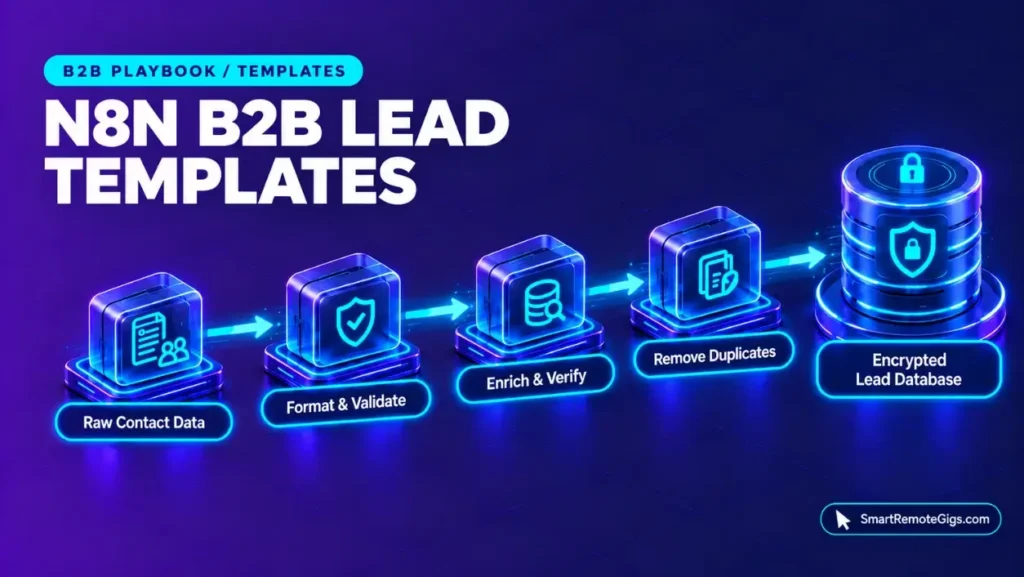



Working with n8n active loops means choosing between two models: the automatic per-item iteration that standard nodes apply, and the explicit batching of the Loop Over Items node. Paginated APIs add a third concern, because the HTTP Request node must be told how to fetch the next page. Each of these has documented settings, covered step by step below.
This SOP guides automation engineers, technical freelancers, and low-code developers through batch processing and API pagination in n8n. It excludes VPS server provisioning. Smart Remote Gigs (SRG) publishes source-backed technical guides, SOPs, and career blueprints.
Method: compiled from 3 sources reviewed on October 2026 for n8n core looping and pagination nodes. SRG did not hands-on test this setup.
SRG Quick Guide Summary
One-Line Goal: Build deterministic batch iterations and handle paginated REST APIs in n8n using Loop Over Items and the native $pageCount pagination expression.
🚀 Prerequisites: An n8n canvas (Cloud or self-hosted), an API endpoint that paginates by next-page URL or by page parameter, and the Loop Over Items node (formerly Split In Batches).
📋 Core Workflow: Set the batch size ➔ route the loop and done outputs ➔ configure HTTP Request pagination with Response Contains Next URL or {{ $pageCount + 1 }} ➔ add an exit condition and set the Reset option where the loop reinitializes.
⚠️ Primary Pitfall: EXECUTIONS_TIMEOUT defaults to -1, which disables the timeout, so a loop without an exit condition has no default time cap.
n8n Iteration Architecture: Auto-Iteration vs. Explicit Loops
The Mechanics of Auto-Iteration in Standard Nodes
Standard n8n nodes run once for each item in the incoming data, so a node receiving a list of items processes each item without a loop. This is the default model, and it needs no configuration.
Auto-iteration does not by itself divide the list into batches or fetch additional pages from an API. Those two jobs belong to Loop Over Items and to the HTTP Request node’s pagination settings.
When Explicit Looping is Mandatory
The official n8n Loop Over Items documentation describes the node, formerly named Split In Batches, as the way to process incoming items in batches. Use it when work must happen in controlled groups rather than all at once. Two cases are covered in this guide:
- Batched processing: the Batch Size parameter sets how many items each pass handles.
- Multi-page ingestion: the HTTP Request node’s pagination settings fetch successive pages from an API until the data ends.
The sources reviewed do not document item-count thresholds or memory limits, so this guide does not assert them. Choose a batch size by testing against your own data.
Implementing the Loop Over Items Node: Step-by-Step Sequence
Step 1: Batch Sizing Calibration & Memory Footprint Sizing
Add a Loop Over Items node after the node that produces your item list, then set its Batch Size. A smaller batch means more passes, each carrying fewer items. A larger batch means fewer passes, each carrying more.
The documentation does not specify a recommended batch size, so treat the value in the fragment below as a placeholder. Export the node from your own canvas if you need the exact parameter keys for your n8n version.
{
  "node": "Loop Over Items",
  "formerly": "Split In Batches",
  "parameters": {
    "batchSize": [BATCH_SIZE],
    "options": {
      "reset": false
    }
  }
}
This fragment demonstrates an SRG reference illustration, not an importable node export; validate settings in a sandbox before deploying to live client workloads.
[BATCH_SIZE]: a whole number of items per batch, chosen by testing against your own data and downstream node limits.
Step 2: Isolating the ‘loop’ vs. ‘done’ Output Branches
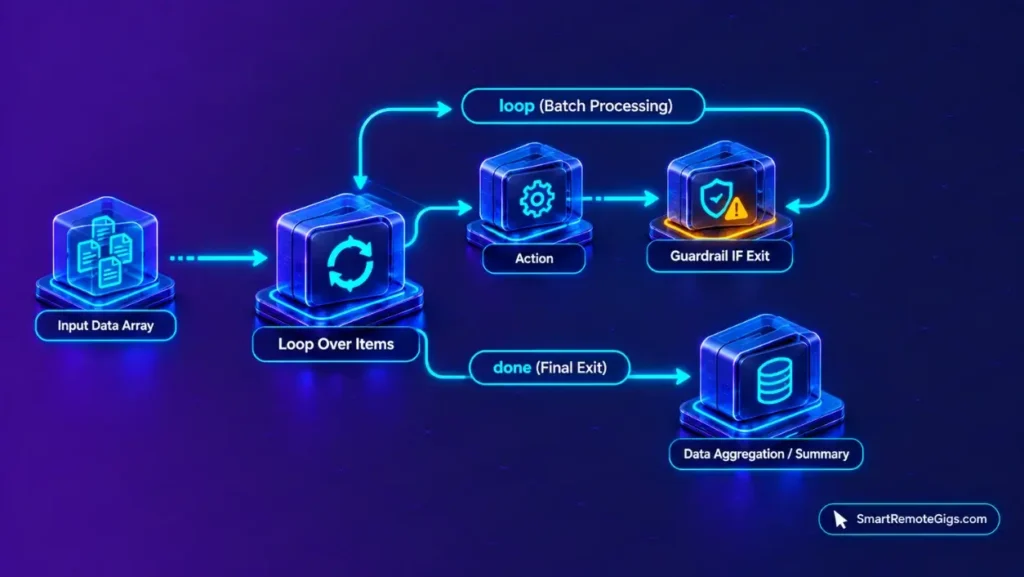
Loop Over Items has two outputs. Connect the loop output to the nodes that process each batch, then connect the last of those nodes back to the input of Loop Over Items so the next batch is requested.
Connect the done output to the nodes that should run once after all batches are processed, such as a summary or notification step. Do not connect the done output back into the loop, because it is the exit path.
Step 3: Data Aggregation Across Iterations
Each pass through the loop handles one batch, so results from earlier batches must be collected or stored if a later step needs them together. Two approaches apply: collect results in a Code node on the done path, or write each batch to external storage inside the loop.
The script below is a reference pattern for a Code node set to run once for all items. It returns every item it receives as a single combined list, which suits the done path.
// Code node, mode: Run Once for All Items
// Place on the "done" path after Loop Over Items
const collected = $input.all().map(item => item.json);

return [{ json: { total: collected.length, items: collected } }];
This script demonstrates an SRG reference pattern; validate it in a sandbox before deploying to live client workloads. Keep only the fields later steps need, since the sources reviewed do not document memory limits. For ready-made workflow structures that apply batching to lead data, see the B2B lead generation templates.
Advanced HTTP Request Pagination Architecture
Mode 1: Next-URL Traversal (Response Contains Next URL)
In the HTTP Request node, enable pagination and choose Response Contains Next URL, per the official n8n pagination documentation. The node then follows the next-page URL from each response.
Point the setting at the field in your API’s response that holds the next URL. The field name differs between APIs, so take it from your API’s documentation. Pagination stops when the API stops returning that URL.
Mode 2: Offset & Page-Count Increments ({{ $pageCount + 1 }})
The other documented option is Update a Parameter in Each Request, which changes a request parameter on every call. The pagination documentation states that $pageCount is the number of pages the HTTP Request node has fetched, and that it starts at zero.
Because $pageCount starts at zero, $pageCount + 1 gives 1 on the first request. Use that expression as the value of the page parameter if your API numbers pages from 1. If your API numbers pages from 0, use $pageCount alone.
{{ $pageCount + 1 }}Enter the expression as the value of your API’s page parameter, for example page, in the pagination parameter list. Confirm the parameter name and starting number in your API’s documentation.
Preventing Infinite Loops & Execution Starvation
The Reset Option: Reinitializing Data for Sub-Loops
The Loop Over Items documentation describes a Reset option. According to it, the loop reset ensures the loop recognizes each iteration as a new set of data.
Use it when the loop must restart with fresh incoming data, such as a loop inside a repeated or paginated flow. The sources reviewed do not document what happens when Reset is left off in a nested loop, so test that case in a sandbox.
Hard Exit Predicates: Structuring Guardrail IF Conditions
Place an IF node before the connection that returns to Loop Over Items, and route the “stop” branch to the done path. Two reference conditions can be adapted:
- Empty result: stop when the current response contains no items.
- Iteration cap: stop after a chosen number of passes, using n8n’s run-index expression.
Both conditions are SRG reference patterns rather than vendor-documented settings. The exact expressions depend on your data shape, and the iteration cap is a number you choose. Test each in a sandbox with a sample payload.
Execution Timeouts & Worker Safety Ceilings
The official n8n execution variables document two settings. EXECUTIONS_TIMEOUT defaults to -1, which disables the timeout, so no time cap applies unless you set one.
EXECUTIONS_TIMEOUT_MAX is the maximum execution time, in seconds, that users can set for an individual workflow, with a documented default of 3,600. It limits what users can set; it is not documented as an automatic stop while EXECUTIONS_TIMEOUT remains at -1. Set EXECUTIONS_TIMEOUT to a positive number of seconds to cap executions, and add an exit condition either way. Hosting setup is covered in the self-hosting deployment guide.
Production Verification Checklist & Memory Health Check
- Loop return: Open the workflow canvas and verify that the last processing node connects back to the input of Loop Over Items, and that the
doneoutput does not. - Pagination end: Run the HTTP Request node against a short test dataset and verify that pagination stops when the API has no further pages.
- Reset setting: Review the Reset option on every Loop Over Items node and confirm that it is set deliberately for your flow.
- Aggregation scope: Inspect the Code node output and verify that it keeps only the fields later steps need.
- Exit condition: Execute the workflow with a test payload that triggers the IF exit condition and verify that the flow reaches the
donepath.
The Verdict: Designing Resilient Iteration Pipelines
Auto-iteration covers per-item processing without configuration. Loop Over Items adds explicit batching, and the HTTP Request node’s pagination settings handle multi-page APIs through either a next-page URL or an incremented page parameter. The three tools solve different problems and are used together.
The documented timeout defaults leave a gap. EXECUTIONS_TIMEOUT is disabled at -1, and EXECUTIONS_TIMEOUT_MAX caps what users can set rather than stopping executions by itself. An explicit exit condition and a deliberate timeout setting close that gap.
This guide is a documentation-derived configuration baseline, not a field-certified environment. Test loop and pagination settings in a sandbox before they run against live data.
Documented via 3 official vendor sources as of October 2026. SRG did not hands-on test this setup.
Teams that run these loops on lead data can start from the B2B lead generation templates. Managed n8n Cloud plans start at €20/month billed annually and carry monthly execution caps. For full plan specifications and limits, see the n8n dossier:

Best For: Technical solopreneurs, systems integrators, and engineering teams that need either self-hosted execution under the free Community edition or Cloud plans metered per full workflow run with unlimited users.
- Free Free
- Starter From €50 /mo
- Pro From €20 /mo
Automation roles that use n8n are listed on the Smart Remote Gigs Exchange.

Never Miss a New Remote Job
Remote job alertsGet notified about new remote jobs and access practical freelance tools from your phone.