

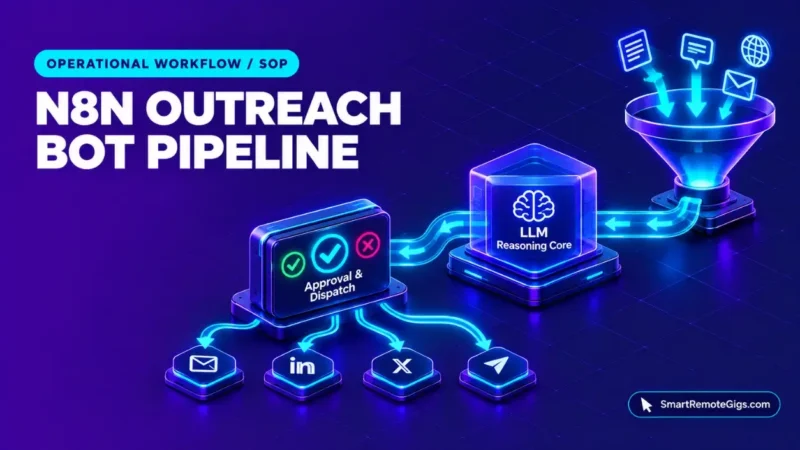
An n8n journalist outreach bot connects four jobs in one workflow: pulling in media query feeds, removing duplicates, scoring each query against an expert’s profile with an LLM, and sending only human-approved pitches. Each stage needs its own safeguard. Without a duplicate check and a review step, an automated pipeline can repeat itself or send unvetted text.
This SOP provides an architectural blueprint for freelance PR consultants, media strategists, and technical founders automating PR outreach in n8n. It excludes server hosting deployment. Smart Remote Gigs (SRG) publishes source-backed technical guides, SOPs, and career blueprints.
Method: compiled from 2 sources reviewed on October 2026 for n8n execution controls and plan data. SRG did not hands-on test this setup.
SRG Quick SOP Summary:
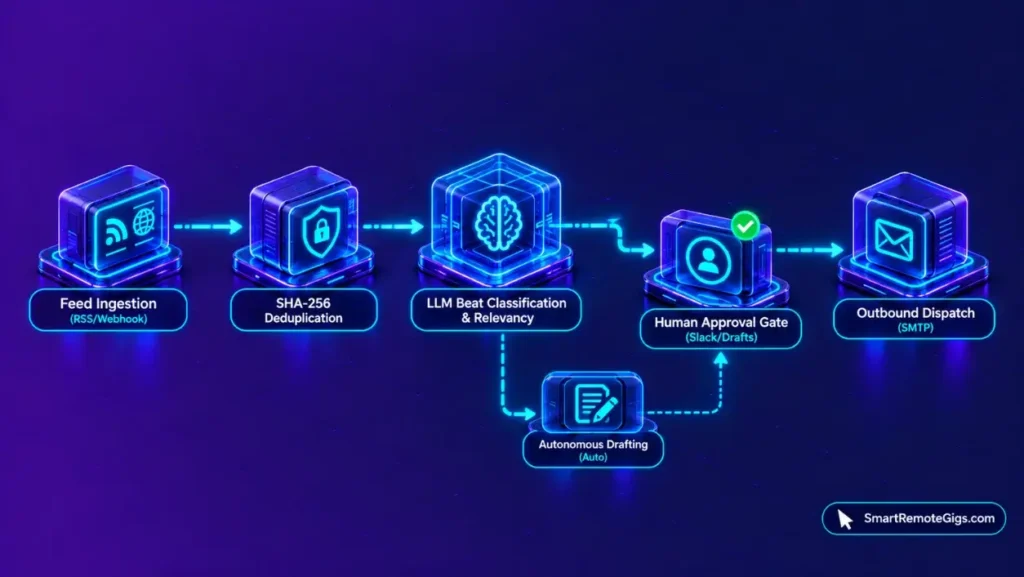
System Architecture: RSS or webhook ingestion ➔ SHA-256 deduplication ➔ LLM beat classification and drafting ➔ human approval in Slack or an email draft ➔ outbound email dispatch.
⚙️ Core Trigger & Action: A scheduled trigger pulls media feeds ➔ an LLM scores each query against an expert profile ➔ pitches at or above a chosen score threshold are staged for approval.
🛡️ Failure Safeguard: A hash check blocks repeat processing of the same query, low-scoring queries are discarded, and a human approves every send. EXECUTIONS_TIMEOUT defaults to -1 (disabled), so set a positive timeout to cap stalled runs.
System Topology & Execution Architecture
Protocol Specifications: Webhooks, LLM Connectors & Outbound SMTP
This pipeline is an SRG reference architecture. The two official sources reviewed document n8n’s execution timeouts and plan data; they do not document the individual nodes used below, so node choices are design decisions rather than vendor specifications. The layers are:
- Ingestion: an RSS Read node or an HTTP Request node polling a media feed.
- Deduplication: a Code node that computes a SHA-256 hash for each query and compares it with hashes already seen.
- Semantic scoring: an LLM node, such as an OpenAI or Anthropic chat model, set to return structured JSON.
- Human staging: a Slack message with approve and reject actions, or an unsent email draft.
- Dispatch: an email-sending node that runs only after approval.
For server setup, see the self-hosting deployment guide.
Architecture Diagram & Pipeline Logic
The flow below shows the path of one query. The relevancy gate is the circuit breaker: a query below the threshold ends there and never reaches drafting.
[Schedule Trigger] -> [RSS Read / HTTP Request]
        |
        v
[Code: SHA-256 hash] -> [IF: hash already seen?] --yes--> [Stop]
        |no
        v
[LLM: score + classify] -> [IF: score >= threshold?] --no--> [Stop]
        |yes
        v
[LLM: draft pitch] -> [Slack / Email draft: human review]
        |approve                         |reject
        v                                v
[Send Email node]                     [Stop]
Ingestion & Deduplication Pipeline Configuration
Step 1: RSS Feed / Webhook Cron Ingestion
Add a Schedule Trigger and connect it to an RSS Read node, setting the node’s URL field to the feed address. If the source offers a push mechanism instead, a Webhook trigger can receive queries as they arrive.
The polling interval is a design choice. Pick one that fits the feed’s update pattern and the provider’s access terms, since the sources reviewed document no feed or interval limits. Each execution counts as one run under the plan’s metering, so shorter intervals increase run volume.
Step 2: Cryptographic Deduplication (Hashing URL & Timestamp)
Headlines for the same query can vary, so matching on title is unreliable. This step hashes the query’s canonical URL together with its publication timestamp and compares the result with hashes from earlier runs.
The script below is a reference pattern. It uses workflow static data to remember hashes between runs and returns only items not seen before. Whether the Code node allows the crypto module depends on your n8n configuration, so confirm that in a sandbox first.
// Code node, mode: Run Once for All Items
// Reference pattern: confirm the crypto module is permitted in your environment
const crypto = require('crypto');
const staticData = $getWorkflowStaticData('global');
const seen = staticData.seenHashes || {};
const fresh = [];

for (const item of $input.all()) {
  const url = item.json.link || '';
  const published = item.json.isoDate || item.json.pubDate || '';
  const hash = crypto.createHash('sha256').update(url + '|' + published).digest('hex');

  if (!seen[hash]) {
    seen[hash] = Date.now();
    fresh.push({ json: { ...item.json, queryHash: hash } });
  }
}

staticData.seenHashes = seen;
return fresh;
This script demonstrates an SRG reference pattern; validate it in a sandbox before deploying to live client workloads. Field names such as link and isoDate depend on the feed, so check them against your RSS Read output.
Semantic Filtering & Pitch Generation Architecture
Step 3: LLM Beat Classification & Relevancy Scoring
Add an LLM node that receives each new query and the spokesperson’s factsheet, and returns a JSON object. Restricting the model to a pre-approved factsheet reduces the chance of invented biographical details, though it does not remove the need for human review.
The schema below is an SRG-authored output format, not a vendor schema. Use it in the node’s structured-output settings, and route queries below your chosen threshold to a stop branch.
{
  "relevance_score": 7,
  "beat_alignment": "[BEAT_NAME]",
  "key_angle": "[ONE_SENTENCE_ANGLE]"
}[BEAT_NAME]: the journalist’s beat or topic area as classified by the model.[ONE_SENTENCE_ANGLE]: the angle the spokesperson can offer in response to the query.relevance_score: an integer from 1 to 10. The value shown is only an example output.
Step 4: Context Injection & Personalized Pitch Drafting
For queries that pass the threshold, send the query text and the factsheet to a second LLM node. The prompt below sets a 150-word target and a score threshold of 8 in the surrounding design, both SRG choices that can be changed.
You are drafting a media pitch for [SPOKESPERSON_NAME].
Use only the facts in the FACTSHEET below. Do not add any claim, statistic, credential, or quote that is not in the FACTSHEET.
JOURNALIST QUERY:
[QUERY_TEXT]
FACTSHEET:
[FACTSHEET_TEXT]
Write a direct pitch of about 150 words that answers the journalist's exact question. Start with the answer, not a greeting. Cite specific data points from the FACTSHEET. If the FACTSHEET does not support an answer, reply with only: NO_PITCH.[SPOKESPERSON_NAME]: the expert’s name as it should appear in the pitch.[QUERY_TEXT]: the journalist query, passed in from the previous node.[FACTSHEET_TEXT]: the pre-approved biography, credentials, and past commentary the model may draw on.
Human-in-the-Loop Staging & Multi-Channel Dispatch
Step 5: Routing Qualified Pitches to Slack / Email Drafts
Send each drafted pitch to a private review channel or save it as an unsent email draft. Include the original query, the score, and the draft so the reviewer can judge it without opening other tools. Nothing leaves the workflow at this stage.
A reviewer should check every claim in the draft against the factsheet. The sources reviewed do not document model accuracy, so human review is the control, not the prompt alone.
Step 6: Approval Trigger & Outbound SMTP Dispatch
Configure a Webhook node to receive the approval action from the staging message. When the action is “approve,” pass the draft, the journalist’s contact address, and the subject line to an email-sending node. When the action is “reject,” end the run.
Confirm the contact address from the original query rather than from model output. The exact Slack interaction setup is outside the sources reviewed, so test the approval round trip in a sandbox.
Production Safeguards: Rate Limits, Timeouts & Hallucinations
The official n8n execution variables document two timeout settings. EXECUTIONS_TIMEOUT defaults to -1, which disables the timeout, so no time cap applies unless one is set.
EXECUTIONS_TIMEOUT_MAX is the maximum execution time, in seconds, that users can set for an individual workflow, with a documented default of 3,600. It limits what can be set; it is not documented as an automatic stop. Three safeguards apply to this pipeline:
- Timeout cap: set
EXECUTIONS_TIMEOUTto a positive number of seconds so a stalled LLM call cannot hold a run open indefinitely. - Call spacing: add a Wait node between repeated external API calls if a provider documents a rate limit. Take the interval from that provider’s documentation.
- Context restriction: keep the model limited to the approved factsheet, and keep human approval before every send.
Production Maintenance Runbook & Reusable Template
Routine maintenance for this pipeline covers four items: clear or trim the stored hash list on a schedule, review and adjust the scoring prompt against the queries that were accepted or rejected, rotate API credentials for the LLM and email providers, and re-check that the feed fields the script reads have not changed. The schedule for each is an operator decision.
The template below packages the workflow described in this SOP as an importable file.
Review credentials and prompts in a sandbox after importing, since the template reflects the reference architecture above.
The Verdict: Operational Boundaries of Autonomous Media Bots
The pipeline automates triage and drafting, and keeps sending behind a person’s approval. That split follows from what the sources can and cannot support: the timeout controls are documented, while model accuracy and feed behavior are not. Human review therefore stays in the design.
The documented timeout defaults call for deliberate settings. EXECUTIONS_TIMEOUT is disabled at -1, so a positive value must be set to cap runs. The duplicate check, the score threshold, and the factsheet restriction are SRG design controls, and each should be tested before live use.
This SOP is a documentation-derived production configuration baseline, not a field-certified environment. Run the full flow with test queries and a private review channel before connecting real contacts.
Documented via 2 official vendor sources as of October 2026. SRG did not hands-on test this setup.
Sales-focused enrichment flows are covered in the B2B lead generation templates. Per the official n8n pricing page, Cloud plans start at €20/month billed annually and meter usage by workflow executions. For full plan specifications and limits, see the n8n dossier:

Best For: Technical solopreneurs, systems integrators, and engineering teams that need either self-hosted execution under the free Community edition or Cloud plans metered per full workflow run with unlimited users.
- Free Free
- Starter From €50 /mo
- Pro From €20 /mo
Automation roles that use n8n are listed on the Smart Remote Gigs Exchange.

Never Miss a New Remote Job
Remote job alertsGet notified about new remote jobs and access practical freelance tools from your phone.