

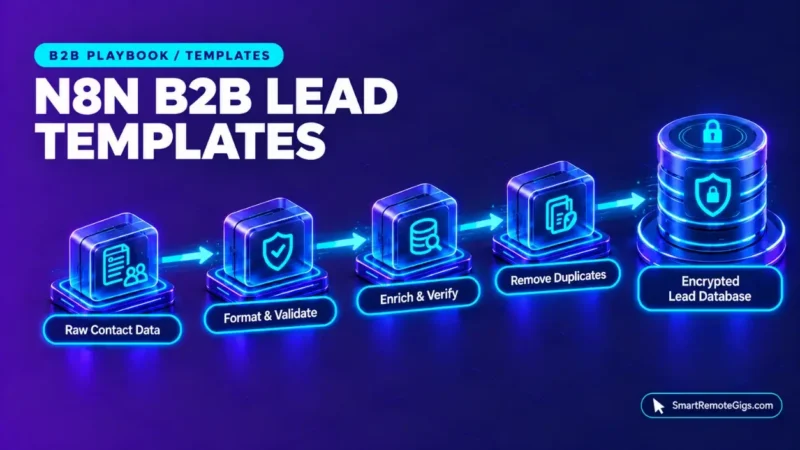
These n8n lead generation templates cover two stages of a B2B pipeline: capturing and cleaning inbound lead data, then enriching records in batches and syncing them to a CRM. Each stage uses n8n features with documented settings: Loop Over Items batching, HTTP Request pagination, and execution timeouts. Provider-specific details are left as placeholders.
This playbook gives copyable workflow templates and an implementation runbook for RevOps professionals, growth consultants, and B2B automation operators. It excludes server hosting management. Smart Remote Gigs (SRG) publishes source-backed technical guides, SOPs, and career blueprints.
Method: compiled from 4 sources reviewed on October 2026 for n8n workflow templates and integration nodes. SRG did not hands-on test this setup.
SRG Quick Summary
Core Insight / Strategy: Order enrichment so cheaper checks run before paid lookups. This is an SRG design principle, not a vendor-documented rule.
🎯 Actionable Takeaway: Import the two JSON templates, replace the placeholders, and test with sample leads before connecting live data.
📊 Sourced Benchmark / Policy: The workflows use n8n’s documented Loop Over Items batching and {{ $pageCount + 1 }} pagination. EXECUTIONS_TIMEOUT defaults to -1 (disabled), so a positive timeout must be set to cap runs.
Strategic Context: Architecture of an Enterprise Lead Engine
The Waterfall Enrichment Principle
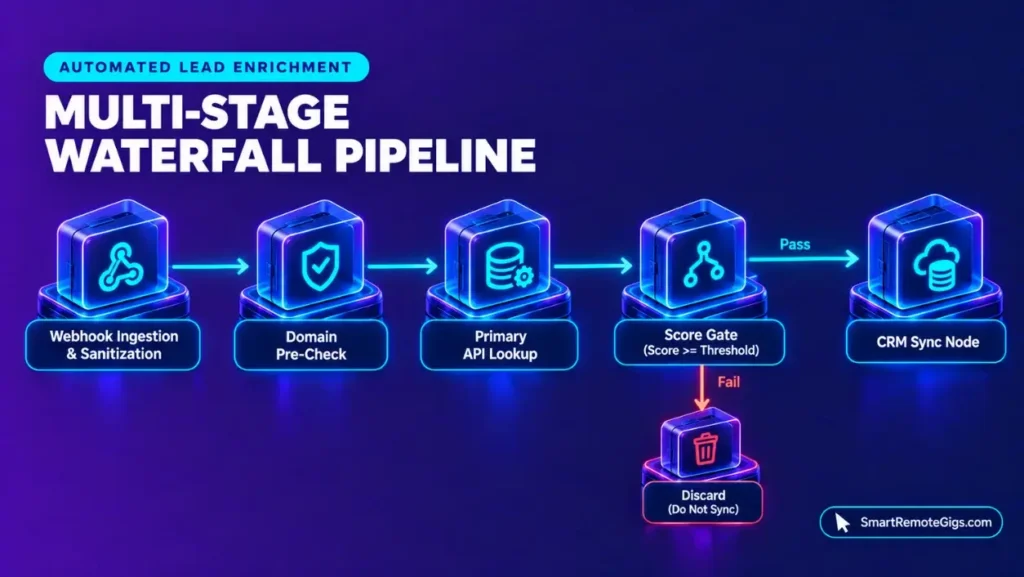
Waterfall enrichment runs lookups in sequence and stops as soon as a stage gives a usable answer. A typical order is a cheap or free check first, a primary provider second, and a secondary provider only when the primary result is low-confidence. The goal is to avoid paying for lookups that earlier stages already settled.
The sources reviewed do not document any provider’s pricing, credit rules, or response format, so this ordering is a design choice. Template 2 implements the primary-enrichment stage and a score gate. A free pre-check and a secondary provider can be added as extra stages on the low-score branch.
Credit Conservation & Schema Sanitization
A Code node placed before any external call can trim whitespace, lowercase email addresses, and split the domain out of each address. Cleaning records first means the paid endpoints receive consistent input. Format any other fields, such as phone numbers, to match what your CRM expects.
Template 1 applies these steps to inbound webhook data. For a different n8n pipeline built on scheduled ingestion and human review, see the journalist outreach bot SOP.
Documented Asset 1: Webhook Ingestion & Data Sanitization Template
Ingestion Flow & Payload Validation
Template 1 has four parts. A Webhook node receives form submissions or inbound lead data. A Code node checks that first_name, last_name, company, and email are present, trims the values, and lowercases the email. An IF node routes valid records onward and sends invalid payloads to a discard branch.
The final “Route to Enrichment” node is an empty placeholder. Connect it to Template 2, or to whichever enrichment flow you use.
Copyable Template Schema
{
"name": "SRG Reference: Lead Webhook Ingestion and Sanitization",
"nodes": [
{
"parameters": {
"httpMethod": "POST",
"path": "[WEBHOOK_PATH]",
"responseMode": "onReceived"
},
"name": "Lead Webhook",
"type": "n8n-nodes-base.webhook",
"typeVersion": 2,
"position": [0, 0]
},
{
"parameters": {
"jsCode": "const out = [];\nfor (const item of $input.all()) {\n  const b = item.json.body || item.json;\n  const email = String(b.email || '').trim().toLowerCase();\n  const first = String(b.first_name || '').trim();\n  const last = String(b.last_name || '').trim();\n  const company = String(b.company || '').trim();\n  const valid = Boolean(first && last && company && /^[^@\s]+@[^@\s]+\.[^@\s]+$/.test(email));\n  out.push({ json: { first_name: first, last_name: last, company: company, email: email, domain: valid ? email.split('@')[1] : '', valid: valid } });\n}\nreturn out;"
},
"name": "Validate and Sanitize",
"type": "n8n-nodes-base.code",
"typeVersion": 2,
"position": [240, 0]
},
{
"parameters": {
"conditions": {
"boolean": [
{ "value1": "={{ $json.valid }}", "value2": true }
]
}
},
"name": "Is Valid Lead",
"type": "n8n-nodes-base.if",
"typeVersion": 1,
"position": [480, 0]
},
{
"parameters": {},
"name": "Route to Enrichment",
"type": "n8n-nodes-base.noOp",
"typeVersion": 1,
"position": [720, -80]
},
{
"parameters": {},
"name": "Discard Invalid",
"type": "n8n-nodes-base.noOp",
"typeVersion": 1,
"position": [720, 80]
}
],
"connections": {
"Lead Webhook": {
"main": [[{ "node": "Validate and Sanitize", "type": "main", "index": 0 }]]
},
"Validate and Sanitize": {
"main": [[{ "node": "Is Valid Lead", "type": "main", "index": 0 }]]
},
"Is Valid Lead": {
"main": [
[{ "node": "Route to Enrichment", "type": "main", "index": 0 }],
[{ "node": "Discard Invalid", "type": "main", "index": 0 }]
]
}
},
"settings": {}
}
This manifest demonstrates an SRG reference architecture; validate syntax in a sandbox before deploying to live client workloads.
[WEBHOOK_PATH]: the URL path segment for the Webhook trigger, for example a short unique string of your choice.
Documented Asset 2: Multi-Step API Enrichment Waterfall Template
Cascaded Enrichment Logic (Domain Verification ➔ Email Discovery ➔ CRM Sync)
Template 2 receives a list of qualified leads, processes them in batches, calls a primary enrichment API for each one, and checks a returned score. Records at or above the threshold sync to the CRM. Records below it return to the loop without a CRM write, and that branch is where a secondary provider can be added.
The batching node is documented in the official n8n Loop Over Items documentation. Send the webhook a body in the form {"leads": [ ... ]}, where each lead carries email and domain.
Copyable Waterfall Workflow Schema
{
"name": "SRG Reference: Batched Enrichment Waterfall and CRM Sync",
"nodes": [
{
"parameters": {
"httpMethod": "POST",
"path": "[WEBHOOK_PATH]",
"responseMode": "onReceived"
},
"name": "Lead List Webhook",
"type": "n8n-nodes-base.webhook",
"typeVersion": 2,
"position": [0, 0]
},
{
"parameters": {
"jsCode": "const first = $input.first().json;\nconst body = first.body || first;\nconst leads = Array.isArray(body.leads) ? body.leads : [];\nreturn leads.map(lead => ({ json: lead }));"
},
"name": "Expand Leads",
"type": "n8n-nodes-base.code",
"typeVersion": 2,
"position": [240, 0]
},
{
"parameters": {
"batchSize": [BATCH_SIZE],
"options": {}
},
"name": "Loop Over Items",
"type": "n8n-nodes-base.splitInBatches",
"typeVersion": 3,
"position": [480, 0]
},
{
"parameters": {},
"name": "Batches Complete",
"type": "n8n-nodes-base.noOp",
"typeVersion": 1,
"position": [720, -160]
},
{
"parameters": {
"method": "POST",
"url": "[PRIMARY_ENRICHMENT_URL]",
"sendHeaders": true,
"headerParameters": {
"parameters": [
{ "name": "Authorization", "value": "Bearer [APOLLO_API_KEY]" }
]
},
"sendBody": true,
"specifyBody": "json",
"jsonBody": "={{ JSON.stringify({ email: $json.email, domain: $json.domain }) }}",
"options": {}
},
"name": "Primary Enrichment",
"type": "n8n-nodes-base.httpRequest",
"typeVersion": 4.2,
"position": [720, 0]
},
{
"parameters": {
"conditions": {
"number": [
{
"value1": "={{ Number($json['[SCORE_FIELD]']) }}",
"operation": "largerEqual",
"value2": [SCORE_THRESHOLD]
}
]
}
},
"name": "Score Check",
"type": "n8n-nodes-base.if",
"typeVersion": 1,
"position": [960, 0]
},
{
"parameters": {
"method": "POST",
"url": "[CRM_ENDPOINT_URL]",
"sendHeaders": true,
"headerParameters": {
"parameters": [
{ "name": "Authorization", "value": "Bearer [CRM_ACCESS_TOKEN]" }
]
},
"sendBody": true,
"specifyBody": "json",
"jsonBody": "={{ JSON.stringify($json) }}",
"options": {}
},
"name": "CRM Sync",
"type": "n8n-nodes-base.httpRequest",
"typeVersion": 4.2,
"position": [1200, -80]
}
],
"connections": {
"Lead List Webhook": {
"main": [[{ "node": "Expand Leads", "type": "main", "index": 0 }]]
},
"Expand Leads": {
"main": [[{ "node": "Loop Over Items", "type": "main", "index": 0 }]]
},
"Loop Over Items": {
"main": [
[{ "node": "Batches Complete", "type": "main", "index": 0 }],
[{ "node": "Primary Enrichment", "type": "main", "index": 0 }]
]
},
"Primary Enrichment": {
"main": [[{ "node": "Score Check", "type": "main", "index": 0 }]]
},
"Score Check": {
"main": [
[{ "node": "CRM Sync", "type": "main", "index": 0 }],
[{ "node": "Loop Over Items", "type": "main", "index": 0 }]
]
},
"CRM Sync": {
"main": [[{ "node": "Loop Over Items", "type": "main", "index": 0 }]]
}
},
"settings": {}
}
This manifest demonstrates an SRG reference architecture; validate syntax in a sandbox before deploying to live client workloads.
Breakdown of Placeholders & Customization Parameters
Replace every placeholder before importing. The two numeric placeholders sit outside quotation marks, so the JSON is not valid until they hold numbers.
[WEBHOOK_PATH]: the URL path configured on the Webhook trigger.[PRIMARY_ENRICHMENT_URL]: the enrichment endpoint from your provider’s API documentation.[APOLLO_API_KEY]: the credential for the primary enrichment provider. The header name and format differ by provider, so adjust theAuthorizationheader to match the provider’s documentation.[SCORE_FIELD]: the name of the confidence or score field in the provider’s response.[SCORE_THRESHOLD]: the number at or above which a record is synced. This is your own cutoff.[CRM_ENDPOINT_URL]: the CRM’s record-creation endpoint from its API documentation.[CRM_ACCESS_TOKEN]: the bearer token or API key for CRM writes.[BATCH_SIZE]: the number of items per batch in the Loop Over Items node, for example 50. The documentation specifies no recommended value, so choose one by testing.
Production Safeguards: Rate Limiting, Deduplication & Timeouts
Throttling & Batch Iteration with Loop Over Items
Loop Over Items processes records in groups of the size you set, so a long list becomes a series of smaller passes. The sources reviewed do not document provider rate limits or memory limits, so take any request-rate ceilings from each provider’s documentation. A Wait node between calls can slow the request rate if a provider requires it.
The node’s Reset option is documented as ensuring the loop recognizes each iteration as a new set of data. Review the Loop Over Items documentation before enabling it, and test in a sandbox.
Paginated Data Capture via {{ $pageCount + 1 }}
When a source API returns contacts across several pages, configure pagination on the HTTP Request node. The official n8n pagination documentation lists Update a Parameter in Each Request for page-number APIs. It states that $pageCount is the number of pages fetched so far and starts at zero.
Enter {{ $pageCount + 1 }} as the value of the API’s page parameter if the API numbers pages from 1. The active loops and pagination guide covers both documented pagination modes in detail.
Timeout Protection & Max Execution Ceilings
The official n8n execution variables document EXECUTIONS_TIMEOUT, which defaults to -1 and disables the timeout. EXECUTIONS_TIMEOUT_MAX is the maximum execution time, in seconds, that users can set for an individual workflow. Its documented default is 3,600.
It limits what can be set; it is not documented as an automatic stop. Set EXECUTIONS_TIMEOUT to a positive number of seconds if long enrichment runs should be capped.
To limit duplicate records, query the CRM for an existing email before the sync step, or use the CRM’s own duplicate handling. This is an SRG design suggestion; the sources reviewed document no deduplication feature.
Downloadable System Assets & Implementation Runbook
Import each JSON template into an n8n instance through the canvas import option, which accepts pasted workflow JSON. The menu label varies by version. After import, replace every placeholder, confirm the connections, and check which Loop Over Items output is done and which is loop, because the template assumes done is first.
Create credentials inside n8n rather than keeping API keys in node parameters once the flow works. If you host n8n yourself, the self-hosting deployment guide covers the server side. The packaged versions of both templates are available below.
The Verdict: Operational Boundaries of Automated Lead Engines
Automating lead capture and enrichment removes repeated manual entry. The two templates here handle intake, batching, scoring, and CRM writes with n8n features that have documented settings. Provider details, credit rules, and response fields stay with each provider’s own documentation.
Pipeline behavior at scale depends on settings the operator controls. Batch size, pagination parameters, and timeout values are all configurable, but the sources reviewed document no ideal values for any of them. Test with small lists first, and set EXECUTIONS_TIMEOUT explicitly since it is disabled by default.
These templates are documentation-derived reference architectures, not field-certified environments. Validate the full flow in a sandbox before it touches live contacts.
Documented via 4 official vendor sources as of October 2026. SRG did not hands-on test this setup.
Outbound media pipelines with human review are covered in the journalist outreach bot SOP. Per the official n8n pricing page, Cloud plans start at €20/month billed annually and meter usage by workflow executions. For full plan specifications and limits, see the n8n dossier:

Best For: Technical solopreneurs, systems integrators, and engineering teams that need either self-hosted execution under the free Community edition or Cloud plans metered per full workflow run with unlimited users.
- Free Free
- Starter From €50 /mo
- Pro From €20 /mo
Automation roles that use n8n are listed on the Smart Remote Gigs Exchange.

Never Miss a New Remote Job
Remote job alertsGet notified about new remote jobs and access practical freelance tools from your phone.