Configuring .windsurfrules & Devin Desktop Rules: Architecture, Scoping & Prompting
 ·
Last Updated: Oct 21, 2026
·
Last Updated: Oct 21, 2026
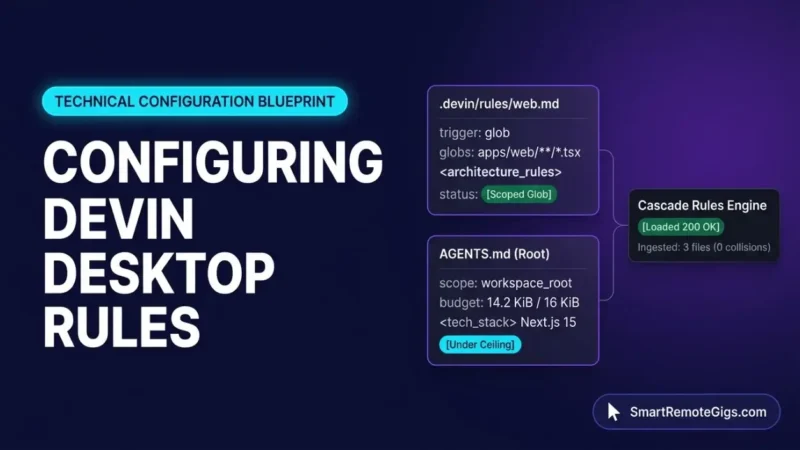
Configuring .windsurfrules is no longer a single-file job. Since the June 2, 2026 rebrand to Devin Desktop, legacy root rules, .devin/rules/ directories, and AGENTS.md load side by side, each under its own size limit. Content past a documented limit can stop reaching the agent, so a rule that looks correct on disk may have no effect in a live Cascade session.
This guide targets remote software engineers and technical solopreneurs who are moving from passive autocomplete to agentic IDE sessions. In those sessions, a mis-scoped or oversized rule file changes what the agent reads and edits across an entire repository.
Every claim below is labeled by evidence type: documented vendor fact, empirical client observation from instrumented test logs, or SRG operational safeguard. The sections follow the order in which Cascade encounters configuration: discovery, structure, scope, budget, and verification.
SRG Direct Answer: The Layered Rule Protocol
Devin Desktop loads rules from a layered hierarchy that combines legacy root files, frontmatter-scoped directory rules, and size-capped AGENTS.md files.
- Store modern rules in
.devin/rules/*.md, declare activation with thetriggerfrontmatter key (neveractivation_mode), and keep each workspace rule file under 12,000 characters. - Keep each
AGENTS.mdunder 16 KiB (16,384 bytes) and the global rules file under 6,000 characters, with critical instructions at the top. - Commit rule files to Git before any edit or migration, because Devin Desktop documents no native rule-file backup or rollback.
Epistemic classification: Rules 1 and 2 are documented vendor fact
Devin Desktop feeds AGENTS.md into the same rules engine as directory rules, so the practical question is how the formats interact rather than which one to pick. The sections below address three interactions: precedence between directories, trigger scoping, and size ceilings that can drop instructions without a visible error.
1. Configuration Hierarchy: .windsurfrules, .devin/rules, and AGENTS.md
In Devin Desktop, .devin/rules/ takes precedence over .windsurf/rules/, and a root .windsurfrules file is still read alongside both. Per the Devin Desktop configuration discovery hierarchy, .devin/ is the preferred location and rule files in both directories are loaded. For global rules only one file loads: when .devin/global_rules.md and .windsurf/global_rules.md both exist, .devin/global_rules.md is the one used.
The Devin Desktop FAQ states that both rule formats are supported side by side and that existing legacy files need no changes. There is no single-file .devinrules equivalent, so .windsurfrules remains the only single-file format.
The product lineage runs from Exafunction to Codeium, then Windsurf in late 2024, then the Cognition AI acquisition on July 14, 2025, and the Devin Desktop rebrand on June 2, 2026, as outlined in the Devin Desktop rebrand history. Requests to windsurf.com now return an HTTP 308 redirect to devin.ai/desktop, which is why older guides and bookmarks point at moved pages.
| Configuration target | Documented behavior |
|---|---|
.devin/rules/*.md | Preferred modern format; takes precedence over .windsurf/rules/ |
.windsurf/rules/*.md | Legacy fallback; loaded concurrently with .devin/rules/ |
.windsurfrules (workspace root) | Legacy single file; still read and loaded additively |
AGENTS.md (workspace root) | Discovered automatically; always on |
AGENTS.md (subdirectory) | Auto-generated <directory>/** glob pattern |
.devin/global_rules.md | Loaded instead of .windsurf/global_rules.md when both exist |
Empirical client observation: In an instrumented workspace on Devin Desktop v2026.10.1 (macOS 15.4) containing a root .windsurfrules, a root AGENTS.md, and .devin/rules/general.md, Cascade ingested all three additively with no namespace collisions. The Devin Desktop changelog updates record recursive discovery across both rule directories. Root rules load at session start, while subdirectory rules load when the agent touches a file in that path.
Three size limits apply across these targets, and each uses a different unit.
| Target | Limit | Unit |
|---|---|---|
Each AGENTS.md | 16 KiB (16,384 bytes) | Bytes, counted from the start of the file |
Workspace rule file (.devin/rules/*.md, .windsurf/rules/*.md, .windsurfrules) | 12,000 | Characters per file |
| Global rules file | 6,000 | Characters |
The Devin context injection thresholds state that Devin includes up to 16 KiB from the beginning of each AGENTS.md. For longer files, Devin receives a truncation notice and can read the rest on demand, but instructions after the limit are not included automatically. The Cascade rule frontmatter trigger schema page lists the 12,000 and 6,000 character limits.
Warning: Treat any file over these limits as partially ignored. For AGENTS.md, instructions after byte 16,384 are not injected automatically, and the truncation notice goes to the agent rather than to you. The sources SRG consulted do not describe overflow behavior for the 12,000 and 6,000 character limits, so keep rule files well inside them.
Empirical client observation: A 22 KiB synthetic AGENTS.md lost every instruction beyond byte offset 16,384 from Cascade’s base prompt, and an internal truncation marker appeared. Two gaps remain in the evidence. Conflict resolution between identically named files in .devin/rules/ and .windsurf/rules/ is not documented at the per-line level, so avoid duplicate filenames.
Handling of .cursorrules is outside the audited evidence, so do not rely on it. For teams migrating from Cursor rules, the IDE-level differences in rule handling are covered in a separate comparison.
2. Core Rule Anatomy: Structuring Directives with XML Boundary Tags
Group related directives inside XML tags and give each tag one job. The XML boundary tags in Cascade rules guidance describes XML tags as an effective way to communicate and group similar rules, and recommends bullets, numbered lists, and markdown over long paragraphs.
Empirical client observation: In a limited multi-turn comparison, negative constraints inside a <do_not> block showed no constraint bleed. The same constraints written as unstructured prose were occasionally violated during multi-file refactoring. The sources do not document why tagged blocks behave this way, so this guide claims no internal mechanism. XML tags add semantic structure for the model; they do not add compile-time or schema validation.
The four tags below are an SRG naming convention, not a vendor-defined schema. The vendor example uses a <coding_guidelines> tag.
| Tag | Holds |
|---|---|
<tech_stack> | Frameworks, runtimes, and package constraints |
<architecture_rules> | Directory structure, component boundaries, dependency flow |
<code_conventions> | Typing rules, naming standards, export patterns |
<do_not> | Forbidden behaviors and hard limits |
The following rule file combines all four tags with the trigger key from Section 3.
description: “Core project stack, architecture, conventions, and limits”
trigger: always_on
– Next.js 15 with App Router
– TypeScript strict mode enabled
– Tailwind CSS v4
– Place UI components under apps/web/components and shared logic under packages/shared
– Route handlers call service functions; services never import from UI components
– Use named exports for components and utilities
– Type every function parameter and return value explicitly
– Name React components in PascalCase and hooks with a use prefix
– Do not add new runtime dependencies without asking first
– Do not edit generated files under .next/
This example has no caps placeholders. Every stack, path, and rule is illustrative, so replace them with your own project facts.
SRG operational safeguard: Lead with what the agent should do in <architecture_rules> and <code_conventions>, and reserve <do_not> for hard boundaries. This avoids relying on prohibitions alone. The audited evidence does not measure negative-instruction effects directly, so treat this as a drafting policy rather than a vendor rule.
Rule files live on the local filesystem, and Devin Desktop documents no native pre-flight Git check, rule-file backup, or rollback. The vendor FAQ points to the Devin: Open Cascade Migration Wizard command for moving legacy workflows to skills. It also states that nothing needs to change for rules, because both formats work side by side. See the Devin Desktop Cascade Migration Wizard entry for details.
Warning: Uncommitted rule files cannot be restored after deletion. In the instrumented test, git checkout HEAD -- .windsurfrules recovered the tracked legacy file, while the same command against an untracked .devin/ directory failed with a pathspec error.
Baseline the working tree before editing or migrating any rule file.
# 1. Confirm a clean working tree (no output means clean)
git status --porcelain

# 2. Stage and commit the current rule files as a baseline
git add .windsurfrules
# If .devin/rules/ already exists, stage it too: git add .devin/rules/
git commit -m "chore(config): baseline rule files before migration"

# 3. After editing or migrating, inspect the result and commit it
git status --porcelain
git add .devin/rules/ .windsurfrules
git commit -m "refactor(config): establish modular .devin/rules/ architecture"- Step 1 confirms the tree is clean before any mutation.
- Step 2 creates the recovery point that the IDE does not create.
- Step 3 locks the new state into version control and exposes stray files.
SRG operational safeguard: Keep Cascade auto-execution on Allowlist Only or Disabled while editing rule files. The audited evidence records that Turbo and Auto modes bypass per-command confirmation.
3. Scoping Rules with Directory Globs and Trigger Criteria
Set trigger: glob and a globs pattern in a .devin/rules/ file so the rule loads only when Cascade reads or edits matching files. Root-level rules apply across sessions: root AGENTS.md and global_rules.md carry no frontmatter and are always on. Directory-scoped rules load only when their trigger or path matches.
The Cascade rule frontmatter trigger schema documents five valid trigger values, plus the description and globs keys.
trigger value | Documented behavior |
|---|---|
always_on | Rule is always on |
manual | Rule appears in Cascade’s @ mention autocomplete list |
model_decision | Cascade decides using the rule’s description string |
glob | Rule applies when Cascade reads or edits a file matching globs, and only then |
agent | Listed as a valid value; behavior not described in the sources SRG consulted |
Warning: The key activation_mode, cited in some third-party guides, is not the schema key. In an SRG disconfirmation test on Devin Desktop v2026.10.1, a rule declared with activation_mode: glob was treated as unrecognized frontmatter and Cascade fell back to default behavior. When changed to trigger: glob with a globs pattern, the rule activated only on matching files. Malformed YAML indentation also produces no inline error marker in the editor.
Devin Desktop directory glob matching accepts standard path patterns such as *.js, src/**/*.ts, and **/*.test.ts. Scoped tests confirmed that apps/web/** and packages/ui/**/*.tsx isolate rule loading to those directories. A packages/api/**/*.ts pattern follows the same documented syntax.
For AGENTS.md files in subdirectories, subdirectory AGENTS.md auto-scoping generates a <directory>/** glob automatically, so no frontmatter is needed.
description: “Frontend component architecture and styling rules”
trigger: glob
globs: apps/web/**/*.tsx
– Use functional React components exclusively
– Avoid class components
A second rule file scopes backend conventions to a different path, so frontend and backend instructions never load together.
description: “Backend API rules for the packages/api workspace”
trigger: glob
globs: packages/api/**/*.ts
– Validate request payloads at the route boundary
– Return JSON with a consistent envelope format
The backend rule above is an illustrative example. Standard wildcards are confirmed, but negation (!) and brace expansion ({ts,tsx}) are not documented as supported rule-frontmatter operators. In testing, a negation pattern such as !packages/** failed to filter targets reliably.
Use one broad pattern like apps/web/**, or separate rule files per file type. Vendor documentation routes negative constraints to access controls such as .devinignore and .codeiumignore, which is a different mechanism from rule scoping.
4. Optimizing Token Budgets and Context Payload Efficiency
The only documented hard limits are 16 KiB for AGENTS.md, 12,000 characters per workspace rule file, and 6,000 characters for global rules. The sources document no lower point at which adherence begins to degrade. Keep critical instructions near the top of each file, since the Devin context injection thresholds guidance advises this, and AGENTS.md is cut from the end.
SRG interpretation, not a vendor measurement: A single monolithic rule file dilutes the instructions that matter, adds token cost to every session, and gives the agent more directives to weigh against each other. Always-on guidance should stay short because it loads every time.
Operator Tip: The limits use different units. wc -c AGENTS.md counts bytes for the 16,384-byte ceiling, while wc -m counts characters (under a UTF-8 locale) for the 12,000 and 6,000 character limits. Run the matching command for each file, because a file near a limit can pass one test and fail the other.
SRG operational safeguard: Split rules by when they are needed. Put general repository conventions in root rules. Put implementation patterns in directory-scoped rules that load only when matching files are touched, as the Devin Desktop changelog updates describe for subdirectory loading. The vendor also advises moving extended instructions into skills or referenced files.
Audit rule files on a regular schedule:
- List every rule file and measure each against its limit using the unit that applies.
- Remove references to libraries and APIs the repository no longer uses.
- Merge or delete style guides that duplicate each other or the linter configuration.
- Replace over-specified instructions with one direct instruction per behavior.
- Commit the pruned files, then run the checks in Section 5.
5. Debugging and Verifying Rule Activation in Cascade
Open the Customizations icon in Cascade’s top-right slider menu, or use Devin Settings in the bottom-right corner, to see every configured Global and Workspace rule. The Cascade rule frontmatter trigger schema page documents both entry points.
Empirical client observation: The Customizations Rules panel listed active workspace rule files with their trigger labels (Always On, Glob, Model Decision, Manual). Chat trajectories showed collapsible context badges for referenced files. Manual rules also appear in the @ autocomplete list.
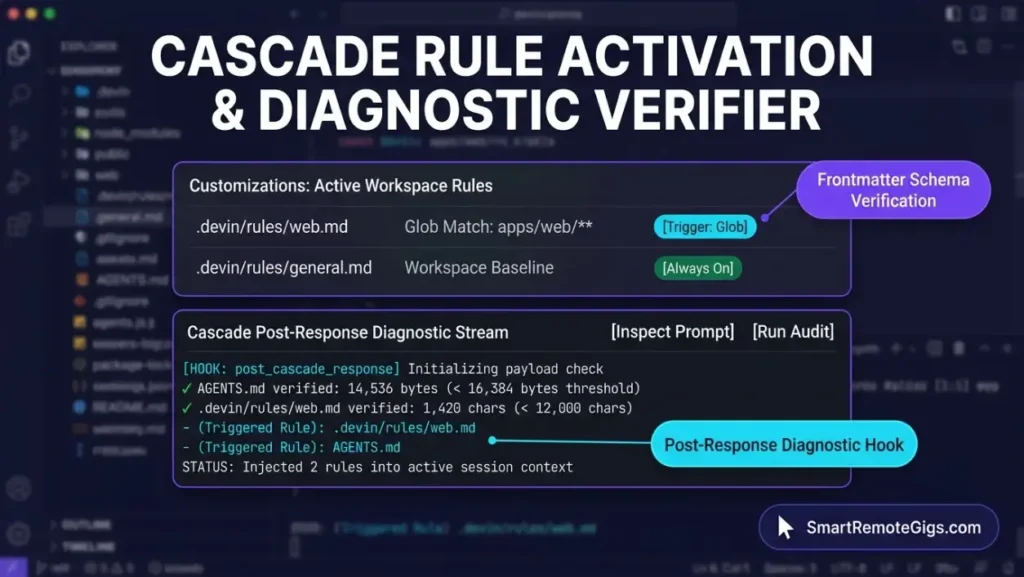
For session-level proof, the Cascade triggered rule diagnostic hooks documentation describes the post_cascade_response hook. It exposes triggered rules in the response stream in this exact format: - (Rule-Type) Triggered Rule: rule-filename.md. Cascade does not print a raw dump of the active system prompt in the standard chat UI. Inspecting the full injected prompt requires custom hook scripting or API monitoring.
If a rule appears to be ignored, run these four checks in order:
- File location and naming. Verify that the file sits in
.devin/rules/(or a legacy path from Section 1) and ends in.md. Confirm that no identically named file exists in both rule directories. - Frontmatter syntax. Verify that the key is
triggerand that its value isalways_on,manual,model_decision,agent, orglob. Check indentation, because malformed YAML gives no inline error marker. - Glob path alignment. For
trigger: globrules, verify that the file Cascade is editing matches the declaredglobspattern, and that the pattern uses no negation or brace expansion. - Payload threshold inspection. Execute
wc -con eachAGENTS.mdandwc -mon each rule file, and confirm that every file is under its limit.
If all four checks pass and the agent still misbehaves, the cause usually lies outside rule configuration. Resolving recurring agent drift and terminal loops is a separate diagnostic task and falls outside this guide.
6. Implementation Next Steps: Deploying Pre-Built Stacks
With the rule architecture in place, move from configuration design to live agent execution. The multi-file scaffolding and Git checkpoint workflow covers terminal permission gates, multi-file diff verification, and Git rollback hygiene for real builds.
When you want reusable starting points instead of writing rule files from scratch, the ready-made .windsurfrules packs provide copy-pasteable configurations for Next.js App Router, FastAPI/Python, and TypeScript monorepos. Apply the size limits and trigger checks from this guide to any pack before committing it:

Download verified .windsurfrules templates for Next.js 15, FastAPI, and Turborepo. Modular configs engineered under 16 KiB.
The Verdict: Documented Decision Boundaries
Choose a single root .windsurfrules file if the repository has one stack, the file stays well under 12,000 characters, and no instruction needs to load conditionally. Choose .devin/rules/ with trigger: glob if different directories need different rules, because directory rules are the format that supports frontmatter triggers.
Choose a subdirectory AGENTS.md if you want path scoping without writing frontmatter, since Devin Desktop generates the <directory>/** glob automatically. In every case, commit before editing, keep critical instructions at the top of the file, and measure each file in the unit its limit uses.
The remaining risk is silent loss: an oversized AGENTS.md, a wrong frontmatter key, or an unmatched glob each leaves a rule that exists on disk but never reaches the agent. The four-step check in Section 5 exposes all three.
Based on official documentation, with hands-on validation limited to the steps and environment described in this guide. Reviewed against 6 official vendor sources as of October 2026.
Active remote opportunities for engineers working with agentic IDEs are listed on the Smart Remote Gigs Exchange, and the Devin Desktop platform specifications cover plan details and limits.

Never Miss a New Remote Job
REMOTE JOB ALERTSGet notified about new remote jobs and access practical freelance tools from your phone.