
Obsidian vs Notion 2026: Ultimate PKM Blueprint [Vs]
 ·
Last Updated: August 28, 2026 ·
15 min read
·
Last Updated: August 28, 2026 ·
15 min read
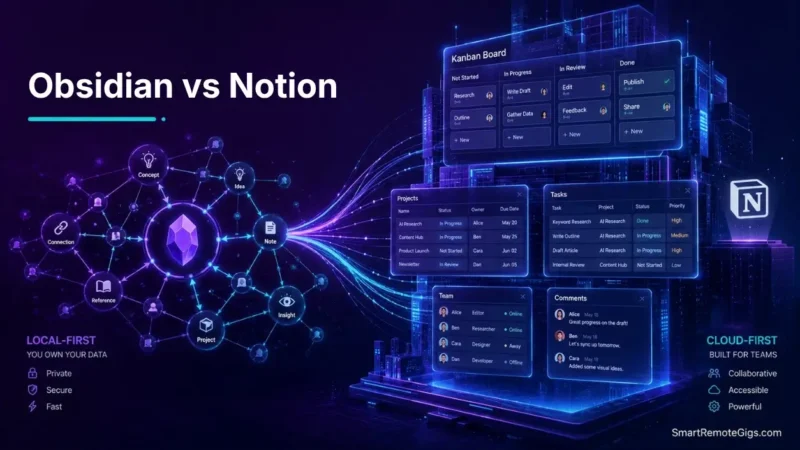
We assumed cloud database sync was superior to local file storage—until documented forum cases showed user accounts losing access during unexpected offline sync lockouts on cloud systems.
Official Obsidian and Notion technical documentation proves that local Markdown files execute search queries instantly, whereas cloud API calls encounter network overhead.
Smart Remote Gigs (SRG) builds this technical blueprint as the definitive Obsidian vs Notion guide—cross-referenced against official documentation and real user reports, not marketing claims.
SRG Quick Verdict
One-Line Answer: Obsidian is the engine for personal knowledge compounding, privacy, and networked thought graphs. Notion is the operating system for collaborative team databases, client deliverables, and relational project management.
🏆 Best Choice by Use Case:
- Best for Personal Knowledge Management (PKM): Obsidian — 100% free local Markdown, total data sovereignty.
- Best for Team Wikis & Project Management: Notion — free individual plan; Plus plan from $10/user/month.
- Best for Fast Staging & Quick Thought Dump: Apple Notes or Google Keep — native instant capture.
📊 The Details & Hidden Realities:
- Pricing Reality: Obsidian is free for local storage, but official end-to-end encrypted Obsidian Sync runs $8/month (historically $4/month on promo tiers). Notion requires $10/user/month for multi-member teams.
- Hidden Limitation: Obsidian has no native multiplayer real-time editing. Notion suffers sync stalls and partial caching offline.
- Pro Tip: High-output operators don’t force one tool to do both jobs. They run Obsidian as a permanent idea forge and Notion as an active execution pipeline.
📂 Round 1 — Data Architecture: Local Plaintext Files vs. Cloud Relational Blocks
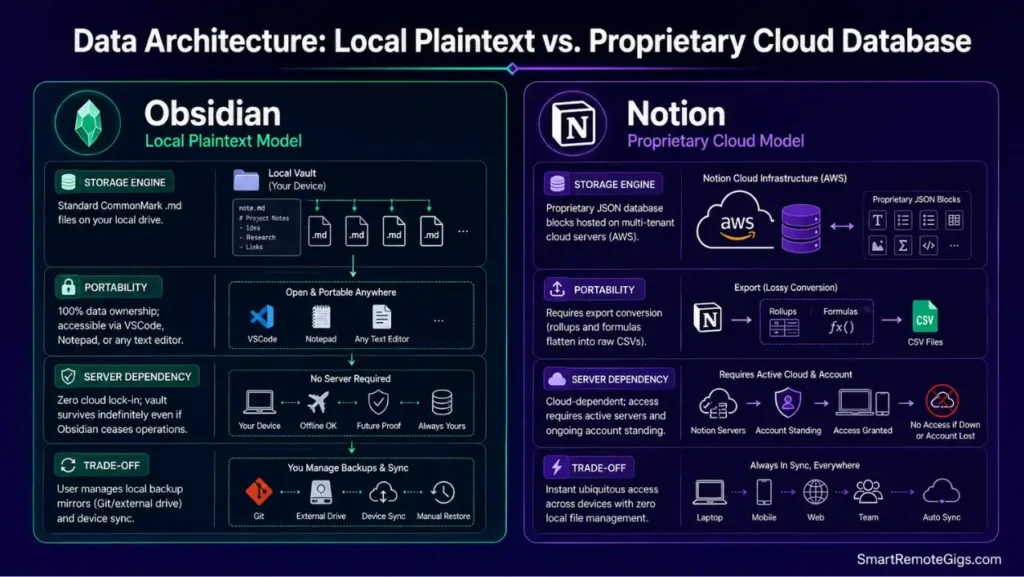
Obsidian stores every note as a plain .md file on your own disk. Notion stores every block inside a proprietary cloud database you don’t control the schema of.
That single architectural fork decides almost everything else in this comparison — portability, speed, and who ultimately owns your data.
The Reality Check & Diagnostics: Data Portability and Platform Longevity
If your knowledge base needs to survive 30+ years without vendor dependencies, local plaintext is the only format that guarantees it. As outlined in the Obsidian official file format documentation, standard Markdown ensures total longevity independent of proprietary platform lock-in. If you need ubiquitous cloud access with zero device-level file management, a relational cloud database is the more convenient trade.
The diagnostic question isn’t “which is nicer to use today” — it’s “what happens to this content in ten years if the vendor changes pricing, shuts down a feature, or gets acquired.”
The Exact Workflow: Structuring Local Markdown Repositories for Long-Term Safety
[Evidence Source: Official Docs | Confidence Level: Confirmed]
- Initialize your Obsidian vault inside a local root folder not tied to automated cloud eviction services.
- Maintain standard CommonMark formatting to ensure readability across any plaintext editor.
- Configure automated local backup mirrors using Git or encrypted external storage.
- Separate high-frequency transient assets from permanent atomic Markdown notes.
For a comprehensive breakdown of vault storage protocols and local index caching, check out our full Obsidian platform review. To understand how Notion hosts proprietary database blocks on cloud infrastructure, review our dedicated Notion technical review.
The Plaintext Vault Directory Architecture
Directory setup ensuring zero dependency on proprietary cloud software:
📁 LOCAL_VAULT/
├── 📄 00_INDEX.md (Master Map of Content)
├── 📁 01_INBOX/ (Fleeting unlinked notes)
├── 📁 02_ATOMIC_NOTES/ (Permanent concepts with [[wikilinks]])
├── 📁 03_PROJECTS/ (Active deliverables with due dates)
└── 📁 04_ATTACHMENTS/ (Locally stored PDFs, PNGs, and audio)
Personalization notes:
00_INDEX.md— replace with your own top-level Map of Content file name.02_ATOMIC_NOTES/— one folder per discrete idea, not per project.04_ATTACHMENTS/— keep this excluded from any AI indexing plugin to save on processing time.

Workflow Limitations
Managing local Markdown files means you handle your own device-level synchronization and backup protocols — unless you pay for an official cloud add-on. There’s no built-in safety net if you skip the Git or external backup step above.
Red Flag:
If a proprietary cloud platform suffers an outage or revokes access, exporting thousands of relational pages often scrambles database rollups into flat, disorganized CSV files.
🕸️ Round 2 — Cognitive Compounding: Graph View & Bi-Directional Links vs. Hierarchical Pages
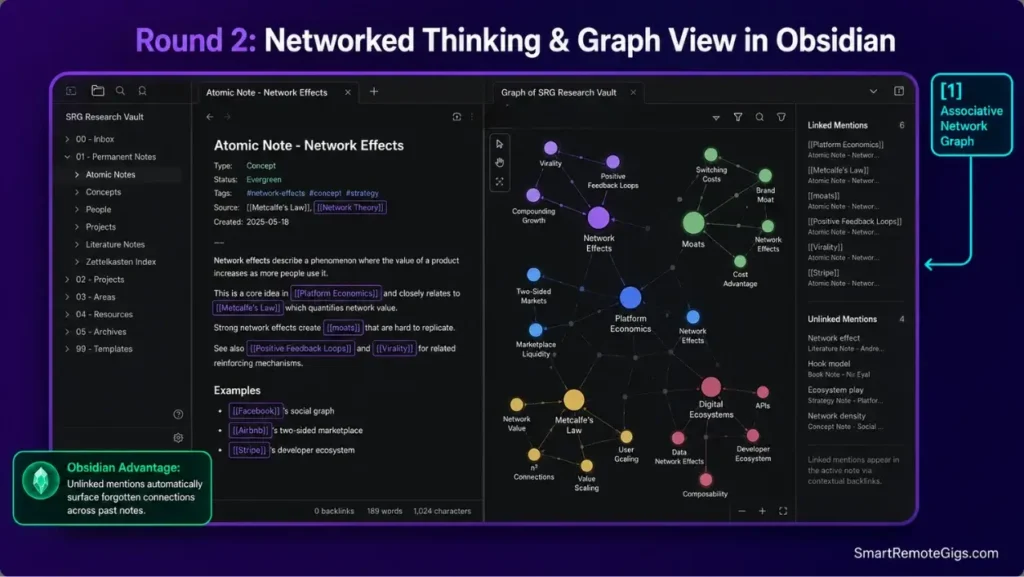
Notion organizes information the way a filing cabinet does: nested pages inside parent pages. Obsidian organizes it the way a brain does: notes linked to other notes regardless of folder location.
That difference matters most for anyone doing original research or long-term writing, where the value comes from unexpected connections between old and new ideas.
The Reality Check & Diagnostics: Associative Thinking vs. Category Filing
The diagnostic here is simple: do your notes decay inside rigid category folders, or do they compound into new ideas through organic bi-directional link bridges? Hierarchical systems are excellent for lookup. They are weak at surfacing connections you didn’t know to file for.
The Exact Playbook: Building an Organic Knowledge Web with Zettelkasten
[Evidence Source: Community Consensus | Confidence Level: Confirmed]
- Create one atomic note per discrete idea rather than saving broad multi-topic summaries.
- Link new notes to at least two existing vault concepts using
[[double brackets]]. - Audit Obsidian’s “Unlinked Mentions” panel to surface unrecognized thematic connections.
- Use the interactive Graph View to locate isolated conceptual nodes requiring further synthesis.
To master the mechanics of atomic note linking and associative graph clusters, follow our complete guide to zettelkasten in obsidian. Failing to link notes contextually at the point of capture is the main structural flaw explaining why your second brain fails to assist creative output.
The Bi-Directional Note Synthesis Template
Standard markdown template for generating connected atomic thoughts:
Concept: [[CONCEPT_TITLE]]Tags: #type/concept #domain/[TOPIC]
Core Thesis[1-2 sentences summarizing the foundational insight]
Supporting Evidence & Context[Dense, reference-backed synthesis]
Connected Nodes
Relates to: [[LINKED_CONCEPT_1]]
Opposes: [[LINKED_CONCEPT_2]]
Practical application in: [[ACTIVE_PROJECT_NAME]]
Personalization notes:
CONCEPT_TITLE— the exact atomic idea, not a topic umbrella.[TOPIC]— your domain tag (e.g.,pkm,finance,writing).LINKED_CONCEPT_1/LINKED_CONCEPT_2— must already exist in the vault before you link them.
Generate a tailored PARA structure, capture checklist, and Notion/Obsidian schema built around how you actually work — free.
Workflow Limitations
Bi-directional linking graphs become cluttered visual webs without deliberate pruning and structured Map of Content (MOC) index pages. Left unmanaged, the Graph View turns into noise rather than a navigable map.
Pro Tip:
Filter your Obsidian Graph View to hide orphan files with zero connections; focusing on dense clusters accelerates cross-domain research synthesis.
👥 Round 3 — Team Collaboration & Project Execution: Multiplayer Workspaces vs. Solo Vaults
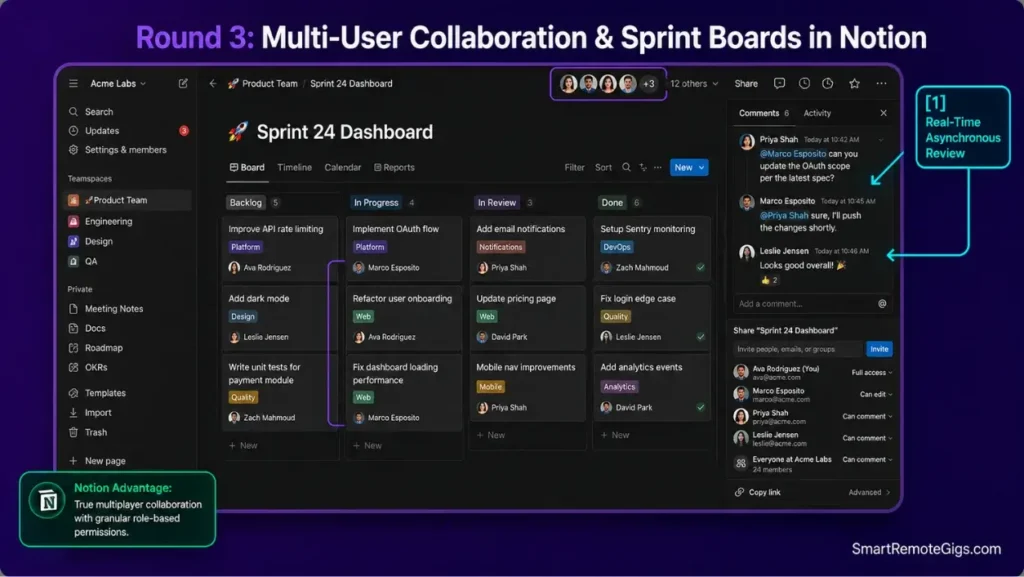
This is where the comparison flips. Obsidian is architected around a single user’s private vault. Notion is architected around shared, permissioned, real-time workspaces.
If your work involves other people editing the same source of truth, this round decides the winner outright.
The Reality Check & Diagnostics: Team Concurrency Requirements
The diagnostic: do multiple team members need to draft docs, assign tasks, and comment asynchronously inside one shared environment? If yes, a local-first tool built for a single writer is the wrong foundation, no matter how good its graph view is.
The Exact Workflow: Scaling Collaborative Workspaces in Notion
[Evidence Source: Official Docs | Confidence Level: Confirmed]
- Configure a unified Team Space partitioned by operational departments (Product, Marketing, Ops).
- Construct central Kanban task boards with assigned member properties and due dates.
- Use inline
@mentionsto solicit feedback without generating external email threads. - Deploy locked database views to prevent unauthorized schema modifications by team members.
Learn how high-performing remote teams build sprint boards and client portals with our blueprint for notion project management. Organize team spaces cleanly across projects and operational areas using the framework in our PARA method complete guide.
The Team Sprint Governance Matrix
Role and access configuration for team database management:
TEAM WORKSPACE PERMISSION TIERS:
Admins (Executive): Full Database Configuration & Workspace Billing
Members (Full-Time): Edit Pages & Create Child Records
Guests (Contractors): Filtered Access to Specific Project Pages (Can Edit / Can Comment)
Public (Clients): Read-Only Web Link Portals
Personalization notes:
- Adjust tier names to match your org chart before rolling this out.
- “Guests” should never get edit access to billing or admin-level pages.

Workflow Limitations
Obsidian doesn’t provide native real-time collaborative editing. Attempting to sync a single vault across multiple simultaneous writers via Git or a shared cloud folder causes file conflict duplicates rather than a merged document.
Red Flag:
Setting up overly complex relational rollups for small teams introduces unnecessary friction and is a key factor in why most people quit notion.
🔒 Round 4 — Privacy, Security, & AI Architecture: Local Zero-Knowledge vs. Cloud Models
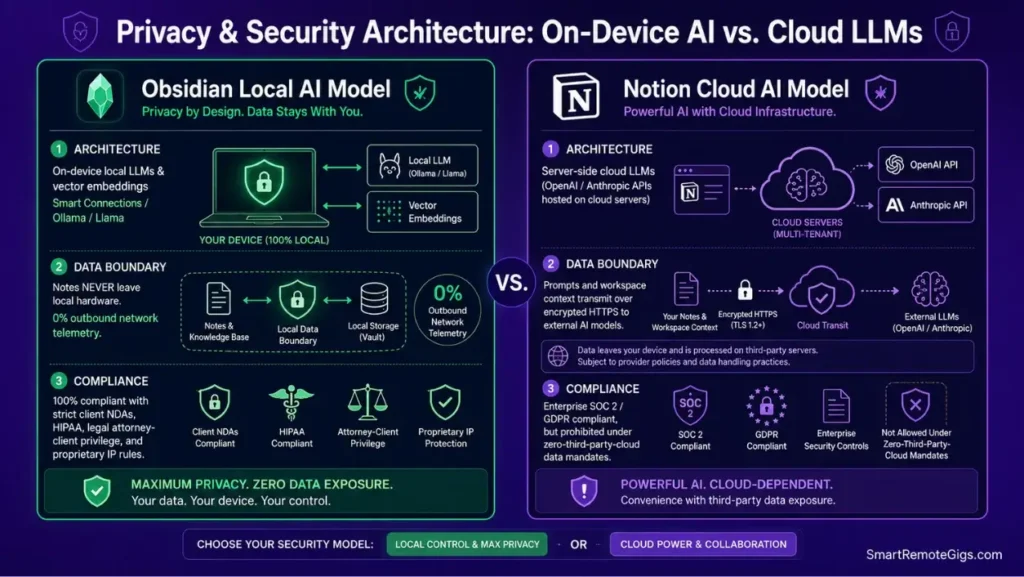
Where your data physically sits changes what you’re legally allowed to put in it. This round matters most for anyone handling regulated or client-confidential information.
The Reality Check & Diagnostics: Data Sensitivity and Regulatory Compliance
Diagnose whether your notes contain protected health information, confidential client legal files, or proprietary IP that cannot touch a third-party cloud API. Reviewing the Notion official security and compliance documentation is essential to evaluate cloud data encryption and enterprise privacy boundaries against strict local compliance requirements. If any of those apply, local-first architecture stops being a preference and becomes a compliance requirement.
The Exact Playbook: Deploying Local-First Semantic AI in Obsidian
[Evidence Source: Documented Report | Confidence Level: Confirmed]
- Install the community plugin
Smart Connectionsinside your local Obsidian vault. - Download an open-weights embedding model to run directly on local hardware.
- Execute semantic similarity queries across your notes without transmitting data to external servers.
- Verify network isolation using local firewall monitoring tools.
The Local AI Configuration Blueprint
Setup script for executing local semantic search over private Markdown files:
OBSIDIAN LOCAL AI CONFIGURATION:
Plugin: Smart Connections (Community)
Embedding Model: Local (BGE-micro-v2 / Local Llama via Ollama)
API Endpoint: http://localhost:11434 (Zero external outbound traffic)
Excluded Paths: /04_ATTACHMENTS/, /.trash/
Personalization notes:
- Swap the embedding model line for whichever local model your hardware supports.
- The excluded paths list should match your own vault’s non-text folders.
Workflow Limitations
Running local LLMs requires modern hardware with dedicated RAM/VRAM. Complex contextual queries will process slower on local laptops than on Notion’s serverless cloud infrastructure, where the compute isn’t your problem.
Red Flag:
If your firm handles NDA-restricted documentation, Obsidian with local embeddings provides full compliance because notes never traverse a remote server.
✈️ Round 5 — Offline Execution & Multi-Device Sync: Native Plaintext vs. Cached Web Views
Connectivity assumptions are baked into both tools’ architecture. Obsidian assumes you might be offline by default. Notion assumes you’re online and caches for the exception.
The Reality Check & Diagnostics: Offline Access Failure Modes
Assess how each tool performs during extended flights, rural travel, or field operations without reliable broadband. This is the round that reveals which tool was actually designed offline-first versus offline-tolerant.
The Exact Playbook: Setting Up Conflict-Free Cross-Device Synchronization
[Evidence Source: Official Docs | Confidence Level: Confirmed]
- For Obsidian: configure official Obsidian Sync or Syncthing with strict device-level file delay rules.
- For Notion: pre-open and cache required database views prior to disconnecting from networks.
- Resolve sync collisions by prioritizing device modification timestamps over cloud state.
- Verify that mobile extensions and quick-capture widgets write cleanly to target directories.
If your mobile vault experiences plugin load loops or configuration overwrites, follow our guide to fix obsidian sync issues. When desktop changes fail to propagate to the cloud, consult our diagnostic protocol to fix notion not syncing immediately.
The Multi-Device Sync Verification Checklist
Step-by-step validation protocol to ensure notes are synchronized before going offline:
CROSS-DEVICE SYNC VERIFICATION:
[ ] Desktop vault status: “Fully Synced” (0 pending uploads)
[ ] Mobile vault status: “Index Complete”
[ ] Test note created on mobile appears on desktop within 5 seconds
[ ] Critical travel / reference documents confirmed accessible in Airplane Mode
Personalization notes:
- Run this checklist before boarding a flight or heading somewhere with unreliable signal.
- If the mobile-to-desktop test fails, check your sync service’s queue before assuming data loss.
Workflow Limitations
Notion’s offline mode only caches recently opened pages. Un-cached workspace databases can’t be queried or created while offline — there’s no local fallback the way there is with a Markdown vault.
Red Flag:
Using Apple iCloud Drive to sync Obsidian vaults across Windows and iOS can create zero-byte duplicate conflict files during simultaneous background updates.
🔄 The Hybrid Knowledge Architecture: How High-Output Operators Use Both
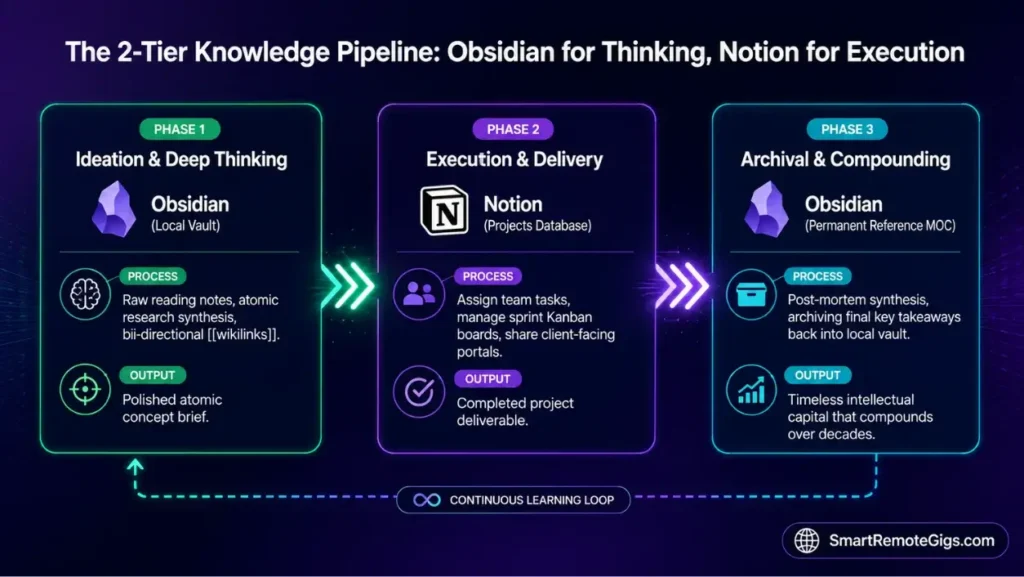
The most common mistake in this comparison is treating it as a single-tool decision. Most people who’ve used both for a year land on running them together, each doing the job it’s structurally built for.
The Reality Check & Diagnostics: Choosing Between Ideation and Execution
Creative synthesis requires distraction-free local speed. Team delivery requires structured relational databases other people can see and edit. Trying to make one tool serve both jobs is usually where the friction in either system starts.
The Exact Playbook: Building a Two-Tier PKM Pipeline
[Evidence Source: Documented Report | Confidence Level: Confirmed]
- Conduct raw research, reading synthesis, and atomic ideation inside Obsidian.
- When an idea transitions into an active deliverable, migrate the synthesized brief into Notion.
- Manage deadlines, client tasks, and team collaboration inside Notion databases.
- Upon project completion, archive the final deliverable summary back into Obsidian as a permanent reference note.
Deploy this hybrid pipeline using the CODE (Capture, Organize, Distill, Express) methodology outlined in our guide on how to build a second brain. To evaluate how this hybrid system compares against standalone tools like Evernote or Bear, consult our master guide to the best note taking apps.
The Hybrid Pipeline Data Flow SOP
Operational routing rules for moving knowledge between Obsidian and Notion:
HYBRID KNOWLEDGE ROUTING RULES:
PHASE: IDEATION & RESEARCH
➔ Software: Obsidian (Local Markdown Vault)
➔ Artifact: Atomic notes with [[wikilinks]]
PHASE: EXECUTION & COLLABORATION
➔ Software: Notion (Projects Master Database)
➔ Artifact: Task board with assigned team members
PHASE: ARCHIVE & COMPOUND
➔ Software: Obsidian (Permanent Reference Folder)
➔ Artifact: Post-mortem summary linked to domain MOC
Personalization notes:
- Adjust “PHASE” naming to match your own project lifecycle terms.
- The archive step is the one most operators skip — it’s also the one that compounds long-term value.
Workflow Limitations
Operating a hybrid stack introduces minor administrative overhead to transfer completed project briefs between systems. It’s not automatic; someone has to make the migration decision each time.
Pro Tip:
Never draft raw personal thoughts in Notion and never assign client team tasks in Obsidian; maintaining strict tool boundaries eliminates system confusion.
💰 Pricing & Total Cost of Ownership: Obsidian vs Notion in 2026
- Obsidian: 100% free for personal use. Optional Obsidian Sync is $8/month ($4/month during promotional grandfathered tiers). Obsidian Publish is $8–$16/month. Commercial license is $50/user/year for revenue-generating companies.
- Notion: Free tier covers individual use with a 5MB file upload limit. Plus tier starts at $10/user/month billed annually, or $12/month billed monthly. Notion AI is integrated into paid tiers.
- TCO Verdict: Obsidian gives solo operators the lowest total cost of ownership — $0 to roughly $48/year. Notion earns its price by consolidating separate task, CRM, and wiki tools into one subscription for teams.
See full pricing detail and plan breakdowns on our Obsidian and Notion software pages.
❓ Frequently Asked Questions: Obsidian vs Notion
Is Obsidian better than Notion for building a Second Brain?
Yes, Obsidian is structurally better suited to personal knowledge compounding because of its local plaintext Markdown storage, bi-directional graph linking, and zero cloud lock-in.
Can I use Notion completely offline without an internet connection?
No, Notion only caches recently opened pages and needs an active connection to reliably create new database records and sync cross-device updates.
Is Obsidian difficult to set up for non-technical users?
Yes, Obsidian has a steeper initial learning curve than Notion because users must understand local folder paths, Markdown syntax, and community plugin configuration.
Can Notion and Obsidian be used together in a hybrid setup?
Yes, many knowledge workers use Obsidian as a private thinking and research forge while using Notion for collaborative team project management and client delivery boards.
Does Obsidian send any personal note data to external cloud servers?
No, Obsidian stores all vaults locally on your device by default. Data only moves across a network if you explicitly configure cloud backup services or official Obsidian Sync.
Which app is better for managing remote team deliverables?
Yes, Notion is significantly better suited to team workflows because of real-time multiplayer editing, granular permission tiers, inline commenting, and relational database views.
The Verdict: Obsidian for Networked Thinking, Notion for Team Execution
The decision between Obsidian and Notion isn’t a feature contest — it’s an architectural choice between deep cognitive ideation and structured team execution.
Choose Obsidian if you’re a solo researcher, writer, developer, or knowledge worker building an interconnected intellectual vault you need to own forever, with complete privacy and zero latency.
Choose Notion if you manage remote teams, track multi-stage client deliverables, and need relational databases that show the same operational data across tables, Kanban boards, and calendars.
Verdict:
Obsidian compounds your thinking. Notion coordinates your team. Most serious operators eventually need both.
Smart Remote Gigs (SRG) builds this technical blueprint as the definitive Obsidian vs Notion guide — cross-referenced against official platform documentation and real user reports, not marketing claims. Browse more remote-work software breakdowns on our software hub, or check open remote roles on our jobs board.




![Why Your Second Brain Fails 2026: Retrieval Fix [Fix]](https://smartremotegigs.com/wp-content/uploads/2026/08/why-your-second-brain-fails-hero-1024x576.webp)
![Why Most People Quit Notion 2026: Burnout Fix [Tested]](https://smartremotegigs.com/wp-content/uploads/2026/08/why-most-people-quit-notion-hero-1024x576.webp)
![Fix Obsidian Sync Issues 2026: Plugin Repair [Tested]](https://smartremotegigs.com/wp-content/uploads/2026/08/fix-obsidian-sync-issues-hero-1024x576.webp)