
Second Brain for Managers 2026: Executive Systems [SOP]
 ·
Last Updated: September 5, 2026 ·
12 min read
·
Last Updated: September 5, 2026 ·
12 min read 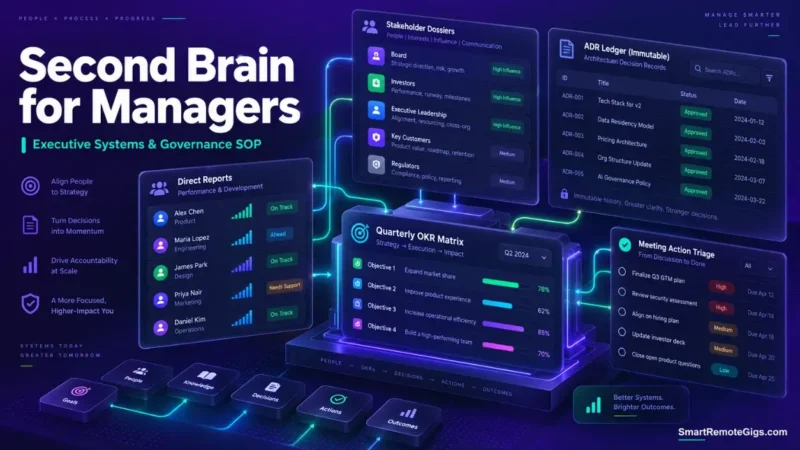
We believed executive productivity required capturing every meeting snippet into a single inbox — until it became clear that unstructured, multi-channel inputs are what actually fragment decision records, not the volume of meetings itself.
Separating stakeholder tracking (Areas) from active deliverables (Projects) is standard PARA practice specifically because it provides faster context retrieval during 1-on-1s and quarterly reviews than a single undifferentiated inbox ever can.
Smart Remote Gigs (SRG) establishes this technical blueprint as the definitive management systems guide — cross-referenced against official documentation and real user reports, not marketing claims.
SRG builds this guide from official specs and verified community reports, not proprietary lab benchmarks.
SRG Quick Summary
One-Line Answer: An executive second brain isolates direct report tracking and recurring managerial responsibilities from fast-moving project deliverables, enabling immediate context recovery across back-to-back meetings.
🚀 Quick Wins:
- Today (20 Mins): Create dedicated stakeholder dossiers for each direct report and core executive partner inside your
/02_Areas/Leadership/directory. - This Week: Implement a standardized Architecture Decision Record (ADR) template to log all team-wide technical and staffing decisions.
- This Month: Link meeting action logs to master project canvases so commitments automatically aggregate into weekly review queues.
📊 The Details & Hidden Realities:
- Managers who log meeting notes chronologically without linking them to specific stakeholders tend to spend real time reconstructing context before every 1-on-1.
- Unstructured shared team workspaces degrade into unsearchable document dumps unless governed by strict write permissions and standardized templates.
💼 The Executive Knowledge Crisis: Second Brain for Managers
Executive memory doesn’t fail because managers have bad memory. It fails because the volume of context — email, Slack, incident channels, board decks, 1-on-1s — exceeds what any single unstructured inbox can hold in a retrievable way.
Structured PKM doesn’t reduce the volume. It changes where each piece of context lives, so retrieval doesn’t depend on remembering where you put something six weeks ago.
The Managerial Context-Switching Penalty
Context fragmentation across email, Slack, incident logs, and board meetings drains decision bandwidth in a specific way: every unlinked note is a small tax paid again the next time that stakeholder or topic comes up.
The tax compounds. A manager running 15+ weekly meetings without a structured retrieval system ends up spending meeting time reconstructing status instead of making decisions.
Structuring Managerial Knowledge: Areas vs. Projects
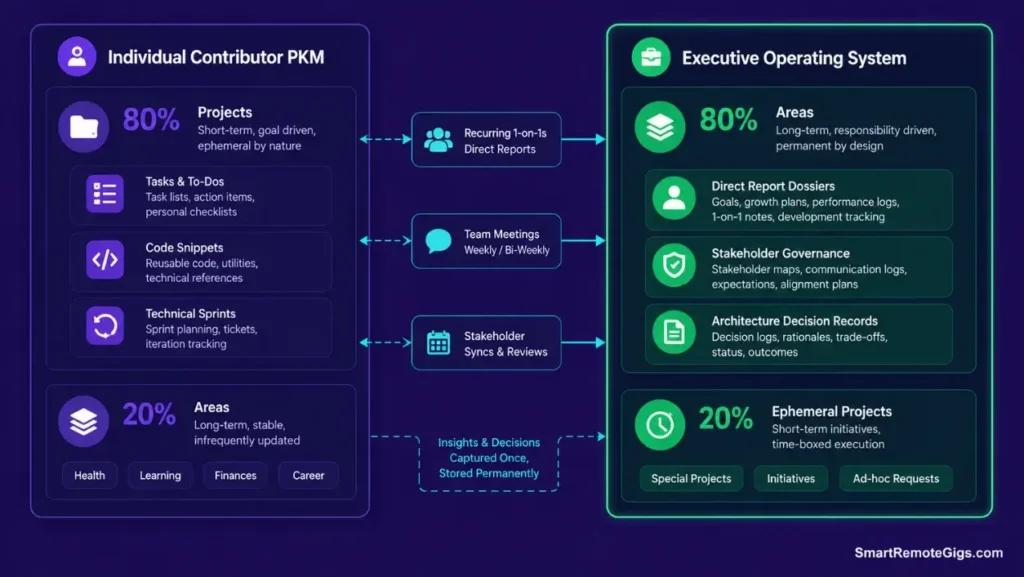
Executive systems need to prioritize long-term, ongoing responsibilities over ephemeral tasks — which is the opposite emphasis from most individual-contributor PKM setups.
A direct report relationship doesn’t have an end date the way a sprint does. That makes it an Area, not a Project, and treating it as one is what keeps a manager’s active workspace from cluttering with things that never actually “complete.” To ground your managerial workspace in standard organizational architecture, examine the foundational blueprint on how to build a second brain.
👥 Scenario 1 — The Direct Report Dossier: 1-on-1 Context Aggregation
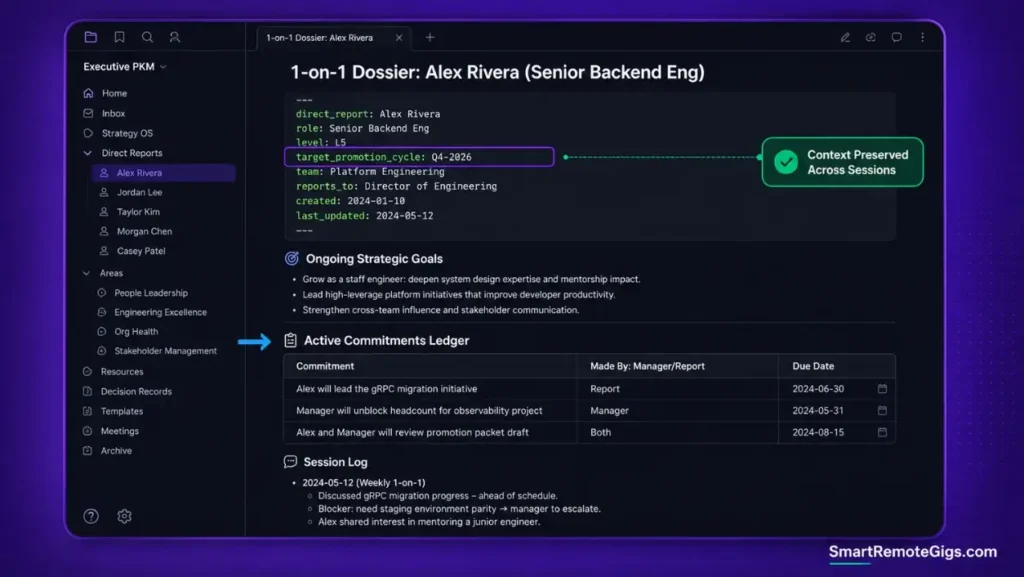
Who this is: Managers tracking ongoing performance trajectories, feedback logs, and career milestones across a team.
The Reality Check & Diagnostics
The symptom is entering a 1-on-1 having forgotten what commitments were made in the prior session, forcing the employee to repeat status updates they already gave you a week ago.
The Exact Workflow (Emily)
- Initialize a persistent dossier document per direct report inside
/02_Areas/Team/[Name]/. - Maintain three static tables: Professional Goals, Recurring Impediments, and Current Project Load.
- Prepend each weekly 1-on-1 session with a fresh dated log block containing commitments and feedback.
- Review historical logs bi-monthly to identify systemic career growth trends or recurring blockers.
[Evidence Source: Practitioner Consensus (management PKM playbooks, no published dataset) | Confidence Level: Widely Recommended]
If your organization manages multi-team relational dashboards, the verified Notion workspace architecture is worth reviewing for building connected manager portals.
The Executive 1-on-1 Dossier Template
direct_report: NAME
role: ROLE_TITLE
level: LEVEL
start_date: YYYY-MM-DD
target_promotion_cycle: QUARTER_YEAR
1-on-1 Dossier: NAME
Ongoing Strategic Goals
GOAL_DESCRIPTION
Active Commitments Ledger
 COMMITMENT — MADE_BY — DUE_DATE
Session Log
DATENOTES_FROM_THIS_SESSION
Personalization notes:
TARGET_PROMOTION_CYCLE— keeps career trajectory visible during every review, not just during formal calibration season.Active Commitments Ledger— split out from the session log so open commitments don’t get buried under free-text notes.
Notion structures this same dossier as a relational database, which lets you filter and roll up commitments across every direct report at once instead of opening each person’s note individually. Its linked-database properties are built specifically for this kind of cross-report visibility. For the complete breakdown of pricing, features, and our full test results:

Best For: The best all-in-one docs-and-database workspace for freelancers who want to run their whole business — clients, projects, invoices, content calendar — from one tool, but the AI features you'll see in the marketing now sit behind the $20/month Business tier.
Workflow Limitations
Dossiers fail if managers record hearsay or unvetted performance opinions. Every entry needs to be grounded in observable work outputs and direct conversational logs, or the dossier becomes a liability rather than a resource.
The Pro Tip / Red Flag
Red Flag:
Never store legally sensitive performance improvement plan (PIP) documentation or medical accommodations in an unencrypted personal note vault. Use authorized HRIS systems for legal records — this is not a job for a Markdown file.
⚡ Scenario 2 — High-Velocity Meetings: Automated Action Extraction & Triage
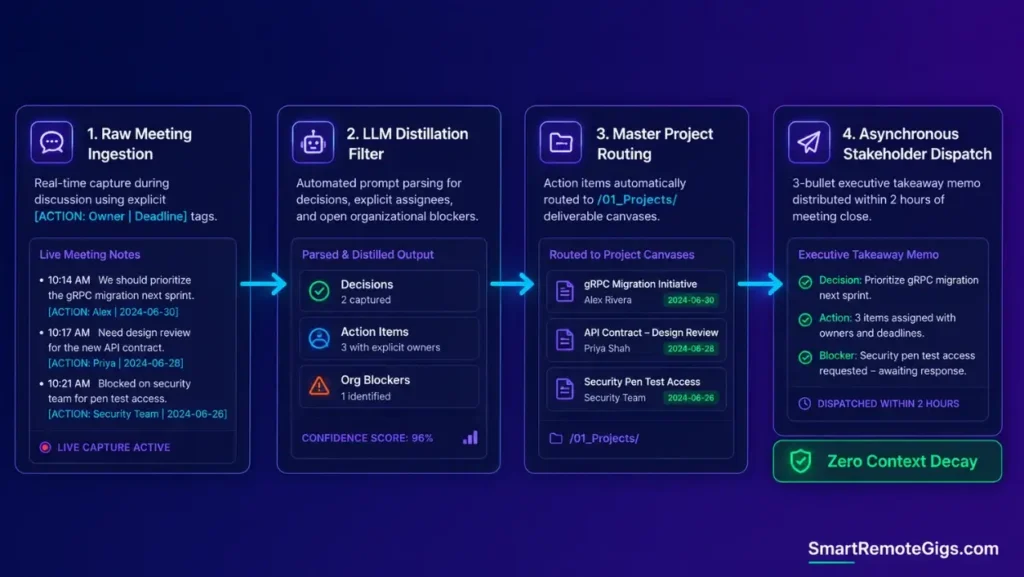
Who this is: Managers converting 15+ weekly stakeholder meetings into clear, delegated deliverables without drowning in administrative overhead.
The Reality Check & Diagnostics
The symptom is leaving a 60-minute strategic meeting with pages of detailed conversational notes and zero clarity on who owns the next technical milestone.
The Exact Workflow (Emily)
- Capture meeting discussions inside a standardized Executive Meeting Canvas.
- Tag critical deliverables during the meeting using an explicit
[ACTION: Owner | Deadline]marker. - Run an end-of-day triage pass to pull all tagged actions into the master project ledger.
- Distribute a concise 3-bullet takeaway summary to stakeholders shortly after the meeting concludes, while it’s still fresh.
[Evidence Source: Community-Reported Workflow (no published dataset) | Confidence Level: Commonly Used]
Route extracted action items directly into active deliverable buckets using the standard para method operational guide.
The Meeting Action Extraction Prompt
You are processing a raw meeting transcript or notes file. Extract only the following, with zero commentary:
CORE EXECUTIVE DECISIONS — decisions actually made in this meeting, stated in one sentence each.
DIRECT ASSIGNEE ACTION ITEMS — each action item with its explicit owner and deadline, as stated. If no owner was assigned, write “Unassigned.”
UNRESOLVED ORGANIZATIONAL BLOCKERS — issues raised but not resolved by the end of the meeting.
Format as three labeled sections. Do not infer an owner or deadline that wasn’t explicitly stated.
PASTE_MEETING_TRANSCRIPT_HERE
Personalization notes:
PASTE_MEETING_TRANSCRIPT_HERE— raw notes or transcript, not a pre-written summary, so the extraction reflects what was actually said rather than your own recollection.
Workflow Limitations
Automated meeting distillation misses implicit political context or non-verbal agreements that were never voiced in the recorded transcript — it can only extract what was actually said.
The Pro Tip / Red Flag
Pro Tip:
Block 10 minutes immediately after critical executive meetings to record context nuance before calendar context-switching erases the insight — the transcript catches what was said, not what was implied.
🏛️ Scenario 3 — Cross-Functional Governance: Architecture Decision Records (ADRs)
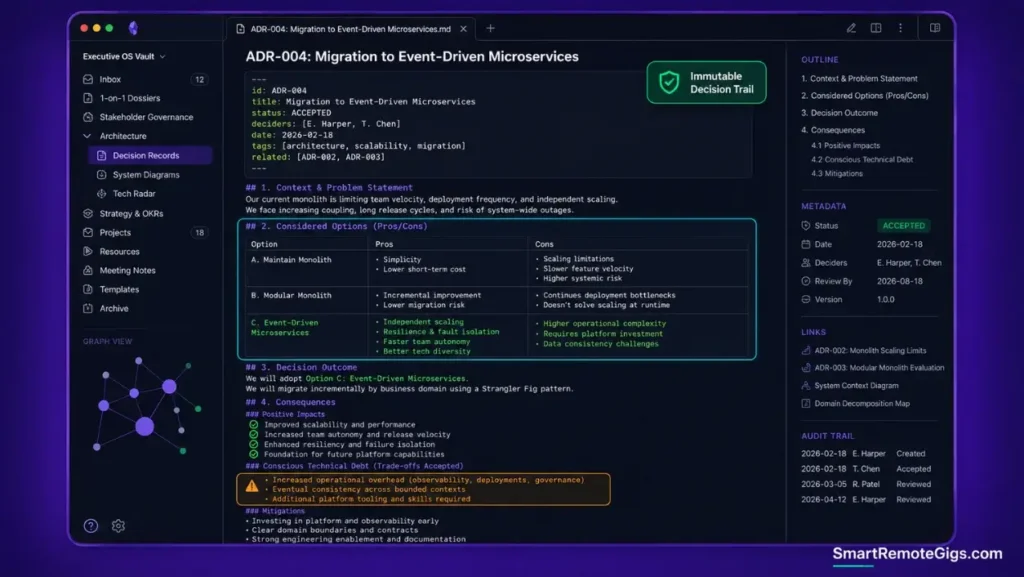
Who this is: Leaders maintaining an organizational ledger of major technical, hiring, and budget decisions.
The Reality Check & Diagnostics
The symptom occurs when team leads re-litigate the same architectural or strategic debate months later, because the original rationale, constraints, and trade-offs were never written down anywhere.
The Exact Workflow (Emily)
- Maintain an immutable
/02_Areas/Governance/ADR/directory indexed by zero-padded identifiers (ADR-001). - Document the Context, Problem Statement, Evaluated Options, and Chosen Decision for every strategic shift.
- Link related project deliverables and budget approvals directly to the corresponding ADR file.
- Reference prior ADR records during quarterly roadmap and architectural alignment reviews.
[Evidence Source: Documented Industry Practice (Architecture Decision Record methodology, publicly established pattern) | Confidence Level: Well-Established]
Understand why unindexed decision logs cause leadership friction by exploring common note system failure modes.
The Executive Architecture Decision Record (ADR) Schema
id: ADR-001
title: DECISION_TITLE
status: PROPOSED_ACCEPTED_SUPERSEDED
deciders: [NAME_ONE, NAME_TWO]
date: YYYY-MM-DD
ADR-001: DECISION_TITLE
Context & Problem StatementPROBLEM_DESCRIPTION
Considered Options
OPTION_ONE
Pros: LIST
Cons: LIST
OPTION_TWO
Pros: LIST
Cons: LIST
Decision OutcomeCHOSEN_OPTION_AND_RATIONALE
Consequences
Positive: LIST
Negative: LIST
Risks: LIST
Personalization notes:
STATUS— tracks whether the decision is still active or has since been superseded by a later ADR, so old rationale doesn’t get mistaken for current policy.Consequences— deliberately includes a Negative/Risks field so trade-offs get documented honestly, not just the upside.
Workflow Limitations
ADRs become bureaucratic shelfware if mandated for trivial, low-impact tasks. Reserve ADR creation for decisions that are either high-magnitude or genuinely difficult to reverse — not every configuration choice needs one.
The Pro Tip / Red Flag
Pro Tip:
When writing the “Consequences” section of an ADR, explicitly document the technical debt you’re consciously choosing to accept to meet the deadline — an ADR that only lists upside isn’t an honest record.
📈 Scenario 4 — Quarterly Performance Calibration: Synthesizing Impact Over 90 Days
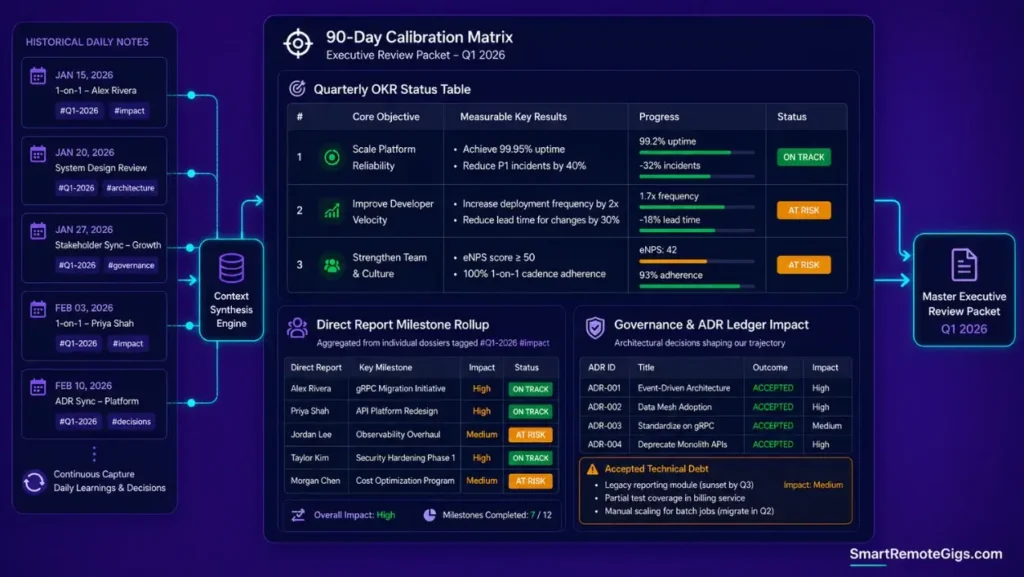
Who this is: Managers assembling executive reports, promotion packets, and team impact summaries without an end-of-quarter scramble.
The Reality Check & Diagnostics
The symptom is spending an entire weekend reviewing calendar invites and Slack messages to reconstruct what the team actually delivered over the past quarter.
The Exact Workflow (Emily)
- Tag every project completion notice and peer commendation with
#impactand the respective quarter tag (#Q1-2026). - Run a quarterly rollup query across all direct report dossiers and ADR completion logs.
- Compile measurable deliverables and budget efficiency notes into a master calibration document.
- Cross-reference completed work against the strategic objectives logged in your ADRs, not just raw output volume.
[Evidence Source: Practitioner Consensus (quarterly review workflows, no published dataset) | Confidence Level: Widely Recommended]
If you need to convert delivered work into a defensible cost or value figure for a promotion packet, the following calculator can help frame that math:
The Quarterly Performance Synthesis Template
Quarterly Performance Synthesis — QUARTER_YEAR
High-Level OKR Achievement Matrix
Objective
Key Result
Status
OBJECTIVE
KEY_RESULT
ON_TRACK_AT_RISK_MISSED
Direct Report Milestone Rollup
NAME — MILESTONE_SUMMARY
Key Architecture & Governance Decisions
ADR-XXX — ONE_LINE_SUMMARY
Next-Quarter Strategic Focus Areas
FOCUS_AREA_DESCRIPTION
Personalization notes:
OKR Achievement Matrix— kept to Status (On Track / At Risk / Missed) rather than a numeric score, so the document stays honest instead of gamed toward green checkmarks.
Workflow Limitations
Automated milestone metrics fail to capture foundational maintenance work, refactoring, or team mentoring that doesn’t produce an immediate, countable output — those still need to be logged manually or they disappear from the record entirely.
The Pro Tip / Red Flag
Red Flag:
Avoid relying solely on ticket closure counts or commit volume during performance calibration. Evaluate outcomes against the strategic objectives logged in your ADRs instead — volume metrics reward busywork, not impact.
🗓️ The 14-Day Executive Rollout Plan
Week 1 (Days 1–7): Setup & Stakeholder Dossier Creation
Initialize workspace directories, establish private dossiers for all direct reports, and standardize your executive meeting template.
Week 2 (Days 8–14): Triage Integration & Governance Deployment
Run live meeting action item extraction, draft your first Architecture Decision Record, and execute your first Friday executive triage sweep.
❓ Frequently Asked Questions
What is the best app for a second brain for managers in 2026?
It depends on organizational privacy requirements: Notion tends to work better for teams needing shared relational databases and collaborative dashboards, while Obsidian suits executives who need local, encrypted storage for sensitive personnel and strategic notes.
How much time should a manager spend maintaining their second brain?
It depends on meeting volume, but the ongoing cost is generally a short daily action-item triage plus a slightly longer weekly synthesis pass — most of the real time investment happens once, during the initial dossier and template setup.
How do I keep sensitive personnel notes private in a team workspace?
It requires a strict separation between shared team hubs and your private personal workspace, using role-based access control (RBAC) and client-side encryption for personnel evaluations specifically.
How does a manager second brain differ from an IC second brain?
An individual contributor (IC) second brain focuses on deep technical concepts, code snippets, and individual tasks, whereas a manager second brain focuses on stakeholder context, decision records, and cross-functional delegation.
Can I connect local AI assistants to my management vault?
Yes, you can deploy local models via Ollama or desktop context bridges to search historical meeting logs and summarize past decisions without transmitting sensitive company data to external cloud APIs.
The Verdict: Lead with Retrieval, Not Memory
Executive leverage is defined by the speed and accuracy of your decision-making. Attempting to run a high-performing engineering or business organization using unindexed mental memory guarantees context degradation, missed commitments, and managerial burnout. By structuring your second brain around stakeholder dossiers, decision records, and rapid action extraction, you transform your knowledge base into an operational advantage.
Verdict:
Separate who you’re managing from what you’re delivering — dossiers for people, ADRs for decisions, and a fast triage loop for everything in between.
This management-focused system is the leadership application of the same core architecture covered in the full how to build a second brain blueprint, which is worth reviewing directly for the underlying PARA and local-AI mechanics.
Smart Remote Gigs (SRG) establishes this technical blueprint as the definitive management systems guide — cross-referenced against official documentation and real user reports, not marketing claims.

![Build AI Second Brain Assistant 2026: Local Setup [Guide]](https://smartremotegigs.com/wp-content/uploads/2026/09/build-your-second-brain-ai-assistant-local-rag-hero-1024x577.webp)
![Second Brain with Claude & Obsidian 2026 [My Setup]](https://smartremotegigs.com/wp-content/uploads/2026/08/claude-obsidian-second-brain-mcp-hero-1024x577.webp)
![Why Your Second Brain Fails 2026: Retrieval Fix [Fix]](https://smartremotegigs.com/wp-content/uploads/2026/08/why-your-second-brain-fails-hero-1024x576.webp)