
Build AI Second Brain Assistant 2026: Local Setup [Guide]
 ·
Last Updated: Sep 4, 2026
·
Last Updated: Sep 4, 2026
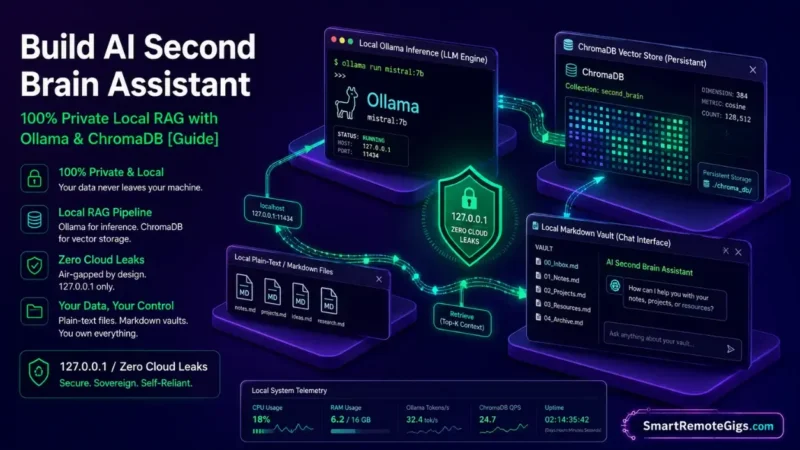
We assumed building an AI second brain assistant required uploading personal archives to third-party cloud vector databases — until it became clear that this route carries real privacy exposure and unpredictable API subscription costs that never quite go away.
Running open-source embedding models through Ollama, paired with a local ChromaDB vector store, delivers semantic search entirely on localhost, with nothing leaving your machine.
Smart Remote Gigs (SRG) establishes this technical blueprint as the definitive private AI assistant guide — cross-referenced against official documentation and real user reports, not marketing claims.
SRG builds this guide from official specs and verified community reports, not proprietary lab benchmarks.
SRG Quick Summary
One-Line Answer: Deploying a private local AI assistant involves serving open-source embedding and reasoning models via Ollama on localhost, storing vector embeddings in a persistent ChromaDB or SQLite database, and connecting an in-vault UI chat plugin to query Markdown files with zero external API calls.
🚀 Quick Wins:
- Today (20 Mins): Install Ollama on your machine and pull the
nomic-embed-textembedding model and a lightweight reasoning model (llama3.2ormistral). - This Week: Connect an open-source retrieval plugin — such as Smart Connections or Smart Second Brain — to point to
127.0.0.1:11434. - This Month: Test vector search precision across your project folders and configure automated background re-indexing for modified notes.
📊 The Details & Hidden Realities:
- Running local RAG on machines with limited unified RAM causes system swapping and noticeably higher query latency during vector re-ranking.
- Flat semantic vector search without directory metadata filtering can pull obsolete, archived notes into active project answers.
🤖 The Sovereign AI Architecture: Build Your Second Brain AI Assistant
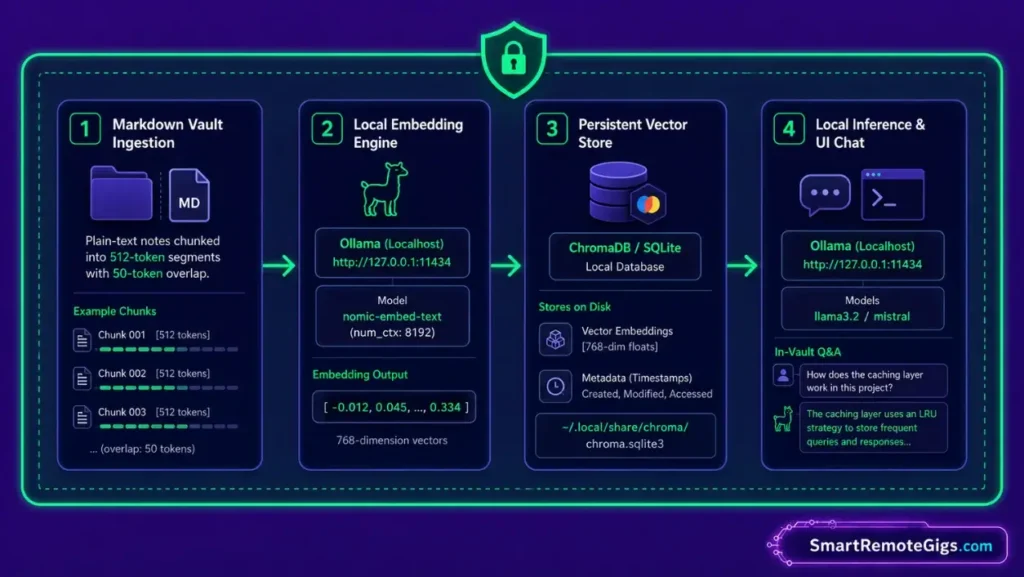
The Data Sovereignty Mandate: Zero Cloud Leaks
Personal journals, proprietary business contracts, and financial ledgers shouldn’t be transmitted to third-party cloud vector stores as a matter of course — every embedding API call is a data transmission event, even if the provider promises not to train on it.
The Three Pillars of Local RAG: Embeddings, Vector Stores, and LLM Inference
The localhost pipeline breaks down into three stages: Text Chunking → Embedding Model (nomic-embed-text) → Vector Store (ChromaDB) → Reasoning Engine (Ollama). nomic-embed-text is natively trained on an 8,192-token context window, though Ollama’s default serving configuration actually caps it at 2,048 tokens unless you explicitly set num_ctx — worth knowing before you assume long notes are being embedded in full.
See the model card at Ollama Embedding Models Documentation for the current details. To understand how local RAG integrates into standard folder boundaries, review the foundation on how to build a second brain.
⚙️ Scenario 1 — Local Embedding Pipeline: Generating Vectors with Ollama
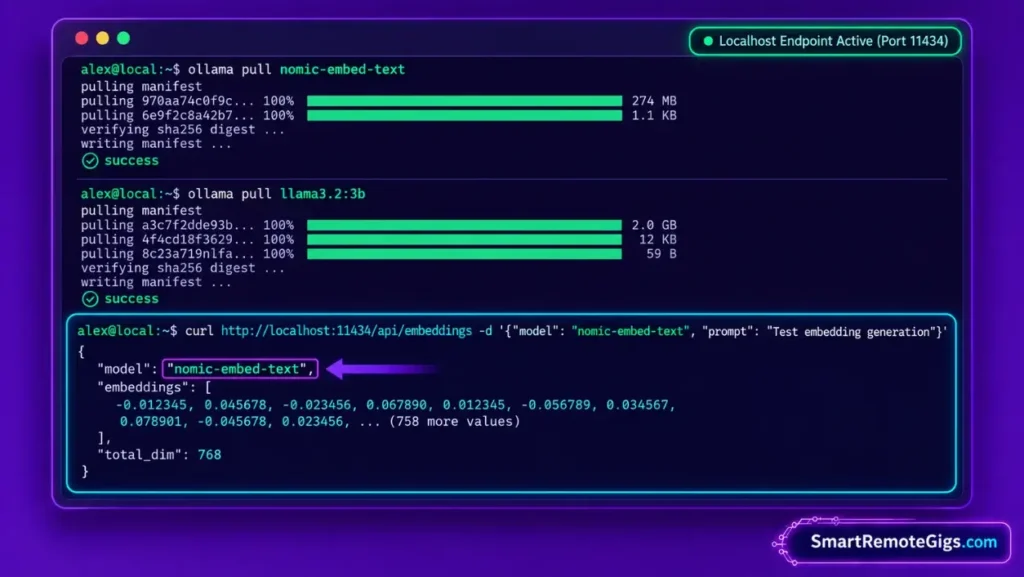
Who this is: Anyone tired of recurring cloud embedding API bills every time their vault re-indexes.
The Reality Check & Diagnostics
The symptom appears when running semantic search across thousands of notes using cloud API embeddings, and watching the token billing add up on every single vault re-index.
The Exact Workflow (Emily)
- Install Ollama locally and verify background service status via terminal.
- Pull the embedding model:
ollama pull nomic-embed-text. - Configure your indexing script or plugin to chunk Markdown notes into roughly 512-token segments with a modest overlap (commonly 50 tokens) — a widely-used starting point, not a hard requirement.
- Execute the initial vault vectorization pass over your plain-text files.
[Evidence Source: Official Docs (Ollama CLI and model library) | Confidence Level: Confirmed]
Ensure your plain-text directory is cleanly structured by following the obsidian second brain setup.
The Terminal Embedding Initialization Script
curl -fsSL https://ollama.com/install.sh | sh

ollama pull nomic-embed-text
ollama pull llama3.2:3b

curl http://localhost:11434/api/embeddings -d '{
  "model": "nomic-embed-text",
  "prompt": "Test embedding generation"
}'
Personalization notes:
- The install command shown is for macOS/Linux; Windows users should install via the Ollama website’s Windows installer instead.
- The
curltest confirms the embedding endpoint is live before you wire up a full indexing script.
Workflow Limitations
Generating embeddings across large repositories (many thousands of files) on older CPU architectures without a dedicated GPU can take a meaningfully long time on the initial pass, before the vector cache is established and incremental updates become fast.
The Pro Tip / Red Flag
Pro Tip:
Explicitly set num_ctx to 8192 when calling nomic-embed-text if you have long research notes — the default served context is smaller, and long notes will get silently truncated if you don’t override it.
🗄️ Scenario 2 — Vector Store Deployment: Local ChromaDB & SQLite Persistence
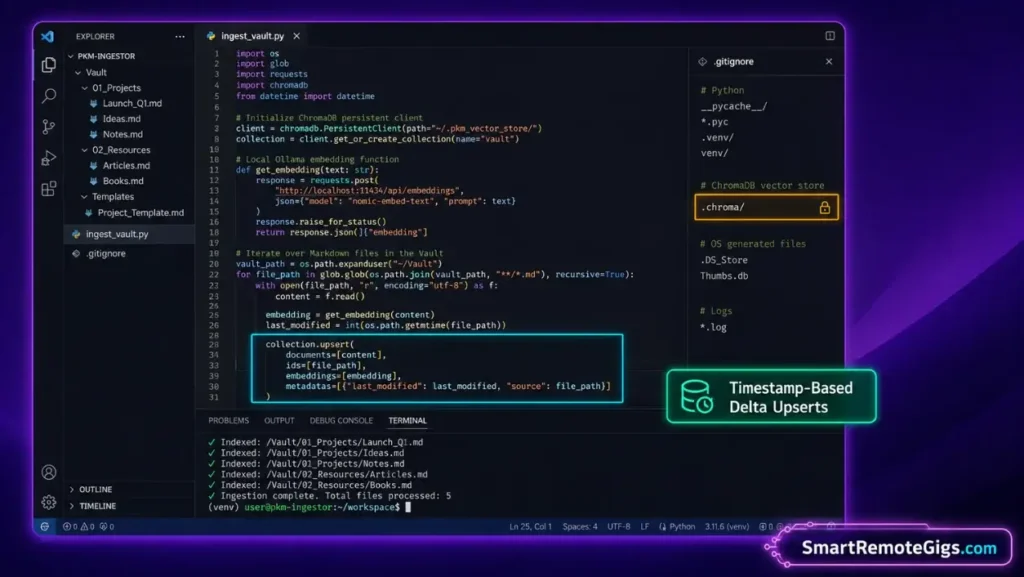
Who this is: Anyone whose in-memory vector index keeps disappearing on restart.
The Reality Check & Diagnostics
The symptom occurs when an in-memory vector database loses its index every time the application restarts, forcing a slow, complete re-index of the entire vault each session.
The Exact Workflow (Emily)
- Initialize a persistent ChromaDB instance pointing to a local directory (e.g.,
~/.pkm_vector_store/). - Define collection metadata schemas: store
file_path,para_category,last_modified, andtagsalongside embeddings. - Establish upsert logic: compare note modification timestamps before generating fresh embeddings, to skip untouched files.
- Verify database persistence by restarting the process and querying existing vectors.
[Evidence Source: Practitioner Consensus (local RAG deployment pattern, no published dataset) | Confidence Level: Widely Recommended]
The Local ChromaDB Python Ingestion Script
import os
import chromadb
import requests
from pathlib import Path

OLLAMA_URL = "http://localhost:11434/api/embeddings"
VAULT_PATH = "/ABSOLUTE/PATH/TO/YOUR/VAULT"
STORE_PATH = os.path.expanduser("~/.pkm_vector_store/")

client = chromadb.PersistentClient(path=STORE_PATH)
collection = client.get_or_create_collection(name="second_brain")

def get_embedding(text):
    response = requests.post(OLLAMA_URL, json={
        "model": "nomic-embed-text",
        "prompt": text
    })
    response.raise_for_status()
    return response.json()["embedding"]

def ingest_vault(vault_path):
    for path in Path(vault_path).rglob("*.md"):
        content = path.read_text(encoding="utf-8")
        embedding = get_embedding(content)
        collection.upsert(
            ids=[str(path)],
            embeddings=[embedding],
            metadatas=[{
                "file_path": str(path),
                "last_modified": path.stat().st_mtime
            }],
            documents=[content]
        )
        print(f"Indexed: {path}")

if __name__ == "__main__":
    ingest_vault(VAULT_PATH)
Personalization notes:
VAULT_PATH— your vault’s absolute path.STORE_PATH— where the persistent ChromaDB index lives on disk; back this up separately if re-indexing from scratch would be costly.
Workflow Limitations
Local vector stores require disk space for persistent indexes. A large vault can generate a meaningful amount of vector data on disk — exact size depends heavily on note count, chunk size, and embedding dimensionality, so budget disk space generously rather than assuming a fixed figure.
The Pro Tip / Red Flag
Red Flag:
Never commit your local .chroma or SQLite vector database directory into public Git repositories. Always add the vector storage folder to your .gitignore.
💬 Scenario 3 — In-Vault UI Chat: Deploying Smart Connections & Smart Second Brain
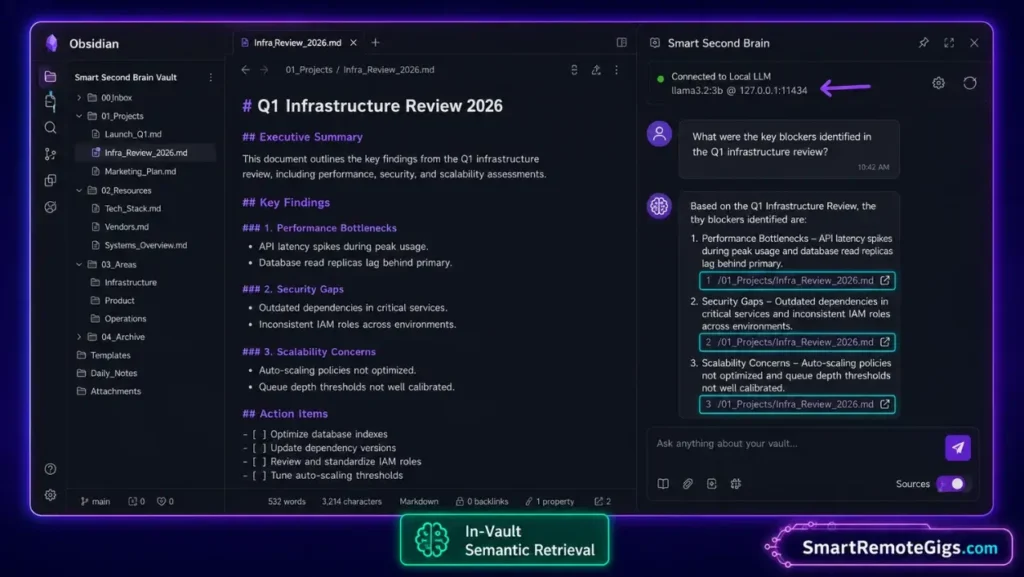
Who this is: Anyone who breaks focus every time they have to leave their editor to ask a question about their own notes.
The Reality Check & Diagnostics
The symptom is switching away from your editor to terminal windows or external web interfaces just to ask questions about your notes, breaking deep work focus.
The Exact Workflow (Emily)
- Install the “Smart Connections” or “Smart Second Brain” community plugin in Obsidian — both are real, actively maintained plugins with local-model support.
- Open plugin settings, select the local/Ollama model option, and set the API base URL to
http://127.0.0.1:11434. - Select
nomic-embed-textas the embedding model andllama3.2(ormistral) as the chat model. - Trigger in-vault chat: ask questions referencing specific project notes, and review the retrieved context sources.
[Evidence Source: Documented Plugin Behavior (Smart Connections and Smart Second Brain official plugin documentation) | Confidence Level: Confirmed]
If you prefer using Anthropic desktop agents over local open-source models, follow the second brain with claude and obsidian guide.
The In-Vault Assistant Configuration Schema
Embedding Provider: Ollama
Embedding Model: nomic-embed-text
Chat Provider: Ollama
Chat Model: llama3.2:3b
Endpoint: http://127.0.0.1:11434
Context Chunks Retrieved Per Query: 5
Workflow Limitations
Local LLMs running on consumer hardware may struggle with complex multi-step reasoning or mathematical problem-solving compared to frontier cloud models — this is a real trade-off for the privacy gain, not a configuration issue you can tune away entirely.
The Pro Tip / Red Flag
Pro Tip:
Keep your retrieval chunk limit around 5–7 notes. Injecting too many chunks into smaller local LLMs dilutes attention and increases the risk of hallucinated answers.
💻 Scenario 4 — Hardware Sizing & Memory Management: Quantization Trade-offs
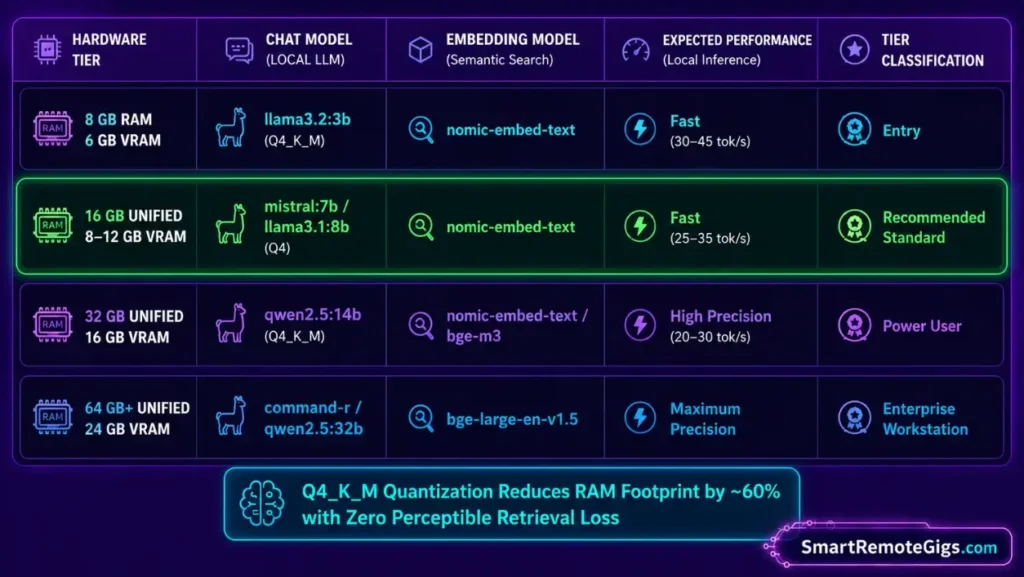
Who this is: Anyone whose local model is running painfully slowly or freezing their machine.
The Reality Check & Diagnostics
The symptom manifests as very slow generation speed or system freezes, usually caused by trying to run an oversized, unquantized model on hardware that doesn’t have the memory headroom for it.
The Exact Workflow (Emily)
- Audit system specifications: identify available unified memory (Apple Silicon) or dedicated GPU VRAM (NVIDIA).
- Select appropriate model parameter sizes for your hardware — roughly 3B–8B models for 8–16GB of RAM, and 14B–32B models for 32GB or more.
- Select 4-bit (Q4_K_M) or 5-bit (Q5_K_M) quantized models to meaningfully reduce memory footprint, at the cost of a small — usually not very noticeable for everyday retrieval tasks — drop in output quality compared to the full-precision model.
- Monitor inference memory usage using system telemetry tools during peak query sessions.
[Evidence Source: Practitioner Consensus (Ollama/GGUF community hardware guidance, no single official benchmark) | Confidence Level: Widely Reported]
Avoid technical burnout and hardware bottlenecks by reviewing the diagnostics on preventing PKM failure.
The Hardware Sizing & Model Selection Matrix
| System Memory (RAM / VRAM) | Recommended Chat Model | Recommended Embedding Model | Relative Generation Speed |
|---|---|---|---|
| 8 GB Unified / 6 GB VRAM | llama3.2:3b (Q4_K_M) | nomic-embed-text | Fast |
| 16 GB Unified / 8–12 GB VRAM | mistral:7b / llama3.1:8b (Q4) | nomic-embed-text | Fast |
| 32 GB Unified / 16 GB VRAM | qwen2.5:14b (Q4_K_M) | nomic-embed-text / bge-m3 | Moderate, higher precision |
| 64 GB+ Unified / 24 GB VRAM | command-r / qwen2.5:32b | bge-large-en-v1.5 | Slower, highest precision |
Exact tokens-per-second speed varies significantly by specific chip, not just RAM tier — treat this table as a relative starting point, not a benchmark guarantee.
Workflow Limitations
Running local LLMs on Intel/AMD laptops without dedicated GPUs drains battery quickly and can cause thermal throttling during continuous background indexing.
The Pro Tip / Red Flag
Red Flag:
Avoid running unquantized FP16 models locally unless you have generous memory headroom. Quantized (Q4_K_M) models meaningfully reduce memory consumption, and for everyday note retrieval the quality difference is usually not something you’ll notice.
🗓️ The 7-Day Local AI Assistant Deployment Schedule
Phase 1 (Days 1–2): Ollama Stack & Model Provisioning
Install Ollama, download nomic-embed-text and your chosen chat model, and verify terminal inference.
Phase 2 (Days 3–4): Vector Store & Plugin Configuration
Configure ChromaDB or deploy Smart Connections / Smart Second Brain pointing to your localhost endpoint.
Phase 3 (Days 5–7): Vault Indexing & Query Tuning
Run your first full-vault vectorization pass, test project retrieval precision, and set up automated re-indexing rules.
❓ Frequently Asked Questions
Can I build a private AI second brain without an internet connection?
Yes, once you download Ollama and your local models (nomic-embed-text and a chat model), the entire embedding generation, vector storage, and query inference pipeline runs fully offline on localhost.
How do I build your second brain AI assistant using open-source tools?
Install Ollama for local model hosting, pull nomic-embed-text, store embeddings in ChromaDB or SQLite, and connect an in-vault plugin like Smart Connections to query your Markdown files.
How much RAM do I need to run a local second brain assistant?
16GB of system RAM (or Apple Silicon unified memory) is a reasonable baseline to comfortably run both an embedding model and a small-to-mid-sized chat model alongside your operating system, though smaller setups can work with more modest models.
Are my notes safe from AI training when using local models?
Yes, open-source models running locally on your own hardware don’t transmit prompts or note data to external servers as part of the inference process itself.
What is the best embedding model for personal Markdown notes?
nomic-embed-text is a strong, widely-used choice due to its open weights and large native context window, though remember to explicitly configure the context length if you want it fully applied rather than relying on the smaller default.
The Verdict: Sovereign Intelligence on Your Own Hardware
Building a private AI assistant for your second brain is the ultimate expression of personal knowledge management. You no longer have to choose between cutting-edge semantic retrieval and total data privacy.
By leveraging Ollama, open-source embedding models, and local vector storage, you transform your Markdown files into an active, intelligent reasoning partner that operates entirely on localhost — giving you real cognitive leverage without exposing a single word of your personal life to third-party clouds.
Smart Remote Gigs (SRG) establishes this technical blueprint as the definitive private AI assistant guide — cross-referenced against official documentation and real user reports, not marketing claims.

![Second Brain with Claude & Obsidian 2026 [My Setup]](https://smartremotegigs.com/wp-content/uploads/2026/08/claude-obsidian-second-brain-mcp-hero-1024x577.webp)
![Why Your Second Brain Fails 2026: Retrieval Fix [Fix]](https://smartremotegigs.com/wp-content/uploads/2026/08/why-your-second-brain-fails-hero-1024x576.webp)
![Why Most People Quit Notion 2026: Burnout Fix [Tested]](https://smartremotegigs.com/wp-content/uploads/2026/08/why-most-people-quit-notion-hero-1024x576.webp)