
Fix Obsidian Sync Issues 2026: Plugin Repair [Tested]
 ·
Last Updated: August 15, 2026 ·
8 min read
·
Last Updated: August 15, 2026 ·
8 min read
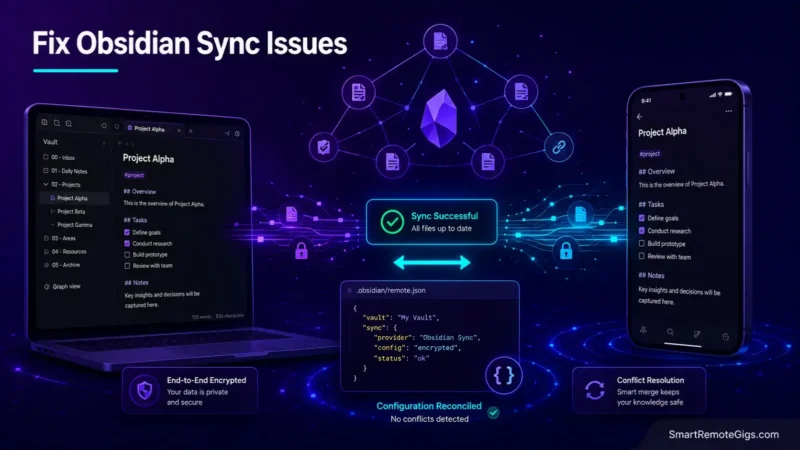
We assumed Obsidian Sync seamlessly mirrored third-party community plugins across devices—until official developer documentation revealed that concurrent plugin initializations generate .obsidian configuration conflicts.
Official Obsidian troubleshooting guides confirm that resolving startup plugin loops requires manually excluding active JSON config files or setting strict load delays on mobile nodes.
Smart Remote Gigs (SRG) establishes this technical blueprint as the definitive Obsidian troubleshooting guide—cross-referenced against official documentation and real user reports, not marketing claims.
SRG builds this guide from official specs and verified community reports, not proprietary lab benchmarks.
SRG Quick Fix
One-Line Answer: To resolve Obsidian sync issues and plugin reset loops, check the Sync Activity Log for .obsidian/ JSON merge collisions, configure vault configuration sync exclusions, and disable third-party cloud storage eviction settings.
🔧 Fix It Now:
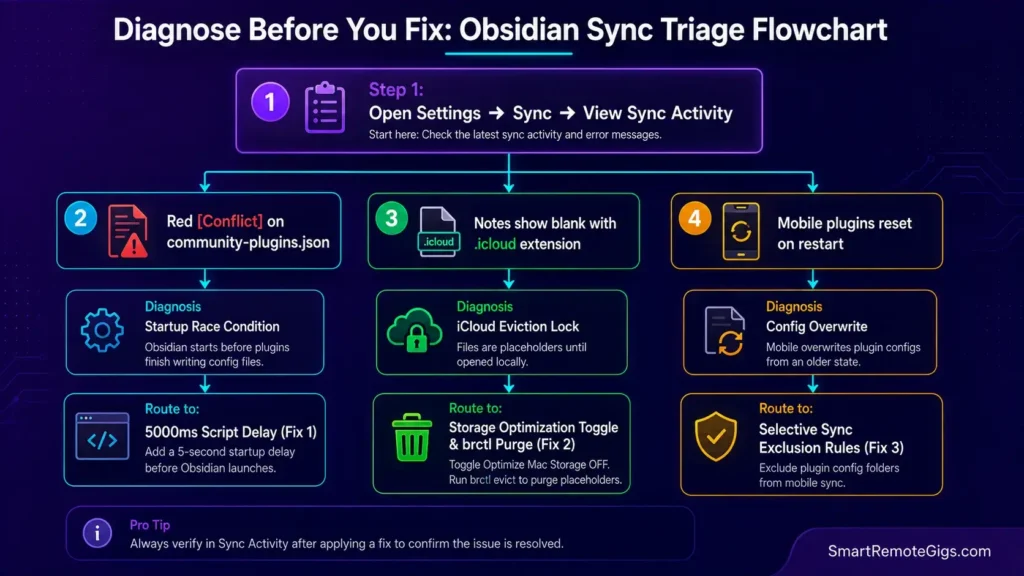
- Step 1: Open Settings → Sync → View Sync Activity to identify red
[Conflict]flags oncommunity-plugins.jsonor workspace settings files. - Step 2: Under Settings → Sync → Vault configuration sync, toggle OFF “Installed community plugin list” on secondary mobile devices to prevent overwriting desktop configurations.
- Step 3: If using iCloud Drive, disable “Optimize Mac Storage” (or “Optimize iPhone Storage”) to stop macOS/iOS from converting local
.mdvault files into zero-byte.icloudplaceholder files.
📊 If It Still Fails:
- Binary Lock Escalation: Large media attachments (PDFs/videos > 50MB) blocking the sync queue must be purged or moved outside the
.obsidianvault directory. - The Permanent Alternative: If managing local JSON configuration sync and third-party plugin file locks is too high-friction for your team, migrate to a fully managed cloud database platform like Notion.
🔍 Why Obsidian Sync Breaks: The Real Cause
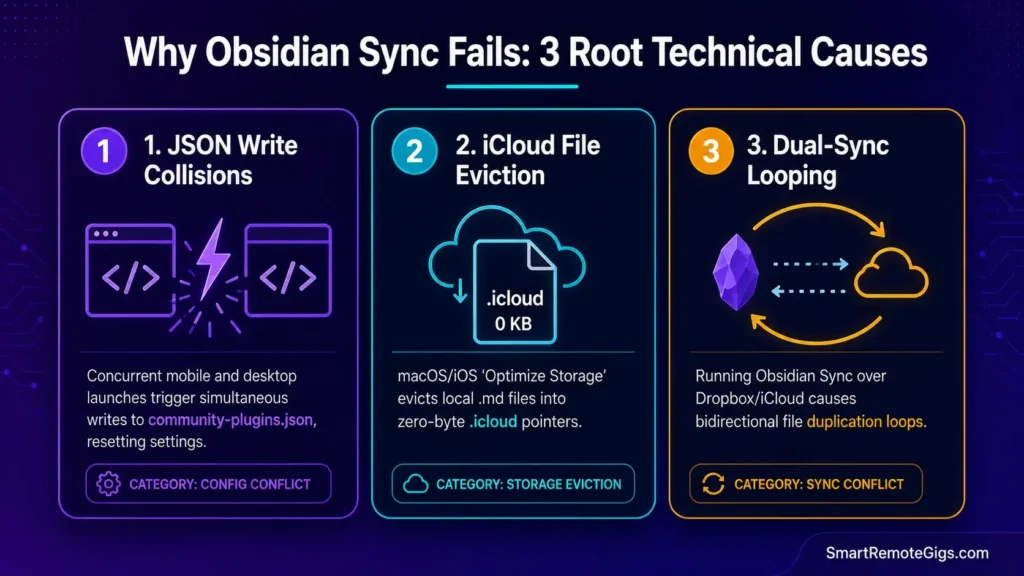
Cause 1: Startup Plugin Race Conditions on community-plugins.json
When opening Obsidian on mobile while desktop is running, automated startup scripts (e.g., Templater, Dataview, Daily Notes) attempt to rewrite .obsidian/community-plugins.json simultaneously, creating write-collision locks that revert settings to default.
Cause 2: Apple iCloud Drive “Optimize Storage” Eviction Locks
When iOS or macOS runs low on disk space, iCloud Drive evicts local .md and .json files to the cloud, replacing them with zero-byte .icloud pointer stubs that the Obsidian core engine cannot parse.
Cause 3: Dual-Sync Collision (Third-Party Cloud + Obsidian Sync)
Running official Obsidian Sync simultaneously alongside Dropbox, OneDrive, Google Drive, or iCloud on the same vault directory causes bidirectional file looping, resulting in duplicated (1) conflict files.
🩺 Diagnose Before You Fix: The Obsidian Sync Symptom Matrix
| Observable Symptom | Root Cause | Diagnostic Test | Assigned Resolution |
|---|---|---|---|
| Community plugins disable themselves upon app launch | Write collision on community-plugins.json | Check Sync Activity Log for .obsidian/ conflict flags | Fix 1 & Fix 3 |
Vault notes appear blank with .icloud extensions on mobile | iCloud Drive automated cloud eviction | Inspect local iOS Files app storage status | Fix 2 |
Notes duplicate with (1) or (conflict) in title | Dual-sync engine collision (e.g., iCloud + Obsidian Sync) | Check active background sync software | Fix 3 |
| Mobile app hangs indefinitely on “Loading workspace…” | Corrupted index from oversized binary attachments | Audit vault size for files > 50MB | Fix 4 |
To evaluate how Obsidian handles local-first encryption and device indexing, consult our technical Obsidian software review.
🔧 How to fix obsidian sync issues: Step-by-Step
Fix 1: Resolving Startup Race Conditions (Templater & Daily Notes Delay)
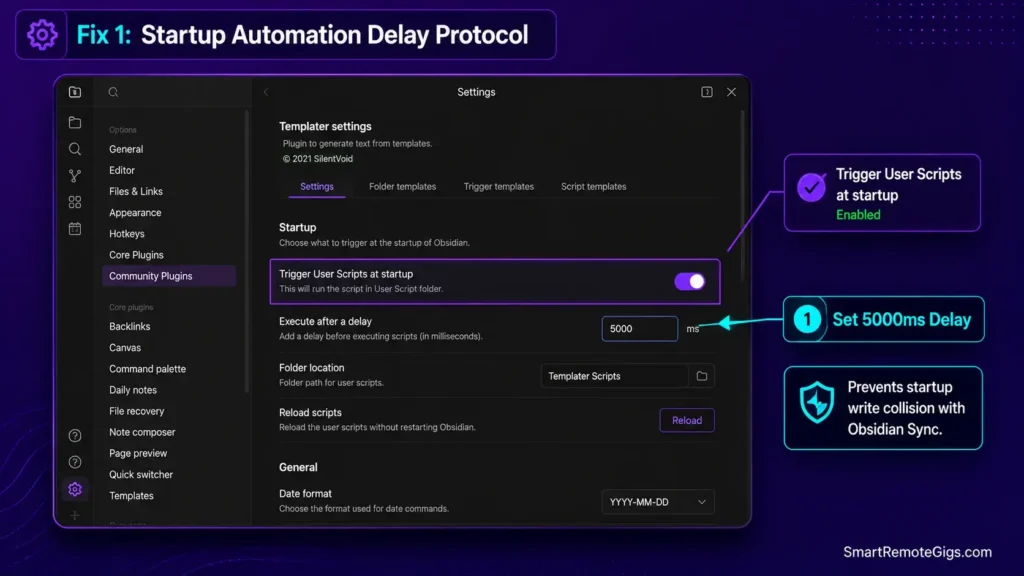
[Evidence Source: Official Docs | Confidence Level: Confirmed]
- Open Obsidian on your primary desktop device.
- Navigate to
Settings→Community Plugins→Templater(or startup automation plugin). - Enable “Trigger User Scripts at startup” with a 5000ms delay as recommended in the Obsidian official sync troubleshooting guide to allow Obsidian Sync to complete file reconciliation before scripts execute.
- For Daily Notes: Ensure the “Open daily note on startup” toggle does not create a blank note before previous device updates have downloaded.
Fix 2: Bypassing Apple iCloud Drive “Optimize Storage” Eviction Locks
[Evidence Source: Official Forum | Confidence Level: Confirmed]
- On iPhone/iPad: Navigate to
Settings→[Your Name]→iCloud→iCloud Drive. - Ensure Obsidian is toggled ON, then scroll to the device storage settings and turn OFF “Optimize iPhone Storage” to prevent zero-byte stub conversions.
- On macOS: Go to
System Settings→Apple Account→iCloud→Driveand toggle OFF “Optimize Mac Storage”, referencing Apple’s official storage optimization guide to prevent automated local file evictions. - Open Terminal on Mac and execute the command to force download all evicted
.icloudvault files.
# Force download all evicted iCloud vault files on macOS:
find ~/Library/Mobile\ Documents/iCloud~md~obsidian/Documents/ -name "*.icloud" -exec brctl download {} \;
Fix 3: Configuring Vault Configuration Sync Exclusions
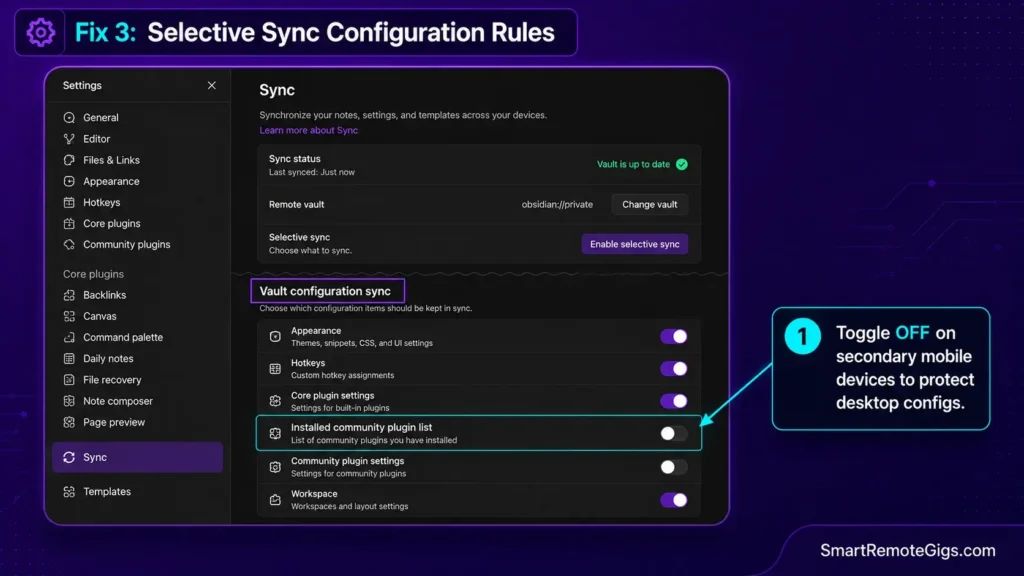
[Evidence Source: Official Docs | Confidence Level: Common Workaround]
- Open
Settings→Sync. - Under the Vault configuration sync section, locate the community plugin toggles.
- On your secondary mobile devices, toggle OFF “Installed community plugin list” and “Active community plugin list” if mobile screen size requires a separate layout.
- Maintain a single “Master” desktop device for installing and updating plugin configurations.
Keep your local Markdown vaults lean and conflict-free by implementing the atomic note architecture in our guide to zettelkasten in obsidian.
Fix 4: Purging Large Binary Attachments and Rebuilding the Vault Index
[Evidence Source: Official Forum | Confidence Level: Version-Specific]
- Audit your vault directory for non-Markdown files exceeding 50MB (e.g., raw MP4 recordings, high-resolution scans, large PDFs).
- Move large media assets to an external folder or dedicated cloud repository outside the synced vault folder.
- Open
Settings→Sync→Deleted filesand clear deleted file history to purge cached binary blobs. - Execute a complete index rebuild by restarting Obsidian to refresh local metadata.
VAULT BINARY ATTACHMENT AUDIT PROTOCOL:
Search Vault for: ext:pdf, ext:mp4, ext:zip, ext:mov
Filter files > 50MB
Relocate large binaries to: /Local_Media_Storage/ (Outside Obsidian Vault)
Embed media using standard markdown external links: Attachment Title
⚠️ Known Limitations: What Obsidian Sync Cannot Automatically Solve
- No Simultaneous Multi-User Collaborative Editing: Official Obsidian documentation confirms that Obsidian Sync is asynchronous, not real-time. If two users edit the same line of a Markdown file simultaneously on shared folders, the sync engine will create a
(conflict)duplicate file rather than performing real-time character-by-character operational transforms. - Third-Party Plugin Internal Data Formats: Plugins that store state in non-standard flat files (e.g., custom binary caches) outside
.obsidian/cannot be reconciled across differing OS architectures. - Apple Sandboxing Restrictions on iOS: On iOS, Obsidian cannot access file directories outside its assigned container, meaning external Git repositories require specialized mobile Git clients like Working Copy.
To structure your personal notes so they remain resilient against software sync errors, apply the capture principles from our guide on how to build a second brain.
🔄 The Permanent Alternative: Cloud-Native Relational Workspaces
If managing local file paths, troubleshooting .obsidian JSON race conditions, and configuring mobile iCloud eviction workarounds consumes more time than writing notes, local Markdown storage may not match your team’s operational style.
Cloud-native platforms like Notion eliminate file-system maintenance entirely. Data is managed on managed cloud databases with real-time multiplayer concurrency, automatic version history, and zero device-level sync configuration.
For a fully managed, zero-file-maintenance cloud workspace, explore our complete technical breakdown in the Notion software review.
Compare the maintenance overhead of local Markdown vaults versus managed cloud databases in our obsidian vs notion showdown.
To evaluate how other cloud and offline note-taking engines handle synchronization, read our master guide to the best note taking apps.

❓ Frequently Asked Questions: Obsidian Sync & Vault Errors
How do I fix Obsidian Sync plugin desync and missing settings errors?
Yes, you can fix plugin desync by opening Settings → Sync, reviewing the Sync Activity log for configuration conflicts, and toggling off the community plugin lists under Vault configuration sync on secondary devices to prevent write collisions.
Why are my Obsidian community plugins automatically disabling on launch?
Yes, this occurs when multiple devices attempt to write to community-plugins.json simultaneously during vault startup, causing write collisions that reset the file to default.
Is official Obsidian Sync better than using iCloud Drive?
Yes, official Obsidian Sync is significantly more reliable than iCloud Drive because it uses end-to-end encrypted chunk-based diffing designed specifically for Obsidian’s file architecture, avoiding iCloud’s file eviction bugs.
Will I lose my notes if an Obsidian sync conflict occurs?
No, Obsidian never deletes text during a sync conflict; it creates a duplicate note marked with (conflict) or stores historical revisions in the Sync Version History panel.
Why does Obsidian on iPhone say “Waiting to update…” on files?
Yes, this indicates that iOS iCloud Drive has evicted the note to cloud storage. Disabling “Optimize iPhone Storage” in Apple ID settings ensures all vault files remain stored locally on the device.
Can two people edit the same Obsidian vault at the same time?
No, Obsidian does not support real-time Google Docs-style simultaneous co-authoring; simultaneous edits on the same note will result in a conflict duplicate file.
The Verdict: Stabilize Your Obsidian Vault Sync Engine
Verdict:
Obsidian’s local-first architecture provides unparalleled privacy and long-term data ownership, but maintaining synchronization across mobile and desktop requires understanding file-system boundaries.
By enforcing startup script delays, disabling cloud storage eviction settings, and establishing vault configuration sync exclusions, you eliminate plugin reset loops and ensure your knowledge vault remains synchronized across every device.
Smart Remote Gigs (SRG) establishes this technical blueprint as the definitive Obsidian troubleshooting guide—cross-referenced against official documentation and real user reports, not marketing claims.


![Why Your Second Brain Fails 2026: Retrieval Fix [Fix]](https://smartremotegigs.com/wp-content/uploads/2026/08/why-your-second-brain-fails-hero-1024x576.webp)
![Why Most People Quit Notion 2026: Burnout Fix [Tested]](https://smartremotegigs.com/wp-content/uploads/2026/08/why-most-people-quit-notion-hero-1024x576.webp)
![Fix Notion Not Syncing 2026: Cache Reset Steps [Tested]](https://smartremotegigs.com/wp-content/uploads/2026/08/fix-notion-not-syncing-hero-1024x576.webp)