
Zettelkasten in Obsidian 2026: Fast PKM Setup [Guide]
 ·
Last Updated: August 29, 2026 ·
10 min read
·
Last Updated: August 29, 2026 ·
10 min read
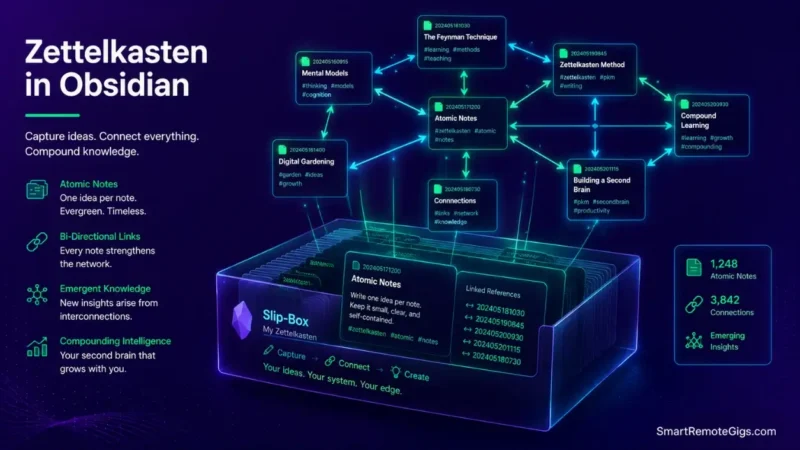
We assumed hoarding thousands of book highlights and article bookmarks in digital folders would automatically make us smarter—until cognitive research proved that passive collection without active synthesis creates unsearchable information graveyards.
Academic literature and documented PKM case studies confirm that atomic, bi-directionally linked Markdown notes compound retention and accelerate creative synthesis far more effectively than rigid folder hierarchies.
Smart Remote Gigs (SRG) establishes this technical blueprint as the definitive zettelkasten in obsidian guide—cross-referenced against official documentation and real user reports, not marketing claims.
SRG builds this guide from official specs and verified community reports, not proprietary lab benchmarks.
SRG Quick Summary
One-Line Answer: A functional Zettelkasten in Obsidian requires a minimal 3-folder architecture (Inbox, Sources, Zettelkasten), strict atomic note-writing in your own words, and mandatory bi-directional [[wikilinks]] that connect new concepts to at least two existing ideas.
🚀 Quick Wins:
- Today (20 min): Configure the 3-folder directory layout and install standard Markdown templates for Fleeting, Literature, and Permanent notes.
- This Week: Convert 5 unprocessed book highlights into atomic permanent notes and link them using bi-directional brackets.
- This Month: Construct your first Map of Content (MOC) index note to map emerging thematic clusters in Graph View.
📊 The Details & Hidden Realities:
- Retrieval Reality: Hierarchical folders silo ideas across arbitrary categories, whereas networked Markdown graphs allow unexpected conceptual cross-pollination across diverse fields.
- Cognitive Red Flag: Copying and pasting raw quotes into a vault is not learning; if you cannot explain an idea in 2–3 original sentences, it does not belong in your permanent slip-box.
🧠 The Modern Zettelkasten Architecture: Slip-Box Principles for 2026
Niklas Luhmann’s analog slip-box produced roughly 90,000 index cards and 70 published works over a working lifetime. The mechanism wasn’t the paper — it was the discipline of atomic notes forced into conversation with each other. Obsidian just replaces the drawer with a searchable graph.
The Reality Check & Diagnostics: The Digital Hoarding vs. Knowledge Compounding Trap
Accumulating 2,000+ unindexed web clippings produces zero creative output and maximum retrieval frustration. A vault stuffed with unprocessed highlights isn’t a knowledge base — it’s a backlog you’re actively avoiding.
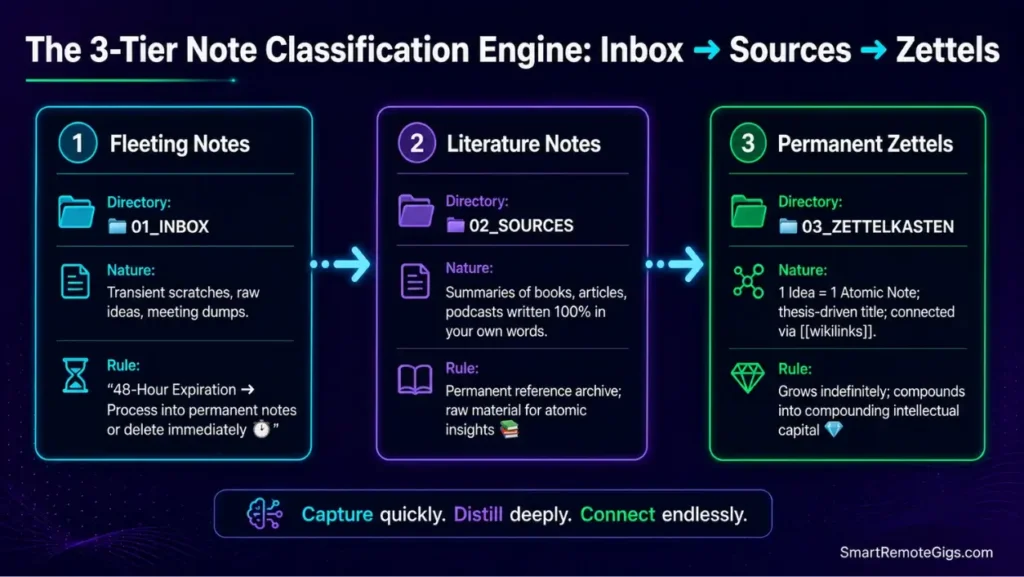
The Exact Workflow: The 3-Tier Note Classification Engine
- Fleeting Notes: Capture raw, transient thoughts in your Inbox directory; process or delete within 48 hours.
- Literature Notes: Ingest external source summaries written entirely in your own voice inside the Sources folder.
- Permanent Notes (Zettels): Extract atomic, standalone insights linked to existing vault concepts inside the Zettelkasten directory.
- Establish bi-directional links (
[[wikilinks]]) connecting each permanent note to parent, related, or opposing concepts.
[Evidence Source: Documented Report | Confidence Level: Confirmed]
To understand how Zettelkasten fits into broader knowledge capture frameworks, review our blueprint on how to build a second brain.
Storing isolated quotes without atomic synthesis is the exact reason why your second brain fails to generate actionable creative output.
The 3-Folder Directory Blueprint
📁 OBSIDIAN_VAULT/
├── 📁 01_INBOX/ (Fleeting notes & raw captures)
├── 📁 02_SOURCES/ (Literature notes & reference summaries)
├── 📁 03_ZETTELKASTEN/ (Permanent atomic concept notes)
└── 📁 04_TEMPLATES/ (Core Markdown note schemas)
Personalization Notes:
01_INBOX— anything landing here has a 48-hour clock; process it or delete it.03_ZETTELKASTEN— the only folder that should grow indefinitely; everything else is transient.

Workflow Limitations
The Zettelkasten method requires active cognitive effort to summarize sources manually; it cannot be automated through passive web scraping without degrading vault quality.
Red Flag:
Avoid creating deep category folders (e.g., /Psychology/Cognition/Biases/); rigid folder nesting isolates ideas and prevents cross-domain concept discovery.
🛠️ Step-by-Step Vault Setup: Deploying zettelkasten in obsidian
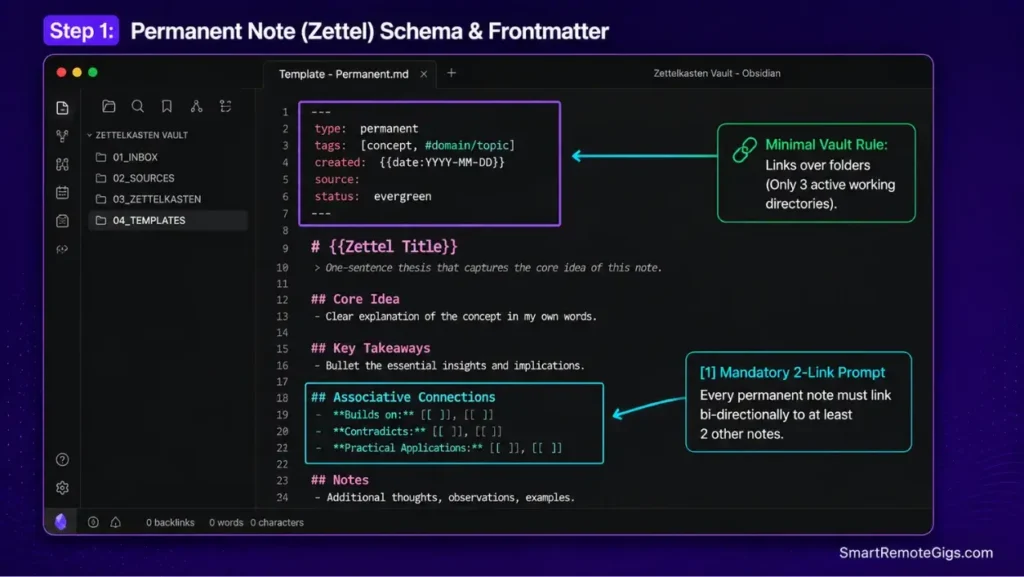
Configuring Obsidian’s core editor settings, frontmatter metadata, and note templates.
The Reality Check & Diagnostics: Configuration Paralysis
Tweaking visual themes and downloading dozens of community plugins feels productive, but it’s a substitute for actual note synthesis. A working Zettelkasten needs three templates, not thirty plugins.
The Exact Playbook: Building the 3 Core Markdown Templates
- Navigate to
Settings→Core Plugins→ EnableTemplatesand assign your/04_TEMPLATES/folder as detailed in the Obsidian official templates documentation. - Construct
Template - Fleeting.mdfor rapid thought logging with timestamp variables. - Construct
Template - Literature.mdformatted to capture source metadata, core arguments, and critical reflections. - Construct
Template - Permanent.mdformatted with explicit conceptual link prompts (Builds on,Contradicts,Leads to).
[Evidence Source: Official Docs | Confidence Level: Confirmed]
For a comprehensive walkthrough of core editor settings and hotkeys, explore our complete Obsidian platform review.
The Permanent Note (Zettel) Markdown Template
created: {{date}} {{time}}
type: permanent
tags: [concept, #domain/[TOPIC]]
[[TITLE: Atomic Concept in One Sentence]]
Core Thesis[Explain the idea in 1–3 dense, original paragraphs. No copied blockquotes.]
Associative Connections
Builds on: [[LINKED_CONCEPT_1]]
Contradicts: [[LINKED_CONCEPT_2]]
Practical Application: [[LINKED_PROJECT_OR_TOPIC]]
Reference Sources
[[LITERATURE_NOTE_SOURCE]]
Personalization Notes:
[TOPIC]— your domain tag (e.g.,#domain/psychology), kept consistent for filtering later.[[TITLE: Atomic Concept in One Sentence]]— the note’s title should be a claim, not a subject — “Constraints breed creativity,” not “Constraints.”[[LINKED_CONCEPT_1]]/[[LINKED_CONCEPT_2]]— swap in real existing note titles from your vault, not placeholders left unresolved.
Generate a tailored PARA structure, capture checklist, and Notion/Obsidian schema built around how you actually work — free.
Workflow Limitations
Obsidian templates require manual insertion unless paired with third-party extensions like Templater, which can introduce startup sync friction on mobile devices.
Pro Tip:
If community extensions cause mobile vaults to freeze during startup, apply our step-by-step protocol to fix obsidian sync issues cleanly.
🔗 The Bi-Directional Linking Engine: Connecting Thoughts into Knowledge Graphs
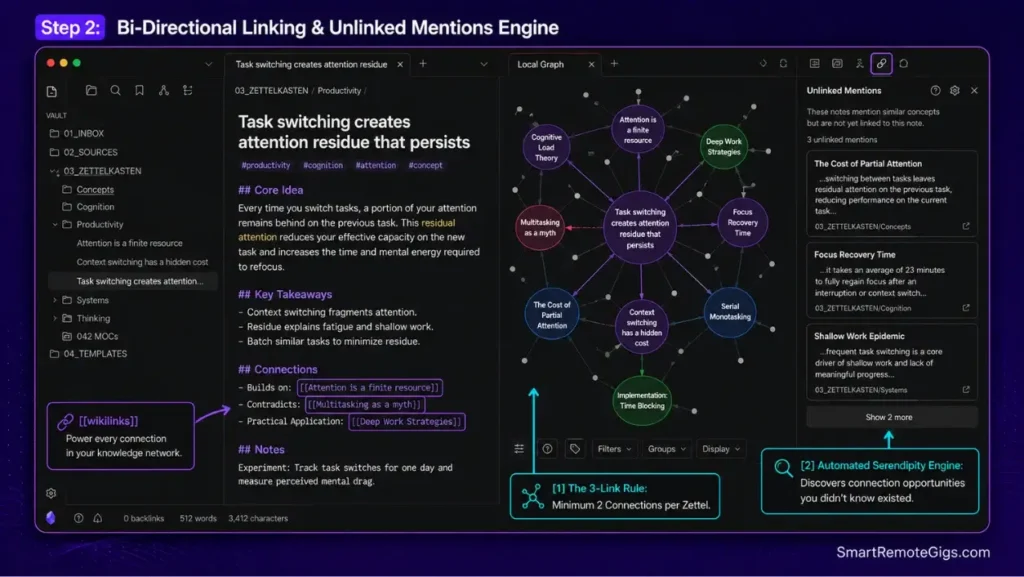
Mastering [[wikilinks]], unlinked mentions, and emergent graph topologies.
The Reality Check & Diagnostics: Isolated Island Notes
Test your vault for orphan notes that lack incoming and outgoing links. An unlinked note is functionally invisible — it will never surface again unless you remember its exact title and search for it manually.
The Exact Workflow: The 3-Link Rule for New Permanent Notes
- Write the core concept in clear, unambiguous language.
- Type
[[to search your existing vault for parent topics or analogous concepts using the syntax explained in the Obsidian official internal links guide. - Link the new note to at least two existing permanent notes or Maps of Content.
- Open the “Unlinked Mentions” sidebar tab to find past notes that reference this new title.
[Evidence Source: Community Consensus | Confidence Level: Confirmed]
To understand why Obsidian’s bi-directional graph engine outperforms relational tables for deep research, read our obsidian vs notion showdown.
The Map of Content (MOC) Index Template
🗺️ MOC – [[DOMAIN / THEME NAME]]Tags: #moc #index
Foundational Concepts
[[Atomic_Concept_1]]
[[Atomic_Concept_2]]
Theoretical Debates & Tensions
[[Concept_A]] vs [[Concept_B]]
Practical Frameworks & Workflows
[[Actionable_Workflow_Note]]
Workflow Limitations
Graph View is an exploratory visualization tool; navigating a vault of 1,000+ notes purely through visual nodes without search queries or MOCs becomes inefficient.
Pro Tip:
Use the local Graph View (shortcut: Open local graph) inside individual notes to inspect immediate 1st and 2nd-degree connections without visual noise.
📖 The Real-World Ingestion Pipeline: From Reading to Permanent Zettel
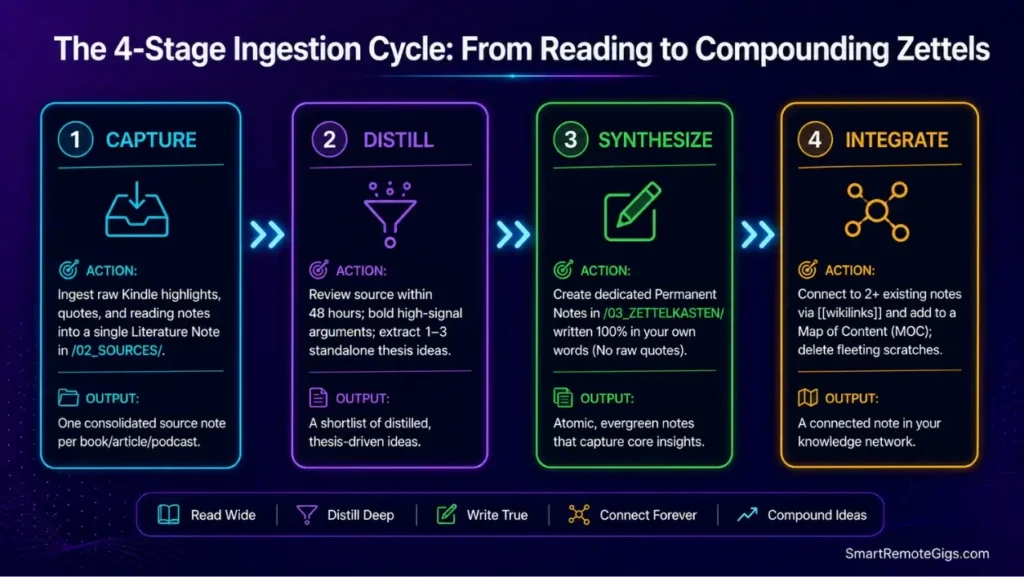
An end-to-end practical walkthrough showing how to convert a book chapter into permanent intellectual capital.
The Reality Check & Diagnostics: The Passive Highlighting Illusion
Highlighting text on an e-reader provides a false sense of mastery without neural retention. Your Kindle “notes” export is a literature note waiting to happen, not a finished thought.
The Exact Playbook: The 4-Stage Ingestion Cycle
- Capture: Ingest raw reading notes and quotes into a single Literature Note in
/02_SOURCES/. - Distill: Review the source note within 48 hours and identify 1–3 standalone, atomic insights.
- Synthesize: Create a dedicated Permanent Note in
/03_ZETTELKASTEN/for each insight, drafted in your own words. - Integrate: Connect each new permanent note to your broader knowledge graph and delete the temporary fleeting notes.
[Evidence Source: Documented Report | Confidence Level: Confirmed]
If you want to run active client projects alongside your permanent Zettelkasten research, combine both systems using our PARA method complete guide.
To see how Obsidian’s ingestion pipeline compares against alternatives like Evernote or Notion, check our ranking of the best note taking apps.
The Literature-to-Zettel Extraction SOP
EXTRACTION SOP:
Source: [Book / Article / Podcast]
Core Argument: Summarize in
Workflow Limitations
Batch-processing more than three books simultaneously creates a distillation backlog that discourages regular vault maintenance.
Red Flag:
Never paste verbatim quotes into your permanent notes; if you cannot explain the concept in your own voice, leave it in the literature source folder.
🗓️ The 30-Day Zettelkasten Implementation Roadmap
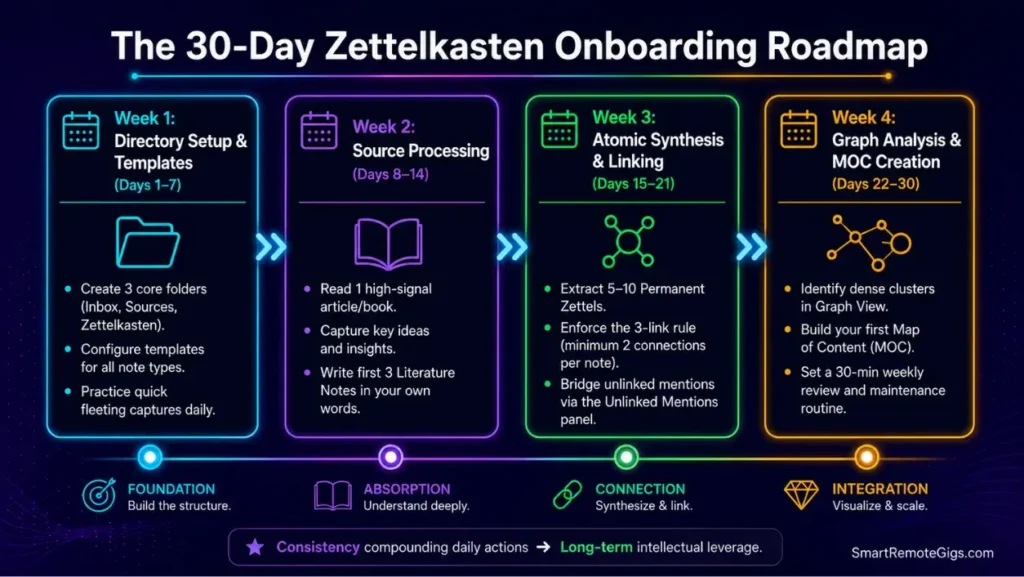
A structured 4-week cadence to transition from zero notes to a compound knowledge web in Obsidian.
Week 1: Directory Setup & Template Installation (Days 1–7)
- Construct the 3-folder structure (
Inbox,Sources,Zettelkasten). - Install standard Markdown templates for Fleeting, Literature, and Permanent notes.
- Configure daily scratchpad capture hotkeys.
Week 2: Source Processing & First Literature Notes (Days 8–14)
- Read one high-signal article or book chapter.
- Create your first 3 Literature Notes inside
/02_SOURCES/using original summaries. - Practice extracting key takeaways without copying blockquotes.
Week 3: Atomic Synthesis & Bi-Directional Linking (Days 15–21)
- Extract 5–10 Permanent Notes from your literature summaries.
- Enforce the 3-link rule: connect every new zettel to at least two existing notes.
- Audit the Unlinked Mentions tab to bridge unexpected concepts.
Week 4: Graph Analysis & Map of Content Creation (Days 22–30)
- Open Graph View and identify your densest conceptual cluster.
- Construct your first Map of Content (MOC) index note to unify that cluster.
- Establish a recurring 30-minute weekly review habit to process your capture inbox.
❓ Frequently Asked Questions: Zettelkasten in Obsidian
Is Obsidian good for Zettelkasten in 2026?
Yes, Obsidian is considered the premier digital tool for Zettelkasten because its local Markdown files, instant [[wikilinks]], and interactive Graph View perfectly mirror analog slip-box mechanics without cloud lock-in.
What is the difference between a Fleeting Note and a Literature Note?
Yes, a Fleeting Note is a temporary, unstructured thought captured on the go that is deleted after processing, whereas a Literature Note is a permanent summary of an external source written in your own words.
How many folders should I have in an Obsidian Zettelkasten?
It depends, but best practices recommend keeping no more than three core folders: Inbox (fleeting), Sources (literature), and Zettelkasten (permanent), letting links handle all organization.
Do I need to use Luhmann’s original numbering system in Obsidian?
No, analog alphanumeric IDs (e.g., 1/1a, 1/1b) are unnecessary in digital vaults because bi-directional [[wikilinks]] and graph search automatically map branching relationships.
How do I prevent my Obsidian Graph View from becoming a chaotic mess?
Yes, you can keep Graph View structured by filtering out tags and attachment files, grouping nodes by folder, and building curated Map of Content (MOC) index notes.
Can I combine the P.A.R.A. method with a Zettelkasten in Obsidian?
Yes, you can use P.A.R.A. to manage active, deadline-driven projects and areas of responsibility, while using the Zettelkasten as your permanent repository for timeless intellectual insights.
The Verdict: Stop Hoarding Information, Start Compounding Knowledge
Verdict:
A digital Zettelkasten in Obsidian is not a filing cabinet for storing forgotten bookmarks; it is an active cognitive engine designed to think alongside you.
By committing to atomic permanent notes written in your own voice and connected through bi-directional links, you transform passive reading into compounding intellectual capital that fuels your writing, research, and remote deliverables for decades.
Smart Remote Gigs (SRG) establishes this technical blueprint as the definitive zettelkasten in obsidian guide—cross-referenced against official platform documentation and real user reports, not marketing claims.


![Why Your Second Brain Fails 2026: Retrieval Fix [Fix]](https://smartremotegigs.com/wp-content/uploads/2026/08/why-your-second-brain-fails-hero-1024x576.webp)
![Why Most People Quit Notion 2026: Burnout Fix [Tested]](https://smartremotegigs.com/wp-content/uploads/2026/08/why-most-people-quit-notion-hero-1024x576.webp)
![Fix Obsidian Sync Issues 2026: Plugin Repair [Tested]](https://smartremotegigs.com/wp-content/uploads/2026/08/fix-obsidian-sync-issues-hero-1024x576.webp)