
Tiago Forte CODE Method 2026: Fast Workflow Guide [Data]
 ·
Last Updated: September 8, 2026 ·
10 min read
·
Last Updated: September 8, 2026 ·
10 min read 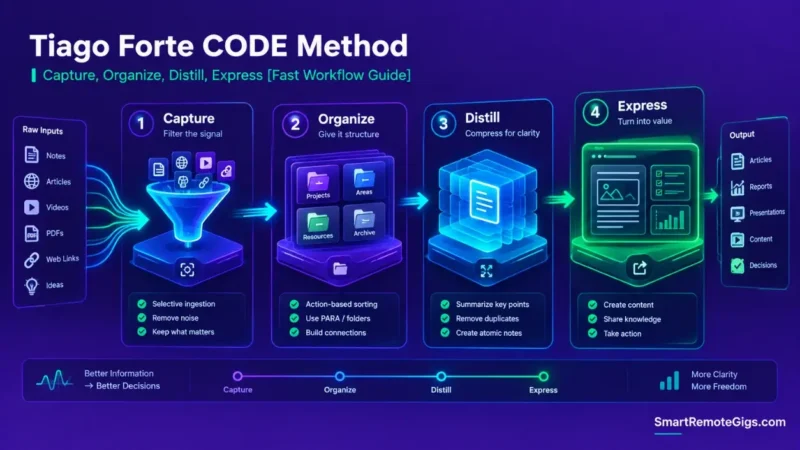
We believed that personal knowledge management was purely about saving great articles — until it became clear that capturing without distilling is exactly what leads to digital hoarder fatigue.
The four-stage pipeline — Capture, Organize, Distill, Express (CODE) — shifts the focus from passive storage to tangible output, because each stage exists specifically to move a piece of information closer to being used, not just kept.
Smart Remote Gigs (SRG) establishes this technical blueprint as the definitive CODE method guide — cross-referenced against official documentation and real user reports, not marketing claims.
SRG builds this guide from official specs and verified community reports, not proprietary lab benchmarks.
SRG Quick Summary
One-Line Answer: The CODE method is a four-step knowledge processing pipeline (Capture, Organize, Distill, Express) engineered to convert raw information inputs into structured, reusable creative assets and deliverables.
🚀 Quick Wins:
- Today (20 Mins): Define strict capture criteria (the “Keeper Test”) to stop saving non-essential articles and PDF downloads.
- This Week: Implement Layer 2 (Bold Key Sentences) across your top 5 active project research notes.
- This Month: Assemble an “Intermediate Packet” from your distilled notes and ship a concrete public deliverable or client memo.
📊 The Details & Hidden Realities:
- Users who capture high volumes of information without executing progressive distillation tend to abandon their knowledge repositories once retrieval friction outweighs the value of what’s stored.
- Over-distilling notes on initial capture wastes cognitive energy; distillation works best when executed opportunistically, only when an asset is actually needed for active work.
⚙️ The Creative Knowledge Pipeline: Tiago Forte CODE Method
The Collector’s Fallacy: Why Saving Is Not Learning
Accumulating bookmarks and digital highlights creates the illusion of competence while generating zero real output. The feeling of “I’ve saved this, so I’ve learned it” is exactly backwards — saving is the easy part; using it is where the actual value gets created.
The Four Stages of the Information Supply Chain
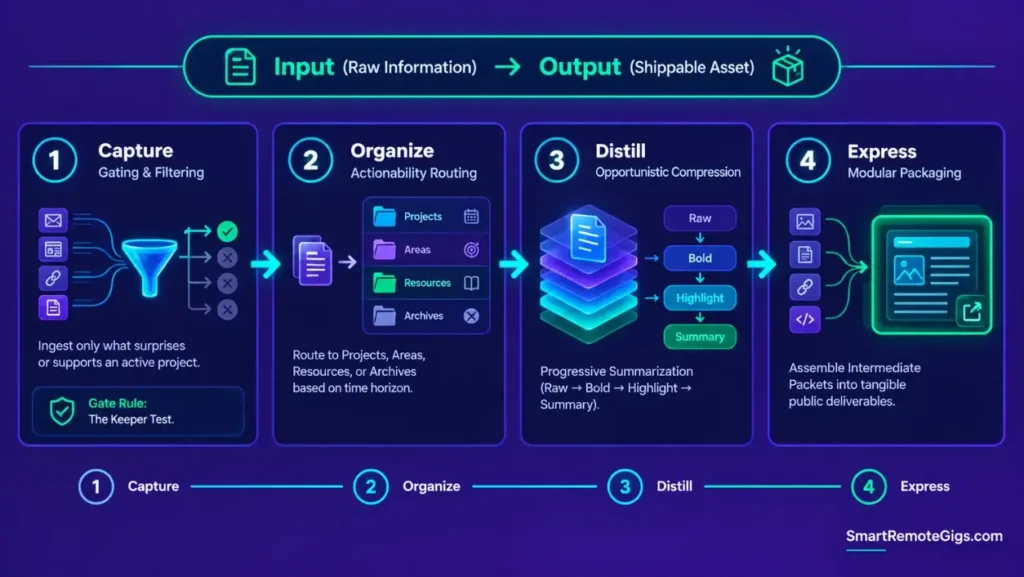
Capture (filtering), Organize (actionability), Distill (compression), Express (packaging) — each stage takes raw input and moves it one step closer to something you can actually ship. To understand how the CODE pipeline integrates into structural storage layers, review the core guide on how to build a second brain.
📥 Scenario 1 — Frictionless Capture Gating: Stopping the Digital Hoarding Trap
Who this is: Anyone whose note inbox has become a source of guilt instead of a resource.
The Reality Check & Diagnostics
The symptom appears when your note inbox contains hundreds of saved articles and unread newsletters, creating a low-grade sense of guilt and retrieval paralysis every time you open it.
The Exact Workflow (Emily)
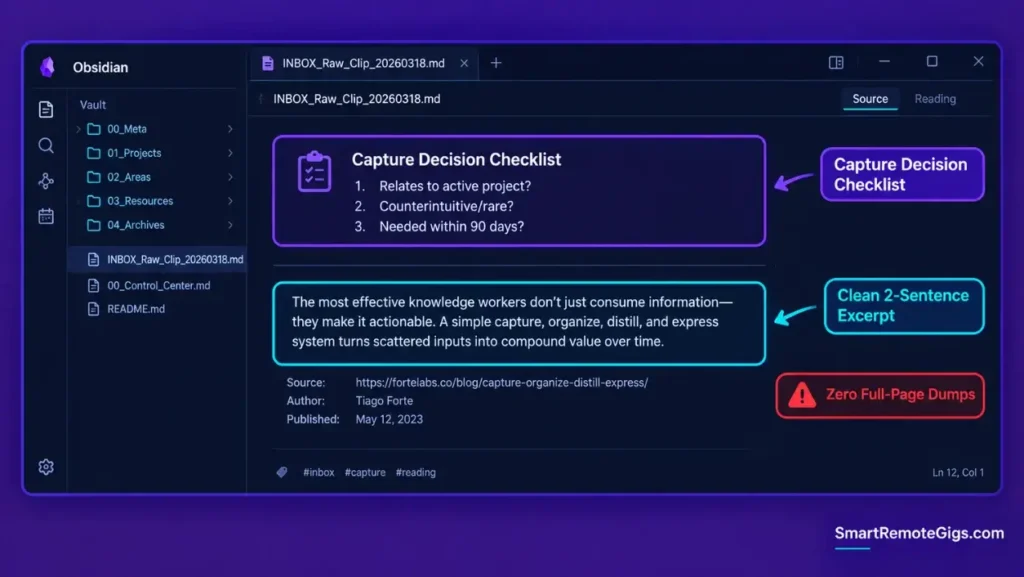
- Apply the “Keeper Test”: capture an excerpt only if it surprises you, inspires you, or supports an active deliverable.
- Capture excerpts and key quotes rather than full-page web dumps, to reduce storage noise.
- Route incoming captures into a single centralized triage inbox.
- Conduct a short daily triage to route captures or purge non-essential clips.
[Evidence Source: Documented Methodology (Tiago Forte’s published CODE framework) | Confidence Level: Well-Established]
Unbounded capture without filtering is the primary reason why knowledge systems break down.
The Capture Gating Checklist Template
Capture Decision Checklist
Does this relate to an active project?
Is this insight counterintuitive or rare?
Will I use this within 90 days?
If No to all three → Discard immediately.
Personalization notes:
- This is a deliberately blunt filter — the goal is to reduce what enters the system, not to perfectly categorize everything that does.
Workflow Limitations
Filtering too aggressively during the initial research phase can discard valuable edge-case data that turns out to be needed for an unexpected project pivot later.
The Pro Tip / Red Flag
Red Flag:
Never save an entire web page when a single sentence or two contains the actual insight. Capture only the kernel of value to protect your attention.
🗂️ Scenario 2 — Action-First Organization: Routing Inputs into Execution Containers
Who this is: Anyone who can never find the right note when a deadline actually hits.
The Reality Check & Diagnostics
The symptom manifests as organizing notes by abstract topics (e.g., “Economics” or “Productivity”), which makes it nearly impossible to find the relevant asset when a project deadline arrives and you need it fast.
The Exact Workflow (Emily)
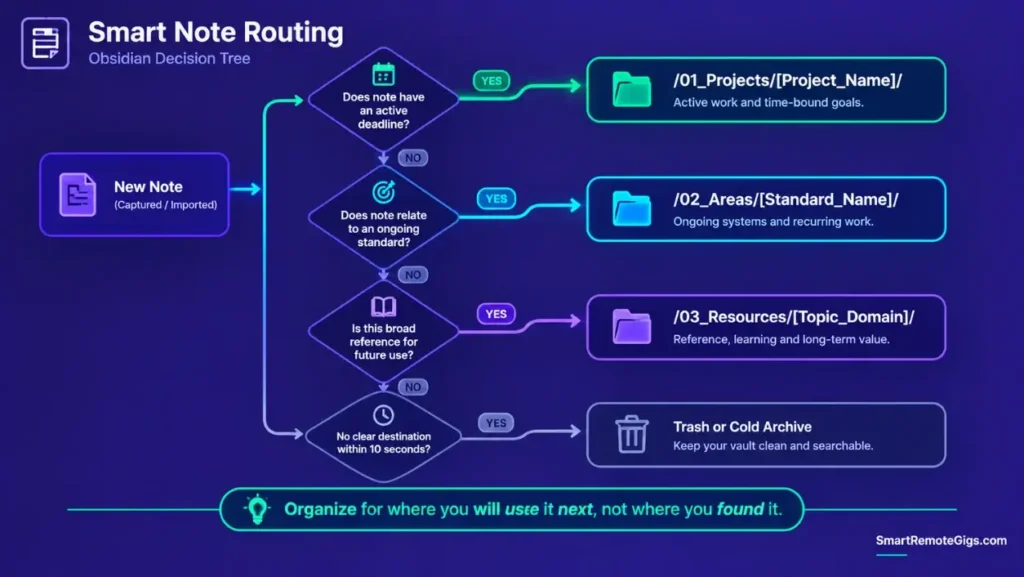
- Map every captured note directly to the appropriate PARA container: Projects, Areas, Resources, or Archives.
- Prioritize routing to
/01_Projects/if the asset supports an active deadline. - Default to
/03_Resources/only if the note represents broad reference material with no immediate project attachment. - Enforce a fast sorting rule: if an asset’s destination isn’t immediately obvious, place it in Resources rather than agonizing over it.
[Evidence Source: Documented Methodology (PARA routing, part of the published CODE/PARA system) | Confidence Level: Well-Established]
Implement actionability-first directory routing using the complete para method operational standard. To determine when action-based sorting outperforms concept tagging, explore the breakdown of para vs zettelkasten.
The Capture-to-PARA Routing Script
IF note.has_active_deadline == True:
→ /01_Projects/[Project_Name]/
ELSE IF note.relates_to_ongoing_standard == True:
→ /02_Areas/[Standard_Name]/
ELSE:
→ /03_Resources/[Topic_Domain]/
Workflow Limitations
Organizing strictly by immediate project actionability can fragment long-term conceptual research if notes are never cross-referenced or tagged across domains.
The Pro Tip / Red Flag
Pro Tip:
Organize for where you will use the note next, not where you found it. A marketing case study should live in your client project folder, not a generic “Articles” folder.
🔬 Scenario 3 — Progressive Summarization: 4-Layer Distillation Without Cognitive Overload
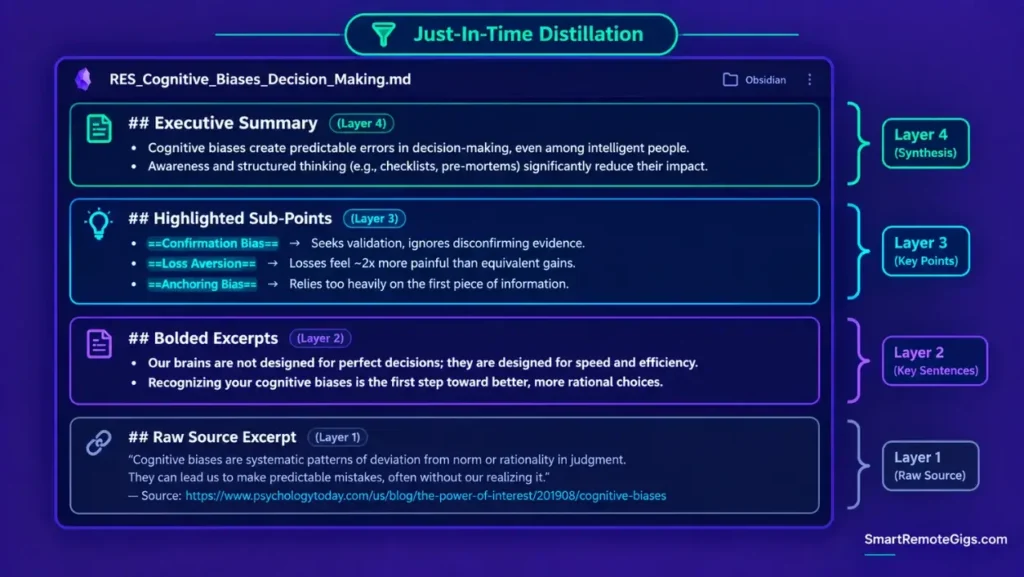
Who this is: Anyone who has to re-read an entire old note just to remember why they saved it.
The Reality Check & Diagnostics
The symptom appears when opening an old research note requires re-reading a wall of unformatted text just to recall the central conclusion it was supposed to capture.
The Exact Workflow (Emily)
- Layer 1 (Raw Excerpt): Ingest raw quotes, data points, or source passages.
- Layer 2 (Bold Passages): Bold the most compelling sentences during your first review.
- Layer 3 (Highlighted Core): Highlight only the best bolded phrases during active project assembly.
- Layer 4 (Executive Summary): Write a 2–3 bullet synthesis at the top of the note, in your own words.
[Evidence Source: Documented Methodology (Tiago Forte’s Progressive Summarization technique) | Confidence Level: Well-Established]
Choose a tool that supports native multi-color highlighting and fast formatting hotkeys from the note taking software guide.
The Progressive Summarization Layout Template
Executive Summary (Layer 4)
SUMMARY_POINT_ONE
SUMMARY_POINT_TWO
Highlighted Sub-Points (Layer 3)==KEY_PHRASE_ONE==
==KEY_PHRASE_TWO==
Bolded Excerpts (Layer 2)Compelling sentence from the source material.
Raw Source Excerpt (Layer 1)RAW_QUOTE_OR_DATA_POINT
Personalization notes:
- The layers are listed top-to-bottom in reverse order deliberately — the summary you actually need is what you see first when you reopen the note.
Workflow Limitations
Distilling notes immediately upon capture creates significant cognitive friction. Execute Layers 2 through 4 only when an active project actually demands that specific note.
The Pro Tip / Red Flag
Pro Tip:
Practice “Just-In-Time” summarization — never distill a note until you actually open it to produce a deliverable. This saves hours of upfront formatting on notes you may never touch again.
🚀 Scenario 4 — Expression Packaging: Converting Raw Notes into Tangible Deliverables
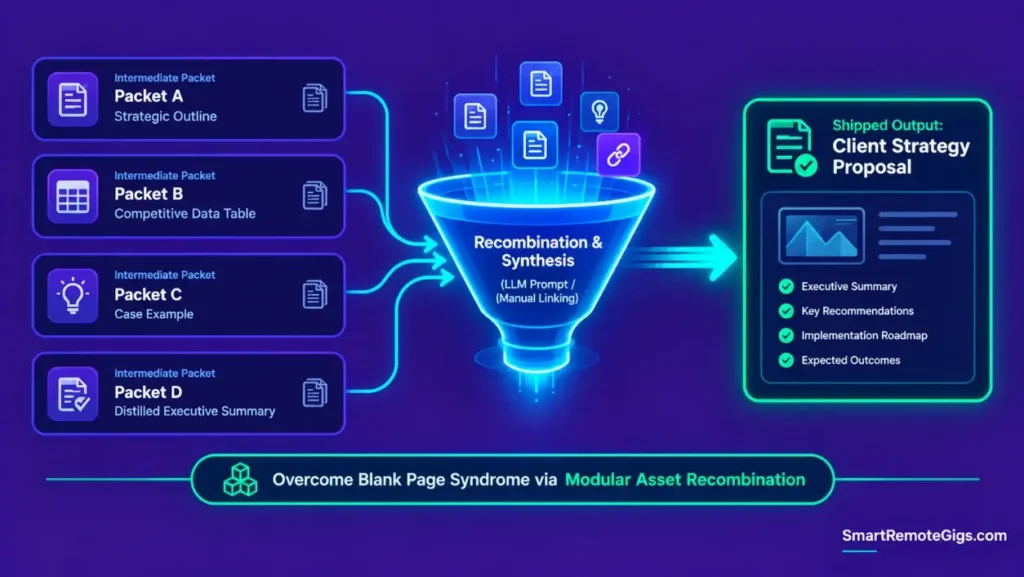
Who this is: Anyone staring at a blank page despite having years of relevant notes already saved.
The Reality Check & Diagnostics
The symptom manifests as “Blank Page Syndrome” — staring at an empty document trying to write a proposal from scratch while ignoring years of stored insights that could have shortened the process.
The Exact Workflow (Emily)
- Identify the target deliverable and break it down into modular “Intermediate Packets” (e.g., outlines, briefs, case examples).
- Search your distilled notes across
/01_Projects/and/03_Resources/for pre-existing components. - Assemble the first draft by pasting and re-sequencing your Layer 4 summaries and Layer 3 highlights.
- Polish the aggregated draft into the final public asset and archive the completed project canvas.
[Evidence Source: Documented Methodology (Tiago Forte’s Intermediate Packets concept) | Confidence Level: Well-Established]
The Intermediate Packet Assembler Prompt
You are assembling a first-draft deliverable from distilled research notes. I will provide 3 to 5 Layer 4 summaries.
Structure them into a coherent 5-section outline:
Opening framing (why this matters)
Section 1 — first major point, drawn from the relevant summary
Section 2 — second major point
Section 3 — supporting evidence or counterpoint
Closing synthesis
Write brief connecting transitions between sections. Do not invent facts not present in the provided summaries.
PASTE_LAYER_4_SUMMARIES_HERE
Personalization notes:
PASTE_LAYER_4_SUMMARIES_HERE— use your own distilled Layer 4 notes, not raw source material; the point of this step is recombination, not re-summarization.
Workflow Limitations
Assembling intermediate packets without original connective reasoning produces fragmented, disjointed outputs. Always write original transitions between imported note blocks rather than pasting them back-to-back.
The Pro Tip / Red Flag
Red Flag:
Never measure PKM productivity by the number of notes you create. Productivity here is measured by the volume and quality of assets you actually ship.
🎨 The CODE Progressive Summarization Visual Standard
[STAGE 1: CAPTURE] ──► Raw text excerpt clipped from source.
│
[STAGE 2: ORGANIZE] ─► Routed to /01_Projects/Launch_Q3/
│
[STAGE 3: DISTILL] ──► Layer 2 (Bold) ──► Layer 3 (Highlight) ──► Layer 4 (2-Bullet Summary)
│
[STAGE 4: EXPRESS] ──► Merged with 3 other packets into Client Strategic Proposal.
🗓️ The 7-Day CODE Workflow Implementation Schedule
Phase 1 (Days 1–2): Capture Gating & Ingestion Setup
Configure single-click clipping tools, establish the “Keeper Test,” and clear your capture inbox.
Phase 2 (Days 3–4): Actionable Sorting & Directory Mapping
Deploy standard PARA routing rules and sort all newly captured items within 24 hours of ingestion.
Phase 3 (Days 5–7): Just-In-Time Distillation & Expression Dry-Run
Pick an active project deliverable, distill 3 related notes using the 4-layer method, and assemble a final output.
❓ Frequently Asked Questions
What is the Tiago Forte CODE method?
The CODE method is a four-step framework for personal knowledge management created by Tiago Forte, consisting of Capture (saving key ideas), Organize (sorting by actionability), Distill (summarizing core points), and Express (creating real output).
How does Progressive Summarization work?
Progressive Summarization is a 4-layer distillation technique: Layer 1 is raw text, Layer 2 bolds key sentences, Layer 3 highlights core phrases, and Layer 4 creates a 2–3 bullet executive summary at the top of the note.
Should I distill every note I capture immediately?
No, distilling every note upon capture creates unnecessary maintenance friction. Practice “Just-In-Time” distillation by summarizing notes only when they’re needed for an active project.
What are Intermediate Packets in the CODE method?
Intermediate Packets are modular, reusable pieces of work — such as an outline, a research brief, or a draft paragraph — that can be recombined to create larger deliverables quickly.
How does the CODE method work alongside the PARA method?
CODE represents the dynamic process of how information moves through your system, while PARA represents the structural storage architecture — the folders — where that information actually lives.
The Verdict: Knowledge Is Only as Valuable as Its Expression
Personal knowledge management is not about building a private digital museum of interesting facts; it is about building an execution pipeline that amplifies your creative output. The Tiago Forte CODE method strips away the administrative vanity of traditional note-taking and replaces it with a lean, four-stage manufacturing process for ideas. By capturing selectively, organizing for action, distilling opportunistically, and expressing continuously, you turn your second brain into a high-leverage asset.
Verdict:
Capture less, distill only when needed, and measure yourself by what you ship — not by how much you’ve saved.
CODE is the process layer that runs on top of the structural system covered in the full how to build a second brain blueprint — worth reviewing together if you haven’t set up the underlying PARA folders yet.
Smart Remote Gigs establishes this technical blueprint as the definitive CODE method guide — cross-referenced against official documentation and real user reports, not marketing claims.

![Build AI Second Brain Assistant 2026: Local Setup [Guide]](https://smartremotegigs.com/wp-content/uploads/2026/09/build-your-second-brain-ai-assistant-local-rag-hero-1024x577.webp)
![Second Brain with Claude & Obsidian 2026 [My Setup]](https://smartremotegigs.com/wp-content/uploads/2026/08/claude-obsidian-second-brain-mcp-hero-1024x577.webp)
![Why Your Second Brain Fails 2026: Retrieval Fix [Fix]](https://smartremotegigs.com/wp-content/uploads/2026/08/why-your-second-brain-fails-hero-1024x576.webp)