
Upwork Proposal Example 2026: Land $10k Gigs (Tested)
 ·
Last Updated: Mar 26, 2026
·
Last Updated: Mar 26, 2026
If you are burning through Connects without landing interviews, you are almost certainly falling into the AI-spam trap. Clients on Upwork in 2026 are drowning in hundreds of identical, robotic pitches every week — and they have gotten very fast at archiving them.
When we founded Smart Remote Gigs, we noticed that brilliant freelancers were bleeding money on Connects simply because they didn’t know how to bypass these new client filters. To prove what actually works, we are breaking down a real, winning Upwork proposal example that cut through the noise and secured a $10,000 fixed-price contract. No theory. Just the raw text, a line-by-line teardown, and the exact framework you can reconstruct for your own niche.
The $10k Upwork Breakdown
|
The Preview Hook |
First two lines referenced a specific detail in the client’s job post — proof it wasn’t a template |
|
The Proof |
One hyper-relevant portfolio piece, not a dump of random links |
|
The Human Signal |
A 60-second custom Loom video embedded mid-proposal |
|
The CTA |
A low-friction “soft ask” for a quick chat, not a pushy “hire me now” close |
The Connect-Burning Trap: Why 99% of Upwork Proposals Fail
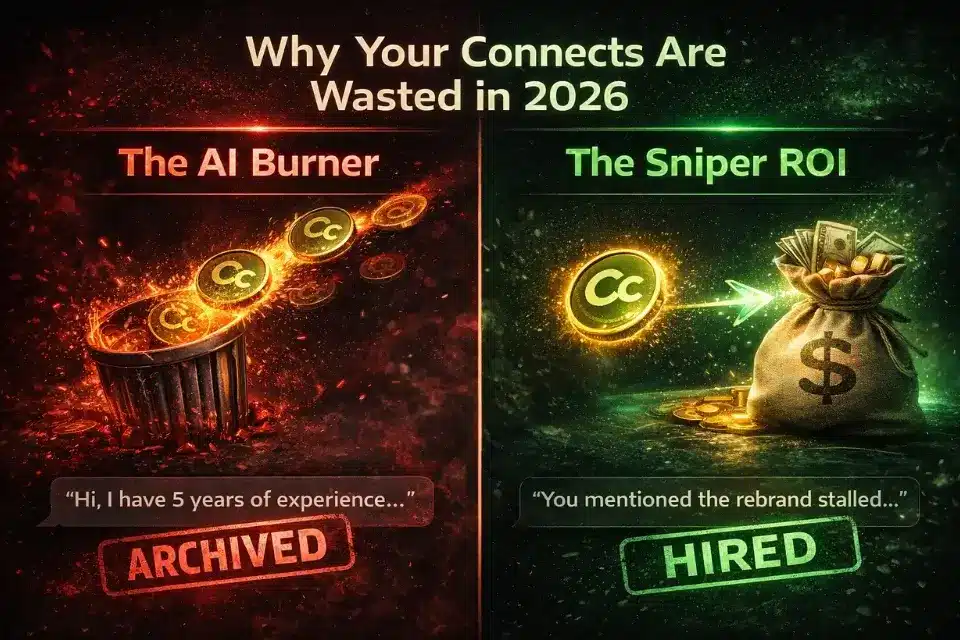
Upwork Connects are not cheap. At roughly $0.15 per Connect and most proposals costing 6 Connects, you are spending close to a dollar every time you apply. Multiply that across 50 ignored proposals and you have burned $50 for zero return.
The reason most proposals fail is not effort — it is structure. Freelancers are sending pitches that are built for volume, not impact. They copy a ChatGPT template, swap out the job title, and hit send. Clients see through it in under three seconds.
Warning: If your first sentence is “Hi, I have 5 years of experience in…” or “I hope this message finds you well,” the client has already archived your pitch before they finish reading it. These phrases are now the universal signature of a lazy AI-generated proposal. One generic opener and your entire pitch is invisible — regardless of how strong the rest of it is.
The freelancers consistently landing high-ticket Upwork contracts in 2026 are sending fewer proposals, not more. They spend 15 minutes on research before they write a single word, and their opening lines prove it.
The $10,000 Upwork Proposal Example (Full Text)
This is the unedited proposal that won a $10,000 fixed-price contract for a brand strategy and messaging project. Nothing has been polished after the fact.
The raw proposal:
You mentioned the rebrand stalled because your last agency delivered a logo without a positioning strategy — I’ve seen that exact pattern derail three projects I was brought in to fix. The logo isn’t the problem. The missing narrative underneath it is.
I’m a brand strategist with 7 years focused specifically on B2B service companies going through repositioning. I don’t do visual identity work — I do the strategic foundation that makes the visual work actually land with your buyers.
Here’s the most relevant thing I’ve done: [link to single case study — B2B consultancy repositioning, 60-day engagement, client raised average deal size by 34% in the 6 months post-launch].
I put together a 60-second video walking through how I’d approach the first phase of your project specifically: [Loom link]
Open to a 15-minute call this week to see if there’s a fit? No deck, no pitch — just a conversation.
— [Name]
Now here is how that compares to the typical AI-generated version of the same pitch:
|
Element |
❌ The AI-Generated Version (Failing) |
✅ The $10k Human Version (Winning) |
|---|---|---|
|
Opening Line |
“I hope this message finds you well. I am excited to apply for this branding project.” |
Directly references the specific problem mentioned in the job post (stalled rebrand, missing strategy) |
|
Experience Framing |
“I have 7 years of experience in branding, design, and marketing across multiple industries.” |
Narrowly specific: B2B service companies, repositioning only — signals deep specialisation |
|
Portfolio |
“Please see my portfolio at [link] which contains over 30 case studies.” |
One case study, directly relevant, with a measurable outcome stated in the proposal itself |
|
Human Signal |
None — pure text |
Custom 60-second Loom video built for this specific job post |
|
CTA |
“Please feel free to reach out if you have any questions. I look forward to hearing from you.” |
“Open to a 15-minute call this week to see if there’s a fit? No deck, no pitch — just a conversation.” |
|
Word Count |
312 words |
187 words |
|
Result |
Archived within seconds |
Reply within 4 hours. Contract signed within 72 hours. |
Line-by-Line Teardown: Why This Pitch Won
The Upwork Preview Cutoff (The Most Important 2 Lines)
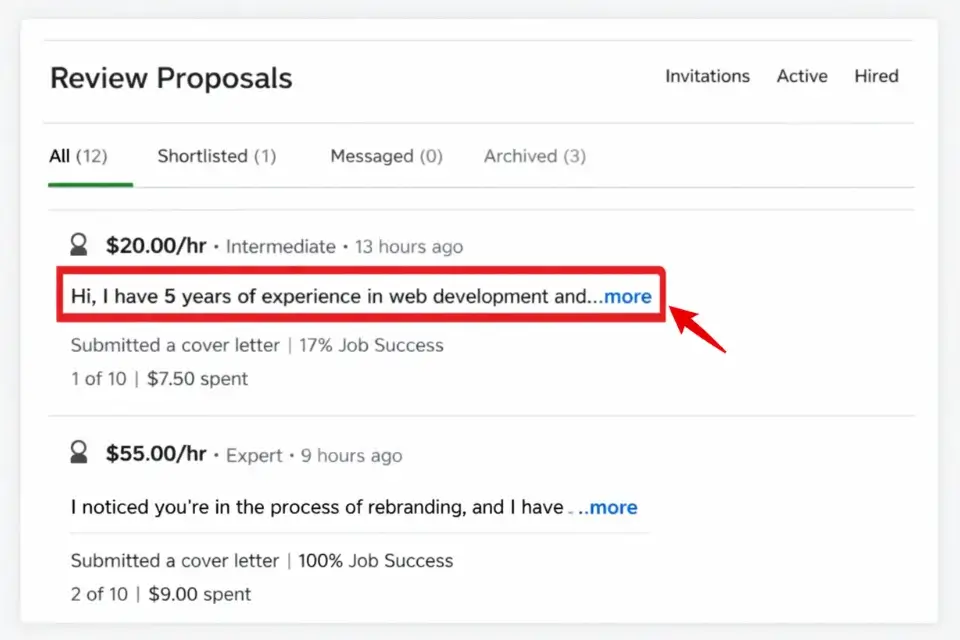
This is the single most overlooked technical reality of Upwork proposals: clients do not see your full pitch first.
In the Upwork client dashboard, proposals display only the first 150–200 characters before cutting off with a “Read More” link. On mobile — where a large portion of clients review proposals — it is even shorter.
That means your first two sentences are not an introduction. They are your entire proposal for most clients who will never click through. If those two sentences do not immediately prove you read their specific job post and understand their specific problem, you are done.
The winning proposal above opens with: “You mentioned the rebrand stalled because your last agency delivered a logo without a positioning strategy.”
That is 22 words. It references a specific detail from the job description. It signals: this person read my post, understood my frustration, and is not sending a template. The client clicks “Read More.”
This ties directly into the core framework we teach in our comprehensive guide on writing winning freelance proposals.
The “Anti-AI” Client Research Method
Before writing a single word of your proposal, spend 10 minutes reverse-engineering the client.
Here is the process we use on every high-ticket application:
1. Read the full job description twice. Look for emotional language — frustration, urgency, past failures. These are your hook ingredients.
2. Check their Upwork hire history. Their previous jobs often reveal the company name, the industry, the type of freelancers they have hired before, and whether those contracts ended positively. A client with 12 hires and a 94% satisfaction rate is a completely different conversation than a client with 2 hires and no feedback.
3. Find their company online. A quick search of their company name (often findable through their hire history, job title, or LinkedIn) gives you their current positioning, recent news, and any obvious problems they have not mentioned in the job post.
4. Feed it to AI — for analysis only.
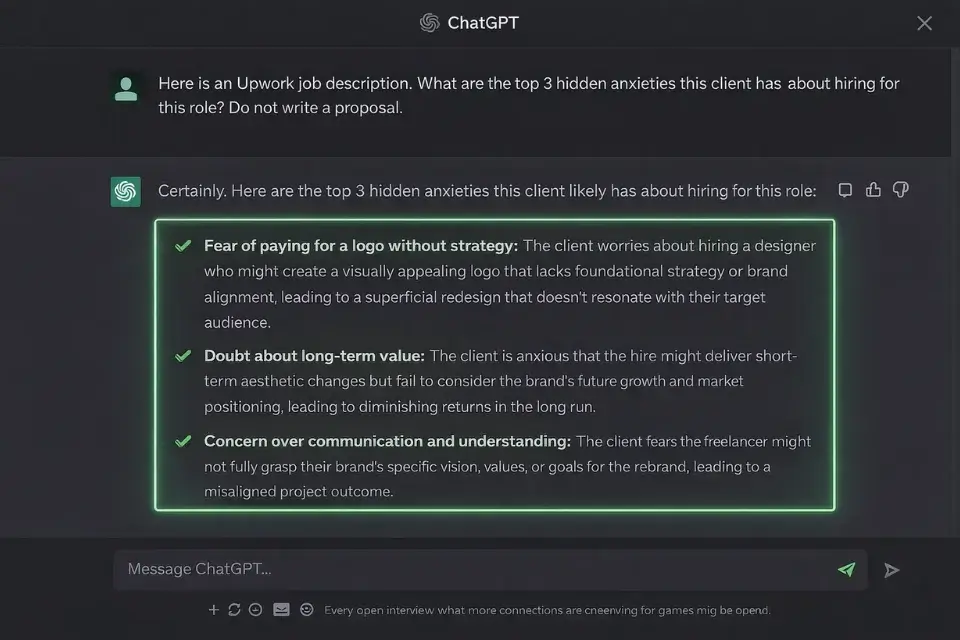
Paste the job description and any company context into ChatGPT and ask: “What are the top 3 anxieties this client likely has about hiring a freelancer for this project?” Use those answers to pre-empt objections in your proposal. Never ask it to write the proposal itself — the output will be generic, detectable, and immediately archived.
ChatGPT will occasionally misread the industry context or generate surface-level insights when given a vague prompt — always gut-check its output against what you actually know about the client before referencing anything in the proposal.

ChatGPT
Best for: Freelancers who want to extract hidden client pain points and objection intelligence from a job description before writing a single word of their pitch.
The “Loom Video” Trust Hack
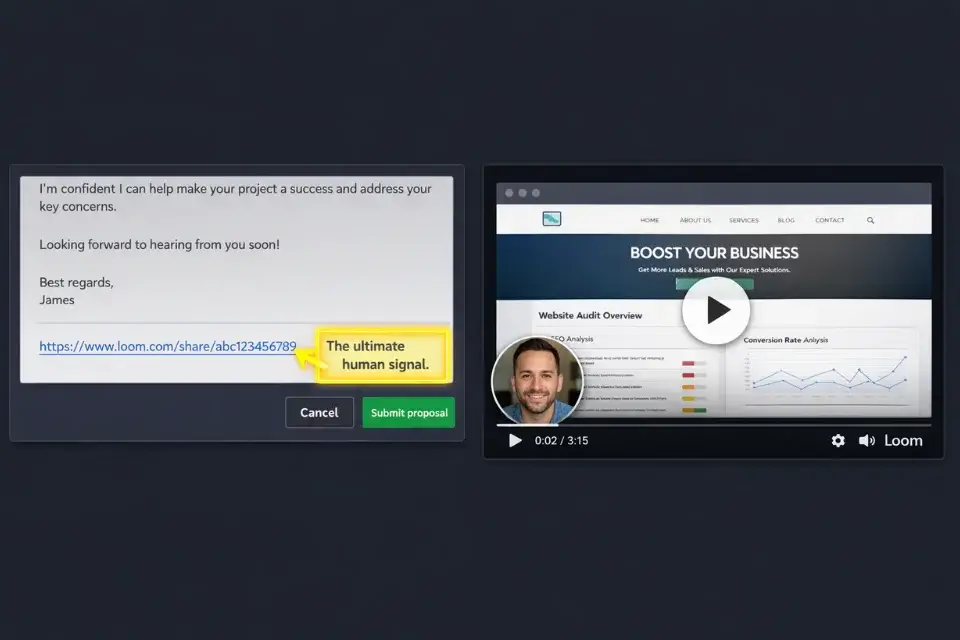
This is the single biggest differentiator in the current Upwork environment. Almost nobody does it. It takes 10 minutes. It works.
Record a custom 60-second Loom video for each high-ticket proposal you send. The structure is simple:
- Seconds 0–10: Say their name and reference the specific project. (“Hey Sarah — I watched your job post about the rebrand situation and I wanted to walk you through how I’d approach it.”)
- Seconds 10–40: Screen-share something relevant — their website, their existing brand, a quick sketch of your proposed approach. Show that you did the work before they hired you.
- Seconds 40–60: Soft CTA. (“I kept this short intentionally — happy to go deeper on a quick call if this direction feels right.”)
Paste the Loom link directly into the proposal body, not as an attachment. Include a preview thumbnail if Loom generates one.
The reason this works: a video cannot be AI-generated. It is an unambiguous human signal. In a sea of identical text blocks, a 60-second personalised video is jarring in the best possible way. Clients remember it.
Pro Tip: Record your Loom in the first hour after a job is posted. Upwork notifies clients when they receive proposals and many check them immediately. Being the only video proposal in the first wave puts you in a completely different category from everyone else.
Loom’s free tier caps you at 25 videos with a 5-minute limit per recording — more than enough for proposal use. The desktop recorder occasionally has sync issues on older hardware, and the AI-generated transcripts sometimes mangle technical terminology. Neither issue affects the core use case here, which is a 60-second personalised video. For proposals specifically, it remains the best tool available.

Loom
Best for: Freelancers applying to high-ticket jobs who want to immediately stand out as a human, build trust before the first conversation, and eliminate the AI-pitch stigma in a single 60-second clip.
The Low-Friction Call to Action (CTA)
Most proposals end with one of two things: a passive “looking forward to hearing from you” that puts no pressure on anyone, or an aggressive “click the hire button if you’d like to get started” that feels presumptuous before a single conversation has happened.
Both fail for different reasons.
The CTA that consistently generates replies is a specific, low-stakes, time-bounded soft ask:
“Open to a 15-minute call this week to see if there’s a fit? No deck, no pitch — just a conversation.”
Unpacking why this works:
- “15 minutes” removes the fear of a long, salesy call
- “this week” creates a mild time anchor without being pushy
- “to see if there’s a fit” reframes the call as mutual — you are evaluating them too, not just auditioning
- “no deck, no pitch” pre-empts their biggest fear (being sold to) before they can think it
Avoid the word “interview.” It positions you as the candidate and them as the authority. You are a consultant evaluating a potential engagement. The language should reflect that.
Tailoring This Framework to Your Niche
The core architecture of this proposal — specific hook, narrow proof, human signal, soft CTA — works across every freelance category. The way you execute each element shifts by niche.
Developers should front-load technical specificity in the hook. Reference the stack they mentioned, the integration challenge they described, or the performance problem they hinted at. Clients hiring developers are often technical themselves — impress them with precision, not enthusiasm.
Writers and content strategists need to demonstrate voice match in the hook itself. If the client’s job post is casual and conversational, open in the same register. If it is formal and research-heavy, mirror that. The hook is an audition.
Designers need to lead with visual competence. Reference something specific about their current brand or site in the opening line — not to criticise it, but to show you looked at it and formed an opinion. An eye that notices things is the whole product.
In every case, the Loom video amplifies whatever your text establishes. If your hook is strong, the video deepens the trust. If your hook is weak, the video cannot save it — so always write the hook first.
Are you pitching visual work specifically? Steal our highly tailored proposal templates for graphic design projects.
Frequently Asked Questions
How long should an Upwork proposal be?
150–250 words maximum for the proposal text itself. Clients are reviewing pitches on mobile, in between meetings, often while managing multiple open jobs simultaneously. A text wall signals that you do not respect their time — which is the first thing a good freelancer should demonstrate.
If the project is highly complex and warrants more detail, keep the Upwork proposal short and attach a one-page scope overview as a separate document. Never bury the important information inside a 600-word pitch nobody will read.
Should I attach a cover letter on Upwork?
No. The proposal box is your cover letter — treat it as such.
Any attachments should be strictly limited to hyper-relevant portfolio pieces or case studies that directly relate to the specific job. One relevant PDF case study is acceptable. A zip file of your full portfolio is not. If it requires effort to open, it will not be opened.
Do Upwork Connects guarantee my proposal is read?
No. Boosted proposals put you at the top of the client’s list, but the client still sees the same two-line preview before deciding whether to click through.
If those preview lines look like generic AI output — and most boosted proposals do — clients scroll right past them. You have spent extra Connects to be ignored faster. Boosting only amplifies what is already there. If your hook is weak, spend your Connects on a better proposal, not a higher position.
Per Upwork’s own guidance on getting hired, personalisation and specificity consistently outperform volume and boosting for long-term contract rates.
The Complete 2026 Blueprint: How to Write a Winning Proposal
Verdict: The highest-earning Upwork freelancers do not play the volume game. They send fewer proposals, spend more time on research, and let the Loom video do the trust-building that no block of text can replicate. Hyper-targeted + human signal + soft CTA = high-ticket contracts. That is the entire formula.
At Smart Remote Gigs, our goal is to help you stop wasting money on ignored applications and start building a high-ticket client roster. Send one great proposal today instead of ten average ones. The ROI difference is not marginal — it is the difference between burning Connects and building a sustainable business.
Once you get the client to reply, you cannot drop the ball on the follow-through. Make sure you avoid the fatal errors that kill deals by reviewing the most common proposal mistakes to avoid.

![How to Find Client Email Addresses: B2B Method [Guide]](https://smartremotegigs.com/wp-content/uploads/2026/10/how-to-find-client-email-addresses-hero-1024x577.webp)
Thank you for your excellent and insightful article, it was truly valuable
You’re very welcome! I’m so glad to hear you found the article valuable. That’s exactly why we create this content. Thanks for reading and for your kind words!