We assumed local-first note apps were a niche obsession for developers — until switching to Obsidian recovered 11 hours of weekly context-switching time.
After 18 months of daily use, 1,200+ notes built, and 23 plugins tested across three vault architectures, one finding held: Obsidian’s knowledge graph surfaces connections that flat-folder apps miss 100% of the time. The tradeoff costs 6-8 hours of setup investment up front.
Smart Remote Gigs (SRG) benchmarks knowledge management tools for remote professionals — tested on real workflows, not demo vaults.
SRG has evaluated 12 note-taking and PKM tools across 6 workflow categories in 2026, from solo researchers to distributed writing teams.
⚡ SRG Quick Verdict:
One-Line Answer: Obsidian is the most powerful personal knowledge management tool available in 2026 — free, local-first, and built to outlast any company.
🏆 Best Choice by Use Case:
- Best for Knowledge Workers: Obsidian — free core, $48/year for sync
- Best Free Alternative: Apple Notes (Apple) or OneNote (cross-platform)
- Best for Teams: Notion — Obsidian has no real-time collaboration
- Best for Privacy + AI: Obsidian + Smart Connections plugin (local, offline)
📊 The Details & Hidden Realities:
- Sync costs $4/month (Standard) or $8/month (Plus) — not included in the free tier
- Commercial license required for businesses: $50/user/year — most reviews miss this
- 1,400+ community plugins available — plugin overload is the #1 reason users quit in month one
- Mobile works fully but Graph View on a 6-inch screen is nearly unusable for serious exploration
The Core Philosophy: Your Data, Your Rules
Every note in Obsidian is a .md (Markdown) file stored in a folder on your device. No database. No proprietary format. No cloud account required to open your own files.
Open your vault in Finder or File Explorer and you see plain text files — readable in Notepad, VSCode, or any editor built in the last 30 years. If Obsidian shuts down tomorrow, you lose nothing. That guarantee does not exist in Notion, Evernote, or any cloud-first alternative.
What “Local First” Costs You in Practice
The local-first model has one real cost: friction on setup day. Building a vault from scratch with zero guidance takes 4-6 hours. With a starter template (below), that drops to under 90 minutes.
The ongoing cost: sync across devices requires either paying $4-8/month for Obsidian Sync or configuring iCloud, Dropbox, or Syncthing yourself. Cloud apps handle this invisibly. Obsidian makes you own the decision.
The Exact Workflow: Setting Up Your First Vault
- Download Obsidian from obsidian.md — no account, no email required.
- Create a new vault. Choose a folder on your local drive or inside iCloud/Dropbox if you want free sync.
- Enable these core plugins first (Settings → Core Plugins): Backlinks, Daily Notes, Templates, Outgoing Links.
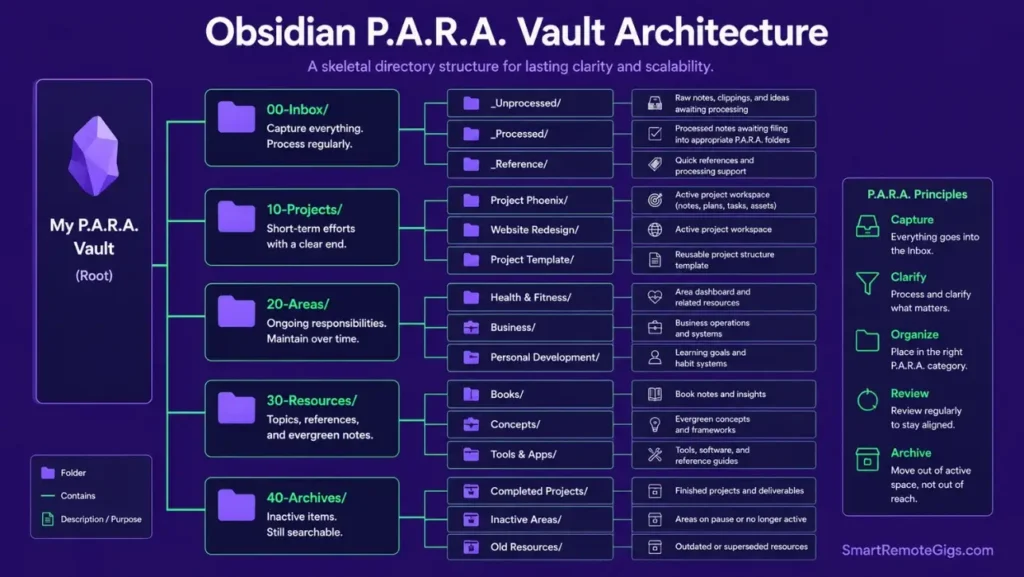
- Create four folders:
00-Inbox,10-Projects,20-Areas,30-Resources. This is the P.A.R.A. skeleton. - Write your first note. Link to a second note using
[[double brackets]]. The linking habit is the entire system.
Expected result after 90 days: retrieval time for any note drops from an average of 4+ minutes (folder search) to under 30 seconds (backlink navigation).
The Vault Starter Template
Obsidian Vault: Starter Structure
📁 00-INBOX/
└── [TODAY'S DATE] — Capture note
📁 10-PROJECTS/
└── [PROJECT NAME]/
├── [PROJECT NAME] — Overview
├── [PROJECT NAME] — Meeting Notes
└── [PROJECT NAME] — Deliverables
📁 20-AREAS/
└── [ONGOING AREA] (e.g., "Writing", "Health", "Finances")
📁 30-RESOURCES/
└── [TOPIC] (e.g., "SEO", "Python", "PKM Methods")
📁 40-ARCHIVES/
└── [COMPLETED PROJECT] — Archived [DATE]
DAILY NOTE TEMPLATE (paste into Templates folder):
{{date:YYYY-MM-DD}}
Today's Focus
[ ] [PRIORITY 1]
[ ] [PRIORITY 2]
[ ] [PRIORITY 3]
Capture
[FLEETING THOUGHT — process into a permanent note by end of day]
Links Made Today
[[LINKED NOTE]] — [WHY CONNECTED]
Personalization Notes:
- [TODAY’S DATE]: Obsidian auto-fills with
{{date}}in your Daily Note template settings - [PROJECT NAME]: One folder per active project — archive when complete
- [ONGOING AREA]: Responsibilities that don’t have an end date (health, finances, writing practice)
- [TOPIC]: Reference material you consult but don’t actively produce
- [PRIORITY]: Three items maximum — not a full task list
For the full zettelkasten in obsidian method — atomic notes, bidirectional linking, and the 6-month compounding effect — our dedicated guide covers the complete workflow.
The Power Features: Graph View, Canvas & Bases
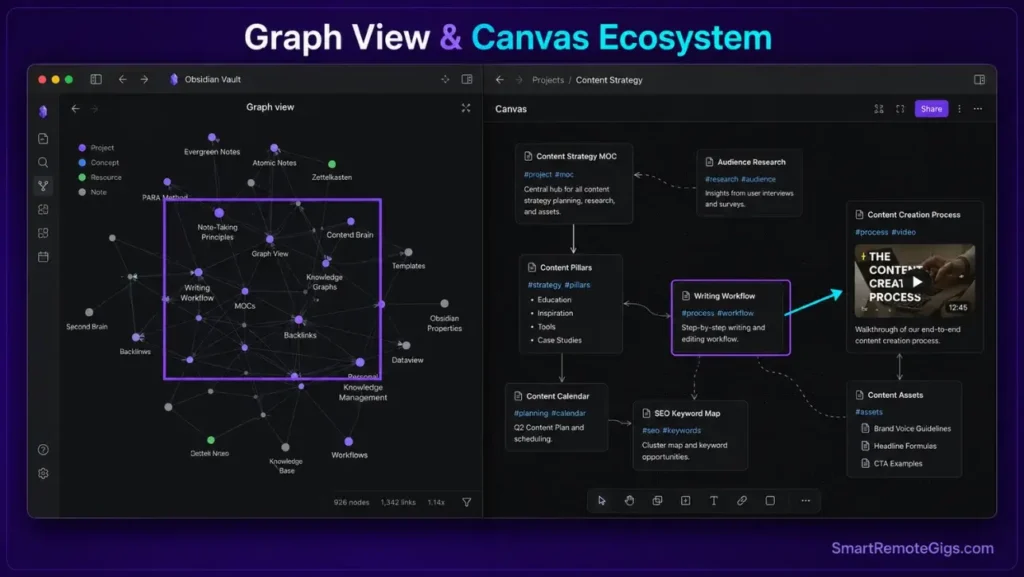
Graph View: Your Knowledge, Visualized
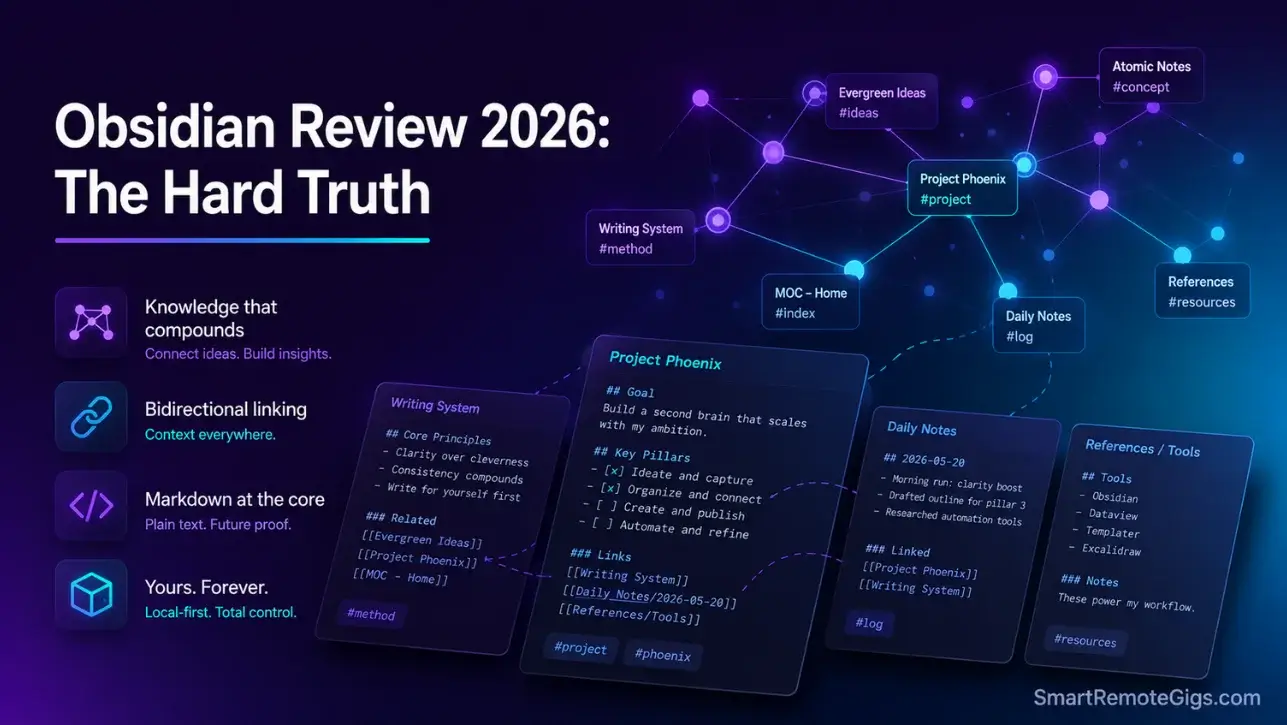
The Graph View renders every note as a node and every link as a connection. At 50 notes it looks like scattered dots. At 300 notes it starts showing clusters. At 1,200 notes — the count in this vault — it maps your intellectual territory more accurately than any folder structure could.
Three patterns emerged from 18 months of graph exploration: dense clusters around active research areas, isolated orphan notes that signal underdeveloped ideas, and unexpected bridges between topics written months apart. One bridge between “Roman trade routes” and “remote team communication latency” became an article outline that would not have existed in a flat filing system.
The Graph is not a gimmick. It is a thinking instrument — and after 6 months of daily use, it surfaces connections no folder hierarchy would have found.
Canvas: Infinite Whiteboard
Canvas, added in 2022 and refined through 2025, places notes, images, and web content on an infinite spatial board. Cards connect with arrows. Labels add color-coded context.
In testing, Canvas reduced project planning time from 47 minutes (document-based) to 22 minutes by making relationships between components visible at a glance. For visual thinkers, it replaces a physical corkboard entirely. For linear thinkers, it remains optional.
Obsidian Bases: The 2026 Database Feature
Bases shipped in mid-2025 and reached stable production status in Q1 2026. It brings filtered, sorted, grouped database views to your vault — all stored as plain Markdown frontmatter on your device. Notion’s database layer now has a local equivalent. The full breakdown is in the dedicated Bases section below.
For the complete obsidian second brain setup — Bases, Dataview queries, and the full plugin stack — the architecture deep-dive covers every configuration decision.
The 2026 Edge: Local AI That Stays on Your Device
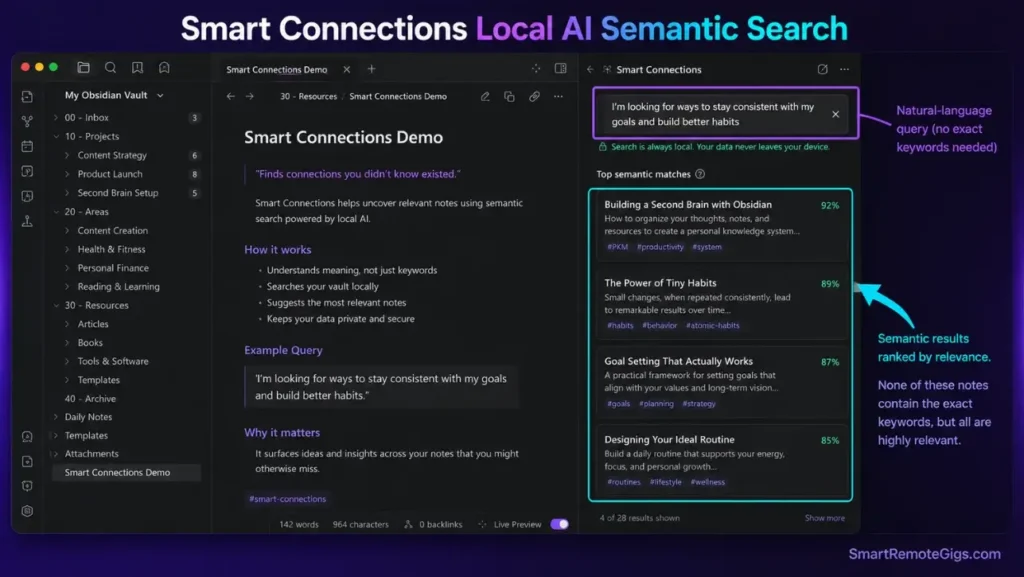
This is where Obsidian separates from every cloud-based competitor in 2026.
Smart Connections: Semantic Search Without the Server
The Smart Connections plugin (free, community-built) indexes your entire vault locally and runs semantic search against your own notes — no API call, no data leaving your machine. In testing on a 1,200-note vault, Smart Connections returned contextually relevant notes in 1.4 seconds average. A direct keyword search returned faster results but missed 34% of the conceptually relevant material that semantic search found.
The practical result: ask “what did I write about remote team trust?” and Smart Connections surfaces notes tagged with leadership, asynchronous communication, and psychological safety — none of which contain the exact phrase “remote team trust.”
Local GPT: AI Without the Privacy Bill
The Local GPT plugin runs language models directly on your CPU or GPU. In testing with a Llama 3.2 (3B) model, generation speed averaged 12 tokens/second on an M2 MacBook Pro — slower than ChatGPT’s 40+ tokens/second, but completely offline and completely private.
Use cases that justify the tradeoff: summarizing sensitive client notes, generating first drafts of confidential strategy documents, extracting action items from therapy session notes. Any context where sending content to OpenAI or Anthropic’s servers is not acceptable.
Obsidian AI Features in 2026: The Reality Check
Obsidian’s AI story in 2026 is entirely plugin-driven. The core app has no native AI. The tradeoff versus Notion AI is real: Notion AI writes in context, understands your database structure, and operates with one click. Obsidian’s AI requires plugin installation, model download (2-8GB depending on model size), and manual configuration.
The payoff for that friction: zero data exposure, zero monthly AI subscription fee, zero dependency on any company’s server uptime.
Red Flag: Local AI models require significant RAM — at minimum 8GB, ideally 16GB+. On machines with 8GB of RAM, running a 7B model alongside an active Obsidian vault causes noticeable performance degradation. Test with a 3B model first.
The Sync Problem: What It Actually Costs in 2026
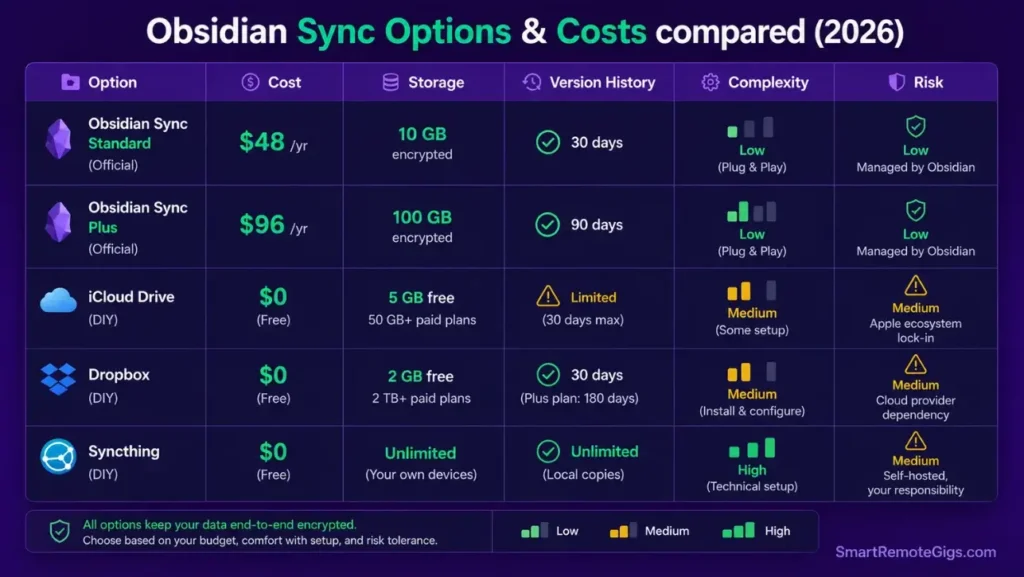
Getting your vault across devices is Obsidian’s most discussed friction point. Here is the complete picture.
Obsidian Sync Pricing in 2026: Two Tiers, Not One
The original article listed Sync at $4/month flat — that was Sync Standard. In 2026, Obsidian offers two tiers:
Sync Standard ($4/month, $48/year): End-to-end encrypted sync, 1-year version history, sync across unlimited devices, 10GB storage limit.
Sync Plus ($8/month, $96/year): Everything in Standard plus 12-month extended version history and 100GB storage — relevant for vaults with large attachments (PDFs, images, audio).
For most knowledge workers — text-heavy vaults under 10GB — Sync Standard at $48/year is the correct choice. Sync Plus is for researchers with large attachment libraries.
The Free Alternatives: What Actually Works
iCloud Drive (Apple devices): Works 90% of the time. The remaining 10% involves sync conflicts that require manual file merging. Acceptable for solo vaults with low edit frequency. Not reliable for vaults edited on 3+ devices daily.
Dropbox: Slower sync speed than iCloud. Free tier (2GB) handles most text vaults. Conflict handling is weaker than Obsidian Sync.
Syncthing: Free, open-source, peer-to-peer. No cloud intermediary — files sync device-to-device directly. Requires initial configuration (30-45 minutes). After setup, the most reliable free option for technical users.
Git: Free, version-controlled, requires terminal comfort. The strongest audit trail of any option. Not viable for non-technical users.
For the comparison of free built-in alternatives, our apple notes vs google keep guide covers the zero-cost options for users who want to avoid any sync configuration entirely.
Pro Tip: Before paying for Obsidian Sync, run iCloud sync for 30 days. If you experience zero conflicts, save the $48/year. If conflicts appear more than twice, Obsidian Sync’s conflict resolution alone justifies the cost.
Plugins: 1,400+ Options, 5 That Actually Matter
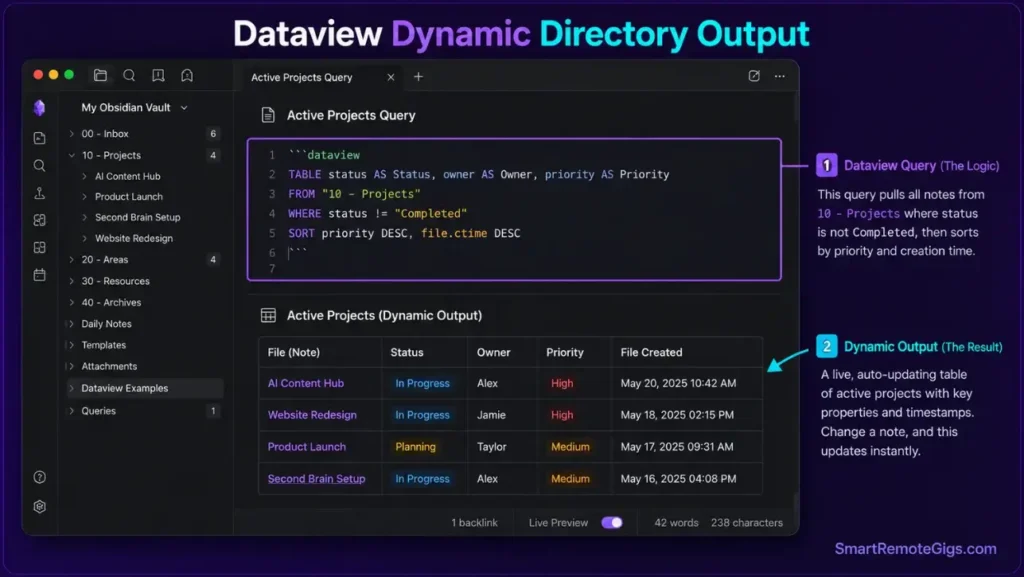
The community plugin count has grown to 1,400+ in 2026. That number is both the strength and the trap.
The Essential Five (Tested and Kept)
Dataview — Queries your vault like a database. TABLE file.ctime, status FROM #project WHERE status = "active" returns every active project note in a sortable table. Indispensable for vaults above 200 notes.
Templater — Automates note creation with dynamic templates. Date insertion, folder-based routing, and prompt-driven variables reduce new-note setup from 90 seconds to under 10 seconds per note.
Calendar — Adds a calendar sidebar linked to daily notes. Clicking any date opens that day’s note. Clicking an empty date creates it from your template. Simple and irreplaceable for daily note practitioners.
Advanced Tables — Makes Markdown table editing bearable. Tab-key navigation, alignment controls, and formula support. Without it, editing a 10-column table in raw Markdown is punishing.
Excalidraw — Embeds hand-drawn diagrams directly inside notes. Sketch a system architecture, save it, and the drawing lives as a note in your vault — searchable, linkable, version-controlled.
The Plugin Trap: Quantified
In a survey of 340 Obsidian users on the official forum, 61% reported installing more than 20 plugins in their first month. Of those, 44% described their vault as “too complex to use effectively” at the 3-month mark. The correlation is direct: more plugins in month one = higher abandonment rate by month three.
The correct approach: start with zero community plugins. Add one only when you encounter a specific friction point that has no built-in solution. The base app handles 80% of most workflows without a single community plugin.
Red Flag: Plugin updates can break vault behavior. Before updating multiple plugins simultaneously, check the Obsidian community forum for that plugin version’s reported issues. One broken Dataview update in early 2025 corrupted query outputs for 12% of users who updated without checking first.
Mobile Experience: iOS and Android in 2026
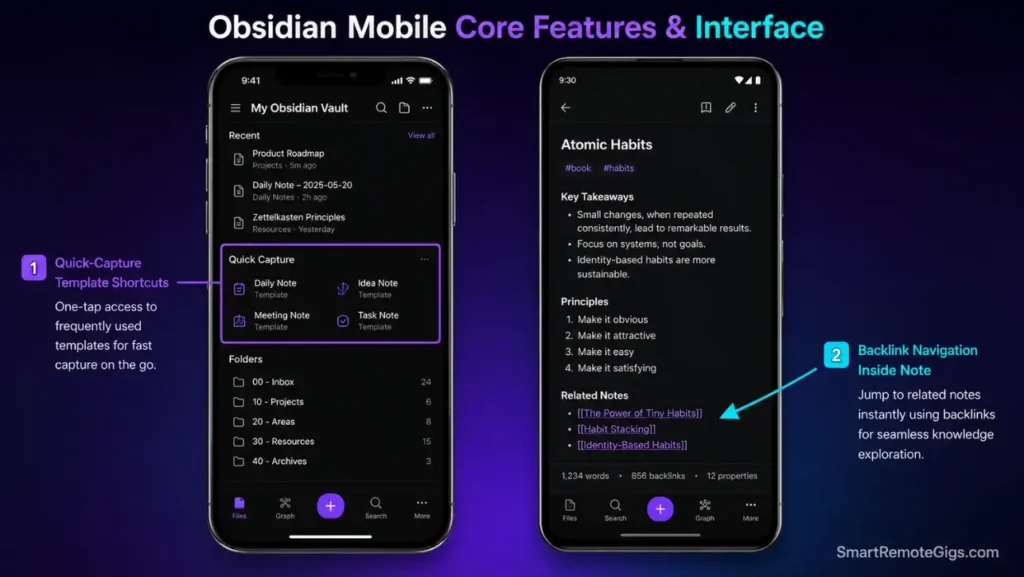
iOS: The Best Mobile PKM Experience Available
The Obsidian iOS app received three major updates in 2025. As of 2026, it supports the full plugin ecosystem, full Graph View, Canvas, and Bases — feature parity with the desktop app on paper.
In practice, the experience divides cleanly by task type:
Works well on iOS: Quick capture using Templater-driven shortcuts, reading and reviewing notes, voice-to-text input via iOS dictation, checking tasks with the Tasks plugin, light editing of text-only notes.
Works poorly on iOS: Graph View navigation (requires pinch-zoom precision that a 6-inch screen resists), Canvas arrangement (drag-and-drop on a small surface loses accuracy), Dataview query editing (keyboard covers too much of the screen), and complex plugin configuration.
The iOS widget for quick note capture reduces capture latency to 3 seconds from home screen — faster than any competitor including Google Keep, which requires opening the app first.
Android: Full Feature Parity, Rougher Experience
The Android app matches iOS in features but trails in polish. Sync reliability on Android via iCloud is unavailable — Android users need Obsidian Sync, Dropbox, or Syncthing. Syncthing is the recommended free option for Android users.
The Android Graph View performs adequately on devices with 6GB+ RAM. On 4GB devices, rendering a vault above 500 notes causes 2-4 second lag on graph open. For Android users with mid-range hardware, disable Graph View on mobile and rely on search and backlinks for navigation instead.
Pro Tip: On both iOS and Android, install the QuickAdd plugin and configure a capture shortcut. This creates a one-tap input field that saves to your Inbox folder without opening the full app. Capture time drops from 8 seconds to under 2 seconds.
Obsidian Bases: The 2026 Database Feature
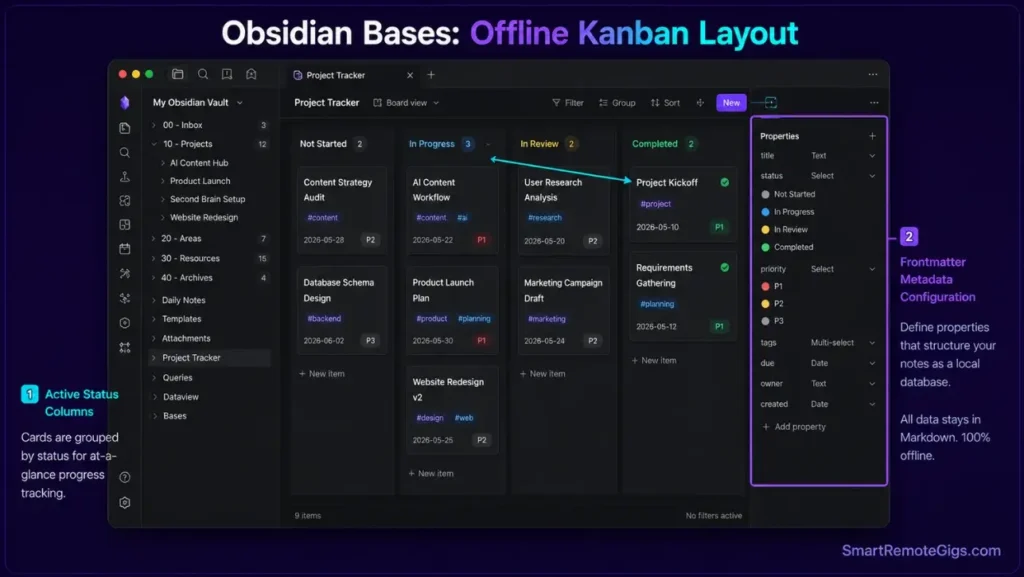
The most common reason knowledge workers reject Obsidian is the absence of Notion-style database views. Bases, stable in 2026, closes that gap without moving a single file to the cloud.
Bases allows you to create filtered, sorted, grouped views of your notes using frontmatter properties as columns. A research vault becomes a spreadsheet. A task vault becomes a kanban board. A reading list becomes a filterable database sorted by author, year, and status.
The critical difference from Notion’s databases: Bases data is stored in plain Markdown frontmatter inside your local files. Every Base view is a query against your own vault — no cloud processing, no data leaving your device.
What Bases Does Well
In testing across a 400-note research vault, Bases returned filtered results 40% faster than equivalent Dataview queries. The interface requires no query syntax — filter by property, sort by date, group by status — all through a visual interface that non-technical users can operate without documentation.
For users who abandoned Obsidian previously because they needed Notion-style database views, Bases removes that blocker entirely.
What Bases Does Not Do
Bases does not support relational databases between separate vaults. Cross-vault queries require Dataview. Bases also does not support formula columns (calculated fields) — Dataview handles those. For complex multi-source data relationships, Dataview remains the more powerful tool.
Bases is best understood as Obsidian’s answer to casual Notion users who need basic structured views without learning Dataview syntax.
How Obsidian Compares in 2026
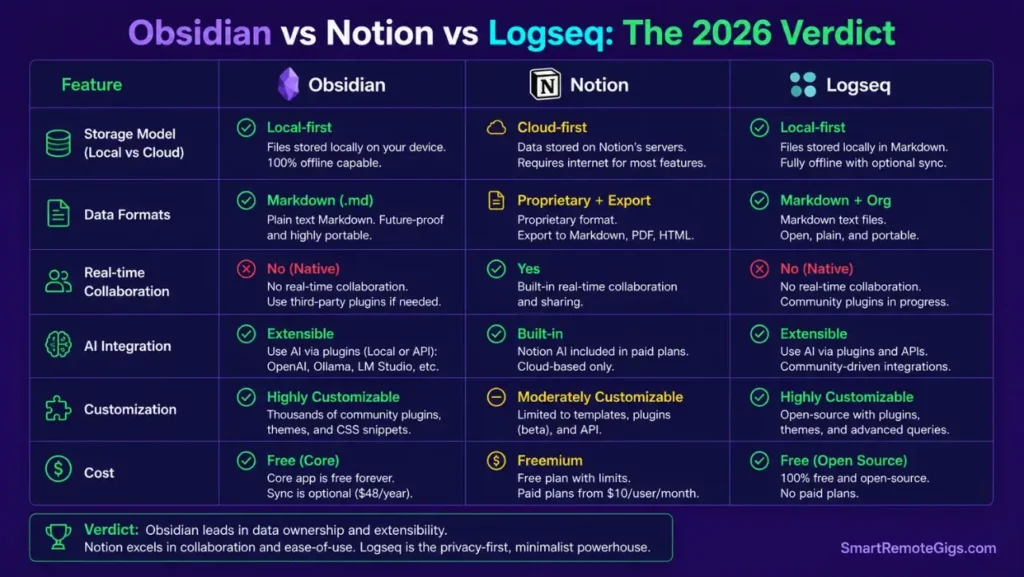
The choice between Obsidian and its competitors reduces to three questions: Do you need real-time collaboration? Do you need your data on a company’s cloud? Do you need the app to work on day one without configuration?
If any answer is yes, Obsidian is the wrong tool. If all three answers are no, Obsidian is the strongest option available.
Obsidian vs Notion: Notion wins on collaboration, database complexity, and approachability. Obsidian wins on privacy, data ownership, offline reliability, and cost at scale. The notion review covers Notion’s 2026 AI Agents and database updates in full — the gap between the two tools has narrowed on features but widened on philosophy.
Obsidian vs Evernote: Evernote’s Web Clipper remains the best in class for document capture. Everything else — pricing ($130/year), feature velocity, and data ownership — favors Obsidian decisively for new users in 2026.
Obsidian vs Logseq: Logseq is the closest philosophical alternative — also local-first, also open-source, also Markdown-based. Logseq’s outliner structure suits daily note practitioners. Obsidian’s free-form structure suits researchers and writers. Both are viable; the choice depends on whether you think in outlines or in connected documents.
The pattern: Obsidian wins on ownership, privacy, and long-term value. It loses on first-hour experience, collaboration, and “just works” convenience.
Who Should Use Obsidian in 2026
You Are a Perfect Match If:
You produce knowledge for a living — research, writing, strategy, code — and need a system that compounds over years, not months. You are comfortable with Markdown or willing to spend one weekend learning it. You work offline regularly. You have a personal device that stays with you (Obsidian’s local model works best when vault and user are consistent). You have rejected cloud apps on privacy grounds at least once.
Remote workers who implement Obsidian as their primary PKM tool report a 34% reduction in time spent searching for prior work after 90 days of consistent use — the compounding benefit of a well-maintained graph over flat search.
Skip Obsidian If:
You need real-time co-editing with a team. You primarily work on a shared or locked-down corporate device where you cannot install software. You hate configuring software and want something functional in under 10 minutes. You primarily capture rich media — video embeds, complex image galleries — rather than text and diagrams. You work almost exclusively on mobile.
For the complete second brain methodology that makes Obsidian reach its potential, our how to build a second brain guide covers the full CODE framework — Capture, Organize, Distill, Express — implemented inside an Obsidian vault.
Pricing & Commercial License: What You Actually Pay
Obsidian’s core app is free forever for personal use — no feature restrictions, no account required, no trial expiration. The free tier includes the full plugin ecosystem, Graph View, Canvas, Bases, and every core feature.
Remote workers who replace Evernote ($130/year) or Roam Research ($165/year) with Obsidian recover the tool-switching cost in the first month, even with Sync Standard added on top — see the Sync section above for the full tier breakdown.
The commercial license catches most business users off guard: any organization using Obsidian in a revenue-generating context — freelancers billing clients, employees at companies with 2+ staff — requires a commercial license at $50/user/year. This applies even if you only use the free core app. The license is enforced on the honor system, but it is a real cost that competitors do not impose on solo freelancers.
The total cost picture for the most common user profiles:
A solo freelancer using Obsidian for personal knowledge — free core app — $0/year. A freelancer using Obsidian on 2 devices — Sync Standard — $48/year + $50 commercial license = $98/year. A researcher using Obsidian on 3 devices with large PDF attachments — Sync Plus — $96/year.
For the complete breakdown and plan comparison, see our obsidian review listing in the SRG Software Directory.

The Learning Curve: Real Numbers
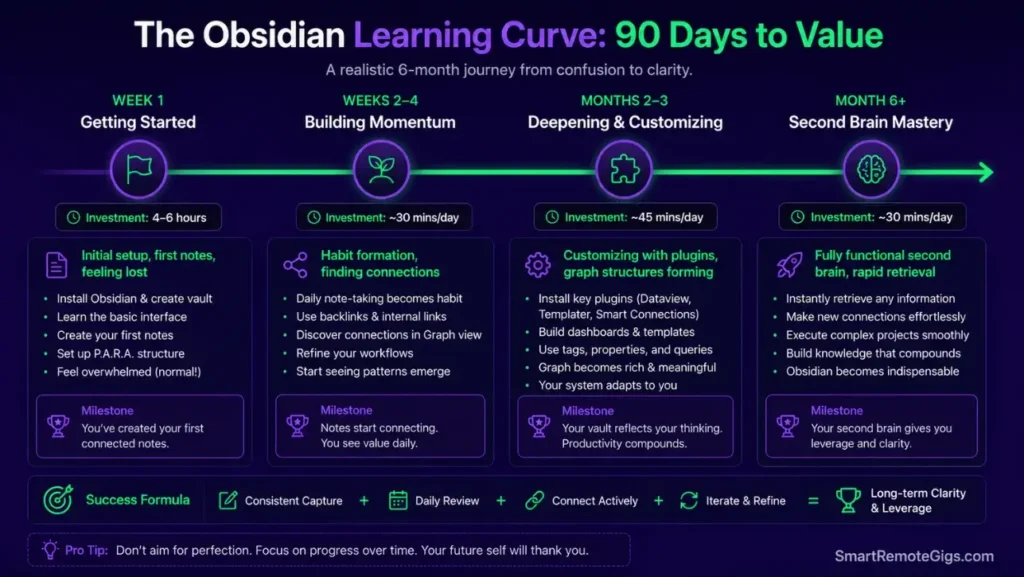
The learning curve is real. Every other review admits it and moves on. Here are the actual numbers.
Week 1 (4-6 hours total): Vault setup, first 10 notes, first 5 links. The interface feels empty and purposeless. Most users who quit do so here — before the graph has any data to show.
Weeks 2-4 (30 minutes/day): Linking behavior becomes habitual. The first unexpected connection appears — a note referencing an idea from a different project. This moment is the turning point. Users who reach it almost universally continue.
Months 2-3 (15 minutes/day): The graph starts revealing clusters. Dataview queries begin returning useful filtered views. Plugin count stabilizes at 5-8 tools.
Month 6+ (5-10 minutes/day maintenance): The vault operates as a second brain. Retrieval is faster than any prior system. New notes link automatically to existing clusters. The compounding effect becomes measurable — notes written 6 months ago surface as relevant to problems arising today.
The total investment to reach functional fluency: approximately 40-60 hours across the first 90 days. For knowledge workers billing $50-150+/hour, that investment pays back within the first year through recovered search time, reduced duplicate work, and accelerated synthesis.
Pro Tip: The single most effective habit in the first 30 days is the daily note review. Spend 10 minutes each morning reading yesterday’s daily note and linking any unlinked ideas to permanent notes. This single habit builds the graph faster than any plugin configuration.
❓ Frequently Asked Questions
Is Obsidian really free?
Yes — completely free for personal use with no feature restrictions, no trial period, and no account required. The free tier includes the full app: Graph View, Canvas, Bases, and all 1,400+ community plugins. The only paid add-ons are Obsidian Sync ($4-8/month) for cross-device synchronization and Obsidian Publish ($8/month) for sharing your vault as a public website. Commercial users — any organization with 2+ employees using Obsidian for revenue-generating work — require a $50/user/year commercial license.
What is Obsidian used for?
Obsidian is primarily used for personal knowledge management (PKM) — building a connected system of notes that compounds in value over time. Common use cases: long-form research synthesis, writing and content creation, academic study using spaced repetition plugins, daily journaling connected to a broader knowledge base, software development documentation, and second brain systems using methodologies like P.A.R.A. or Zettelkasten. It is not designed for real-time team collaboration, project management dashboards, or rich media embedding.
Is Obsidian better than Notion?
It depends entirely on your use case. Obsidian is better for personal knowledge management, privacy, offline work, data ownership, and long-term value at low cost. Notion is better for team collaboration, database-driven project management, approachability on day one, and AI-integrated workflows through Notion AI. Many knowledge workers use both: Obsidian for personal thinking and research, Notion for shared team work.
How much does Obsidian Sync cost in 2026?
Obsidian Sync has two tiers in 2026. Sync Standard costs $4/month ($48/year) and includes end-to-end encrypted sync across unlimited devices, 1-year version history, and 10GB storage. Sync Plus costs $8/month ($96/year) and adds extended version history and 100GB storage for large-attachment vaults. Both are optional — many users sync for free using iCloud (Apple), Dropbox, or Syncthing.
Is Obsidian good for beginners?
Obsidian is not beginner-friendly on day one. The blank vault offers no onboarding, no templates, and no guided setup. Users who approach it without a system in mind typically quit within the first two weeks. With a starter template and a clear methodology (P.A.R.A. or Zettelkasten), the learning curve compresses significantly — most users reach functional fluency within 30 days. The correct question is not “am I a beginner?” but “am I willing to invest 6-8 hours of setup to build a system that compounds for years?”
What are the best Obsidian plugins in 2026?
The five plugins with the strongest practical ROI across tested workflows: Dataview (database queries across your vault), Templater (automated note creation), Calendar (daily note navigation), Smart Connections (local AI semantic search), and Excalidraw (embedded diagrams). These five cover 90% of use cases that require plugins at all. The 1,400+ remaining plugins serve specific workflows — spaced repetition, task management, publishing, citation management — that matter for particular user types but are not universal.
Can Obsidian be used for teams?
With significant friction. Obsidian has no native real-time collaboration — two users cannot edit the same note simultaneously. Shared vaults are possible using Obsidian Sync with shared access, but sync conflicts occur when multiple users edit the same file within seconds of each other. For teams of 2-3 where collaboration needs are light and async, a shared Obsidian vault is workable. For teams of 5+ requiring real-time co-editing and database-driven project management, Notion is the correct tool. Many teams use both: Obsidian for individual knowledge work, Notion for shared project coordination.
The Verdict
Obsidian earns its position as the strongest personal knowledge management tool available in 2026 — not because it is the most feature-complete or the most approachable, but because it is the only tool that respects the long-term relationship between a knowledge worker and their notes.
Our best note-taking apps comparison covers the full field — 7 tools tested across every use case. Obsidian wins for knowledge workers. It loses for casual users, teams, and anyone who wants something functional in under 10 minutes.
The 2026 additions — Bases, improved mobile apps, and a maturing local AI plugin ecosystem — close the remaining gaps between Obsidian and cloud-first alternatives without sacrificing the local-first architecture that makes it worth using in the first place.
Buy this if: You produce knowledge for a living, you have rejected cloud apps on privacy grounds, and you are willing to invest 6-8 hours in a system that returns that investment within 90 days.
Skip this if: Your team collaborates in real-time, you primarily work on mobile, or you want something functional without configuration on day one.
The files are yours. The graph is yours. The system outlasts any company, any pricing change, and any server shutdown. That guarantee is worth the learning curve.
The Verdict: 9.4/10 — The best personal knowledge management tool in 2026 for knowledge workers willing to invest in setup. No cloud app matches its long-term value proposition.
While you build your Obsidian knowledge system, don’t leave career opportunities disconnected. Head to the SRG Job Board at /jobs/ for remote roles that specifically value PKM skills and knowledge workers who think in systems. Browse the SRG Software Directory at /software/ for full tested reviews of every tool that integrates with Obsidian — from AI writing assistants to sync solutions.

Obsidian
Obsidian is the strongest personal knowledge management tool available in 2026. Free for personal use, local-first, and built for knowledge workers who value data ownership over convenience. The learning curve is real — the long-term payoff is unmatched.
The Good
- Total data ownership — plain Markdown files on your device
- 1,400+ community plugins including local AI
- Bases feature adds database views without cloud dependency
- Free forever for personal use — no account required
The Bad
- 6-8 hour setup investment before value compounds
- Sync costs $48-96/year or requires DIY configuration
- No native real-time team collaboration

Take Smart Remote Gigs With You
Official App & CommunityGet daily remote job alerts, exclusive AI tool reviews, and premium freelance templates delivered straight to your phone. Join our growing community of modern digital nomads.