
Proposal Templates for Graphic Designers 2026 (Steal Mine)
 ·
Last Updated: March 26, 2026 ·
12 min read
·
Last Updated: March 26, 2026 ·
12 min read 
Every designer knows the unique frustration of losing a great project to someone with a weaker portfolio but a better pitch. If you want to stop getting ghosted by high-paying clients, you need proposal templates for graphic designers that rely on visual proof and hyper-personalization, rather than the generic AI filler flooding their inboxes.
When we launched Smart Remote Gigs, our mission was to help world-class remote creatives stop losing high-ticket jobs simply because of a bad pitch. I used the exact three template structures in this guide to close over $50k in freelance branding and UI/UX projects this year alone. No theory — just the copy-paste frameworks that convert, with the psychology behind why each one works.
The 2026 Design Pitch Manifesto | What It Means in Practice |
|---|---|
The Visual Rule | Clients buy with their eyes. Your proposal must be as well-designed as the portfolio you are pitching. |
The Anti-AI Rule | Ditch the 5-page generic cover letter. Use a 3-sentence human hook and get straight to mockups and ROI. |
The Framework Rule | One template does not fit all. Use the right structure for Branding, UI/UX, or Retainer engagements. |
The Delivery Rule | Interactive web proposals beat PDF attachments. Track opens, not guesses. |
Why Your Beautiful Portfolio Isn’t Enough in 2026
Design clients are not like typical B2B buyers. They respond to aesthetics, confidence, and clarity — in that order.
The problem is that most designers spend 40 hours on a portfolio piece and 4 minutes on the proposal that introduces it. That imbalance shows. Clients feel it.
Your proposal is your first unpaid deliverable. The way it looks, reads, and flows tells the client exactly what working with you will feel like. If it is a cluttered wall of text with a PDF attachment they have to download, you have already answered their question.
The “Text-Wall” Death Trap (And How to Avoid It)
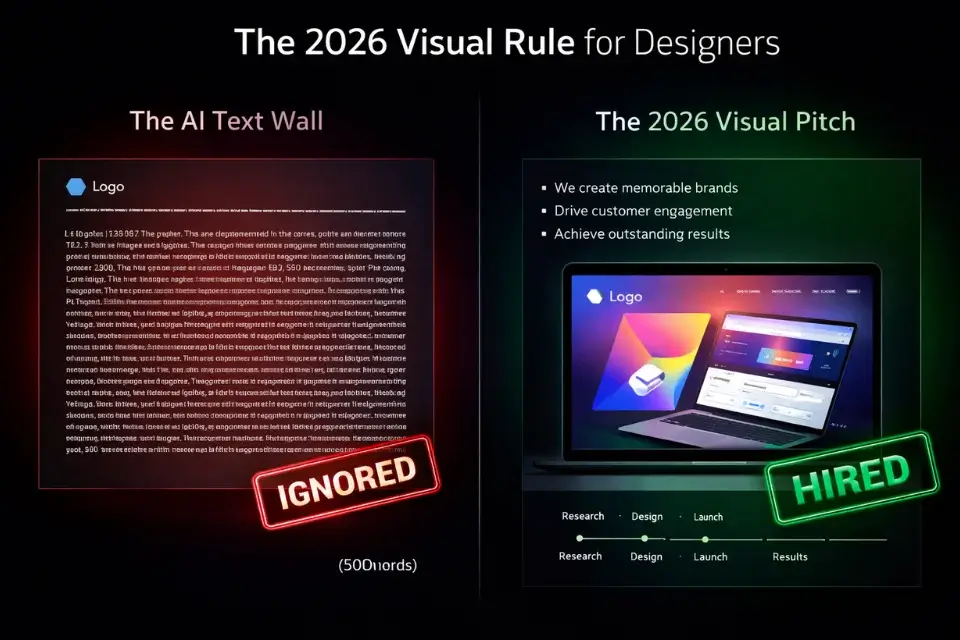
Design clients skim. They are visually trained to process layout before content. If your proposal opens with three dense paragraphs about your background, they are gone before they reach your portfolio link.
The fix is simple: lead with a specific insight about their project, follow immediately with a relevant visual, and keep every text block under four lines.
Warning: Do not let AI draft a 500-word introduction for a design proposal. Design clients have a sharper-than-average radar for generic language — they work with words and visuals professionally. One robotic opening paragraph and your carefully designed portfolio never gets seen.
The goal of your first screen is not to sell. It is to prove taste. Show a mood board snippet, a relevant before/after, or a single sharp sentence that proves you looked at their brand before writing.
3 Proposal Templates for Graphic Designers (Copy & Paste)
Before we get into each template, here is when to use which:
Template | Best For | Project Size | Key Proof Point |
|---|---|---|---|
Template 1: High-Ticket Branding | Brand identity, logo systems, brand guidelines | $3k–$20k+ | Business ROI, market positioning |
Template 2: UI/UX Web Design | Website redesigns, app interfaces, landing pages | $2k–$15k | Conversion metrics, user journey |
Template 3: Monthly Design Retainer | Ongoing design support, content assets, social | $1k–$5k/mo | Consistency, turnaround SLA, bucketed hours |
Template 1: The “High-Ticket Branding” Proposal
Most designers pitch branding projects like they are selling a logo. That is why they lose them to agencies charging triple the rate.
A high-ticket branding proposal is not about deliverables. It is about business transformation. The client is not buying a logo — they are buying a competitive edge, a perception shift, and a system that will generate trust for the next decade.
Your proposal structure should reflect that:
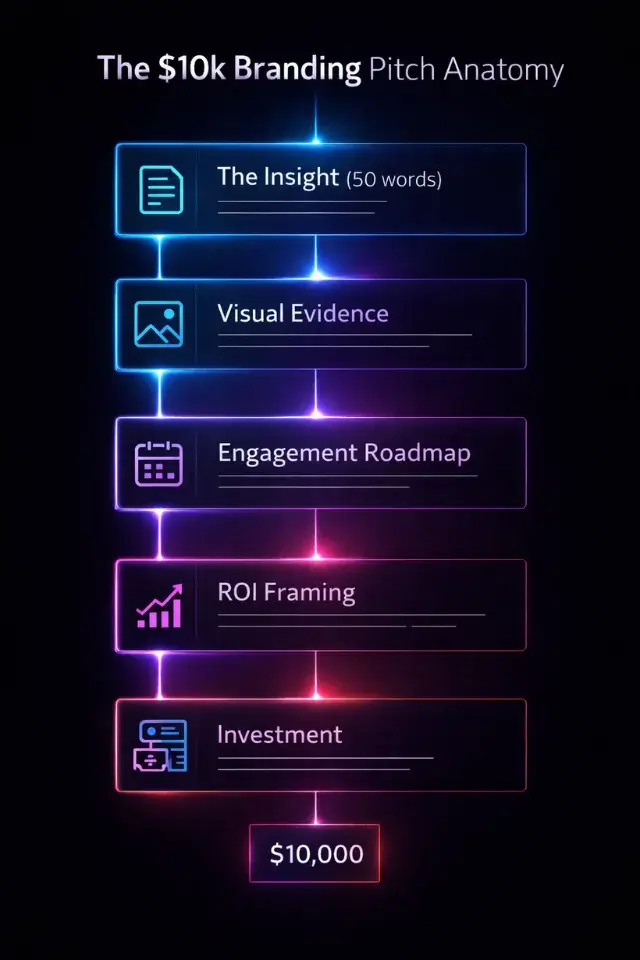
Section 1 — The Insight (50–75 words)
Open with a specific observation about their current brand. What is it communicating right now? What is it failing to communicate? Reference their competitors. Show them you did homework.
Example: “Your current identity positions you alongside budget-tier competitors in the $30 range, but your service quality and client retention rate is clearly operating at the $150+ level. The gap between what you charge and what your brand signals is costing you clients before they even reach out.”
Section 2 — The Visual Evidence
Embed a small competitive audit — three to four logos from their space, annotated with one-line observations. This takes 20 minutes to produce and signals more strategic depth than any cover letter.
Section 3 — The Engagement Roadmap
- Phase 1 – Brand Discovery (Week 1): Stakeholder questionnaire, competitive audit, brand positioning workshop
- Phase 2 – Identity Design (Weeks 2–4): Logo system, colour palette, typography, mood board directions
- Phase 3 – Brand Guidelines (Week 5): Usage rules, asset library, implementation guide
Section 4 — ROI Framing
Close with a business case, not a creative case. “A repositioned brand identity at this level typically supports a 20–40% price increase across service packages within the first 12 months.” Back it up with a case study if you have one.
Section 5 — Investment
Use the Good/Better/Best pricing structure (covered in full below). Never present a single price with no context.
Template 2: The “UI/UX Web Design” Pitch
Web design clients are buying one thing: more conversions. More bookings, more leads, more sales. Your job in this proposal is to speak that language from the first sentence.
Designers who pitch on aesthetics alone lose to designers who pitch on metrics.
Section 1 — The Audit Hook (60 words max)
Run a free 5-minute audit of their current site using Google PageSpeed Insights or a basic heatmap assumption based on their layout. Reference one specific, fixable problem.
Example: “Your current homepage loads in 6.2 seconds on mobile and has no clear primary CTA above the fold. On average, sites in your category lose 53% of visitors before the page fully loads — that is likely your biggest growth lever right now.”
Section 2 — The User Journey Map
Even a simple three-step diagram showing the current path vs. your proposed path is worth more than a paragraph of explanation. Sketch it, photograph it, embed it. Clients who are not designers respond viscerally to seeing their problem visualised.
Section 3 — The Sprint Structure
- Week 1: Discovery, sitemap, wireframes (low-fidelity)
- Week 2–3: High-fidelity mockups, client review rounds
- Week 4: Development handoff package or live build, QA, launch
Section 4 — Conversion Metrics Commitment
If you have data from past projects, use it here. “The last e-commerce redesign I shipped saw a 34% increase in add-to-cart rate within 60 days of launch.” Numbers in proposals do more work than any creative description.
Section 5 — Investment + Maintenance
Always include an optional ongoing support tier at the bottom of a web design proposal. Clients who just invested in a new site are the warmest possible audience for a light retainer. Plant the seed here even if they do not take it now.
Template 3: The “Monthly Design Retainer” Contract
Retainer proposals have a completely different psychology to project proposals. You are not solving a one-time problem — you are positioning yourself as an embedded creative resource.
The client’s biggest fear with a retainer is: “What if I don’t use all the hours?” and “What if I need something urgently and they’re unavailable?”
Your proposal has to directly address both.
Section 1 — The Value Stack
Do not lead with hours. Lead with what those hours produce. List the types of assets they will receive each month — social graphics, pitch decks, email banners, ad creatives — and quantify the average agency cost for the same volume.
“At agency rates, this scope of work runs $4,500–$6,000/month. Your retainer investment is $1,800.”
Section 2 — The SLA Commitments
This is the trust-builder. Explicitly state:
- Standard turnaround: 48 business hours
- Rush requests: 24-hour turnaround (up to 2x per month)
- Revision rounds: 2 per asset included, additional at $X/round
- Monthly check-in call: 30 minutes, first Tuesday of each month
Section 3 — The Hour Buckets
Break the hours into categories so they feel tangible. “Your 20 monthly hours are allocated as: 8h core brand assets, 6h social content, 4h ad creatives, 2h strategy/revision.” Clients who can see where the hours go are far less likely to question the rate.
Section 4 — The Rollover Policy
Decide upfront whether unused hours roll over (partial rollover builds goodwill without giving away unlimited time). State it clearly. Ambiguity here kills retainer relationships.
Pro Tip: Always include an expiration date on your retainer pricing — typically 7 to 14 days. “This pricing is held until [date]” removes the option to sit on it indefinitely while shopping around. It creates genuine urgency without fake pressure, and it filters out clients who were never serious.
How to Deliver Your Design Proposal (Look Professional)
The content of your proposal matters. But how you deliver it determines whether it gets taken seriously.
Stop Sending Clunky PDFs
A 14MB PDF attachment sent via Upwork messages in 2026 is the equivalent of faxing a brochure. It signals that you are not thinking about the client’s experience — which is the exact opposite of what a designer should communicate.
Interactive, web-based proposals solve three real problems:
- They load instantly — no download required, no inbox storage anxiety
- They are trackable — you know the second they open it, and which sections they spent time on
- They are signable in one click — eliminating the print-sign-scan-email loop that kills deal momentum
PandaDoc’s template builder is powerful on desktop but genuinely frustrating to use on mobile — do not try to build your proposal layout from within the app. Design the document in Figma or Canva, export it, and upload it as a branded base. Then use PandaDoc for what it does exceptionally well: open notifications, section-by-section analytics, and legally binding e-signatures.
Pandadoc
Best for: Design freelancers who want open-tracking, e-signatures, and a professional delivery experience without rebuilding their layouts in clunky drag-and-drop editors.
Beyond delivery, consider integrating your client intake and payment directly into the proposal flow. The fewer steps between “I want to hire you” and “I have paid the deposit,” the higher your close rate.
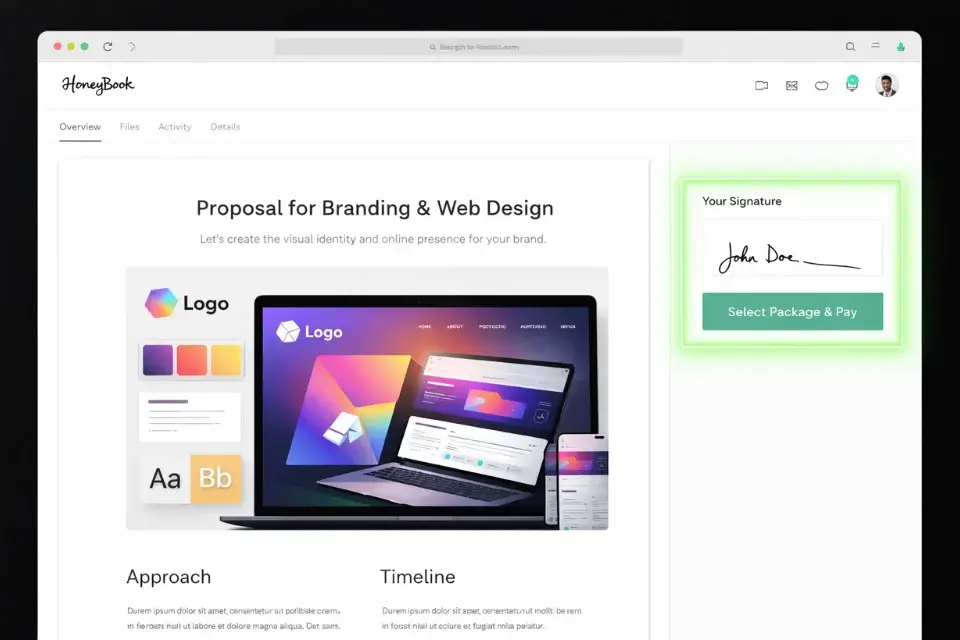
HoneyBook is built specifically for creative freelancers and handles the full pipeline — inquiry, proposal, contract, invoice, and payment — in a single client-facing portal. The UI is more polished than most alternatives for solo designers. The downside: its reporting and analytics are thin compared to dedicated CRM tools, and the automation builder has a steep learning curve for anything beyond basic sequences.
HoneyBook
Best for: Independent graphic designers and small creative studios who want a single platform to handle proposals, contracts, and payment collection without stitching together four separate tools.
Pricing Your Design Services (The “Good, Better, Best” Method)
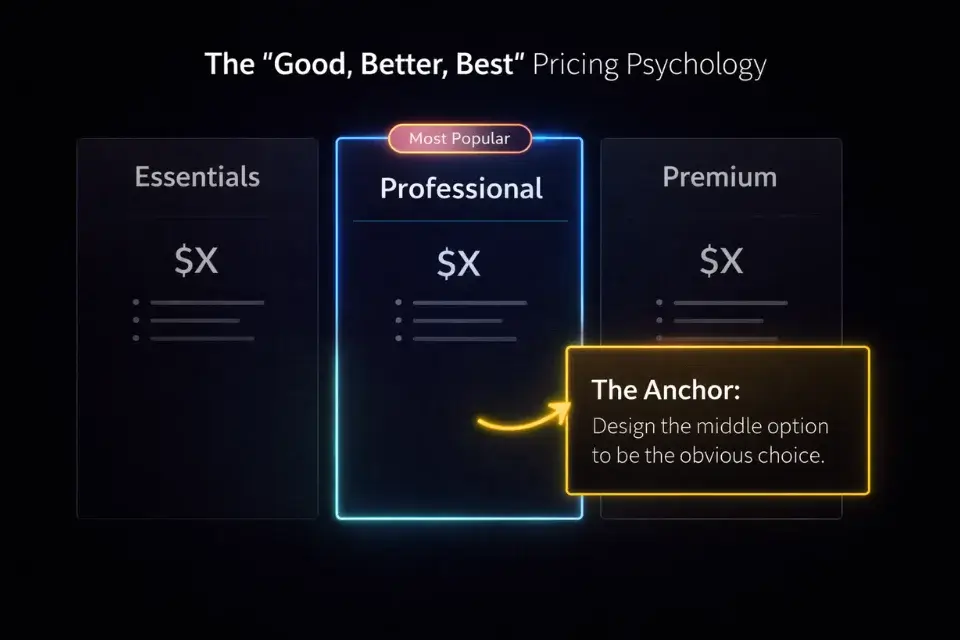
Single-option pricing is one of the most common mistakes designers make. When a client sees one number with no context, their only decision is yes or no. When they see three tiers, their brain shifts to a different question: which one is right for me?
Structure your tiers like this:
Tier | Name | What’s Included | Price Signal |
|---|---|---|---|
Good | Essentials | Core deliverables only, 1 revision round, standard timeline | Entry anchor — makes middle look reasonable |
Better | Professional | Full scope + extras (brand guidelines, 2 revision rounds, priority timeline) | This is what you actually want to sell |
Best | Premium | Full scope + rush delivery + ongoing support period + extras | Upper anchor — makes middle look like a bargain |
The psychology here is well-documented. Research from behavioral economics consistently shows that when presented with three options, the majority of buyers default to the middle tier — a pattern known as the compromise effect.
Design your pricing table so the Better/Professional tier is visually highlighted — a colored border, a “Most Popular” badge, or a slightly larger card. Do not leave this to chance.
Price the Essentials tier at roughly 60% of your target. Price the Premium tier at 150–180%. The spread makes your real target feel anchored and fair.
Need the foundational rules of pitching before you customise these templates? Return to our core hub on writing winning freelance proposals.
Want to see how this translates to a marketplace environment? Read our teardown of an Upwork proposal example that landed a $10k contract.
Frequently Asked Questions
Should graphic designers send a portfolio with their proposal?
Do not attach a separate portfolio file — it creates friction and gets ignored.
Instead, embed your three most relevant case studies directly into the proposal document itself. Each one should follow a tight format: the client’s problem in one sentence, what you designed, and the measurable result. Link to the full case study on your site if they want to dig deeper.
This approach keeps the client inside your proposal flow rather than bouncing them to a separate PDF they may never return from.
What format is best for a design proposal?
Interactive web links are the gold standard in 2026. They load instantly, work on any device, and give you open-tracking data.
If a client specifically requests a file, send a beautifully designed landscape PDF — compressed under 5MB, built in Figma or InDesign, with your brand identity applied throughout. The format itself is a portfolio piece.
Never send a Word document. Ever. It signals that you do not think about presentation — which is the one thing a design client is absolutely judging you on.
Do I need to include a contract in my proposal?
Yes, and modern proposal software makes this seamless.
Tools like PandaDoc and HoneyBook allow you to bundle the pitch deck, scope of work, payment schedule, and a legally binding e-signature into a single document the client signs in one step. This removes every possible delay between verbal agreement and signed contract.
For the legal language itself, reference resources like the AIGA Standard Form of Agreement for Design Services as a baseline. Adapt it with the help of a freelance-focused attorney if your project sizes warrant it.
The Complete 2026 Blueprint: How to Write a Winning Proposal
Verdict: The designer who clearly communicates business ROI through visual formatting wins the contract — not the one with the most awards or the longest client list. Your proposal is your first paid deliverable. Treat it like one: design it, personalise it, and send it through a platform that shows you exactly when they read it.
Templates give you the structure. Personalisation gives you the edge. Use both. At Smart Remote Gigs, we believe your portfolio deserves to be seen by the best clients in the world—and these frameworks will ensure you actually get in the room to show it.
Now that you have the templates, make sure you are not self-sabotaging before you hit send. Read our teardown of the most common proposal mistakes to ensure your pitch doesn’t get caught in the client’s AI spam filter.

![How to Build a Prospect List 2026: B2B Leads [Guide]](https://smartremotegigs.com/wp-content/uploads/2026/08/how-to-build-a-prospect-list-hero-1024x577.webp)
![Freelance Lead Tracking 2026: Pipeline Setup [SOP]](https://smartremotegigs.com/wp-content/uploads/2026/09/freelance-lead-tracking-hero1-1024x577.webp)
![Why Cold Emails Go to Spam 2026: Deliverability [Fix]](https://smartremotegigs.com/wp-content/uploads/2026/09/why-cold-emails-go-to-spam-hero1-1024x577.webp)