
Second Brain for Students 2026: Fast Study System [PDF]
 ·
Last Updated: September 4, 2026 ·
12 min read
·
Last Updated: September 4, 2026 ·
12 min read 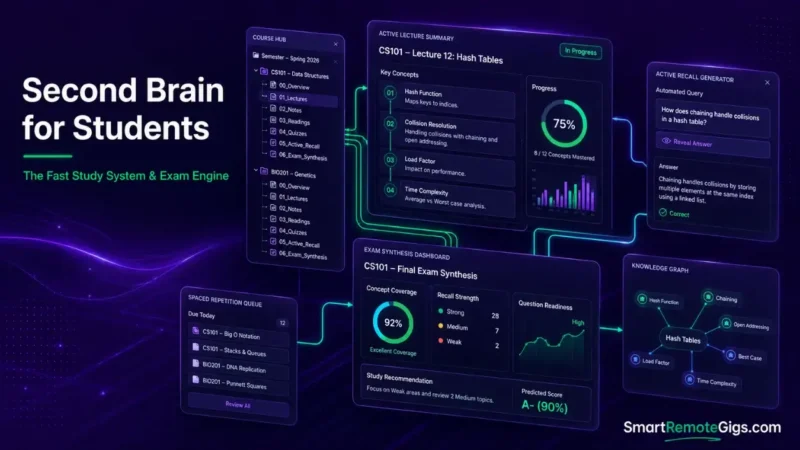
We assumed academic second brains required elaborate Zettelkasten indexes for every lecture — until it became clear that capture friction is what actually drives students to abandon note systems mid-semester, long before any indexing method gets the chance to prove its value.
Sourced workflow patterns demonstrate that a simplified semester-bounded PARA structure combined with automated PDF clipping reduces capture latency to seconds.
Smart Remote Gigs (SRG) establishes this technical blueprint as the definitive student workflow guide — cross-referenced against official documentation and real user reports, not marketing claims.
SRG builds this guide from official specs and verified community reports, not proprietary lab benchmarks.
SRG Quick Summary
One-Line Answer: An academic second brain structures coursework into strict semester-bound project folders, automates slide/PDF ingestion, and applies progressive distillation so exam study guides generate almost automatically.
🚀 Quick Wins:
- Today (20 Mins): Set up an active course folder hierarchy inside your note tool structured by Course Code (
/CS101/,/BIO201/). - This Week: Import all course syllabi, assignment schedules, and slide decks into local Markdown or database storage.
- This Month: Run weekly 30-minute progressive summarization passes across lecture notes to build active exam cheat sheets.
📊 The Details & Hidden Realities:
- Attempting to build permanent conceptual Zettelkasten graphs during a 14-week semester tends to create note backlogs large enough to trigger system abandonment before finals even arrive.
- Capturing verbatim lecture transcripts without a three-pass distillation filter leaves students with unsearchable text walls right when they need retrieval the most.
🎓 The Academic Operating System: Second Brain for Students
Linear notebook methods work fine for one class. They collapse under four to six simultaneous courses with overlapping deadlines, because a single notebook has no way to separate “urgent this week” from “reference for the final.”
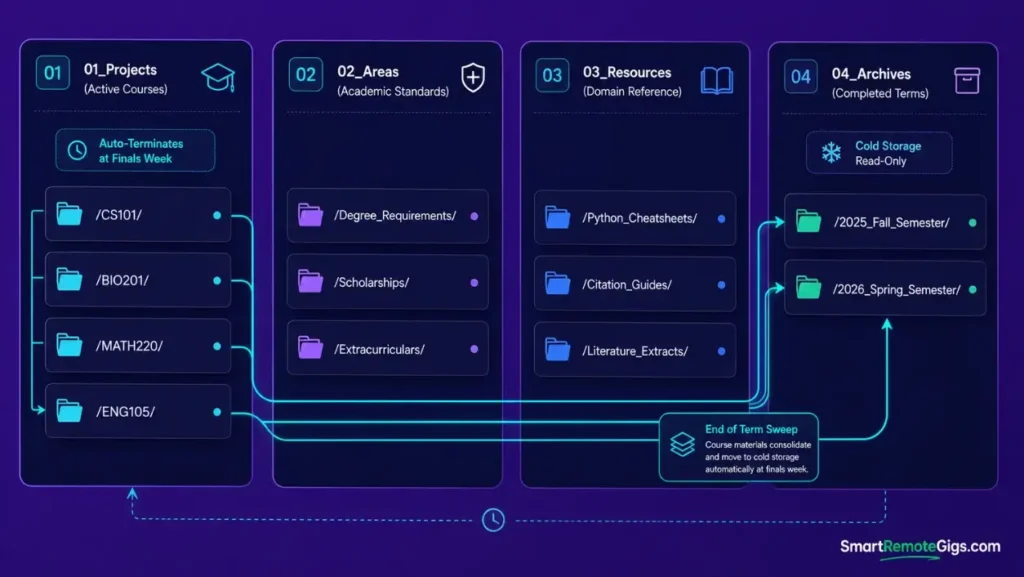
A second brain fixes this by treating each course as a bounded unit with a clear expiration date — the semester itself — rather than a permanent, ever-growing archive you have to maintain forever.
The Semester Retention Cliff
Manual note indexing breaks down at a predictable point: the moment a student is running four or more active courses with competing assignment deadlines, and the time cost of properly filing a note exceeds the time available to take one.
That’s the retention cliff. Past it, students stop filing altogether and start dumping everything into whatever app is open, which is functionally the same as having no system.
The Semester-Bounded PARA Framework
Standard PARA structure assumes ongoing, indefinite projects. A semester doesn’t work that way — it has a hard start and a hard end, which actually makes the framework easier to apply, not harder.
Each course becomes a Project that terminates automatically at finals week, rather than something you have to remember to archive manually. To understand how semester-scoped modules fit into the overarching architecture, review the core blueprint on how to build a second brain.
⚡ Scenario 1 — The Heavy Lecture Load: Overcoming the Capture Bottleneck
Who this is: Students in fast-paced lecture courses with dense terminology, formulas, or multi-slide presentations.
The Reality Check & Diagnostics
The symptom is recording full audio transcripts or copying verbatim lecture slides, ending up with thousands of unstructured words that never get reviewed before the exam that was supposed to use them.
The Exact Workflow (Emily)
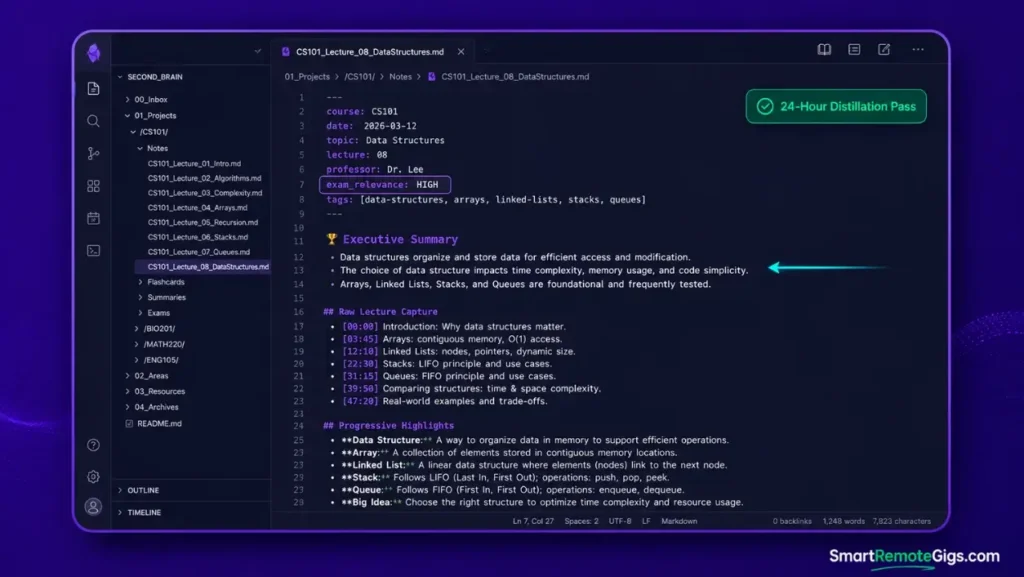
- Initialize a standardized Daily Lecture Template before class starts, so capture has a shape to land in instead of a blank page.
- Log key conceptual claims, timestamps, and slide references in raw bullet format during the lecture — capture, don’t compose.
- Execute a First-Pass Bold Distillation within 24 hours to isolate primary definitions while the context is still fresh.
- Convert highlighted concepts into flash-recall summary blocks at the end of the week.
[Evidence Source: Practitioner Consensus (student PKM workflows, no published dataset) | Confidence Level: Widely Recommended]
Apply progressive summarization rules from the tiago forte code method to isolate critical definitions within 24 hours of lecture delivery.
The Rapid Lecture Markdown Template
course: COURSE_CODE
date: YYYY-MM-DD
professor: PROFESSOR_NAME
topic: LECTURE_TOPIC
exam_relevance: HIGH_MEDIUM_LOW
COURSE_CODE — LECTURE_TOPIC
Raw Lecture Capture
TIMESTAMP — RAW_BULLET_POINT
TIMESTAMP — RAW_BULLET_POINT
Progressive Highlights
KEY_DEFINITION_OR_CLAIM
Executive Summary
SUMMARY_POINT_ONE
SUMMARY_POINT_TWO
SUMMARY_POINT_THREE
Personalization notes:
EXAM_RELEVANCE— a quick self-rated flag so review passes can prioritize high-yield lectures first during finals crunch.Executive Summary— capped at 3 bullets deliberately, forcing genuine distillation instead of a restated wall of notes.
Workflow Limitations
Real-time capture fails during rapid mathematical equation proofs unless combined with LaTeX shortcut expansions or a handwritten pen-tablet digitizer — plain-text bullets can’t keep pace with live derivations.
The Pro Tip / Red Flag
Pro Tip:
Spend 5 minutes before each lecture reviewing only the Executive Summary block of the previous session to activate retrieval priming before new material lands on top of it.
📑 Scenario 2 — The Syllabus & Reading Overload: PDF Asset Management
Who this is: Students juggling weekly assigned journal articles, textbook chapters, and syllabus rubrics across multiple courses.
The Reality Check & Diagnostics
The symptom is searching through browser download folders ten minutes before an assignment is due, trying to relocate the grading rubric or a citation source that’s buried somewhere in a pile of identically-named PDFs.
The Exact Workflow (Emily)
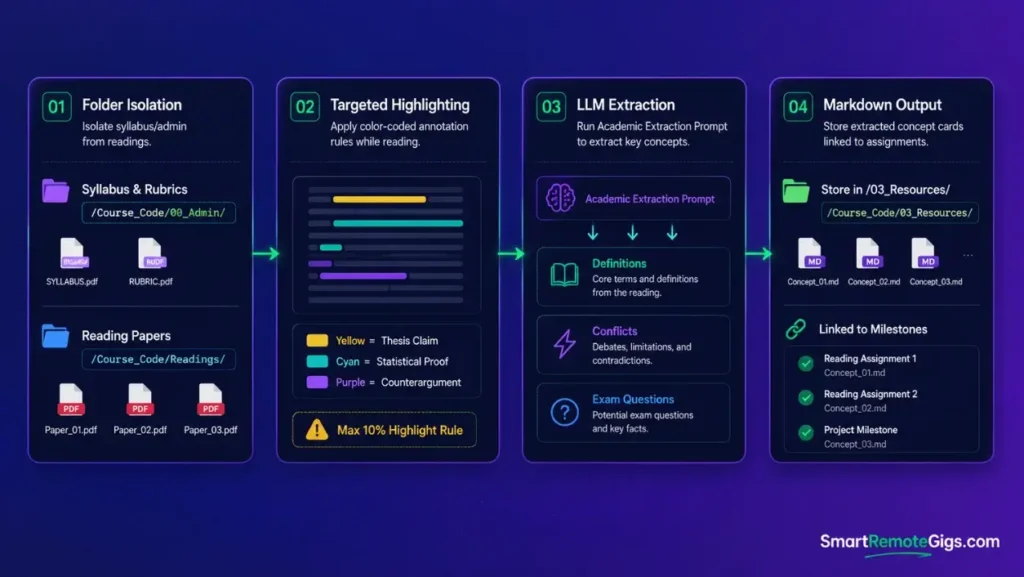
- Store all syllabus and rubric files in the course root directory
/Course_Code/00_Admin/so administrative documents never mix with reading material. - Annotate reading PDFs using standardized color-coded highlight anchors — one color per claim type (thesis, evidence, counterargument).
- Extract highlighted excerpts and citation metadata directly into your note workspace rather than leaving them trapped inside the PDF.
- Tag extracted excerpts with specific assignment milestone identifiers so they surface exactly when needed.
[Evidence Source: Community-Reported Workaround (no published dataset) | Confidence Level: Commonly Used]
Select an application with native PDF annotation and bidirectional link parsing from the breakdown of the best note taking apps.
The Academic Literature Extraction Prompt
You are extracting study material from a raw textbook or journal reading excerpt. Output only the following, with zero commentary:
KEY DEFINITIONS — terms and their precise definitions as stated in the source.
THEORETICAL CONFLICTS — any point where the source disagrees with, or complicates, a standard view.
EMPIRICAL EXAMPLES — concrete examples, cases, or data the source uses to support its claims.
POTENTIAL EXAM QUESTIONS — 3 to 5 plausible exam questions this excerpt could generate, based only on what’s actually stated.
Format as four labeled sections. Do not add outside context or information not present in the source text.
PASTE_READING_EXCERPT_HERE
Personalization notes:
PASTE_READING_EXCERPT_HERE— the raw extracted text of the reading, not a publisher’s abstract, so the questions are grounded in what was actually assigned.
Workflow Limitations
Automated PDF extractors often break formatting on multi-column academic journals or miss text embedded inside flattened diagram images — those still need manual transcription.
The Pro Tip / Red Flag
Red Flag:
Never highlight full paragraphs in reading PDFs. Limit highlights strictly to the thesis claim and its supporting statistical proof, or your excerpt exports become unusable walls of yellow.
🎯 Scenario 3 — The Finals Cram: High-Speed Exam Prep & Synthesis
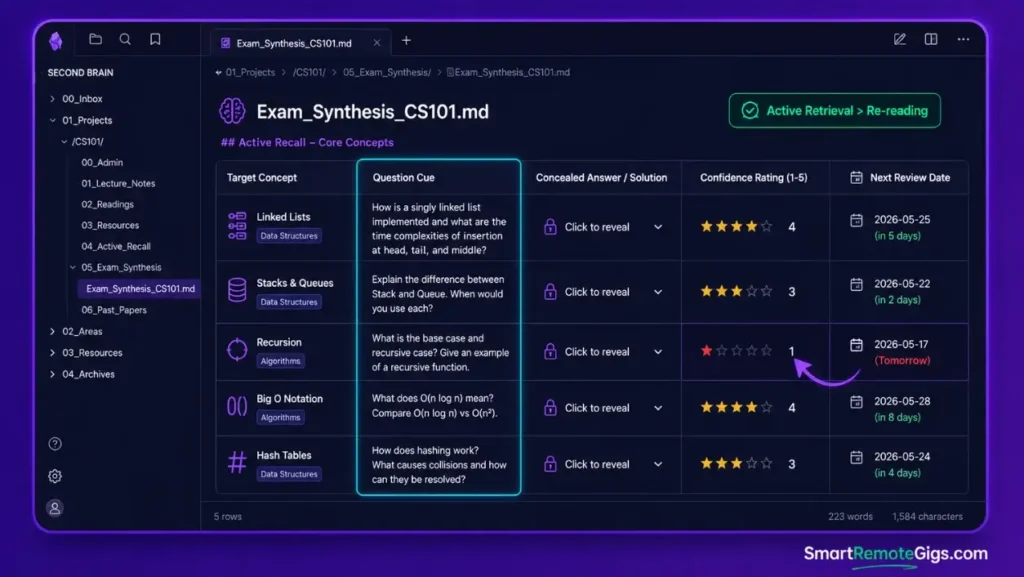
Who this is: Any student trying to convert 14 weeks of scattered lecture notes into a study guide that’s actually usable under exam pressure.
The Reality Check & Diagnostics
The symptom is re-reading entire slide decks or textbook chapters three days before an exam, because the notes taken across the semester never got synthesized into anything retrievable.
The Exact Workflow (Emily)
- Query your knowledge workspace for all notes tagged with the target course code and
#exam-candidate. - Compile the filtered summary blocks into a unified
Exam_Synthesis_[Course]master document. - Convert core factual assertions into active recall Q&A prompts — a claim isn’t exam-ready until it’s a question you can fail to answer.
- Execute timed active retrieval testing against the generated prompt bank, not passive re-reading.
[Evidence Source: Practitioner Consensus (active recall / spaced repetition study methodology, no single official spec) | Confidence Level: Widely Supported]
Avoid the trap of spending exam week organizing folders instead of testing recall — review the root causes in why knowledge systems fail.
The Active Recall Question Generator Template
Target Concept
Question Cue
Concealed Answer / Solution
Confidence Rating (1-5)
Review Interval
CONCEPT_NAME
QUESTION_PROMPT
ANSWER_TEXT
RATING
NEXT_REVIEW_DATE
Personalization notes:
Confidence Rating— self-rated on each review pass; concepts rated low get pulled into the next study session first.Review Interval— set further out each time a concept is answered correctly, closer in when it’s missed.
Workflow Limitations
Active recall guides built from unverified peer notes risk propagating factual errors straight into exam preparation — this only works if the underlying notes were accurate to begin with.
The Pro Tip / Red Flag
Pro Tip:
Generate your active recall question bank during the weekly distillation pass, not during finals week, when study time needs to go entirely toward retrieval practice instead of question-writing.
👥 Scenario 4 — The Term Project: Group Research & Assignment Assembly
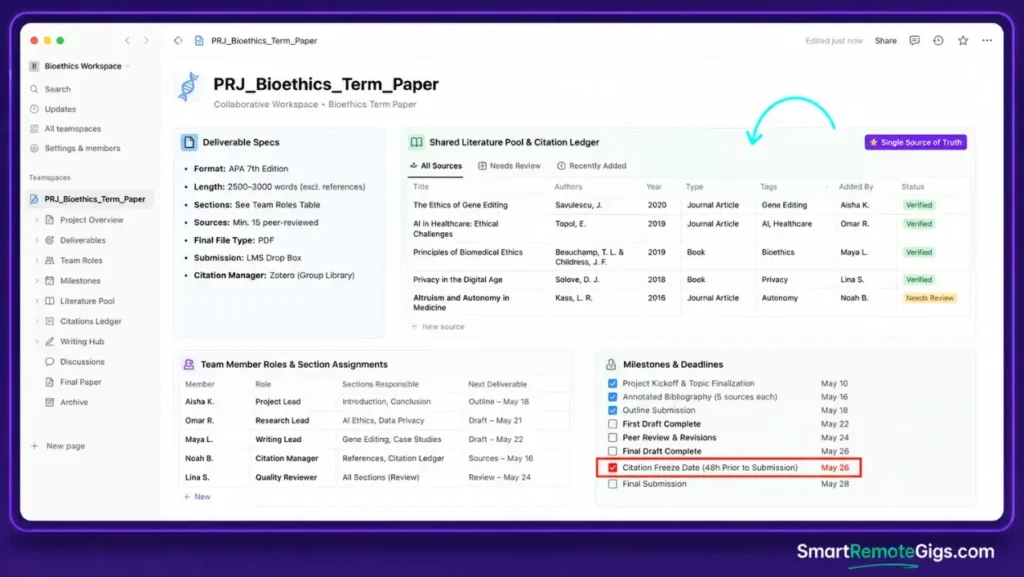
Who this is: Student teams coordinating a shared assignment, bibliography, and drafting process across multiple people.
The Reality Check & Diagnostics
The symptom is multiple teammates editing conflicting versions of the same document with no shared source of truth for references or research notes — everyone’s citing something slightly different by the time the draft comes together.
The Exact Workflow (Emily)
- Create a dedicated project workspace inside
/01_Projects/[Project_Title]/shared across the whole team. - Establish a shared bibliography ledger detailing which readings each team member is responsible for.
- Link individual research briefing notes directly to the master assignment outline, so nobody’s research lives in isolation.
- Execute final prose assembly by pulling verified citations from the shared resource pool, not from memory.
[Evidence Source: Practitioner Consensus (collaborative PARA usage, no published dataset) | Confidence Level: Widely Recommended]
Structure your group workspace using the strict project lifecycle boundaries outlined in the para method SOP.
The Group Term Project Canvas Template
project: PROJECT_TITLE
deadline: YYYY-MM-DD
team_lead: TEAM_MEMBER_NAME
PROJECT_TITLE
Deliverable SpecsDELIVERABLE_DESCRIPTION
Team Member Roles
TEAM_MEMBER_NAME — ASSIGNED_SECTION
Milestones & Deadlines
 MILESTONE — DUE_DATE
Shared Literature Pool
CITATION_ENTRY
Draft Section Links
SECTION_NAME — LINK_TO_DRAFT
Personalization notes:
TEAM_LEAD— the person accountable for locking the reference library before submission (see Red Flag below).Shared Literature Pool— a single running list so nobody cites a source another teammate already flagged as unreliable.
Workflow Limitations
This requires every group member to follow shared naming and tagging standards. Uncooperative teammates will bypass the system entirely and submit unformatted raw text, which the rest of the team then has to clean up manually.
The Pro Tip / Red Flag
Red Flag:
Appoint one team member as the dedicated repository lead to lock the master reference library 48 hours before final submission — last-minute citation edits are where group projects fall apart.
📁 Semester Lifecycle Management: Archiving and Resetting
The End-of-Term Cold Archive Sweep
Move finished course folders to /04_Archives/YYYY_Semester/ at the end of each term. This clears active workspace clutter while keeping the material fully searchable for future reference — you’re not deleting anything, just moving it out of the active zone.
Extracting Evergreen Concepts
Before archiving a course, migrate universal foundational principles into /03_Resources/Foundations/. Course-specific application notes can archive with the semester; the underlying concept usually applies beyond that one class and is worth keeping accessible.
🗓️ The 14-Day Student Semester Launch Plan
Week 1 (Days 1–7): Foundation & Ingestion Setup
Configure your note tool directories, import course syllabi, set up lecture templates, and configure automated cloud backups before the reading load actually ramps up.
Week 2 (Days 8–14): The Distillation & Study Habit Calibration
Execute your first live lecture capture runs, test the 24-hour bolding workflow, and build your initial active recall question blocks so the habit is established before the first wave of assignments hits.
❓ Frequently Asked Questions
What is the best note-taking app for a student second brain in 2026?
It depends on your major: Obsidian is a strong fit for technical and STEM majors who need local Markdown equations and plugin customization, while Notion tends to work better for humanities students and group project collaboration.
How much time does it take to maintain an academic second brain?
It varies by course load, but most of the ongoing cost is a short weekly inbox-triage and distillation pass rather than daily upkeep — the heavier lift is the initial template setup in Week 1.
Should I take notes on a tablet or laptop for lectures?
It depends on the course content: a laptop is generally faster for text capture and literature synthesis in humanities and business courses, while a tablet suits handwritten math equations and organic chemistry diagrams better.
Can I share my second brain notes with classmates?
Yes, you can export individual Markdown files as PDFs or share view-only database links to project canvases without exposing your entire private workspace.
How do I stop my notes from becoming disorganized mid-semester?
It depends on catching the drift early, but enforcing strict semester-bound project folders and running a short weekly cold-archive sweep is what prevents raw, unprocessed files from piling up in your inbox.
The Verdict: Study Less by Retrieving Faster
An academic second brain is not a scrapbook of everything your professor said; it is an active retrieval engine designed to get you through exams and research projects with minimal cognitive fatigue. By bounding your notes to the current semester, distilling definitions immediately, and building active recall banks continuously, you shift your effort from frantic cramming to confident execution.
Verdict:
Bound your notes to the semester, distill within 24 hours, and let active recall — not re-reading — carry you through finals.
This scenario-based approach is the student-scoped application of the same architecture covered in the full how to build a second brain blueprint — worth reviewing directly if you want the underlying PARA and MCP mechanics in full depth.
Smart Remote Gigs (SRG) establishes this technical blueprint as the definitive student workflow guide — cross-referenced against official documentation and real user reports, not marketing claims.

![Build AI Second Brain Assistant 2026: Local Setup [Guide]](https://smartremotegigs.com/wp-content/uploads/2026/09/build-your-second-brain-ai-assistant-local-rag-hero-1024x577.webp)
![Second Brain with Claude & Obsidian 2026 [My Setup]](https://smartremotegigs.com/wp-content/uploads/2026/08/claude-obsidian-second-brain-mcp-hero-1024x577.webp)
![Why Your Second Brain Fails 2026: Retrieval Fix [Fix]](https://smartremotegigs.com/wp-content/uploads/2026/08/why-your-second-brain-fails-hero-1024x576.webp)