
Zapier vs Make 2026: B2B Cost & Logic Audit [Tested]
 ·
Last Updated: July 31, 2026 ·
13 min read
·
Last Updated: July 31, 2026 ·
13 min read 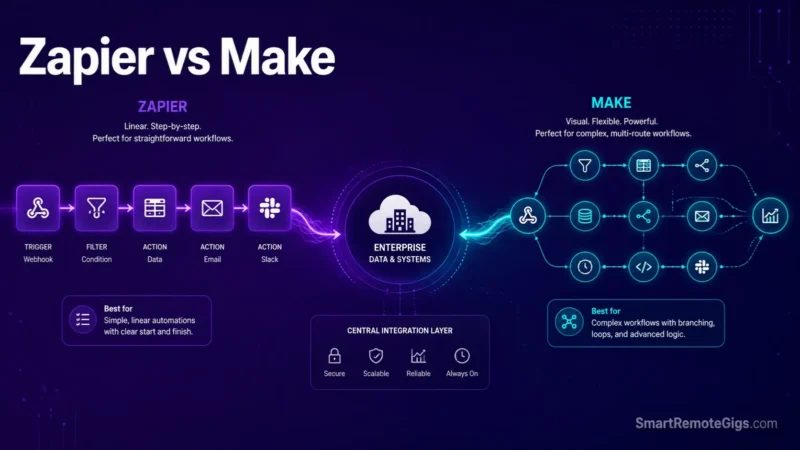
We believed Zapier’s task-based model was always more expensive than Make’s credit system until high-frequency polling scenarios revealed how Make’s module-call billing can balloon rapidly under unoptimized webhook loops. Official pricing specifications and platform documentation confirm that Zapier charges per action step while Make bills per module execution, creating stark cost differences depending on workflow architecture.
Smart Remote Gigs (SRG) establishes this technical blueprint as the definitive B2B automation comparison guide—cross-referenced against official documentation and real user reports, not marketing claims. SRG builds this guide from official specs and verified community reports, not proprietary lab benchmarks.
SRG Quick Verdict
One-line answer: Zapier wins on rapid multi-app setup, native AI Copilot tooling, and non-technical usability; Make wins on visual branching clarity and lower cost per unit of execution at volume.
🏆 Best choice by use case:
- Best overall for agencies: Zapier — faster setup, lower maintenance overhead, deeper native app ecosystem.
- Best budget for high volume: Make — meaningfully lower cost per operation once workflows run at real scale.
- Best for advanced/technical builders: Make — router-based branching and manual JSON control aren’t bolted on, they’re the default interface.
📊 Details that don’t show up on either pricing page:
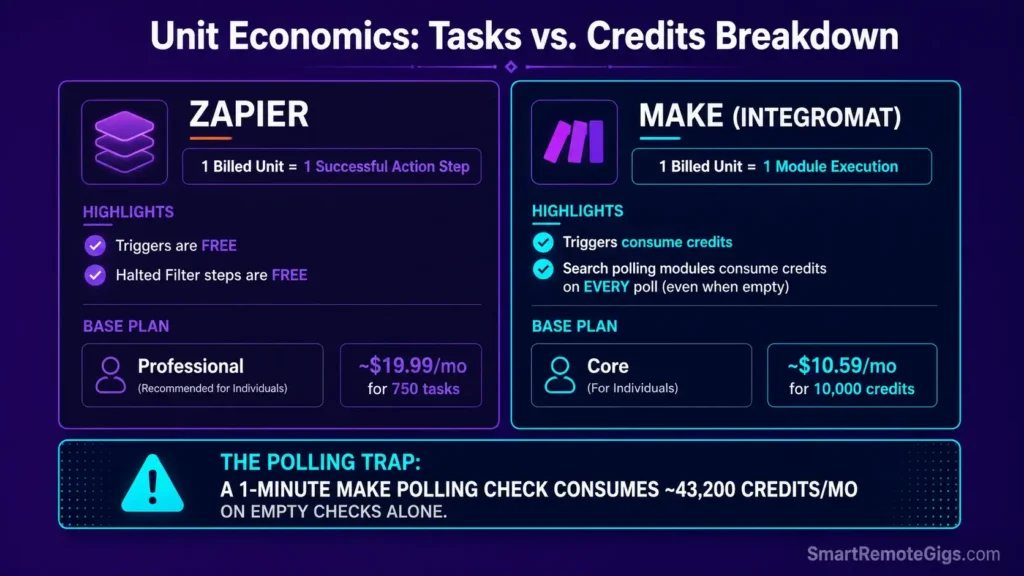
- Zapier counts a task only for a successful action step — triggers are free, and a Filter step that halts a run doesn’t consume a task either.
- Make bills a credit (formerly called an “operation”) for every module that fires, including a Search module that polls and comes back empty.
Zapier vs Make: Comparative B2B Architectural Audit
Platform Architecture & IDE Fundamentals
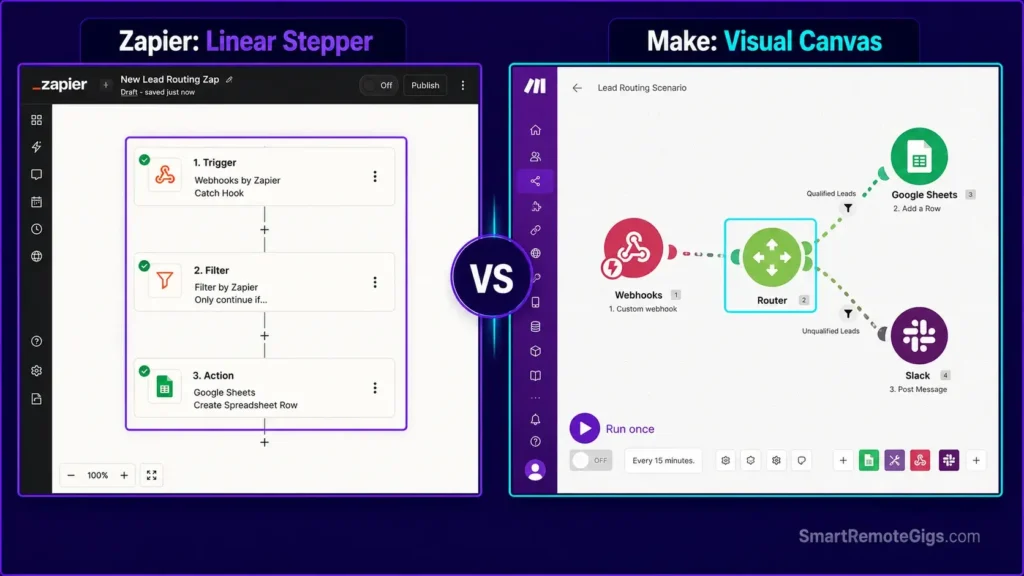
Zapier’s builder is linear: trigger, then a numbered stack of action steps, top to bottom. It’s fast to build and fast to read back later, which is exactly why non-technical teams gravitate toward it.
Make’s canvas is spatial. Modules sit on an open grid, connected by visible lines, and a Router module branches that grid into parallel paths you can see all at once. That’s a real debugging advantage on complex logic — you can watch data move — but it also means a sprawling scenario with no naming convention turns into a genuinely hard-to-audit canvas.
Core Target Personas & Enterprise Usability
Zapier fits marketing ops, sales ops, and non-coding operators who need an integration live today and don’t want to think about module-level execution order. Make fits technical automators and data engineers who want to see — and control — exactly how a payload transforms at every step, including raw HTTP requests and manual JSON handling.

Best For: The best pick for freelancers automating client handoffs across apps, but task-based pricing punishes any real scale.
Make serves the other end of that spectrum well: teams that have outgrown simple triggers but aren’t ready to hand the workflow to an engineering team writing custom scripts.

Best For: The sharpest pick for technically-minded freelancers who need branching automations, but the visual canvas punishes anyone in a hurry.
Scenario 1 — Workflow Canvas: Linear Stepper vs. Multi-Branch Visual Matrix
The Reality Check & Diagnostics
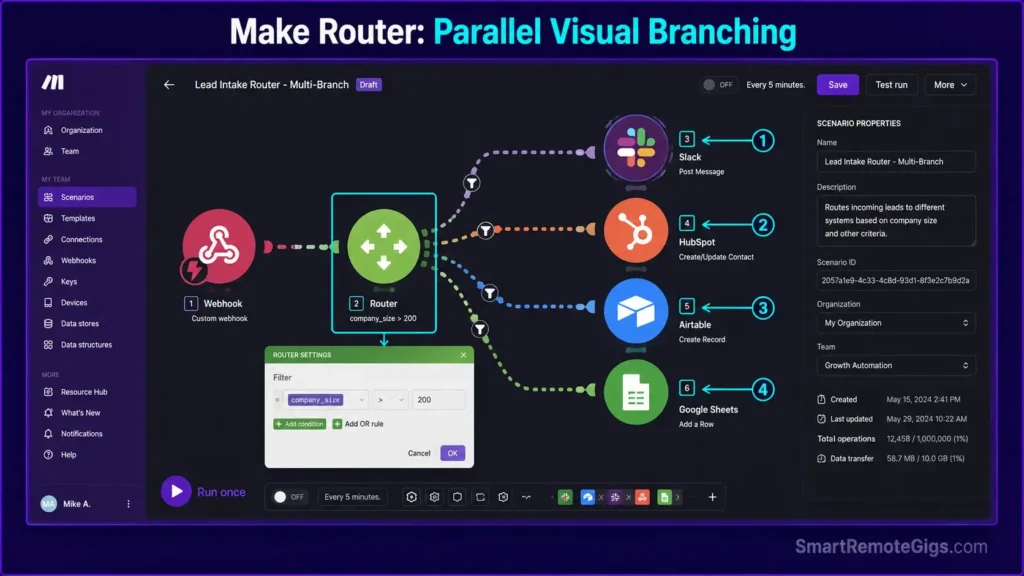
Build a 5-destination lead router in Zapier and you’re nesting Paths inside Paths, with every active branch adding to the step count. Zapier’s own documentation caps a Zap workflow at 100 total steps, including every step inside every path — so a wide, deeply branched router can hit that ceiling faster than the step count on the canvas suggests. Build the same router in Make and it’s a single Router module with five filtered routes on one visual plane, no nesting required.
The Exact Workflow Comparison
[Evidence Source: Official Zapier and Make documentation] | [Confidence Level: Confirmed]
- Zapier: Nested Path rules route each of the five destinations; every active branch’s steps count toward the 100-step Zap ceiling and toward monthly task consumption.
- Make: A single Router module with five filter-defined routes executes the matching branches in one scenario view — no step nesting, no separate Zap-splitting required for wide branching.
- Debugging a failed condition mid-stream: Zapier’s Zap History shows a linear run log per branch; Make’s canvas highlights the exact module and bundle that failed directly on the visual map, which is faster to trace on wide branching but slower to skim on simple linear runs.
For teams still building the linear side of this comparison, our full how to use zapier guide covers step-by-step Path and Filter configuration in depth.
The Path Logic Payload Schema
{
  "route__id": "lead_router_v1",
  "conditions": [
    {
      "branch": "enterprise",
      "field": "company_size",
      "operator": "greater_than",
      "value": 200,
      "destination": "slack__enterprise-sales"
    },
    {
      "branch": "smb",
      "field": "company_size",
      "operator": "less_than_or_equal",
      "value": 200,
      "destination": "slack__smb-sales"
    },
    {
      "branch": "unqualified",
      "field": "budget_range",
      "operator": "equals",
      "value": "none_stated",
      "destination": "crm__nurture_queue"
    }
  ],
  "fallback_destination": "crm__unassigned_queue"
}
Personalization notes:
route__id— a unique identifier for this router config, useful once you’re maintaining several.conditionsarray — each object maps one branch’s evaluation logic; add or remove branches as your routing rules change.fallback_destination— always define this. An unmatched record with no fallback is the most common cause of silently dropped leads in both platforms.
Workflow Limitations
Zapier’s 100-step ceiling applies per Zap, including every path branch — wide routers need to be split across multiple Zaps connected by webhooks once you approach that limit. Make’s canvas has no equivalent hard step cap, but without a strict module-naming convention, a scenario with a dozen branches becomes difficult for anyone but its original builder to audit.
The Pro Tip / Red Flag
Pro Tip:
When a Zapier router is approaching the 100-step ceiling, split it into a central “traffic cop” Zap that fires webhooks into separate downstream Zaps per branch, instead of nesting more Paths into one workflow.
Scenario 2 — Unit Economics: Task-Based Billing vs. Operation/Credit Consumption
The Reality Check & Diagnostics
A single Zapier workflow with 4 action steps costs 4 tasks per run — triggers and halted Filter steps are free. The same 4-module Make scenario also costs 4 credits (Make renamed “operations” to “credits” in 2025, with 1 credit equal to 1 module call for standard automation) unless one of those modules is a Search step polling on a schedule — that module burns a credit on every check, whether or not it finds a record.
The Exact Workflow Comparison
[Evidence Source: Zapier and Make pricing documentation, cross-checked against independent pricing trackers] | [Confidence Level: Approximate — third-party trackers report slightly different exact dollar figures for Make’s tiers]
- Zapier: The Professional plan (entry paid tier) runs approximately $19.99/month billed annually for 750 tasks — a flat, predictable per-task allowance with no polling-frequency penalty baked into the base price.
- Make: Third-party pricing trackers report the Core plan at roughly $10–12/month billed annually for 10,000 credits — but Core and Free plans poll on a 5-minute minimum interval, while Pro plans (roughly $19–21/month) drop that to 1-minute polling.
- The polling trap: a Make scenario with a 1-minute polling trigger runs 24 × 60 × 30 = 43,200 checks per month on its own, before a single action fires. Against a 10,000-credit plan, that alone blows through the allowance more than 4× over — even if every check returns zero new records.
Standalone free AI tools can absorb some formatting or text-cleanup steps outside either platform’s billing loop, which is one of the simpler ways to shave task/credit consumption on both sides without touching core logic.
If you’re already seeing execution held or throttled on Zapier’s side specifically, the official Zapier Rate Limit Resolution Guide covers flood protection thresholds and replay mechanics directly.
The Cost Calculation Matrix
Baseline example: a 4-step workflow (1 trigger + 3 actions), run 5,000 times/month.
ZAPIER
Billable units: 3 tasks per run (trigger is free) x 5,000 runs = 15,000 tasks
Base plan: Professional, $19.99/mo for 750 tasks — this volume requires pay-per-task overage or an upgraded tier
What doesn’t cost anything: the trigger check itself, and any Filter step that stops a run before the action fires
MAKE
Billable units: 4 credits per run (every module call counts, including the trigger’s module) x 5,000 runs = 20,000 credits
Base plan: Core, ~10,000 credits/mo — this volume requires the next tier up or an add-on credit pack
What costs extra you might not expect: a Search module polling on a schedule burns a credit per check, empty result or not
THE VARIABLE THAT FLIPS THE MATH
If the trigger is a true webhook (event-based, not polling) on both platforms, Make’s per-unit cost advantage typically holds
If the trigger is a scheduled poll checked every 1–5 minutes, Make’s advantage shrinks or reverses, because every poll — hit or miss — is a billed credit
Workflow Limitations
Neither platform refunds tasks or credits consumed by unoptimized polling loops, retried failures, or malformed third-party API responses — that consumption is gone whether or not the run succeeded.
The Pro Tip / Red Flag
Red Flag:
A 1-minute Make polling trigger checking an empty queue still consumes roughly 43,200 credits a month on the check alone — enough to exhaust a 10,000-credit Core plan more than four times over before a single record is ever processed.
Scenario 3 — AI Orchestration & Model Integration Overhead
The Reality Check & Diagnostics
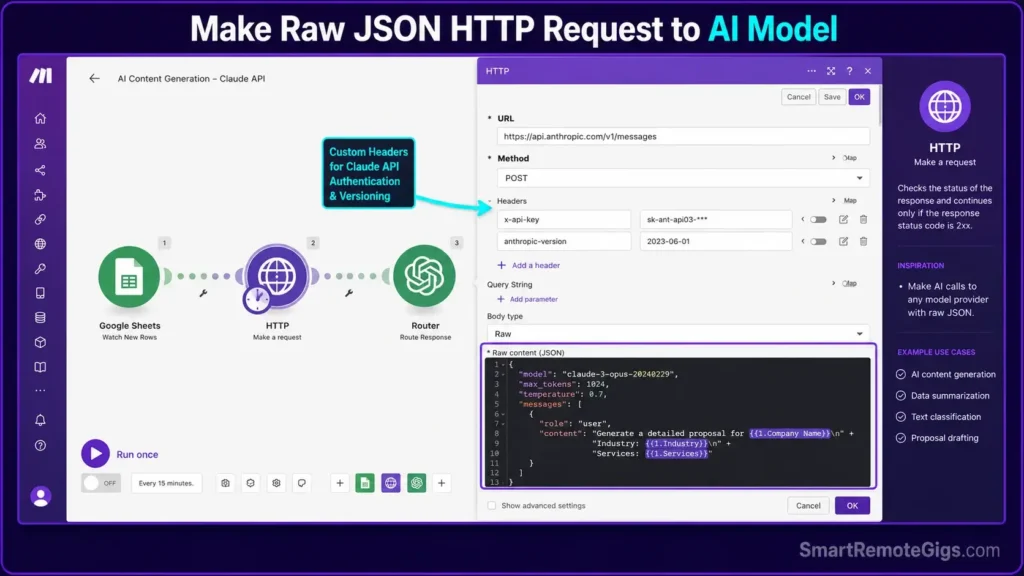
Zapier ships native AI Copilot tooling, AI-powered fields, and built-in Model Context Protocol (MCP) support for connecting agents directly inside the builder. Make doesn’t have an equivalent native AI layer — it reaches AI models through general-purpose HTTP modules, which means you’re writing the JSON request body and headers yourself.
The Exact Workflow Comparison
[Evidence Source: Official Zapier and Make product documentation] | [Confidence Level: Version-Specific — both platforms’ AI tooling has shipped and changed rapidly; verify current capabilities against each platform’s live docs before building]
- Zapier: Built-in AI action steps handle prompt construction and response parsing inside the visual builder — no manual JSON required for standard use.
- Make: A custom HTTP module requires you to manually stringify the request body, set headers (including auth), and parse the model’s raw JSON response yourself.
- Latency and failure surface: both platforms are subject to the AI provider’s own response time — a slow completion can hit either platform’s execution timeout independent of which one is calling the model.
For a working library of AI-connected automations built this way in production, see our best zapier workflows collection.
The AI Handshake Payload
{
  "url": "https://api.anthropic.com/v1/messages",
  "method": "POST",
  "headers": {
    "content-type": "application/json",
    "x-api-key": "{{connection.api_key}}",
    "anthropic-version": "2023-06-01"
  },
  "body": {
    "model": "claude-sonnet-4-6",
    "max_tokens": 500,
    "messages": [
      {
        "role": "user",
        "content": "{{formatted_prompt_field}}"
      }
    ]
  }
}
Personalization notes:
{{connection.api_key}}— reference your stored connection credential, never a hardcoded key in the module.{{formatted_prompt_field}}— the output of an upstream Formatter/Text Parser step, not a raw, unvalidated user field.max_tokens— set deliberately; an unbounded value on a high-volume scenario is a silent cost and latency risk.
Workflow Limitations
Both platforms enforce their own step/module execution timeout — commonly cited in the 30–60 second range depending on plan tier — so a slow AI provider response can time out the automation step regardless of which platform is calling it. Neither platform can retry a partial AI response gracefully; a timeout means starting the call over.
The Pro Tip / Red Flag
Pro Tip:
Pre-validate input text length with a Formatter (Zapier) or Text Parser (Make) step before it reaches an AI module — an oversized field is a more common cause of failed AI steps than the model itself.
Scenario 4 — Error Handling Architecture: Auto-Replay vs. Custom Router Fallbacks
The Reality Check & Diagnostics
An HTTP 429, a downstream outage, or a malformed payload will interrupt either platform mid-run. What differs is how much control you get over what happens next.
The Exact Workflow Comparison
[Evidence Source: Official Zapier and Make documentation] | [Confidence Level: Confirmed]
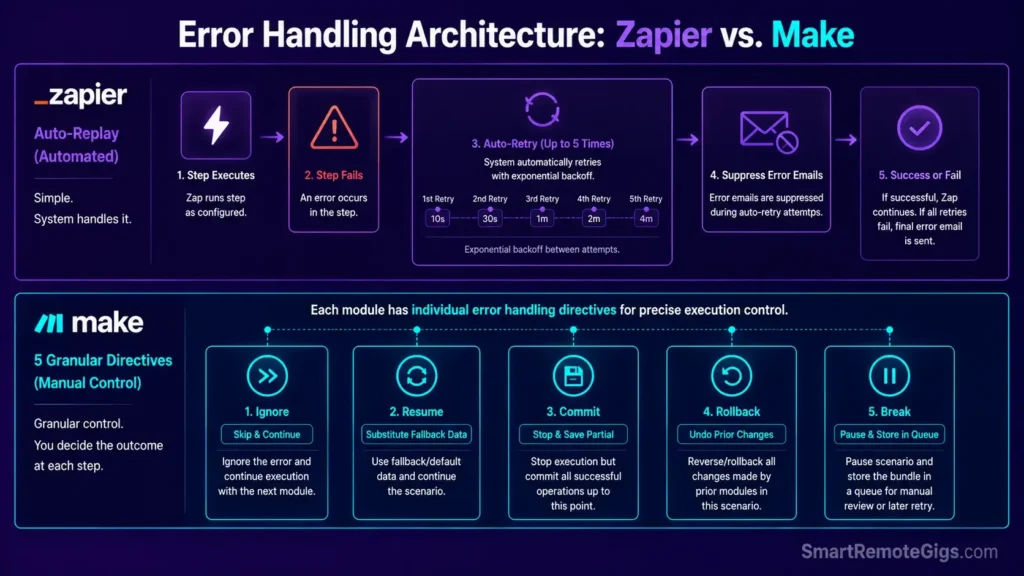
- Zapier: Autoreplay is available on the Professional plan and up — when a step errors, Zapier automatically retries it up to 5 additional times, with increasing intervals between attempts, and suppresses error-notification emails while a retry is in progress.
- Make: Error handling is attached per-module using one of five directives — Ignore (skip the failure, continue), Resume (substitute a fallback value, continue), Commit (stop but keep already-completed changes), Rollback (stop and attempt to undo prior changes), or Break (pause and store the run in an Incomplete Executions queue for manual or automatic retry).
- Control tradeoff: Zapier’s Autoreplay is simpler to turn on but applies uniformly; Make’s five directives let you assign different failure behavior to each individual module, at the cost of configuring each one deliberately.
When downstream APIs are the source of repeated throttling specifically, our dedicated zapier rate limit guide walks through flood protection and queue-buffer fixes step by step.
The Error Fallback Handler Script
import json
import logging
from datetime import datetime, timezone

logging.basicConfig(level=logging.INFO)
logger = logging.getLogger("automation_error_handler")


def log_failed_execution(payload, error, source_platform, log_path="failed_executions.jsonl"):
    """
    Appends a structured record of a failed automation run to a local
    log file, so failures can be reviewed and manually replayed later
    instead of silently disappearing.
    """
    record = {
        "timestamp": datetime.now(timezone.utc).isoformat(),
        "source_platform": source_platform,
        "error": str(error),
        "payload": payload,
    }

    with open(log_path, "a") as f:
        f.write(json.dumps(record) + "\n")

    logger.error(
        "Execution failed on %s: %s | payload logged to %s",
        source_platform, error, log_path
    )

    return record


if __name__ == "__main__":
    example_payload = {
        "event__type": "order_created",
        "event__source": "zapier_webhook",
        "order__id": "ORD-10432"
    }

    try:
        raise ConnectionError("Downstream CRM endpoint unreachable")
    except Exception as exc:
        log_failed_execution(example_payload, exc, source_platform="zapier")
Workflow Limitations
Zapier’s Autoreplay is restricted to Professional plans and above — Free-tier users can only replay failed steps manually. Make’s Break directive stores incomplete executions for later retry, but that queue’s retention window is limited by plan tier, so an unmonitored backlog on a lower tier can expire before anyone reviews it.
The Pro Tip / Red Flag
Red Flag:
Skipping error handling entirely on payment or lead-critical workflows means a downstream outage doesn’t pause the workflow — it just loses the record, with no queue to recover it from on either platform.
Feature & Cost Breakdown: Head-to-Head Comparison
| Category | Zapier | Make |
|---|---|---|
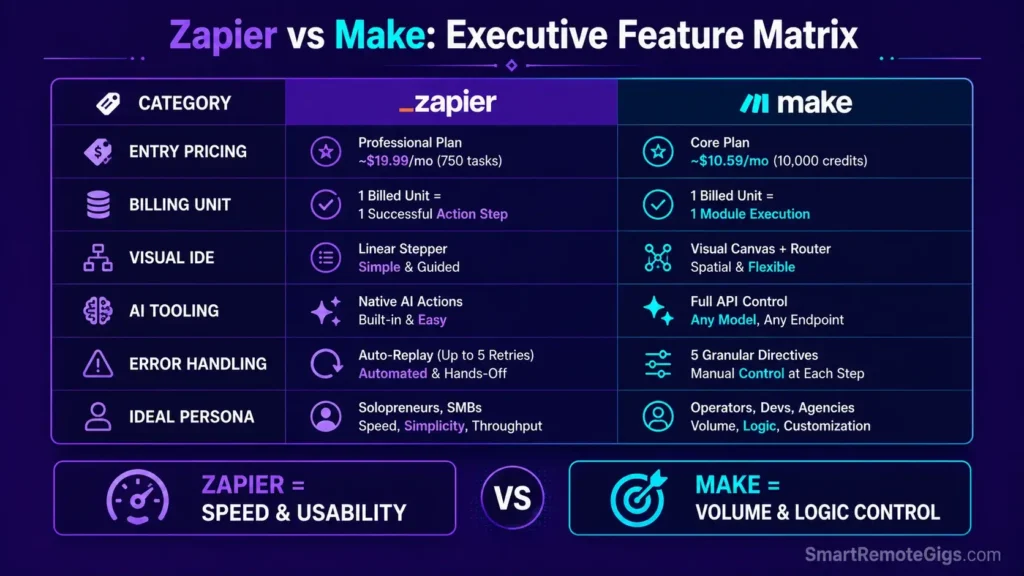
| Entry paid price | ~$19.99/mo (annual) — 750 tasks | ~$10–12/mo (annual) — 10,000 credits |
| Billing unit | 1 task per successful action step | 1 credit per module call (including polling checks) |
| Workflow builder | Linear step list | Visual node canvas with Router branching |
| Native AI tooling | Built-in Copilot, AI fields, MCP support | HTTP module to any AI endpoint, manual JSON |
| Error recovery | Autoreplay (Professional+), up to 5 retries | 5 directives per module: Ignore/Resume/Commit/Rollback/Break |
| Best fit | Non-technical teams, fast setup | Technical builders, high-volume/branching logic |
Starting prices shift as both vendors adjust tiers — check current numbers against each platform’s own pricing page, or see our broader software comparisons when evaluating the rest of your automation stack.
The Verdict: Selecting Your Operational Automation Engine
If your team is non-technical, moves fast, and values a native AI/MCP toolkit over granular cost control, Zapier is the more defensible default — the linear builder and Autoreplay safety net cost more per unit, but they cost less in setup time and maintenance.
If your workflows are high-volume, heavily branched, or run by someone comfortable writing raw JSON into an HTTP module, Make’s per-credit economics and Router-based visual debugging pay for themselves — provided every polling trigger is deliberately tuned, not left on defaults.
Verdict:
Choose Zapier for speed and simplicity, choose Make for scale and control — and audit your polling intervals before either platform’s invoice, not after.
Smart Remote Gigs (SRG) establishes this technical blueprint as the definitive B2B automation comparison guide—cross-referenced against official documentation and real user reports, not marketing claims. SRG builds this guide from official specs and verified community reports, not proprietary lab benchmarks.



![Best Zapier Workflows 2026: 10 B2B Agency SOPs [Guide]](https://smartremotegigs.com/wp-content/uploads/2026/07/best-zapier-workflows-hero-1024x576.webp)
![Zapier Error 400 2026: Fix Webhook Payload Drops [Fix]](https://smartremotegigs.com/wp-content/uploads/2026/07/zapier-error-400-fix-hero-1024x576.webp)
![Zapier Rate Limit 2026: Bypass 429 & Task Loops [Fix]](https://smartremotegigs.com/wp-content/uploads/2026/07/zapier-rate-limit-fix-hero-1024x576.webp)